
The world of Rate Limit Algorithms
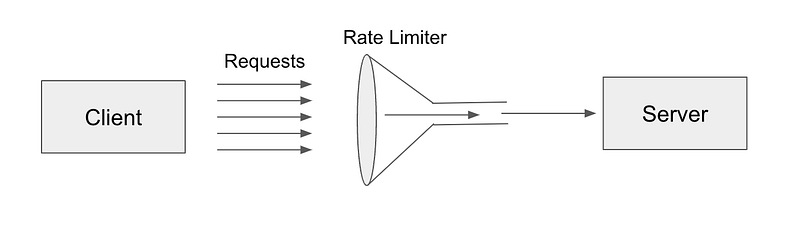
Rate limit algorithm is a mechanism used to control the rate of requests or messages being sent or received by a system or service. It is used to prevent overloading a system or service with too many requests or messages, which can cause system failures or degraded performance. Rate limiting allows a system or service to handle requests or messages in a controlled manner, ensuring that resources are used efficiently and effectively.
Use Cases
- APIs: Many APIs use rate limiting to prevent abuse and ensure fair usage. By limiting the number of requests per user or per API key, APIs can prevent spamming, denial-of-service attacks, and other types of abuse.
- Streaming services: Streaming services use rate limiting to control the amount of data being sent or received by clients. By limiting the bitrate or the number of concurrent streams per user, streaming services can prevent overloading their servers and ensure a smooth streaming experience for all users.
- Email services: Email services use rate limiting to prevent spamming and ensure deliverability. By limiting the number of emails sent per user or per IP address, email services can prevent spamming and improve their reputation with email providers.
- Social media platforms: Social media platforms use rate limiting to prevent spamming, prevent abuse, and improve user experience. By limiting the number of requests per user or per IP address, social media platforms can prevent automated actions, prevent bots from abusing the platform, and ensure a fair and reliable service for all users.
- Distributed systems: Distributed systems use rate limiting to prevent overloading individual nodes or services. By limiting the rate of requests or messages between nodes or services, distributed systems can prevent bottlenecks and ensure a smooth operation of the system as a whole.
Rate limit algorithms are important for ensuring the reliability, security, and scalability of many types of systems and services. By using the right rate limit algorithm and setting appropriate parameters, system administrators can prevent abuse, ensure fair usage, and provide a high-quality service to users.
Rate-limiting algorithms use various techniques to limit the rate of requests or messages, such as:
- Fixed Window: This algorithm limits the number of requests or messages that can be sent or received within a fixed time window. For example, a service may allow 100 requests per minute. Once the limit is reached, further requests are dropped or delayed until the next time window starts.
- Sliding Window: This algorithm allows for a variable number of requests or messages to be sent or received within a sliding time window. For example, a service may allow 10 requests per second, but the limit is calculated over a sliding window of the last 60 seconds. This algorithm can handle bursts of traffic and smooth out sudden spikes.
- Token Bucket: This algorithm works by adding tokens to a bucket at a fixed rate. When a request arrives, a token is removed from the bucket. If the bucket is empty, the request is dropped or delayed. This algorithm allows for bursts of traffic up to the size of the bucket.
- Leaky Bucket: This algorithm works by continuously leaking water from a bucket at a fixed rate. When a request arrives, it is added to the bucket. If the bucket overflows, the request is dropped or delayed. This algorithm smoothes out traffic bursts but does not allow for sustained high traffic.
- Adaptive: This algorithm adjusts the rate limit dynamically based on the current load or capacity of the system or service. For example, a service may reduce the rate limit during peak traffic hours to prevent overload. This algorithm allows for efficient use of resources and can prevent system failures.
Flow Chart of Rate Limit Algorithms
Fixed Window Rate Limit Algorithm:
- Set a fixed time window, for example, 1 minute.
- Initialize a counter for the number of requests or messages processed within the time window.
- When a request or message arrives: a. If the counter is less than the maximum allowed within the time window, process the request or message and increment the counter. b. If the counter is equal to the maximum allowed within the time window, reject or delay the request or message.
- After the time window expires, reset the counter to zero.
         [Start]
            |
            v
   [Set time window]
            |
            v
  [Initialize counter]
            |
            v
[Request or message arrives]
            |
            v
[Counter < Max allowed?]
     /           \
    /             \
 [Yes]           [No]
   |               |
   v               v
[Process request] [Reject or delay request]
            |
            v
    [Time window expires]
            |
            v
   [Reset counter]
            |
            v
         [End]
Here’s an example of how the algorithm works in practice:
Let’s say we have a web service that allows users to make API requests. We set the window duration to 10 seconds and the maximum number of requests per window to 5.
- In the first 10 seconds, 4 requests are made. These requests are allowed because they are below the maximum limit.
- In the next 10 seconds, 7 requests are made. The first 5 requests are allowed, but the last 2 are rejected because they exceed the maximum limit.
- After another 10 seconds, a new window is started and the process starts again.
Sliding Window Rate Limit Algorithm:
- Set a time window, for example, 1 minute.
- Initialize a counter for the number of requests or messages processed within the sliding time window.
- When a request or message arrives: a. Add the request or message to a queue. b. Remove requests or messages from the queue that are outside of the sliding time window. c. If the size of the queue is less than or equal to the maximum allowed within the sliding time window, process the request or message and increment the counter. d. If the size of the queue is greater than the maximum allowed within the sliding time window, reject or delay the request or message.
- After each time interval, slide the time window forward by the interval length.
- Reset the counter to the number of requests or messages within the sliding time window.
         [Start]
            |
            v
   [Set time window]
            |
            v
  [Initialize counter]
            |
            v
[Request or message arrives]
            |
            v
      [Add to queue]
            |
            v
  [Remove old requests]
            |
            v
[Queue size <= Max allowed?]
     /           \
    /             \
 [Yes]           [No]
   |               |
   v               v
[Process request] [Reject or delay request]
            |
            v
  [Slide time window]
            |
            v
   [Reset counter]
            |
            v
         [End]
Token Bucket Rate Limit Algorithm:
- Set the maximum number of tokens in the bucket and the rate at which tokens are added to the bucket.
- Initialize the number of tokens in the bucket to the maximum allowed.
- When a request or message arrives: a. If the number of tokens in the bucket is greater than or equal to the number of tokens required for the request or message, remove the tokens from the bucket and process the request or message. b. If the number of tokens in the bucket is less than the number of tokens required for the request or message, reject or delay the request or message.
- Add tokens to the bucket at a fixed rate.
- If the number of tokens in the bucket exceeds the maximum allowed, set it to the maximum allowed.
         [Start]
            |
            v
[Set max tokens & rate]
            |
            v
[Initialize bucket]
            |
            v
[Request or message arrives]
            |
            v
[Tokens >= Required?]
     /           \
    /             \
 [Yes]           [No]
   |               |
   v               v
[Remove tokens ] [Reject or delay request]
& Process Request
            |
            v
     [Add tokens]
            |
            v
 [Tokens <= Max allowed?]
     /           \
    /             \
 [Yes]           [No]
   |               |
   v               v
[Do nothing]  [Set tokens to max allowed]
            |
            v
         [End]
Leaky Bucket Rate Limit Algorithm:
- Set the maximum number of tokens that the bucket can hold and the rate at which tokens are leaked from the bucket.
- Initialize the number of tokens in the bucket to zero.
- When a request or message arrives: a. If the number of tokens in the bucket plus the number of tokens required for the request or message is less than or equal to the maximum number of tokens allowed in the bucket, add the required number of tokens to the bucket and process the request or message. b. If the number of tokens in the bucket plus the number of tokens required for the request or message is greater than the maximum number of tokens allowed in the bucket, reject or delay the request or message.
- Leak tokens from the bucket at a fixed rate.
- If the number of leaked tokens is greater than the number of tokens in the bucket, set the number of tokens in the bucket to zero.
         [Start]
            |
            v
[Set max tokens & rate]
            |
            v
[Initialize bucket]
            |
            v
[Request or message arrives]
            |
            v
[Tokens + Required <= Max allowed?]
     /           \
    /             \
 [Yes]           [No]
   |               |
   v               v
[Add tokens]   [Reject or delay request]
            |
            v
     [Leak tokens]
            |
            v
 [Tokens >= Leaked?]
     /           \
    /             \
 [Yes]           [No]
   |               |
   v               v
[Do nothing] [Set tokens to zero]
            |
            v
         [End]
Adaptive Rate Limit Algorithm:
- Initialize the number of requests allowed per unit of time.
- When a request or message arrives: a. If the number of requests received in the current time window is less than or equal to the number of requests allowed per unit time, process the request or message. b. If the number of requests received in the current time window is greater than the number of requests allowed per unit time, increase the time window and decrease the number of requests allowed per unit time.
- After a certain amount of time has passed, reset the number of requests allowed per unit of time to its original value and reset the time window.
- If the time window reaches a certain maximum value, reject or delay any further requests until the time window resets.
- If the number of requests allowed per unit of time reaches a certain minimum value, reject or delay any further requests until the time window resets.
         [Start]
            |
            v
[Initialize requests per unit time]
            |
            v
[Request or message arrives]
            |
            v
[Requests <= Allowed?]
     /           \
    /             \
 [Yes]           [No]
   |               |
   v               v
[Process]     [Increase time, decrease requests]
            |
            v
[Time window reaches max?]
     /           \
    /             \
 [Yes]           [No]
   |               |
   v               v
[Reject or delay] [Reset time, requests]
            |
            v
[Requests reach min?]
     /           \
    /             \
 [Yes]           [No]
   |               |
   v               v
[Reject or delay] [Continue processing]
            |
            v
         [End]
Python implementations of the Rate Limit Algorithm
Fixed Window Rate Limit Algorithm:
import time

class RateLimiter:
    def __init__(self, max_requests, window_duration):
        self.max_requests = max_requests
        self.window_duration = window_duration
        self.window_start_time = time.time()
        self.requests_made = 0

    def allow_request(self):
        current_time = time.time()
        time_since_window_start = current_time - self.window_start_time

        if time_since_window_start > self.window_duration:
            self.window_start_time = current_time
            self.requests_made = 0

        if self.requests_made < self.max_requests:
            self.requests_made += 1
            return True
        else:
            return False
The RateLimiter class takes two arguments: max_requests and window_duration. max_requests is the maximum number of requests allowed within a window, and window_duration is the duration of the window in seconds.
The allow_request method is called whenever a new request is made. It checks if the current time is still within the current window. If it's not, a new window is started and the number of requests made is reset.
If the number of requests made within the current window is less than the maximum allowed, the request is allowed and True is returned. If the number of requests made within the current window is equal to the maximum allowed, the request is rejected and False returned.
limiter = RateLimiter(5, 10)

for i in range(20):
    if limiter.allow_request():
        print(f"Request {i + 1} allowed")
    else:
        print(f"Request {i + 1} blocked")

    time.sleep(1)
In this example, the rate limit is set to 5 requests per 10 seconds. The loop runs for 20 iterations, and on each iteration, the allow_request method is called. The loop also includes a call to time.sleep(1) pause for 1 second between requests. The output of the loop indicates which requests were allowed and which were blocked based on the rate limit.
Sliding Window Rate Limit Algorithm:
import time

class RateLimiter:
    def __init__(self, rate, window_size):
        self.rate = rate
        self.window_size = window_size
        self.requests = []

    def allow_request(self):
        # Get the current time
        now = time.time()

        # Remove any requests from the queue that are outside the current window
        self.requests = [request for request in self.requests if request >= now - self.window_size]

        # Check if the number of requests is less than the rate limit
        if len(self.requests) < self.rate:
            # Add the current request to the queue
            self.requests.append(now)
            return True

        # The rate limit has been reached
        return False
Here, the RateLimiter class takes two arguments: rate (the maximum number of requests allowed per window_size seconds) and window_size (the duration of the time window in seconds). The allow_request method is called each time a request needs to be made, and it returns True if the request is allowed and False if the rate limit has been reached.
In the allow_request method, the current time is first obtained using time.time(). Any requests that are outside the current window are then removed from the queue using a list comprehension. The length of the queue is then checked against the rate limit. If the length is less than the rate limit, the current request is added to the queue and True is returned. Otherwise, False is returned to indicate that the rate limit has been reached.
limiter = RateLimiter(rate=5, window_size=10)

for i in range(10):
    if limiter.allow_request():
        print(f"Request {i+1} allowed")
    else:
        print(f"Request {i+1} blocked")

    time.sleep(1)
In this example, the rate limit is set to 5 requests per 10 seconds. The loop runs for 10 iterations, and on each iteration, the allow_request method is called. The loop also includes a call to time.sleep(1) to pause for 1 second between requests. The output of the loop indicates which requests were allowed and which were blocked based on the rate limit.
Token Bucket Rate Limit Algorithm:
import time

class TokenBucketRateLimiter:
    def __init__(self, rate, capacity):
        self.rate = rate
        self.capacity = capacity
        self.timestamp = time.time()
        self.tokens = capacity

    def _refill(self):
        now = time.time()
        elapsed_time = now - self.timestamp
        self.tokens += elapsed_time * self.rate
        self.timestamp = now
        if self.tokens > self.capacity:
            self.tokens = self.capacity

    def allow_request(self):
        self._refill()
        if self.tokens >= 1:
            self.tokens -= 1
            return True
        else:
            return False
In this implementation, the TokenBucketRateLimiter class takes two arguments: rate (the maximum rate at which tokens are generated) and capacity (the maximum number of tokens that can be stored in the bucket). The allow_request method is called each time a request needs to be made, and it returns True if the request is allowed and False if the rate limit has been reached.
In the _refill method, the number of tokens in the bucket is updated based on the elapsed time since the last token refill. The allow_request method first calls _refill to update the number of tokens, and then checks if there is at least one token available. If there is, it decrements the number of tokens by one and returns True. Otherwise, it returns False.
limiter = TokenBucketRateLimiter(rate=0.5, capacity=10)

for i in range(20):
    if limiter.allow_request():
        print(f"Request {i+1} allowed")
    else:
        print(f"Request {i+1} blocked")
    time.sleep(1)
In this example, the rate limit is set to 0.5 requests per second, and the bucket has a capacity of 10 tokens. The loop runs for 20 iterations, and on each iteration, the allow_request method is called. The loop also includes a call to time.sleep(1) pause for 1 second between requests. The output of the loop indicates which requests were allowed and which were blocked based on the rate limit.
Leaky Bucket Rate Limit Algorithm:
import time

class RateLimiter:
    def __init__(self, rate, capacity):
        self.rate = rate
        self.capacity = capacity
        self.last_leak_time = time.time()
        self.water_level = 0

    def allow_request(self,tokens):
        current_time = time.time()
        time_since_last_leak = current_time - self.last_leak_time

        # Calculate how much water should have leaked out since the last leak
        leaked_water = time_since_last_leak * self.rate
        self.water_level = max(0, self.water_level - leaked_water)

        # Add the new tokens to the bucket
        self.water_level = min(self.capacity, self.water_level + tokens)

        # Update the last leak time
        self.last_leak_time = current_time

        # Check if there are enough tokens in the bucket
        if self.water_level >= tokens:
            self.water_level -= tokens
            return True
        else:
            return False
The RateLimiter class takes two arguments: rate and capacity. rate is the maximum rate at which tokens are added to the bucket, and capacity is the maximum number of tokens that the bucket can hold.
The allow_request method is called whenever a new request is made. It calculates how much water should have leaked out of the bucket since the last leak based on the rate, and subtracts that from the current water level. It then adds the new tokens to the bucket and updates the last leak time.
If there are enough tokens in the bucket to satisfy the request, the water_level is reduced by the number of tokens and True is returned. Otherwise, False is returned.
You can use this RateLimiter class in your code by creating an instance with the desired rate and capacity, and calling it each time a new request is made, passing in the number of tokens required. For example:
# Create a rate limiter with a rate of 1 token per second and a capacity of 10 tokens
limiter = RateLimiter(1, 10)

for i in range(10):
    if limiter.allow_request(1):
        print(f"Request {i+1} allowed")
    else:
        print(f"Request {i+1} blocked")
In this example, the limiter object is created with a rate of 1 token per second and a capacity of 10 tokens. When a new request is made, the limiter is called with the number of tokens required (in this case, 1). If there are enough tokens in the bucket to satisfy the request, True is returned and the request is allowed. Otherwise, False is returned and the request is rejected.
Adaptive Rate Limit Algorithm:
import time

class AdaptiveRateLimiter:
    def __init__(self, initial_rate, max_rate, min_rate, window_size):
        self.initial_rate = initial_rate
        self.max_rate = max_rate
        self.min_rate = min_rate
        self.window_size = window_size
        self.history = []
        self.last_request_time = time.time()
        self.current_rate = initial_rate

    def __call__(self):
        current_time = time.time()
        elapsed_time = current_time - self.last_request_time
        self.history.append(elapsed_time)

        if len(self.history) > self.window_size:
            self.history.pop(0)

        average_time = sum(self.history) / len(self.history)

        if average_time > 1 / self.current_rate:
            self.current_rate = max(self.min_rate, self.current_rate / 2)
        else:
            self.current_rate = min(self.max_rate, self.current_rate * 2)

        self.last_request_time = current_time

        return self.current_rate
The AdaptiveRateLimiter class takes four arguments: initial_rate, max_rate, min_rate, and window_size. initial_rate is the initial rate at which requests are allowed, max_rate is the maximum rate at which requests can be allowed, min_rate is the minimum rate at which requests can be allowed, and window_size is the size of the sliding window used to calculate the average request time.
The __call__ method is called each time a new request is made and returns the current rate at which requests should be allowed. The method first calculates the time elapsed since the last request and adds it to the sliding window history. If the history is longer than the window size, the oldest entry is removed.
The method then calculates the average request time over the sliding window history. If the average request time is longer than the reciprocal of the current rate (i.e. the number of requests per second), the current rate is decreased by half, or to the minimum rate if that would be lower. Otherwise, the current rate is doubled, or capped at the maximum rate if that would be higher.
The current time is then saved as the last request time, and the current rate is returned.
You can use this AdaptiveRateLimiter class in your code by creating an instance with the desired initial, maximum, and minimum rates, and window size, and calling it each time a new request is made, to get the current rate at which requests should be allowed. For example:
# Create an adaptive rate limiter with an initial rate of 10 requests per second,
# a maximum rate of 100 requests per second, a minimum rate of 1 request per second,
# and a window size of 10 seconds
limiter = AdaptiveRateLimiter(10, 100, 1, 10)

# Make a new request
rate = limiter()
if some_condition:
    # Do something if the request is allowed
else:
    # Do something if the request is not allowed
In this example, the limiter object is created with an initial rate of 10 requests per second, a maximum rate of 100 requests per second, a minimum rate of 1 request per second, and a window size of 10 seconds. When a new request is made, the limiter is called to get the current rate at which requests should be allowed. If some condition is met (e.g. if the request is within the allowed rate limit), the request is allowed, otherwise it is rejected.
Hope you have enjoyed the world of Rate Limit Algorithms and learning about their use case, flows, and implementations.
Thank you for taking the time to read my articles. If you enjoyed my content and would like to stay up to date with my latest posts, I would be grateful if you could consider following me on Medium. Your support means a lot and will motivate me to continue sharing valuable insights and ideas with you. Thank you in advance for your support!


