
The Way I Present a Perfect Seminar With Some Idiotic Tactics.
It Is Just My Own Opinion and Experience. Others Might Disagree.

The day before that, my teacher asks everyone who was going to accept this responsibility (Seminar). But no one will be ready for it and then the teacher will select a student. At that moment, I will pray to God that I should not be that student. As it turned out, the teacher chose me. I knew who was going to be publicly trolled on the next day. So I will plan how to skip classes the next day. I tell my parents that I had a fever and take a break from going to school the next day. I thought I’ve crossed that trouble. But my teacher changed the seminar to the day after tomorrow and she knew that I would not come.
Even at work, I am the one who is easily recognized for the presentation in meetings.
Practice makes a man perfect. Right?? I’m too. Every time I upgraded my seminars or presentations like a pro. So I’ve prepared for my upcoming disasters (Seminars) with some cheating works. But I’m not good here, Instead, I changed as a fraud. Hope this won’t going to disappoint you.
1. Survey Generators
(here you understand how to use online tools that used to create fake proofs)
I always follow “A lie should be mixed with some truth.”
Here is the example following: I’ve followed this article to create this graph below(Top writers on Medium)
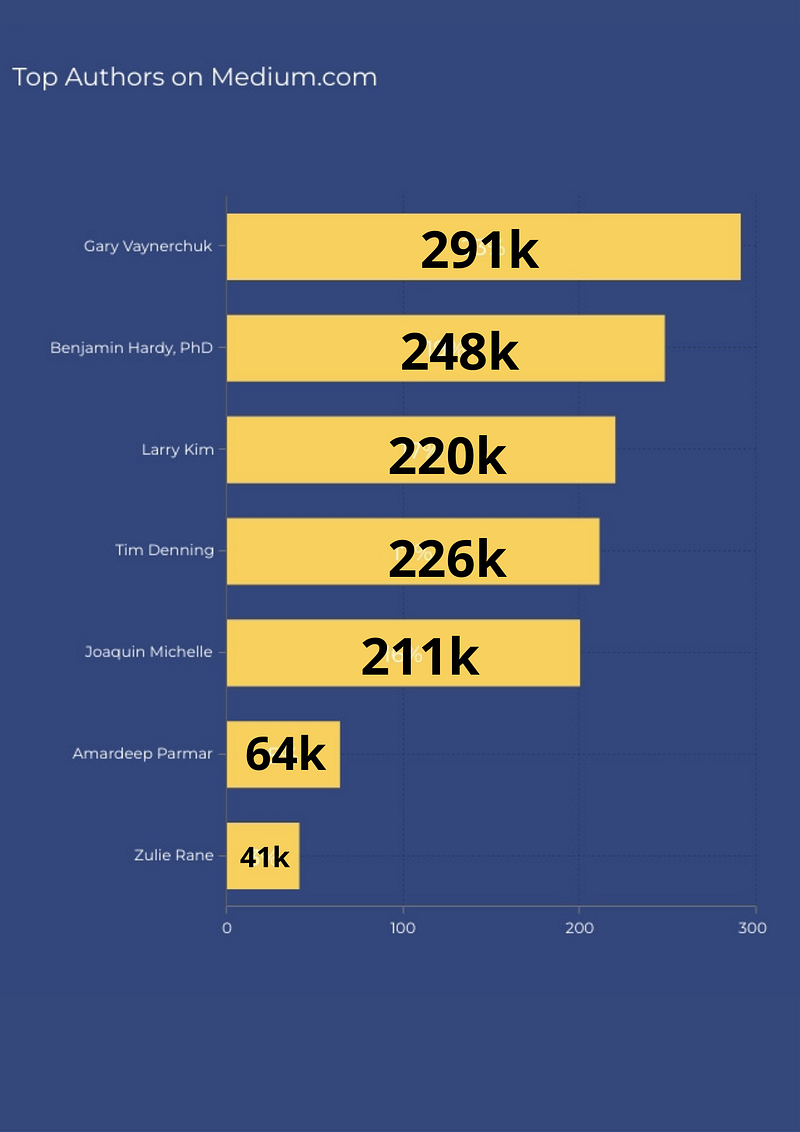
I created this fake graph using visme.co and canva.com
You can’t easily find some of the writer’s data mismatched. Additionally, there is no writer named Joaquin Michelle with 211k followers. Some actual data makes a lie more reliable.
Similar to this fake survey, we can create fake blogs, Graph Maker, Slideshare presentations, Fake Social Media Screenshots using canva.com and Article generators.
- www.fodey.com (Here you can create fake newspaper clips, ninja text, etc…)
- https://pranx.com/ (You can create funny pranks like hacker typer simulator, chat screenshots, fake code rain)
2. Metaphors:
It’s one of the forgotten things among presenters. A metaphor simplifies complex ideas, expresses a creative point of view, and signals a change. Here is how you can use it as part of your presentation.
Defining Metaphor
A metaphor is a figure of speech that compares two things, people, ideas, etc. by stating that one is the other. The two are not similar, of course, and the purpose of the comparison is for emphasis, symbolism, or adding humor/color to an author’s language.
Metaphor generators:
If you can not find the right metaphor for your presentation, these tools will help you.
Link 1 (You can create N number of metaphor examples like “Determination is a meal. Jealousy is a gift. Dedication is a pencil. Charity is a waterfall. Compassion is an ocean. Brilliance is a book. Sympathy is a candle”)
Link 2 (Generate a synæsthetic or surreal metaphor or simile either completely at random or by restricting one or more of the word classes)
As results like,
For example,
- “All the world’s a stage” — William Shakespeare
- “Conscience is a man’s compass” — Vincent Van Gogh
- Money growing in a tree (Example)
3. 10–20–30 Rule:
Contain no more than 10 slides
How you select those 10 slides is up to you, but typically they will identify the problem, present your solution, talk about how to achieve it, who will do it, the timeline, and a summary.
Last no more than 20 minutes
Twenty minutes is the amount of time it should take. Never mind that you have an hour for the presentation. Get it done in 20 minutes and you’ll have an extra 40 for discussion.
Use a font size of no less than 30 points.
How many times have you looked at slides filled with paragraphs and bullet points of 10 point text? It’s as much text as anyone could fit on the screen. To add insult to injury, the presenter proceeds to read the text! Of course, the audience figures this out and begins to read it too, putting them out of sync with the presenter.
Or we can follow rules like:
- 2 4 8 rule in Powerpoint presentation
- Rudolph rule
- There is Some experts suggest using the 5/5/5 rule
- The Birds of a Feather Rule
- 6x6 rule in PowerPoint presentation
4. Time to practice with VR
Some apps use Virtual Reality (VR) to help people who have stage fear.
One of those is a new app called Ummo. With Ummo, you take a prepared speech, tap the microphone icon, wait for the countdown, and then talk. As you speak, the app listens and automatically logs the words, the number of pauses, and the use of pesky filler words like … you know, like, right?
Ummo can show a transcript of what you have said on the screen. To improve, you can tell the app to beep when you use a filler word and edit the list of filler words to include ones you know you overuse.
5. Professionalism
Before everything dives into this, be aware of professionalism. Presentation is not just about using colorful PowerPoint templates with proper dressing. It’s about your positive attitude combined with your positive thinking and the way of your approach. The ones that stand out from the crowd. It is always about how you treat your Investors.
If you fold a piece of paper into four parts and give it to someone, you can pique their curiosity about what it contains. There is 90% likely to read what you write. Whether people liked it or not is a secondary matter. People will remember the way you presented your idea.
6. Try to avoid Acronyms.
If you are presenting with the acronym, and you want your audience to understand it, this is the way to go:
1. Spell out the acronym in full.
2. Give a one-sentence definition.
3. Use an example of the acronym in action or something that illustrates how it’s used.
If you don’t need the audience to understand the acronym, don’t spell it out–it will just be confusing. Also, It’s better to display instead of spell out. For example,
IMRDC — Introduction, Methods, Results, Discussion, and conclusion.
KISS — — Keep It Short n Simple.
Relax and enjoy yourself for your work:
The more you work on your presentation, the more nervous you become. And the more nervous you are, the harder it is to relax. But if you actually enjoy what you’re doing, that will help relax you and make the presentation go better.
In fact, so will the experience of giving it. Sometimes the best way to relax is to do something else for a while; then come back and see how you feel about it. You will probably find that whatever technique or approach you have been using, what works best is to let yourself be as inarticulate and unstructured as possible.
If you think it will be boring, then you should not give the presentation and it probably will be. If you do not think it will be boring, then it probably won’t be.