
Learning Python
The Ultimate Python Tutorial For Beginners
Covering All The Basic Topics, From Variables To Classes & Objects

Programming is basically designing and building an executable computer program that is used to accomplish a specific computing task to generate some results. For example, we design a calculator that can be used to perform different arithmetic operations. The need for programming occurs when we try to communicate and instruct the computer to do some tasks we want but the problem is computer only understands the binary language. Programming languages do the work for us by converting the high-level language to binary. One of the best and easy to work with programming language is python.
Python is an interpreted, high-level, and general-purpose programming language. It is created by Guido van Rossum and was first released in 1991. It is very easy to understand, from a beginner's perspective python is the best choice to start. It uses an interpreter to convert the high-level language into a low-level language. It has become famous because of its one-liners, Vast amount of packages, and active community of developers.
Python provides lots of advantages for its developers, below is a list containing some of them.
Advantages
- Versatile Language Can be used for different purposes.
- Open Source with an Active Community of developers.
- Has All the Libraries You Can Imagine.
- Large and distinct amount of modules.
- Easy to learn and extend.
- Object-oriented with simple syntax.
Well, You have seen the advantages of python but still wondering why should you learn it. below are some reasons which can justify it.
Why One Should Learn Python?
- High salary Job Offers.
- Data Scientists First Love.
- can do scripting & automation.
- Make Data Preprocessing easy.
- Supports Testing.
- Used for Web Development.
- It is simple & easy to learn.
- Have a massive community of people.
- High In Demand.
Now, That You Have Understood What and Why We Need Python. It's The Right Time To Go Forward and Start With Its Basics.
--------------TABLE OF CONTENTS---------------1. How Does Python Works??
2. Variables
3. Operators
▶ Types of Operator
4. Comments
▶ Single Line Comment
▶ Multiline Comment
5. Taking Input and Printing Output
6. Data Types
▶ Numbers
▶ Strings
▶ List
▶ Tuples
▶ Set
▶ Dictionaries
7. Indexing & Slicing
8. Type Conversion
9. Conditionals
10.Loops
▶ for
▶▶ range
▶▶ enumerate
▶ while
11. Functions
▶ Recursions
▶ Lambda
12. Package
▶ pip
13. random module
14. Files and Their Operations
15. Class & Object16. What's Next1. How Does Python Works??
Python is an interpreted language, which means it uses an interpreter to convert the Human Understandable Code into Machine Understandable Code.
The Best Advantage of using an interpreted language is that they are platform-independent. Unlike C++/C Where You have to Compile the Code, and after a successful compilation a new file gets created that contains the Machine Code that is understood by the CPU. In Python, Instead of translating the code into Machine Code, The Code is translated into bytecode.
Byte Code Is a low-level set of instructions that can be executed by an interpreter. It is executed on virtual memory.
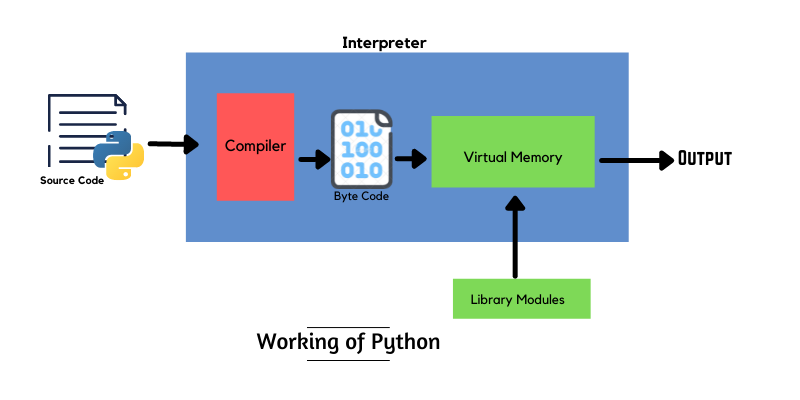
The Source Code of Python is compiled into byte code, and then with the help of Python Virtual Memory, it is again converted into the machine code that the computer can understand.
2. Variables
In python, a variable is the name of a memory location that is assigned with some value. For Example:- a = 5, where a is the name of the variable that is assigned with the value 5. You can refer to a variable as a container that can store any value.
Variable Operator Value
   a       =        20
   b       =        60
   c       =       'Ram'
3. Operators
Operators are a set of symbols that are used to define a computation task between variables.
Ex:- a+b, here + is an operator, that adds values of a & b
c / d, here / is an operator, that divides c from d
There are 7 types of operators available in python —
- Arithmetic operators
* + / ** % - - Assignment operators
= += =+ -= -= != - Comparison operators
< > !< !> =< >= == - Bitwise operators
& ^ ~ << >> - Identity operators
is ,is not - Logical operators
and or not - Membership operators
in ,not in
4. Comments
Comments are part of source code that is ignored by the compiler. They are mostly used to explain the code to others. Comments make your code more readable.
There are two types of comments, Single Line and Multiline. In python, you can write comments with the help of # and ''' '''
# Single Line Comment
## Another Single Line Comment
''' Single Line Comment '''
### An
### Example of
### Multiline Comment Using '#'''' An
Example of
Multiline Comment '''5. Taking Input and Printing Output
Input allows a user to insert a value into a program and output allows users to retrieve values back from the program. To Take Inputs from the user we use input() function. To Show the Output we user print() statement.
a = 5
b = int(input("Enter a Number:-"))
sum = a+b
print(sum)
--------------------------
Enter a Number:- 10
15
6. Data Types
a data type is an attribute of data that explains the computer how the developers intended to use the data. In simple words, data type explains the type of value a variable has. There are mainly 6 types of data types in python.
1. Numbers
It is one of the basic and most used data types in python. Integers, Floats, and Complex Numbers fall under the category of numbers. To check the type of variable you can use type()
                                 OUTPUT
a = 10
print(type(a))                <class 'int'>
b = 4.5
print(type(b)) <class 'float'>c = 1+6j
print(type(c)) <class 'complex'>2. Strings
A Sequence of Unicode Characters is called a string. To Define a string in python we use a single or double quote end with the same.
a = 'R'                                OUTPUT
print(type(a))                       <class 'str'>
b = 'Python Programming'
print(type(b)) <class 'str'>3. List
The list is an ordered sequence of items. They are mutable, which means you can delete and update any element from the list. It can store multiple items from different data types at a time. To Defined a list we use [ ]
data = [98, 'Karl', 85.6,98]                   OUTPUT
print(type(data))                        <class 'list'>
4. Tuple
A Tuple is similar to a list the only difference is they are immutable, which means you can’t change any element from a tuple. They are very important in scenarios where your data is important and you don’t want to update it. To Defined a tuple we use ( )
data = (9,'Kat',79.89,9)                   OUTPUT
print(type(data))                      <class 'tuple'>
5. Set
It is an unordered sequence of items. It doesn’t have any repeated values, unlike lists and tuples. There are many operations that you can perform through sets like union, intersection, etc. Set Object is not subscribable. To Define a set we use { }
data = {9,10,11}                          OUTPUT
print(type(data))                      <class 'set'>
6. Dictionary
It is an unordered collection of keys and values. Dictionaries are mostly used to store large amounts of data. To Defined a Dictionary we use {KEY:VALUE}
dictt1 = {'id' : 'RF5701', 'name' : 'Karl', 'batch':879}dictt2 = {
'id' : ['RF5701','RF5702'],
'name' : ['Karl', 'Kat'],
'batch' : [879,880]
}print(dictt2.keys()) ### Prints all the keys in a list
print(dictt2.values()) ### Prints all the values7. Indexing and Slicing
Indexing is the process of fetching a value of a given index. There are two types of indexing- Positive and Negative. Positive indexing starts from the 0th index and Negative indexing starts from the last index.
Slicing is the process of retrieving values from a given range. The Syntax from slicing is [BottomIndex:TopIndex:Step] , here the bottom index is the lower index value and TopIndex is the higher index value and Step represents how many items it Jump or skips each time. At Default The Step is 0. The top index value is always dropped which retrieving values.
Let’s understand each one —
data = [1,2,3,4,5,6,7,8,9] ''' Indexing ''' OUTPUT RESULT
print(data[0]) 1 Fetch The Value at index 0
print(data[-1]) 9 Fetch the value at last index
print(data[-3]) 7 Fetch the value at last third index''' Slicing '''
print(data[0:1]) 1 Value of 0th index
print(data[1:4]) [2,3] Values from 1st index to 3rd index
print(data[0:8:2]) [0,2,4,6] Values from 0th index to 7th index _ with a Jump of 2print(data[0:-2:2]) [0,2,4,6] "" (Negative Indexing)8. Type Conversion
It is the process of converting a data structure into another.
                     CODE        OUTPUT
a = 2               type(a)    <class 'int'>
b = float(2) type(b) <class 'float'>c = str(b) type(c) <class 'str'>
d = list(c) type(d) <class 'list'>9. Conditionals
Conditional helps us to perform some computation tasks based on some given condition. in python, we have if statements to perform conditional tasks.
if condition:
   task
else:
   task
----------Example-------------
if rain:
Stay
else:
Go--------Combining Multiple if--------
if rain and thunder:
Stay:
elif rain:
Go With Umbrella
else:
Go10. Loops
Loops Are Used to perform a certain task multiple times. They provide code reusability. With Loops, a Small Chunk of Code Can Perform Big Tasks. There are two types of loops in python:-
1. For Loop
a For Loop Iterates over something on a given range. to define a for loop we use for keyword. Syntax:-
for attribute in range(lower_range, upper_range):
        Task
--------------------------------
for i in range(0,10):
print(i) ## Prints Numbers from 0 to 9range(): It returns a sequence of numbers based on the range given. It starts with the lower range and then increments it every time by one until the top range is met. The Top Range Values Always got dropped.
range function is good when you need vales but what should you do if you need both values and index ??
Enumerate(): It is used to iterate over an element and return index and value of each index.
lst = [1,2,3,4,5]
for index, value in enumerate(lst):
          print("At Index", index, "The Value is ",value)
''' The Above Code Will Return The Index and Value At Each Index of the list
OUTPUT will be
At Index 0 The Value is 1
At Index 1 The Value is 2
At Index 2 The Value is 3
At Index 3 The Value is 4
At Index 4 The Value is 5
'''2. While Loop
It iterates over something until the condition is true or false.
while True:
      Task
---------------------
i = 0
while i<10:
    i = i+1  ## The Loop Will Run Until i value becomes equals to
                     10, Means it will run 10 times.
11. Functions
It is a block of code that only executes when called. You Can Pass, Put and receive data from a function. Functions make source code more structural and readable. They Provide Code reusability and Abstraction.
There are two parts of functions — Function Definition, Where the function body lies and Function Calling Through which the function is called.
To create a function we use def keyword.
def function_name(attributes):              ## Parameters
       task
function_name(attributes) ## Arguments
-----------------
def add(x,y):
sum = x+yprint(add(6,9))'''OUTPUT
15
'''Recursive Function
It is a kind of function that calls itself recursively. In a recursive function, there are at least two calling statements. One inside the function and the other outside the function.
def function():
        ------
        ------
        function()      ## Inside the function calling
function() ## Calling (At Start)
----------------------------------
----Program To Check Palindrome Using Recursion in Python------def ispalindrome(word):
if word[0] != word[-1]: return False
if len(word) < 2: return True
return ispalindrome(word[1:-1])
print(ispalindrome('152'))Lambda Function
Lambda Function is a function that is defined with a name. It is also named an anonymous function. It has no body and doesn’t require def keyword for definition. It can take up to any number of arguments but only one expression.
''' Program To Check Whether a Number is Even or not '''even_or_not = lambda num : num%2-==0
print(even_or_not(5))
----------------------
False12. Package
A Package in python is a collection of modules and functions that are put together to perform a certain task. It is basically a directory with python files and a file named __init__.py that means every directory inside the python path with file __init__.pyconsidered as a python package. You Can Create your own package or use the inbuilt packages. Python also offers you the ability to use packages created by other developers.
PIP is a package management system that is used to install and manage external libraries in python.
pip install PACKAGE_NAME
-------------
pip install pandas
13. random module
it is an inbuilt module in python that is mainly used to generate random numbers within a range. It provides many different functions that provide randomness to your source code. Like any other module or library To Use it you first have to import it. import random
------ Some of the most used random module functions ------import random''' Generate a random integer between the given range '''
print(random.randint(1,10)) ## 3
print(random.randrange(1,10,5)) ## 15 (With Step)''' Generate a random number between 0 and 1 '''
print(random.random())''' Save the state of random number ''
random.seed(100)''' Select a random choice '''
random.choice(DATATYPE)
----------
print(random.choice([1,2,3,4,5])) ## 4
14. Files & Operations
A file is a collection of data stored in one unit or location. in general, we divided files into two parts — text and binary files. Text files are simple files that you own and Binary Files Contains data that is only readable by computers. In python to open a file we have open() and to close files we have close()
There are different modes in which you can open a file Like Write(w), Read (r), Append (a), etc.
--------- Reading a File --------
open("FILEPATH/FILENAME.txt")
--------- Reading a File in append Mode --------
open("FILEPATH/FILENAME.txt","a") --------- Opening a File With Handling Exceptions --------
try:
f = open("FILEPATH/FILENAME.txt", "a")
#### Some Tasks
finally:
f.close()--------- The Best Way To Open and Close File ------
with open("FILEPATH/FILENAME.txt", "a", encoding='utf-8') as f:
-------
-------
Some Task
--------
f.close()15. Class & Object
Class & Object both are key parts of Object-Oriented Programming. A Class Works as a blueprint for an object whether an object is an instance of the class. For example, if you consider Employee as a class then Different Employees With Salary, Age, Experience, Department are objects.
A Class Is similar to a function the difference is that to create a class you will use class keyword.
class Data:
       -----
       -----
You Can Create a Function Inside the class too. a Function that is defined inside a class called a module. Also, variables inside the class are called class attributes.
class Data:
      name = 'Ram'

      def __init__(self,age,salary):             ##Constructor
           self.age  = age
           self.salary = salary
      def show(self):
         print(self.age)
         print(self.salary)
__init__ is a reserved method for classes in python that works as a constructor. This method is automatically called when the source code executes. It is mostly used to initialize variables inside the class.
Objects Are the instance of the class. With the help of an object, you can access both attributes and methods of the class. To create an object for the class you need to follow the syntax : Object_name = Class_name(values)
class Data:
      name = 'Ram'

      def __init__(self,age,salary):             ##Constructor
           self.age  = age
           self.salary = salary
      def show(self):
         print(self.age)
         print(self.salary)
obj = Data(29,3000)
print(obj.name)
obj.show()
----------------------
Ram
29
3000Congrats🎉, On Learning The Basics of Python. Below Are Some Links That Can Help You To Boost Your Learning Journey.
16. What’s Next
Now That You have successfully learned python it's time to move forward and build some projects. Below is a Link To an article that contains 21 Python Mini Projects With Source Code.
Done Building Some Projects, Now the Next Step is to improve your code and make it more faster and elegant. Below Are Links To Some Article That Helps you do it.
After Working and Learning So Many Things You Might Be Feeling a little bored. One of the biggest features of python is its packages. Below Are Links To Some Article That Contains Many Different and useful packages that give you a feel of python powers.
15 Python Packages You Probably Don’t Know Exits
That Are Going To Be Very Useful For You
medium.com
The Final Step is to Select a field or carrier to move forward. Below Is a link to an article that will help you to do a good choice.
Liked What You Read Support Me By Subscribing To Medium and Enjoy Unlimited Similar Articles. Want To Get Published With The Pythoneers Leave a Response here.


