avatarArslan Mirza

Free AI web copilot to create summaries, insights and extended knowledge, download it at here

19336

Abstract

src="https://cdn-images-1.readmedium.com/v2/resize:fit:800/1*VMTSVuPh3OkJKI0dxsWKfw.jpeg"><figcaption><a href="https://media.geeksforgeeks.org/wp-content/uploads/20191108131134/For-Loop.jpg">https://media.geeksforgeeks.org/wp-content/uploads/20191108131134/For-Loop.jpg</a></figcaption></figure><ul><li><b>In a while loop</b>, the condition is checked at the beginning of each iteration, and the loop continues as long as the condition is true. In a do-while loop, the condition is checked at the end of each iteration, so the loop is guaranteed to execute at least once.</li></ul><figure id="6018"><img src="https://cdn-images-1.readmedium.com/v2/resize:fit:800/1*N1PiJMzz1SEEl9iYa1ln7w.jpeg"><figcaption><a href="https://media.geeksforgeeks.org/wp-content/uploads/20191118164726/While-Loop-GeeksforGeeks.jpg">https://media.geeksforgeeks.org/wp-content/uploads/20191118164726/While-Loop-GeeksforGeeks.jpg</a></figcaption></figure><p id="8f1b">Switch statements are used to execute different code blocks based on the value of a variable.</p><p id="53b0">In a switch statement, a variable is compared to a list of values, and the code block associated with the matching value is executed.</p><h2 id="233c">iii — Arrays and ArrayLists</h2><p id="1c30">Arrays and ArrayLists are used to store multiple values of the same data type.</p><p id="f77a">In Java, an array is a fixed-size collection of elements of the same data type, while an ArrayList is a dynamic-size collection of elements of the same data type.</p><p id="da7a">Both Arrays and ArrayLists can be accessed using an index, and they can be used to store and manipulate large amounts of data efficiently.</p><figure id="0a4f"><img src="https://cdn-images-1.readmedium.com/v2/resize:fit:800/1*cVp3emTMiBsEKWTMe2P5Ew.png"><figcaption>Arrays and ArraysLists</figcaption></figure><ul><li><b>Arrays</b> in Java are declared with a specific data type and size. Once an array is created, its size cannot be changed. To access an element in an array, an index is used. Array elements are stored in contiguous memory locations, which allows for efficient memory access.</li><li><b>ArrayLists</b> in Java are implemented as objects, and they can grow or shrink in size as needed. ArrayLists can be initialized with an initial capacity, and they can also be resized dynamically. To access an element in an ArrayList, an index is used, similar to an array.</li></ul><p id="2fcd">Understanding these essential concepts of Java is crucial for developing efficient and optimized Java applications. It’s important to have a solid grasp of these concepts and how they can be used to build powerful and scalable software systems.</p><p id="fc80">🚩 (<i>NOTE: In this course, we have three main points that lay the foundation for understanding Java programming. These points are variables and data types, control structures, and methods. It is essential to understand these concepts before moving on to other advanced topics. If you thoroughly comprehend these three points, you will be able to handle the more complex aspects of Java programming with ease. Therefore, make sure to master these basics before proceeding to the other parts of the course.</i>)</p><h2 id="3dba">4. Object-Oriented Programming in Java</h2><h2 id="32fc">i — Explanation of object-oriented programming (OOP) concepts</h2><p id="6b86"><a href="https://readmedium.com/mastering-object-oriented-programming-in-c-672773d87388">Object-oriented programming (OOP)</a> is a programming paradigm based on the concept of objects. It emphasizes the use of objects, which are instances of classes, to represent and manipulate data in a program.</p><p id="614c">OOP enables programmers to organize their code into modular, reusable components, making it easier to maintain and modify code.</p><p id="4e7a">The core concepts of OOP include encapsulation, inheritance, and polymorphism. We will discuss these core points in detail below.</p><p id="7d95"><b>Example:</b></p><p id="62bd">In Java, everything is an object, which means that all data types, including primitive data types, are implemented as objects. OOP concepts include:</p><ul><li><b>Encapsulation:</b> This is the process of hiding the implementation details of a class and providing a public interface for accessing and modifying its data. For example, you can create a class called “Person” that has private fields for name, age, and address, and public methods for setting and getting those values.</li><li><b>Inheritance:</b> This is the process of creating a new class from an existing class, which allows the new class to inherit the properties and behaviours of the existing class. For example, you can create a class called “Student” that inherits from the “Person” class and adds fields and methods specific to students.</li><li><b>Polymorphism:</b> This is the ability of objects of different types to be treated as if they are of the same type. For example, you can create a method called “printInfo” that accepts an object of type “Person” or “Student” and can print out the information for either type of object.</li></ul><figure id="9336"><img src="https://cdn-images-1.readmedium.com/v2/resize:fit:800/1*ixEc6uzuyCZqSLr4eifL0w.png"><figcaption></figcaption></figure><h2 id="d7a4">ii — Classes and objects in Java</h2><p id="d62c">In Java, a class is a blueprint or template for creating objects. A class defines the properties and methods that objects of that class will have.</p><p id="108b">An object, on the other hand, is an instance of a class. Objects have their state (data) and behaviour (methods), which are defined by the class.</p><p id="b5fd">To create a class in Java, you use the “class” keyword, followed by the class name and the class body enclosed in curly braces.</p><p id="5c28">The class body contains the properties and methods of the class. To create an object of a class, you use the “new” keyword, followed by the name of the class and any arguments needed to initialize the object.</p><p id="8a24"><b>Example:</b></p><p id="75c4">In Java, a class is a blueprint for creating objects that define the properties and behaviours of those objects. Here is an example of a class called “Person”:</p><div id="c431"><pre><span class="hljs-keyword">public</span> <span class="hljs-keyword">class</span> <span class="hljs-title class_">Person</span> { <span class="hljs-keyword">private</span> <span class="hljs-title class_">String</span> name; <span class="hljs-keyword">private</span> int age; <span class="hljs-keyword">private</span> <span class="hljs-title class_">String</span> address;

<span class="hljs-keyword">public</span> <span class="hljs-title class_">Person</span>(<span class="hljs-title class_">String</span> name, int age, <span class="hljs-title class_">String</span> address) {
    <span class="hljs-variable language_">this</span>.<span class="hljs-property">name</span> = name;
    <span class="hljs-variable language_">this</span>.<span class="hljs-property">age</span> = age;
    <span class="hljs-variable language_">this</span>.<span class="hljs-property">address</span> = address;
}

<span class="hljs-keyword">public</span> <span class="hljs-title class_">String</span> <span class="hljs-title function_">getName</span>(<span class="hljs-params"></span>) {
    <span class="hljs-keyword">return</span> name;
}

<span class="hljs-keyword">public</span> <span class="hljs-built_in">void</span> <span class="hljs-title function_">setName</span>(<span class="hljs-params"><span class="hljs-built_in">String</span> name</span>) {
    <span class="hljs-variable language_">this</span>.<span class="hljs-property">name</span> = name;
}

<span class="hljs-keyword">public</span> int <span class="hljs-title function_">getAge</span>(<span class="hljs-params"></span>) {
    <span class="hljs-keyword">return</span> age;
}

<span class="hljs-keyword">public</span> <span class="hljs-built_in">void</span> <span class="hljs-title function_">setAge</span>(<span class="hljs-params">int age</span>) {
    <span class="hljs-variable language_">this</span>.<span class="hljs-property">age</span> = age;
}

<span class="hljs-keyword">public</span> <span class="hljs-title class_">String</span> <span class="hljs-title function_">getAddress</span>(<span class="hljs-params"></span>) {
    <span class="hljs-keyword">return</span> address;
}

<span class="hljs-keyword">public</span> <span class="hljs-built_in">void</span> <span class="hljs-title function_">setAddress</span>(<span class="hljs-params"><span class="hljs-built_in">String</span> address</span>) {
    <span class="hljs-variable language_">this</span>.<span class="hljs-property">address</span> = address;
}

}</pre></div><p id="03c6">In this example, the class “Person” has three private fields for name, age, and address, and public methods for setting and getting those values. You can create an object of this class like this:</p><div id="68c0"><pre><span class="hljs-type">Person</span> <span class="hljs-variable">person</span> <span class="hljs-operator">=</span> <span class="hljs-keyword">new</span> <span class="hljs-title class_">Person</span>(<span class="hljs-string">"John Doe"</span>, <span class="hljs-number">25</span>, <span class="hljs-string">"123 Main St"</span>);</pre></div><h2 id="f1ce">iii — Inheritance and polymorphism</h2><p id="8faa">Inheritance and polymorphism are two key features of object-oriented programming in Java.</p><p id="dad7">Inheritance enables a class to inherit properties and methods from another class, allowing for code reuse and easier maintenance.</p><p id="ee8f">To create a subclass that inherits from a superclass, you use the “extends” keyword, followed by the name of the superclass. The subclass can then override or extend the properties and methods of the superclass as needed.</p><p id="a82d">Polymorphism allows objects of different types to be treated as if they were of the same type. In Java, polymorphism is achieved through the use of interfaces and abstract classes.</p><p id="454b">An interface defines a set of methods that a class must implement, while an abstract class provides a partial implementation of a class that can be extended by subclasses.</p><p id="58f8">By using interfaces and abstract classes, you can write code that is more flexible and extensible, since it can work with objects of different types.</p><figure id="358e"><img src="https://cdn-images-1.readmedium.com/v2/resize:fit:800/1*RYOTezZEeH1BKv9A5cTaOA.png"><figcaption></figcaption></figure><p id="67b6"><b>Example:</b></p><p id="c387">Inheritance is a feature in object-oriented programming that allows a class to inherit properties and behaviours from a parent class. This promotes code reusability and reduces redundancy.</p><p id="d190">Here’s an example:</p><div id="071d"><pre><span class="hljs-keyword">class</span> <span class="hljs-title class_">Animal</span>: <span class="hljs-keyword">def</span> <span class="hljs-title function_">init</span>(<span class="hljs-params">self, name</span>): self.name = name

<span class="hljs-keyword">def</span> <span class="hljs-title function_">speak</span>(<span class="hljs-params">self</span>):
    <span class="hljs-keyword">pass</span>

<span class="hljs-keyword">class</span> <span class="hljs-title class_">Dog</span>(<span class="hljs-title class_ inherited__">Animal</span>): <span class="hljs-keyword">def</span> <span class="hljs-title function_">speak</span>(<span class="hljs-params">self</span>): <span class="hljs-keyword">return</span> <span class="hljs-string">"Woof!"</span>

<span class="hljs-keyword">class</span> <span class="hljs-title class_">Cat</span>(<span class="hljs-title class_ inherited__">Animal</span>): <span class="hljs-keyword">def</span> <span class="hljs-title function_">speak</span>(<span class="hljs-params">self</span>): <span class="hljs-keyword">return</span> <span class="hljs-string">"Meow!"</span>

my_dog = Dog(<span class="hljs-string">"Fido"</span>) my_cat = Cat(<span class="hljs-string">"Whiskers"</span>)

<span class="hljs-built_in">print</span>(my_dog.name + <span class="hljs-string">" says "</span> + my_dog.speak()) <span class="hljs-comment"># Output: Fido says Woof!</span> <span class="hljs-built_in">print</span>(my_cat.name + <span class="hljs-string">" says "</span> + my_cat.speak()) <span class="hljs-comment"># Output: Whiskers says Meow!</span></pre></div><p id="28b7">In this example, we have a parent class <code>Animal</code> with a property <code>name</code> and a method <code>speak()</code>. We then create two child classes <code>Dog</code> and <code>Cat</code> that inherit from <code>Animal</code>. Each child class overrides the <code>speak()</code> method to produce the appropriate sound for that animal.</p><p id="aebf">Polymorphism is the ability of objects of different classes to be used interchangeably. It allows us to write code that can work with objects of different classes without knowing their specific type.</p><p id="a26b">Here’s an example:</p><div id="6696"><pre><span class="hljs-keyword">class</span> <span class="hljs-title class_">Shape</span>: <span class="hljs-keyword">def</span> <span class="hljs-title function_">area</span>(<span class="hljs-params">self</span>): <span class="hljs-keyword">pass</span>

<span class="hljs-keyword">class</span> <span class="hljs-title class_">Rectangle</span>(<span class="hljs-title class_ inherited__">Shape</span>): <span class="hljs-keyword">def</span> <span class="hljs-title function_">init</span>(<span class="hljs-params">self, length, width</span>): self.length = length self.width = width

<span class="hljs-keyword">def</span> <span class="hljs-title function_">area</span>(<span class="hljs-params">self</span>):
    <span class="hljs-keyword">return</span> self.length * self.width

<span class="hljs-keyword">class</span> <span class="hljs-title class_">Circle</span>(<span class="hljs-title class_ inherited__">Shape</span>): <span class="hljs-keyword">def</span> <span class="hljs-title function_">init</span>(<span class="hljs-params">self, radius</span>): self.radius = radius

<span class="hljs-keyword">def</span> <span class="hljs-title function_">area</span>(<span class="hljs-params">self</span>):
    <span class="hljs-keyword">return</span> <span class="hljs-number">3.14</span> * self.radius ** <span class="hljs-number">2</span>

shapes = [Rectangle(<span class="hljs-number">3</span>, <span class="hljs-number">4</span>), Circle(<span class="hljs-number">5</span>)] <span class="hljs-keyword">for</span> shape <span class="hljs-keyword">in</span> shapes: <span class="hljs-built_in">print</span>(<span class="hljs-string">"Area:"</span>, shape.area())</pre></div><p id="0cd4">In this example, we have a parent class <code>Shape</code> with a method <code>area()</code>. We then create two child classes <code>Rectangle</code> and <code>Circle</code> that inherit from <code>Shape</code> and implement their <code>area()</code> method.</p><p id="492d">We then create a list of different shapes and loop through them, calling the <code>area()</code> method on each one.</p><p id="755c">Since each shape has its implementation of the <code>area()</code> method, the output will be the area of each shape. This is an example of polymorphism because we can treat objects of different classes as if they were the same type.</p><h2 id="5b49">iv — Abstraction</h2><p id="67d6">Abstraction is one of the key principles of object-oriented programming and refers to the ability to represent complex concepts or systems in a simplified and more manageable way.</p><p id="3a74">It allows developers to create models that capture only the essential features of an object or system while hiding unnecessary details or implementation specifics.</p><p id="8046">In Java, abstraction is often achieved through the use of abstract classes and interfaces.</p><ul><li><b>Abstract</b> classes are classes that cannot be instantiated directly, but instead, serve as blueprints for other classes that extend them. They may contain both abstract and non-abstract methods and provide a level of implementation for their subclasses to build upon.</li><li><b>Interfaces</b>, on the other hand, define a contract that specifies a set of methods that a class must implement, but do not provide any implementation themselves.</li></ul><figure id="db5e"><img src="https://cdn-images-1.readmedium.com/v2/resize:fit:800/1*VFDss9TRkd7XNDVk0EBriw.jpeg"><figcaption><a href="https://static.javatpoint.com/images/abstract-class-in-java.jpg">https://static.javatpoint.com/images/abstract-class-in-java.jpg</a></figcaption></figure><p id="3a5a"><b>For example:</b></p><p id="fa2a">Consider a car. A car can be modelled as an object with properties like make, model, and colour, and behaviours like accelerating, braking, and turning.</p><p id="a8e7">However, a car is a complex system with many different parts and systems that work together, like the engine, transmission, and suspension. When creating a software program that involves cars, we may not need to represent all of these details.</p><p id="57d1">Instead, we can create an abstraction of a car that includes only the essential properties and behaviours we care about.</p><p id="ded9">We can define an abstract class <code>Vehicle</code> that defines basic properties and methods that all vehicles should have, such as <code>startEngine()</code> and <code>stopEngine()</code>.</p><p id="a9e8">Then, we can create a subclass <code>Car</code> that extends <code>Vehicle</code> and provides its implementation for these methods, as well as additional methods specific to cars, such as <code>accelerate()</code> and <code>brake()</code>.</p><p id="82dc">This abstraction allows us to represent a car in our program in a simplified and manageable way, without worrying about the details of every part and system.</p><p id="a85c">It also allows us to create other subclasses of <code>Vehicle</code> that represent other types of vehicles, such as <code>Truck</code> or <code>Motorcycle</code>, each with its specific properties and behaviours.</p><p id="8e47"><b>Here’s an example of using abstraction in Java with abstract classes and subclasses:</b></p><div id="468e"><pre><span class="hljs-comment">// Abstract class for a vehicle</span> <span class="hljs-keyword">abstract</span> <span class="hljs-keyword">class</span> <span class="hljs-title class_">Vehicle</span> { <span class="hljs-comment">// Common properties for all vehicles</span> <span class="hljs-keyword">private</span> <span class="hljs-title class_">String</span> make; <span class="hljs-keyword">private</span> <span class="hljs-title class_">String</span> model; <span class="hljs-keyword">private</span> <span class="hljs-title class_">String</span> color;

<span class="hljs-comment">// Abstract methods for starting and stopping the engine</span> <span class="hljs-keyword">abstract</span> <span class="hljs-built_in">void</span> <span class="hljs-title function_">startEngine</span>(); <sp

Options

an class="hljs-keyword">abstract</span> <span class="hljs-built_in">void</span> <span class="hljs-title function_">stopEngine</span>();

<span class="hljs-comment">// Getters and setters for properties</span> <span class="hljs-keyword">public</span> <span class="hljs-title class_">String</span> <span class="hljs-title function_">getMake</span>(<span class="hljs-params"></span>) { <span class="hljs-keyword">return</span> make; } <span class="hljs-keyword">public</span> <span class="hljs-built_in">void</span> <span class="hljs-title function_">setMake</span>(<span class="hljs-params"><span class="hljs-built_in">String</span> make</span>) { <span class="hljs-variable language_">this</span>.<span class="hljs-property">make</span> = make; } <span class="hljs-keyword">public</span> <span class="hljs-title class_">String</span> <span class="hljs-title function_">getModel</span>(<span class="hljs-params"></span>) { <span class="hljs-keyword">return</span> model; } <span class="hljs-keyword">public</span> <span class="hljs-built_in">void</span> <span class="hljs-title function_">setModel</span>(<span class="hljs-params"><span class="hljs-built_in">String</span> model</span>) { <span class="hljs-variable language_">this</span>.<span class="hljs-property">model</span> = model; } <span class="hljs-keyword">public</span> <span class="hljs-title class_">String</span> <span class="hljs-title function_">getColor</span>(<span class="hljs-params"></span>) { <span class="hljs-keyword">return</span> color; } <span class="hljs-keyword">public</span> <span class="hljs-built_in">void</span> <span class="hljs-title function_">setColor</span>(<span class="hljs-params"><span class="hljs-built_in">String</span> color</span>) { <span class="hljs-variable language_">this</span>.<span class="hljs-property">color</span> = color; } }

<span class="hljs-comment">// Subclass for a car that extends Vehicle</span> <span class="hljs-keyword">class</span> <span class="hljs-title class_">Car</span> <span class="hljs-keyword">extends</span> <span class="hljs-title class_ inherited__">Vehicle</span> { <span class="hljs-comment">// Additional properties for cars</span> <span class="hljs-keyword">private</span> int numDoors;

<span class="hljs-comment">// Implementations for starting and stopping the engine</span> <span class="hljs-built_in">void</span> <span class="hljs-title function_">startEngine</span>(<span class="hljs-params"></span>) { <span class="hljs-title class_">System</span>.<span class="hljs-property">out</span>.<span class="hljs-title function_">println</span>(<span class="hljs-string">"Starting the car engine..."</span>); } <span class="hljs-built_in">void</span> <span class="hljs-title function_">stopEngine</span>(<span class="hljs-params"></span>) { <span class="hljs-title class_">System</span>.<span class="hljs-property">out</span>.<span class="hljs-title function_">println</span>(<span class="hljs-string">"Stopping the car engine..."</span>); }

<span class="hljs-comment">// Getter and setter for number of doors</span> <span class="hljs-keyword">public</span> int <span class="hljs-title function_">getNumDoors</span>(<span class="hljs-params"></span>) { <span class="hljs-keyword">return</span> numDoors; } <span class="hljs-keyword">public</span> <span class="hljs-built_in">void</span> <span class="hljs-title function_">setNumDoors</span>(<span class="hljs-params">int numDoors</span>) { <span class="hljs-variable language_">this</span>.<span class="hljs-property">numDoors</span> = numDoors; } }

<span class="hljs-comment">// Example usage of the Car class</span> <span class="hljs-keyword">public</span> <span class="hljs-keyword">class</span> <span class="hljs-title class_">Main</span> { <span class="hljs-keyword">public</span> <span class="hljs-keyword">static</span> <span class="hljs-built_in">void</span> <span class="hljs-title function_">main</span>(<span class="hljs-params"><span class="hljs-built_in">String</span>[] args</span>) { <span class="hljs-comment">// Create a new car object</span> <span class="hljs-title class_">Car</span> myCar = <span class="hljs-keyword">new</span> <span class="hljs-title class_">Car</span>(); myCar.<span class="hljs-title function_">setMake</span>(<span class="hljs-string">"Toyota"</span>); myCar.<span class="hljs-title function_">setModel</span>(<span class="hljs-string">"Camry"</span>); myCar.<span class="hljs-title function_">setColor</span>(<span class="hljs-string">"Red"</span>); myCar.<span class="hljs-title function_">setNumDoors</span>(<span class="hljs-number">4</span>);

  <span class="hljs-comment">// Call methods on the car object</span>
  <span class="hljs-title class_">System</span>.<span class="hljs-property">out</span>.<span class="hljs-title function_">println</span>(<span class="hljs-string">"My car is a "</span> + myCar.<span class="hljs-title function_">getMake</span>() + <span class="hljs-string">" "</span> + myCar.<span class="hljs-title function_">getModel</span>());
  <span class="hljs-title class_">System</span>.<span class="hljs-property">out</span>.<span class="hljs-title function_">println</span>(<span class="hljs-string">"It has "</span> + myCar.<span class="hljs-title function_">getNumDoors</span>() + <span class="hljs-string">" doors and is "</span> + myCar.<span class="hljs-title function_">getColor</span>());
  myCar.<span class="hljs-title function_">startEngine</span>();
  myCar.<span class="hljs-title function_">accelerate</span>();
  myCar.<span class="hljs-title function_">brake</span>();
  myCar.<span class="hljs-title function_">stopEngine</span>();

} }</pre></div><p id="7999">In this example, we define an abstract class <code>Vehicle</code> that represents the basic properties and methods of all vehicles and a subclass <code>Car</code> that extends <code>Vehicle</code> and provides its implementation for starting and stopping the engine.</p><p id="e300">We can create a new instance of <code>Car</code> and set its properties, then call methods on it to start and stop the engine.</p><p id="cbfc">The abstraction of the <code>Vehicle</code> the class allows us to create more specialized subclasses, like <code>Car</code>, while keeping a common interface for all vehicles.</p><p id="80e4">🚩 <i>(Note: To get the most out of this course and truly become proficient in Java programming, it’s essential to practice the coding examples provided in each section. Don’t worry if you don’t understand everything right away — coding is a skill that takes time and practice to master. By completing the exercises provided at the end of each (article) section, you’ll gain hands-on experience and a better understanding of the concepts covered in the course. Make sure to take advantage of these exercises and dedicate time to practice regularly.)</i></p><h2 id="850b">5. Exception Handling</h2><p id="f6ea">Exception handling is a mechanism in Java that allows us to detect and handle errors or exceptional situations that may arise during program execution. It helps us to gracefully handle runtime errors that would otherwise cause the program to crash or terminate abruptly.</p><h2 id="7564">i — Types of exceptions</h2><p id="46d3">In Java, there are two main types of exceptions:</p><ul><li>Checked exceptions</li><li>Unchecked exceptions</li></ul><p id="33c2"><b>Checked exceptions</b> are those that are checked by the compiler at compile-time and must be handled by the programmer using a try-catch block or declaring the method with a throws clause.</p><p id="1892">Examples of checked exceptions include <a href="https://docs.oracle.com/javase/7/docs/api/java/io/IOException.html">IOException</a>, <a href="https://docs.oracle.com/javase/7/docs/api/java/sql/SQLException.html#:~:text=An%20exception%20that%20provides%20information,available%20via%20the%20method%20getMesasge%20.">SQLException</a>, and <a href="https://docs.oracle.com/javase/7/docs/api/java/lang/ClassNotFoundException.html">ClassNotFoundException</a>.</p><p id="b1c1"><b>Unchecked exceptions</b> are not checked at compile-time and may occur at runtime. Examples of unchecked exceptions include <a href="https://docs.oracle.com/javase/7/docs/api/java/lang/NullPointerException.html">NullPointerException</a>, <a href="https://docs.oracle.com/javase/7/docs/api/java/lang/ArithmeticException.html">ArithmeticException</a>, and <a href="https://docs.oracle.com/javase/7/docs/api/java/lang/ArrayIndexOutOfBoundsException.html">ArrayIndexOutOfBoundsException</a>.</p><figure id="21de"><img src="https://cdn-images-1.readmedium.com/v2/resize:fit:800/1*s2560S1lFVDs_6-4K_1HjA.png"><figcaption><a href="https://media.geeksforgeeks.org/wp-content/uploads/Exception-in-java1.png">https://media.geeksforgeeks.org/wp-content/uploads/Exception-in-java1.png</a></figcaption></figure><p id="f244"><b>Example (Checked exception):</b></p><p id="5a44">Here’s an example of a checked exception being thrown:</p><div id="ddf3"><pre><span class="hljs-keyword">import</span> java.io.*;

<span class="hljs-keyword">public</span> <span class="hljs-keyword">class</span> <span class="hljs-title class_">Example</span> { <span class="hljs-keyword">public</span> <span class="hljs-keyword">static</span> <span class="hljs-keyword">void</span> <span class="hljs-title function_">main</span><span class="hljs-params">(String[] args)</span> { <span class="hljs-keyword">try</span> { <span class="hljs-type">FileInputStream</span> <span class="hljs-variable">file</span> <span class="hljs-operator">=</span> <span class="hljs-keyword">new</span> <span class="hljs-title class_">FileInputStream</span>(<span class="hljs-string">"test.txt"</span>); } <span class="hljs-keyword">catch</span> (FileNotFoundException e) { System.out.println(<span class="hljs-string">"File not found!"</span>); } } }</pre></div><p id="7257">In this example, we try to create a new <code>FileInputStream</code> object to read from a file called "test.txt".</p><p id="e0a1">However, since the file may not exist, the <code>FileInputStream</code> constructor throws a <code>FileNotFoundException</code>. We catch this exception in a try-catch block and print a message to the console.</p><p id="2bda"><b>Example (Unchecked exception):</b></p><p id="2cdd">Here’s an example of an unchecked exception in Java:</p><div id="4415"><pre><span class="hljs-keyword">public</span> <span class="hljs-keyword">class</span> <span class="hljs-title">UncheckedExceptionExample</span> { <span class="hljs-function"><span class="hljs-keyword">public</span> <span class="hljs-keyword">static</span> <span class="hljs-keyword">void</span> <span class="hljs-title">main</span>(<span class="hljs-params">String[] args</span>)</span> { <span class="hljs-built_in">int</span>[] numbers = {<span class="hljs-number">1</span>, <span class="hljs-number">2</span>, <span class="hljs-number">3</span>, <span class="hljs-number">4</span>, <span class="hljs-number">5</span>}; <span class="hljs-keyword">try</span> { System.<span class="hljs-keyword">out</span>.println(numbers[<span class="hljs-number">10</span>]); <span class="hljs-comment">// This will throw an ArrayIndexOutOfBoundsException</span> } <span class="hljs-keyword">catch</span> (Exception e) { System.<span class="hljs-keyword">out</span>.println(<span class="hljs-string">"An exception occurred: "</span> + e.getMessage()); } } }</pre></div><p id="f390">In this example, we declare an array of integers with five elements. We then try to access the 10th element of the array, which does not exist, causing an <code>ArrayIndexOutOfBoundsException</code> to be thrown.</p><p id="fd64">Since this is an unchecked exception, we don’t have to explicitly handle it with a <code>throws</code> clause or a try-catch block.</p><p id="92d7">However, it's still a good idea to handle it gracefully in case it does occur. In the example above, we catch the exception and print out a message indicating that an exception occurred.</p><h2 id="9780">ii — Handling Exceptions Using Try-Catch Blocks</h2><p id="4c16">The try-catch block is a construct in Java that allows us to handle exceptions that may occur during program execution.</p><p id="3519">The try block contains the code that may throw an exception, and the catch block contains the code that handles the exception if it occurs.</p><p id="0555">If an exception is thrown in the try block, the catch block will execute and handle the exception. Multiple catch blocks can be used to handle different types of exceptions.</p><figure id="3d30"><img src="https://cdn-images-1.readmedium.com/v2/resize:fit:800/1*7uRtqjF3mVZ4g0kUYIoUxg.png"><figcaption></figcaption></figure><p id="21b0"><b>Example:</b></p><p id="33a4">Here’s an example of a try-catch block being used to handle an exception:</p><div id="7436"><pre><span class="hljs-keyword">public</span> <span class="hljs-keyword">class</span> <span class="hljs-title">Example</span> { <span class="hljs-function"><span class="hljs-keyword">public</span> <span class="hljs-keyword">static</span> <span class="hljs-keyword">void</span> <span class="hljs-title">main</span>(<span class="hljs-params">String[] args</span>)</span> { <span class="hljs-built_in">int</span>[] nums = {<span class="hljs-number">1</span>, <span class="hljs-number">2</span>, <span class="hljs-number">3</span>}; <span class="hljs-keyword">try</span> { System.<span class="hljs-keyword">out</span>.println(nums[<span class="hljs-number">3</span>]); } <span class="hljs-keyword">catch</span> (ArrayIndexOutOfBoundsException e) { System.<span class="hljs-keyword">out</span>.println(<span class="hljs-string">"Index out of bounds!"</span>); } } }</pre></div><p id="8a27">In this example, we try to access an element in an array that is out of bounds. This will throw an, <code>ArrayIndexOutOfBoundsException</code>which we catch in a try-catch block and print a message to the console.</p><h2 id="68a4">iii — Using Finally</h2><p id="ebeb"><a href="https://docs.oracle.com/javase/tutorial/essential/exceptions/finally.html">Finally</a> block is a construct in Java that is used to execute code that must be executed regardless of whether an exception is thrown or not.</p><p id="a5a1">Finally block is typically used to release resources that were acquired in the try block, such as closing a file or a database connection.</p><p id="e805">The code in the “finally” block will always execute, even if an exception is thrown or caught.</p><figure id="e31c"><img src="https://cdn-images-1.readmedium.com/v2/resize:fit:800/1*km00psTHDAW1z5Vt9wiEag.png"><figcaption></figcaption></figure><p id="b8ad"><b>Example:</b></p><p id="bcb7">Here’s an example of the “finally” block is used to release a resource:</p><div id="73b3"><pre><span class="hljs-keyword">import</span> java.io.*;

<span class="hljs-keyword">public</span> <span class="hljs-keyword">class</span> <span class="hljs-title class_">Example</span> { <span class="hljs-keyword">public</span> <span class="hljs-keyword">static</span> <span class="hljs-keyword">void</span> <span class="hljs-title function_">main</span><span class="hljs-params">(String[] args)</span> { <span class="hljs-type">FileInputStream</span> <span class="hljs-variable">file</span> <span class="hljs-operator">=</span> <span class="hljs-literal">null</span>; <span class="hljs-keyword">try</span> { file = <span class="hljs-keyword">new</span> <span class="hljs-title class_">FileInputStream</span>(<span class="hljs-string">"test.txt"</span>); <span class="hljs-comment">// Code to read from the file</span> } <span class="hljs-keyword">catch</span> (FileNotFoundException e) { System.out.println(<span class="hljs-string">"File not found!"</span>); } <span class="hljs-keyword">finally</span> { <span class="hljs-keyword">try</span> { <span class="hljs-keyword">if</span> (file != <span class="hljs-literal">null</span>) { file.close(); } } <span class="hljs-keyword">catch</span> (IOException e) { System.out.println(<span class="hljs-string">"Error closing file!"</span>); } } } }</pre></div><p id="c3b4">In this example, we create a new <code>FileInputStream</code> object to read from a file called "test.txt". We also have a “finally” block that will always execute, even if an exception is thrown or caught.</p><h1 id="3613">Exercises:</h1><p id="1b4b">In Part 1 of our Java course, we covered all the fundamental concepts that are necessary to get started with Java programming.</p><p id="7131">To ensure that you have understood these concepts thoroughly, we have provided you with a set of exercises that cover all the possible points that you need to practice.</p><p id="fb30">By working through these exercises, you will be able to reinforce your understanding of the concepts and improve your programming skills.</p><p id="b00a">These exercises are designed to be comprehensive and challenging, so you can be confident that you will be mastering Java in no time.</p><p id="67f9">Keep in mind that practice makes perfect, so make sure to take advantage of these exercises and spend time working through them to solidify your knowledge of Java.</p><figure id="b019"><img src="https://cdn-images-1.readmedium.com/v2/resize:fit:800/1*CUQDL_WHVHE-mSKYS44qxA.png"><figcaption></figcaption></figure><p id="a0a0">3 — Essential Concepts of Java</p><ul><li><a href="https://www.w3resource.com/java-exercises/basic/index.php">Data types and variables</a></li><li><a href="https://docs.oracle.com/javase/tutorial/java/nutsandbolts/QandE/questions_flow.html">Control structures (if/else statements, loops, switch statements)</a></li><li><a href="https://www.w3resource.com/java-exercises/array/index.php">Arrays and ArrayLists</a></li></ul><p id="2487">4 — Object-Oriented Programming in Java</p><ul><li>Explanation of object-oriented programming (OOP) concepts</li><li><a href="https://www.w3schools.com/java/java_classes.asp">Classes and objects in Java</a></li><li><a href="https://docs.oracle.com/javase/tutorial/java/IandI/QandE/inherit-questions.html">Inheritance</a> and <a href="https://www.w3schools.com/java/java_polymorphism.asp">polymorphism</a></li><li><a href="https://www.w3schools.com/java/java_abstract.asp">Abstraction</a></li></ul><p id="42c0">5 — Exception Handling</p><ul><li><a href="https://docs.oracle.com/javase/tutorial/essential/exceptions/QandE/questions.html">Types of exceptions</a></li><li><a href="https://www.w3schools.com/java/java_try_catch.asp">Handling Exceptions Using Try-Catch Blocks</a></li><li>Using Finally</li></ul><p id="923d"><i>You can access the exercises by clicking on the heading of the topic that you want to practice. We have included a backlink to the exercise page to make it easier for you to find. Simply click on your desired topic exercise and start practising!</i></p></article></body>

The Ultimate Java Course for Beginners (March 2023) — A Step-by-Step Guide to Mastering Java Development

And Essential Concepts with Exercises (Part 1 of 4)

Image by Author using Canva

Welcome to my comprehensive Java course, where you will learn everything you need to become a proficient Java developer!

With this Ultimate Java Guide for Beginners, I can guarantee that you will learn more than you would from a paid course.

You will not only receive comprehensive step-by-step guidance, but I will also provide you with exercises that will assist you in practising your Java coding skills.

Trust me,

By the end of this course, you’ll be amazed at how much you’ve learned.

I bet,

You’ll be able to tackle real-world coding challenges with ease.

Don’t be fooled by expensive, Overhyped courses

That promises the world but delivers little. I can assure you that the knowledge and skills you will gain from this course are equivalent to those you would acquire in a paid program.

Instead, this course offers something more valuable than mere information — it offers passion, dedication, and a genuine desire to see you succeed.

I will go above and beyond to ensure that you not only learn Java but also fall in love with it.

So, let me be your guide on this journey of discovery, and together, we will unlock the full potential of your programming abilities!

This course is designed to be completed in four parts,

Each covers a different aspect of Java development in detail. Whether you are a beginner or an experienced programmer, this course will take you on a journey from the basics of Java to advanced topics.

At the end of each section,

I will provide you with a series of carefully crafted exercises that will help you solidify your understanding and master the concepts covered in that section.

With practice and hard work, mastering the concepts in these four parts will make you a confident Java developer.

Remember, practice is the key to mastering Java development.

Whether it’s Java or any other programming language, consistent practice and dedication are essential to becoming a proficient developer.

Let me provide you with an overview of the table of contents for our course.

Part 1: Essential Concepts

This part of the course introduces you to the fundamental concepts of Java programming, including its history, virtual machine, and platform.

You’ll also learn how to set up your development environment and execute basic commands and tools.

By practising the exercises provided at the end of this (article) section, you can effectively apply the concepts learned and deepen your understanding of Java programming.

Here are the topics covered in this part of the course:

1 — Introduction

  • Overview of Java and its uses
  • A brief history of Java
  • Explanation of why Java is popular among developers

2 — Getting Started with Java

  • Installing the JDK (Java Development Kit)
  • Setting up the environment for Java development
  • Creating your first Java program

3 — Essential Concepts of Java

  • Data types and variables
  • Control structures (if/else statements, loops, switch statements)
  • Arrays and ArrayLists

4 — Object-Oriented Programming in Java

  • Explanation of object-oriented programming (OOP) concepts
  • Classes and objects in Java
  • Inheritance and polymorphism
  • Abstraction

5 — Exception Handling

  • Types of exceptions
  • Handling Exceptions Using Try-Catch Blocks
  • Using Finally

> Exercises

Part 2: Core Java Development

In this part, we delve deeper into the core features of Java, including its collections framework, input/output, networking, concurrency, GUI programming, and database connectivity.

Here are the topics covered in this part of the course:

6. Java Collections Framework

  • Interfaces and classes in the Collections framework
  • List, Set, and Map interfaces and their implementations
  • Iterators and looping constructs

7. Java Input/Output

  • Streams and Readers/Writers
  • Buffered I/O
  • File I/O

8. Java Networking

  • Overview of networking
  • TCP/IP networking
  • Sockets and URL connections

9. Java Concurrency

  • Threads and concurrency in Java
  • Synchronization
  • Locks and semaphores

10. Java GUI Programming

  • Java Swing library
  • Event handling
  • Layout managers and components

11. Java Database Connectivity

  • Overview of databases and JDBC
  • Connecting to databases
  • SQL queries and updates

> Exercises

Part 3: Advanced Java Development

In this part, we explore some of the advanced features of Java, including generics, lambda expressions, annotations, and enumerations.

We also cover web development with Java, mobile development with Java, testing and debugging, and best practices and design patterns.

Here are the topics covered in this part of the course:

12. Advanced Java Language Features

  • Generics
  • Lambda expressions
  • Annotations
  • Enumerations

13. Web Development with Java

  • Servlets and JSPs
  • Web frameworks (e.g. Spring, Struts, Hibernate)
  • RESTful web services

14. Mobile Development with Java

  • Overview of the Android platform
  • Android app components and lifecycles
  • Android UI development with XML and Java

15. Testing and Debugging

  • JUnit testing framework
  • Debugging tools and techniques

16. Best Practices and Design Patterns

  • Coding standards
  • Refactoring techniques
  • Common design patterns in Java

> Exercises
Part 4: Java Enterprise Development

In this part, we explore Java’s enterprise features, including Enterprise JavaBeans, Java Message Service, Java Persistence API, and JavaFX.

In the final part of the course, we summarize the essential concepts covered in the previous parts, highlight the importance of object-oriented programming and good programming practices, and provide suggestions for further learning.

We also cover Java deployment, Java 9+ features, and Java security.

Here are the topics covered in this part of the course:

17. Java Security

  • Security threats
  • Authentication and authorization
  • Cryptography and digital signatures

18. Java Performance Tuning

  • Profiling and optimization
  • Garbage collection
  • Multithreading performance

19. Java Enterprise Development

  • Enterprise JavaBeans (EJBs)
  • Java Message Service (JMS)
  • Java Persistence API (JPA)

20. JavaFX

  • Overview of JavaFX
  • Scene graph and UI controls
  • Animation and multimedia

21. Java Deployment

  • Packaging and deploying Java applications
  • Java Web Start
  • Java applets and browser integration

22. Java 9+ Features

  • Modularization
  • JShell
  • HTTP/2 support

23. Conclusion

  • Summary of key concepts
  • Recap of essential Java concepts and advanced features covered in the tutorial
  • Highlighting the importance of object-oriented programming and good programming practices

> Exercises

Part 1:

1. Introduction

i — Overview of Java and its uses

Java is a general-purpose, object-oriented programming language that is widely used for developing various types of applications, including web, desktop, mobile, and enterprise applications.

It was first released by Sun Microsystems (now owned by Oracle Corporation) in 1995 and has since become one of the most popular programming languages in the world.

One of the main reasons for Java’s popularity is its portability. Java code can run on different platforms without modification, thanks to the Java Virtual Machine (JVM), which provides a layer of abstraction between the code and the underlying hardware.

This makes it easy for developers to create applications that can run on a wide range of devices, from smartphones to servers.

Java is also known for its security, scalability, and robustness. It provides built-in security features, such as a sandbox environment and automatic memory management, which help prevent common security vulnerabilities.

Additionally, Java’s modular architecture and extensive libraries make it easy to build complex, scalable applications.

ii — A brief history of Java

Java was created by James Gosling, Patrick Naughton, and others at Sun Microsystems in the mid-1990s. The team set out to create a language that would be simple, portable, and secure, and that would run on a wide range of devices, from embedded systems to supercomputers.

The name “Java” was inspired by the coffee that the team drank while working on the language.

The first version of Java, called JDK 1.0, was released in 1996.

Since then, the language has gone through several major revisions, with the latest version, Java 17, released in September 2021.

Over the years, Java has become a popular language for developing all kinds of applications, from simple games and utilities to large-scale enterprise systems.

Today, Java is used by millions of developers worldwide and is considered one of the most important programming languages in the world.

iii — Explanation of why Java is popular among developers

Java’s popularity among developers can be attributed to several factors, including its ease of use, portability, and scalability.

Java has a simple syntax and provides extensive libraries that make it easy for developers to write code quickly and efficiently.

Moreover, Java’s portability allows developers to write code once and run it on different platforms, reducing the amount of time and effort required to develop and deploy applications.

Another reason for Java’s popularity is its use in enterprise systems. Java provides a robust, scalable platform for building large-scale systems, such as banking and financial applications, that require high performance and reliability.

Java’s object-oriented programming model also makes it easy to create reusable code that can be shared across different applications and projects.

Java’s community and ecosystem have contributed to its popularity. Java has a large and active community of developers who contribute to open-source projects, provide support and resources for other developers, and promote best practices and standards for Java development.

This community has helped make Java a flexible and dynamic language that can be used for various applications and projects.

2. Getting Started with Java

i — Installing the JDK (Java Development Kit)

To get started with Java development, you need to install the Java Development Kit (JDK).

The JDK is available for download from the official Oracle website, and the installation process is straightforward.

You can install the JDK directly from here.

The JDK is a software package that provides tools, libraries, and APIs needed to develop and run Java applications. It includes the Java compiler, the Java Virtual Machine (JVM), and the Java Runtime Environment (JRE).

ii — Setting up the environment for Java development

After installing the JDK, you need to configure your development environment for Java development.

This includes setting up your system's environment variables to include the path to the JDK and configuring a text editor or an integrated development environment (IDE) for coding.

IDEs like Eclipse, IntelliJ IDEA, and NetBeans provide advanced features like code completion, debugging, and refactoring, and they can be easily configured to use the JDK.

🚨 (Note: To ensure that you have the latest and most reliable software versions, I recommend that you download and install them from the official website. You can easily access the download pages by clicking on the names of the required software. Which will redirect you to the official download page.)

iii — Creating your first Java program

Once you have set up your development environment, you can create your first Java program.

The "Hello, World!" program is a classic example that prints the message "Hello, World!" to the console.

(Don’t worry, as you will have the opportunity to practice your skills and self-assess your progress at the end of this article with the exercises provided.)

To create this program, you need to write the code using a text editor or an IDE, save the code with a .java file extension, compile the code using the javac command-line tool, and run the program using the java command-line tool.

Getting started with Java involves installing the JDK, configuring your development environment, and creating your first Java program.

These are the fundamental steps required to start developing Java applications.

It's essential to understand these concepts thoroughly to build a strong foundation for developing robust and efficient Java applications.

3. Essential Concepts of Java

i — Data types and variables

Data types in Java are used to define the type of data that a variable can hold. Java has several built-in data types, including primitive types like integers, floating-point numbers, characters, and booleans. Java also has object types, which include classes, interfaces, and arrays.

Variables in Java are used to store data in a program. To use a variable in Java, it must first be declared using a specific data type.

When a variable is declared, it is assigned a memory location where its value can be stored. Variables can be initialized with a value when they are declared, or they can be assigned a value later in the program.

Java variables are strongly typed, meaning that once a variable is declared with a data type, it cannot be used to store values of a different data type.

This ensures that data is stored consistently and predictably, which helps to avoid errors and improve program performance.

ii — Control structures (if/else statements, loops, switch statements)

Control structures in Java are used to control the flow of a program. If/else statements are used to execute different code blocks based on a condition.

In an if/else statement, the condition is evaluated, and if it is true, the code block associated with the if statement is executed.

If the condition is false, the code block associated with the else statement is executed.

Loops are used to execute a block of code repeatedly while a condition is true. Java has several types of loops, including loops, while loops, and do-while loops.

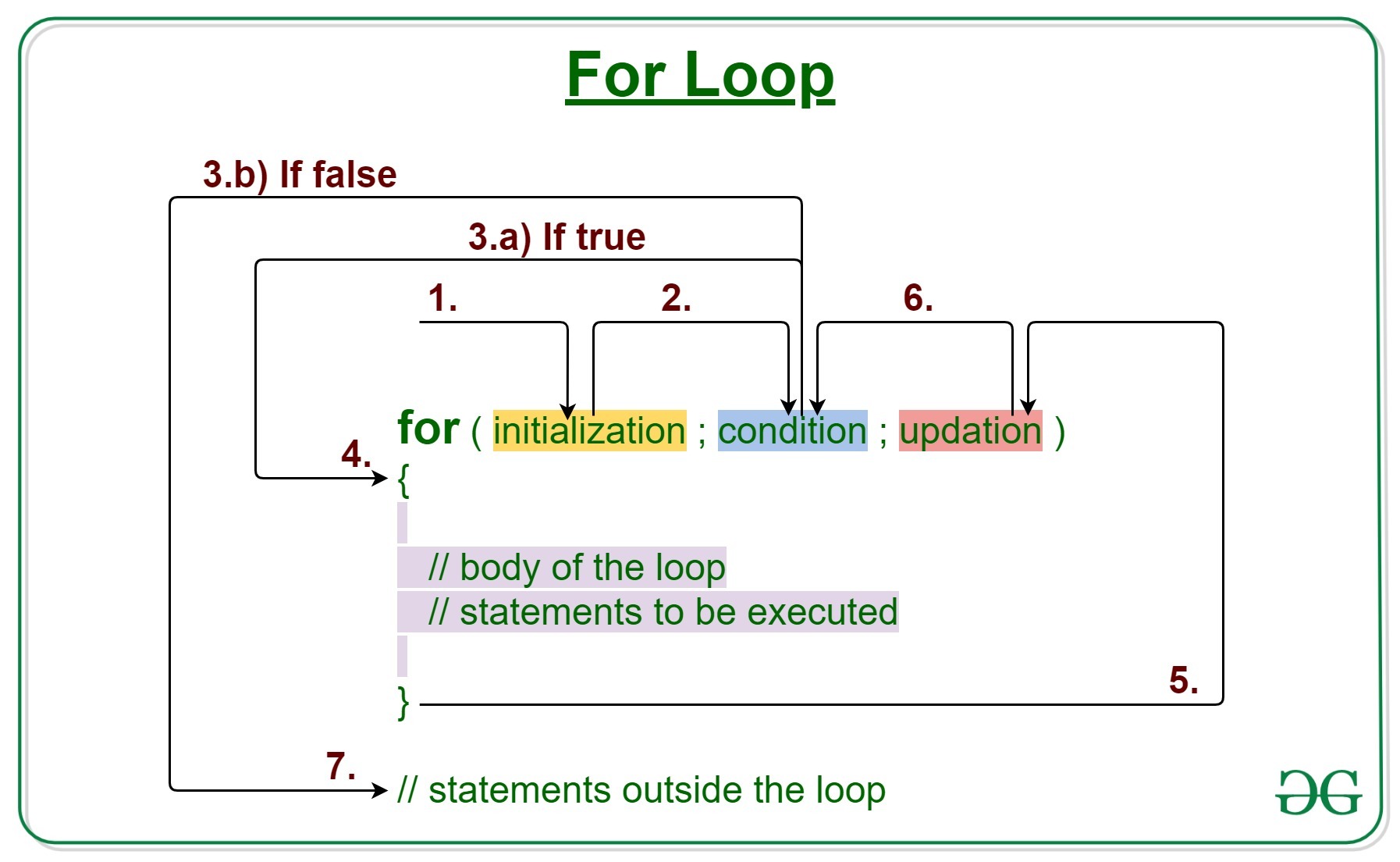
  • In a for loop, a variable is initialized, a condition is checked, and a step is performed at the end of each iteration.
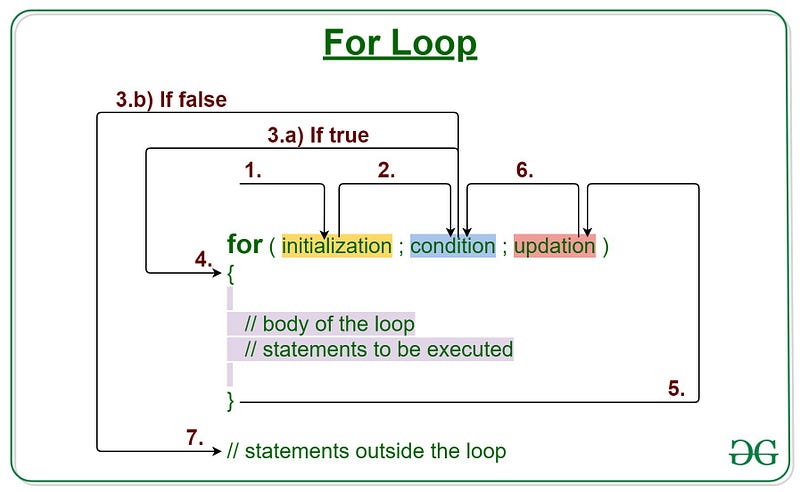
https://media.geeksforgeeks.org/wp-content/uploads/20191108131134/For-Loop.jpg
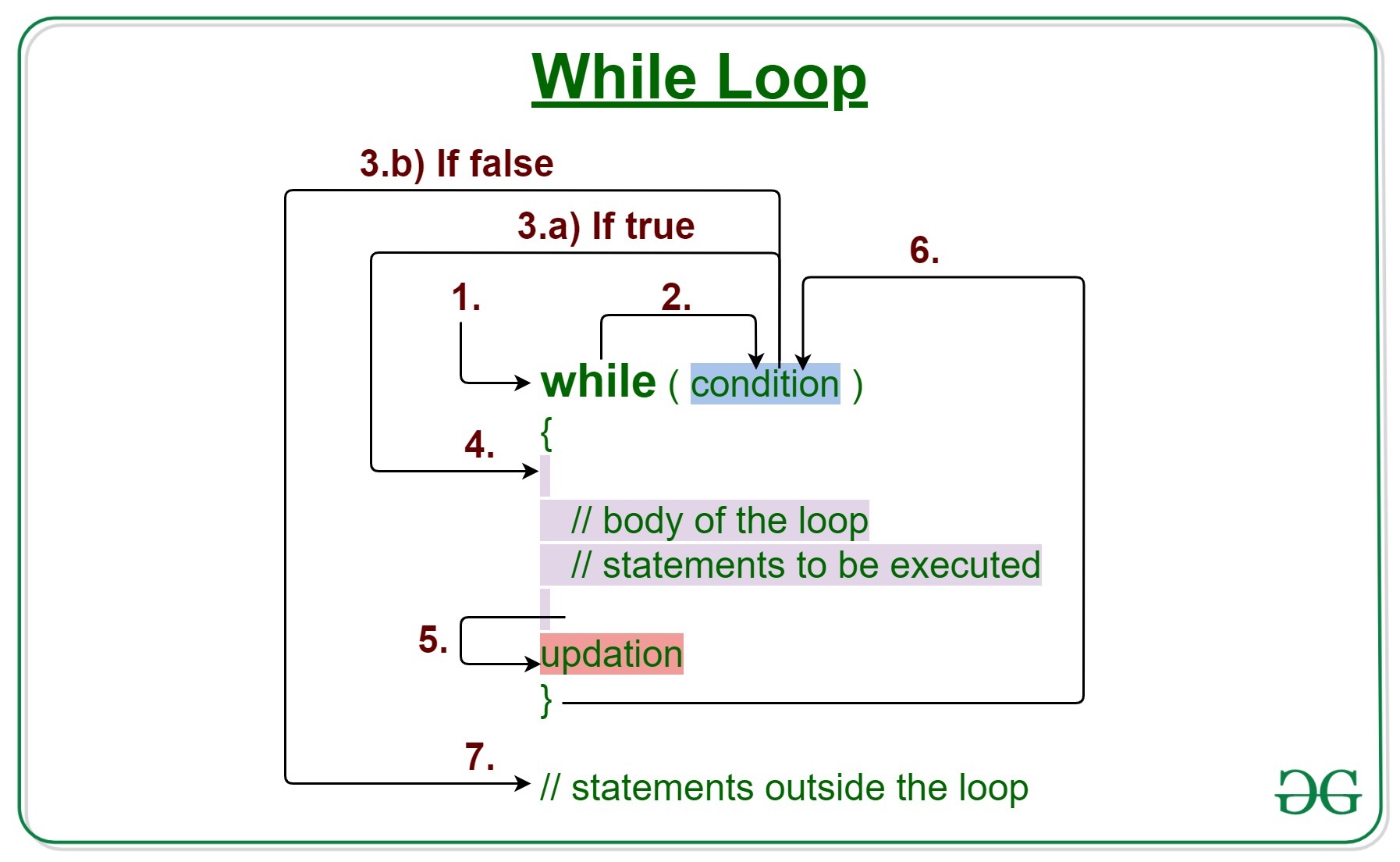
  • In a while loop, the condition is checked at the beginning of each iteration, and the loop continues as long as the condition is true. In a do-while loop, the condition is checked at the end of each iteration, so the loop is guaranteed to execute at least once.
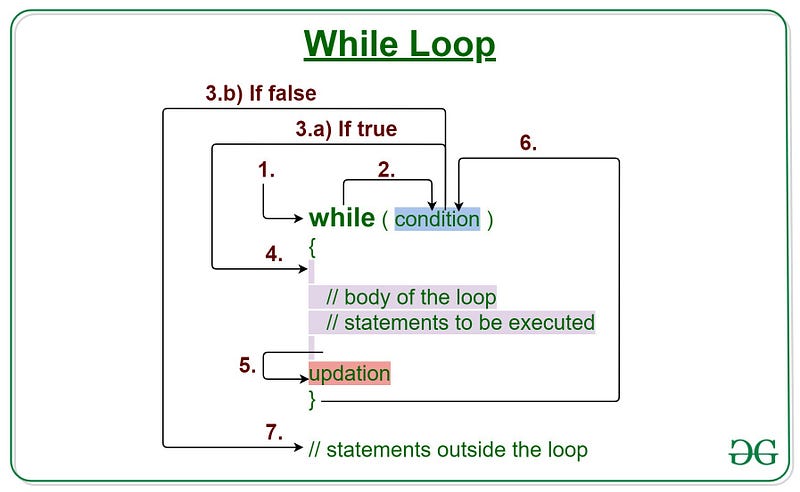
https://media.geeksforgeeks.org/wp-content/uploads/20191118164726/While-Loop-GeeksforGeeks.jpg

Switch statements are used to execute different code blocks based on the value of a variable.

In a switch statement, a variable is compared to a list of values, and the code block associated with the matching value is executed.

iii — Arrays and ArrayLists

Arrays and ArrayLists are used to store multiple values of the same data type.

In Java, an array is a fixed-size collection of elements of the same data type, while an ArrayList is a dynamic-size collection of elements of the same data type.

Both Arrays and ArrayLists can be accessed using an index, and they can be used to store and manipulate large amounts of data efficiently.
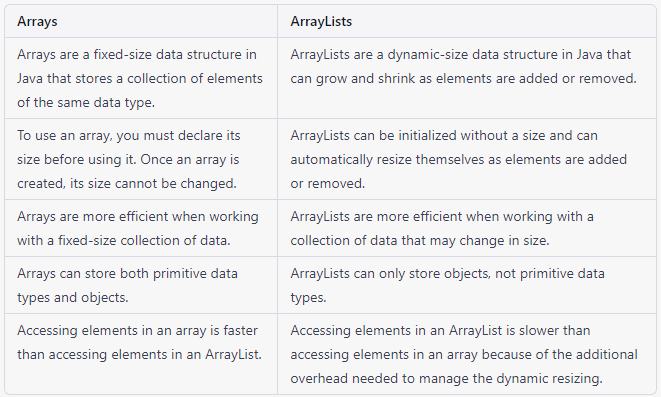
Arrays and ArraysLists
  • Arrays in Java are declared with a specific data type and size. Once an array is created, its size cannot be changed. To access an element in an array, an index is used. Array elements are stored in contiguous memory locations, which allows for efficient memory access.
  • ArrayLists in Java are implemented as objects, and they can grow or shrink in size as needed. ArrayLists can be initialized with an initial capacity, and they can also be resized dynamically. To access an element in an ArrayList, an index is used, similar to an array.

Understanding these essential concepts of Java is crucial for developing efficient and optimized Java applications. It’s important to have a solid grasp of these concepts and how they can be used to build powerful and scalable software systems.

🚩 (NOTE: In this course, we have three main points that lay the foundation for understanding Java programming. These points are variables and data types, control structures, and methods. It is essential to understand these concepts before moving on to other advanced topics. If you thoroughly comprehend these three points, you will be able to handle the more complex aspects of Java programming with ease. Therefore, make sure to master these basics before proceeding to the other parts of the course.)

4. Object-Oriented Programming in Java

i — Explanation of object-oriented programming (OOP) concepts

Object-oriented programming (OOP) is a programming paradigm based on the concept of objects. It emphasizes the use of objects, which are instances of classes, to represent and manipulate data in a program.

OOP enables programmers to organize their code into modular, reusable components, making it easier to maintain and modify code.

The core concepts of OOP include encapsulation, inheritance, and polymorphism. We will discuss these core points in detail below.

Example:

In Java, everything is an object, which means that all data types, including primitive data types, are implemented as objects. OOP concepts include:

  • Encapsulation: This is the process of hiding the implementation details of a class and providing a public interface for accessing and modifying its data. For example, you can create a class called “Person” that has private fields for name, age, and address, and public methods for setting and getting those values.
  • Inheritance: This is the process of creating a new class from an existing class, which allows the new class to inherit the properties and behaviours of the existing class. For example, you can create a class called “Student” that inherits from the “Person” class and adds fields and methods specific to students.
  • Polymorphism: This is the ability of objects of different types to be treated as if they are of the same type. For example, you can create a method called “printInfo” that accepts an object of type “Person” or “Student” and can print out the information for either type of object.

ii — Classes and objects in Java

In Java, a class is a blueprint or template for creating objects. A class defines the properties and methods that objects of that class will have.

An object, on the other hand, is an instance of a class. Objects have their state (data) and behaviour (methods), which are defined by the class.

To create a class in Java, you use the “class” keyword, followed by the class name and the class body enclosed in curly braces.

The class body contains the properties and methods of the class. To create an object of a class, you use the “new” keyword, followed by the name of the class and any arguments needed to initialize the object.

Example:

In Java, a class is a blueprint for creating objects that define the properties and behaviours of those objects. Here is an example of a class called “Person”:

public class Person {
    private String name;
    private int age;
    private String address;
    
    public Person(String name, int age, String address) {
        this.name = name;
        this.age = age;
        this.address = address;
    }
    
    public String getName() {
        return name;
    }
    
    public void setName(String name) {
        this.name = name;
    }
    
    public int getAge() {
        return age;
    }
    
    public void setAge(int age) {
        this.age = age;
    }
    
    public String getAddress() {
        return address;
    }
    
    public void setAddress(String address) {
        this.address = address;
    }
}

In this example, the class “Person” has three private fields for name, age, and address, and public methods for setting and getting those values. You can create an object of this class like this:

Person person = new Person("John Doe", 25, "123 Main St");

iii — Inheritance and polymorphism

Inheritance and polymorphism are two key features of object-oriented programming in Java.

Inheritance enables a class to inherit properties and methods from another class, allowing for code reuse and easier maintenance.

To create a subclass that inherits from a superclass, you use the “extends” keyword, followed by the name of the superclass. The subclass can then override or extend the properties and methods of the superclass as needed.

Polymorphism allows objects of different types to be treated as if they were of the same type. In Java, polymorphism is achieved through the use of interfaces and abstract classes.

An interface defines a set of methods that a class must implement, while an abstract class provides a partial implementation of a class that can be extended by subclasses.

By using interfaces and abstract classes, you can write code that is more flexible and extensible, since it can work with objects of different types.
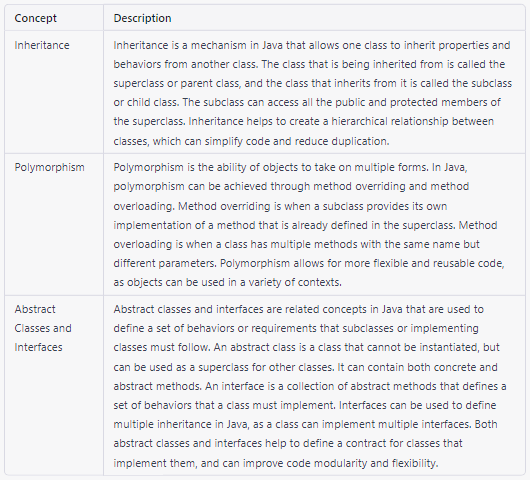
Example:

Inheritance is a feature in object-oriented programming that allows a class to inherit properties and behaviours from a parent class. This promotes code reusability and reduces redundancy.

Here’s an example:

class Animal:
    def __init__(self, name):
        self.name = name
        
    def speak(self):
        pass
    
class Dog(Animal):
    def speak(self):
        return "Woof!"
    
class Cat(Animal):
    def speak(self):
        return "Meow!"
    
my_dog = Dog("Fido")
my_cat = Cat("Whiskers")

print(my_dog.name + " says " + my_dog.speak()) # Output: Fido says Woof!
print(my_cat.name + " says " + my_cat.speak()) # Output: Whiskers says Meow!

In this example, we have a parent class Animal with a property name and a method speak(). We then create two child classes Dog and Cat that inherit from Animal. Each child class overrides the speak() method to produce the appropriate sound for that animal.

Polymorphism is the ability of objects of different classes to be used interchangeably. It allows us to write code that can work with objects of different classes without knowing their specific type.

Here’s an example:

class Shape:
    def area(self):
        pass
    
class Rectangle(Shape):
    def __init__(self, length, width):
        self.length = length
        self.width = width
        
    def area(self):
        return self.length * self.width
    
class Circle(Shape):
    def __init__(self, radius):
        self.radius = radius
        
    def area(self):
        return 3.14 * self.radius ** 2
    
shapes = [Rectangle(3, 4), Circle(5)]
for shape in shapes:
    print("Area:", shape.area())

In this example, we have a parent class Shape with a method area(). We then create two child classes Rectangle and Circle that inherit from Shape and implement their area() method.

We then create a list of different shapes and loop through them, calling the area() method on each one.

Since each shape has its implementation of the area() method, the output will be the area of each shape. This is an example of polymorphism because we can treat objects of different classes as if they were the same type.

iv — Abstraction

Abstraction is one of the key principles of object-oriented programming and refers to the ability to represent complex concepts or systems in a simplified and more manageable way.

It allows developers to create models that capture only the essential features of an object or system while hiding unnecessary details or implementation specifics.

In Java, abstraction is often achieved through the use of abstract classes and interfaces.

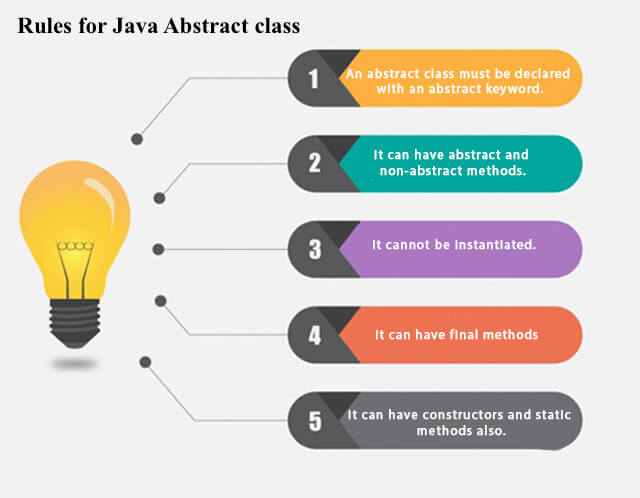
  • Abstract classes are classes that cannot be instantiated directly, but instead, serve as blueprints for other classes that extend them. They may contain both abstract and non-abstract methods and provide a level of implementation for their subclasses to build upon.
  • Interfaces, on the other hand, define a contract that specifies a set of methods that a class must implement, but do not provide any implementation themselves.
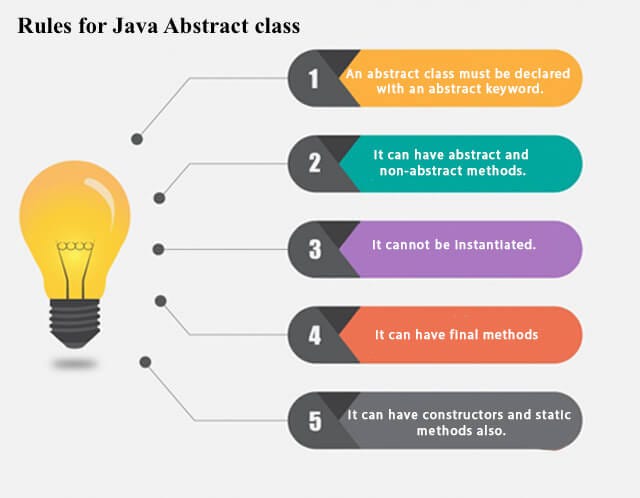
https://static.javatpoint.com/images/abstract-class-in-java.jpg

For example:

Consider a car. A car can be modelled as an object with properties like make, model, and colour, and behaviours like accelerating, braking, and turning.

However, a car is a complex system with many different parts and systems that work together, like the engine, transmission, and suspension. When creating a software program that involves cars, we may not need to represent all of these details.

Instead, we can create an abstraction of a car that includes only the essential properties and behaviours we care about.

We can define an abstract class Vehicle that defines basic properties and methods that all vehicles should have, such as startEngine() and stopEngine().

Then, we can create a subclass Car that extends Vehicle and provides its implementation for these methods, as well as additional methods specific to cars, such as accelerate() and brake().

This abstraction allows us to represent a car in our program in a simplified and manageable way, without worrying about the details of every part and system.

It also allows us to create other subclasses of Vehicle that represent other types of vehicles, such as Truck or Motorcycle, each with its specific properties and behaviours.

Here’s an example of using abstraction in Java with abstract classes and subclasses:

// Abstract class for a vehicle
abstract class Vehicle {
   // Common properties for all vehicles
   private String make;
   private String model;
   private String color;

   // Abstract methods for starting and stopping the engine
   abstract void startEngine();
   abstract void stopEngine();

   // Getters and setters for properties
   public String getMake() {
      return make;
   }
   public void setMake(String make) {
      this.make = make;
   }
   public String getModel() {
      return model;
   }
   public void setModel(String model) {
      this.model = model;
   }
   public String getColor() {
      return color;
   }
   public void setColor(String color) {
      this.color = color;
   }
}

// Subclass for a car that extends Vehicle
class Car extends Vehicle {
   // Additional properties for cars
   private int numDoors;

   // Implementations for starting and stopping the engine
   void startEngine() {
      System.out.println("Starting the car engine...");
   }
   void stopEngine() {
      System.out.println("Stopping the car engine...");
   }

   // Getter and setter for number of doors
   public int getNumDoors() {
      return numDoors;
   }
   public void setNumDoors(int numDoors) {
      this.numDoors = numDoors;
   }
}

// Example usage of the Car class
public class Main {
   public static void main(String[] args) {
      // Create a new car object
      Car myCar = new Car();
      myCar.setMake("Toyota");
      myCar.setModel("Camry");
      myCar.setColor("Red");
      myCar.setNumDoors(4);

      // Call methods on the car object
      System.out.println("My car is a " + myCar.getMake() + " " + myCar.getModel());
      System.out.println("It has " + myCar.getNumDoors() + " doors and is " + myCar.getColor());
      myCar.startEngine();
      myCar.accelerate();
      myCar.brake();
      myCar.stopEngine();
   }
}

In this example, we define an abstract class Vehicle that represents the basic properties and methods of all vehicles and a subclass Car that extends Vehicle and provides its implementation for starting and stopping the engine.

We can create a new instance of Car and set its properties, then call methods on it to start and stop the engine.

The abstraction of the Vehicle the class allows us to create more specialized subclasses, like Car, while keeping a common interface for all vehicles.

🚩 (Note: To get the most out of this course and truly become proficient in Java programming, it’s essential to practice the coding examples provided in each section. Don’t worry if you don’t understand everything right away — coding is a skill that takes time and practice to master. By completing the exercises provided at the end of each (article) section, you’ll gain hands-on experience and a better understanding of the concepts covered in the course. Make sure to take advantage of these exercises and dedicate time to practice regularly.)

5. Exception Handling

Exception handling is a mechanism in Java that allows us to detect and handle errors or exceptional situations that may arise during program execution. It helps us to gracefully handle runtime errors that would otherwise cause the program to crash or terminate abruptly.

i — Types of exceptions

In Java, there are two main types of exceptions:

  • Checked exceptions
  • Unchecked exceptions

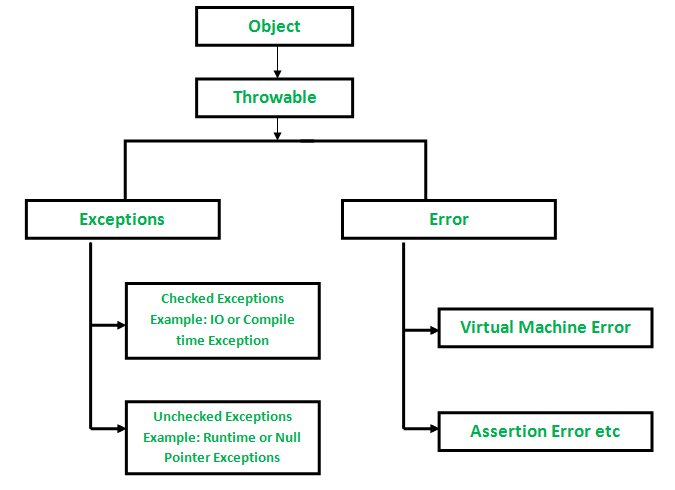
Checked exceptions are those that are checked by the compiler at compile-time and must be handled by the programmer using a try-catch block or declaring the method with a throws clause.

Examples of checked exceptions include IOException, SQLException, and ClassNotFoundException.

Unchecked exceptions are not checked at compile-time and may occur at runtime. Examples of unchecked exceptions include NullPointerException, ArithmeticException, and ArrayIndexOutOfBoundsException.
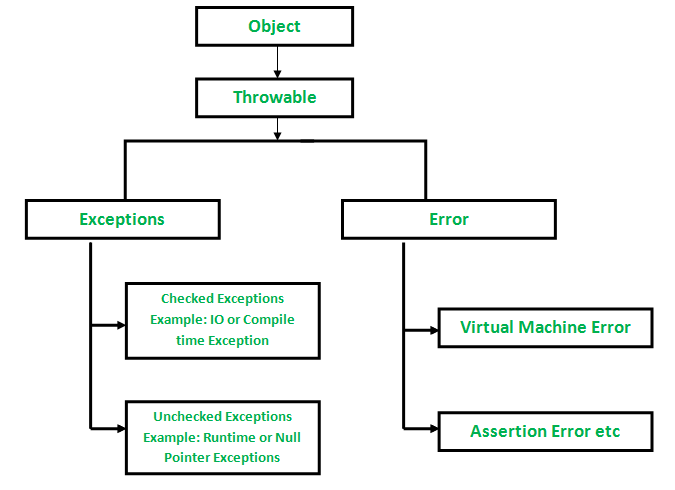
https://media.geeksforgeeks.org/wp-content/uploads/Exception-in-java1.png

Example (Checked exception):

Here’s an example of a checked exception being thrown:

import java.io.*;

public class Example {
    public static void main(String[] args) {
        try {
            FileInputStream file = new FileInputStream("test.txt");
        } catch (FileNotFoundException e) {
            System.out.println("File not found!");
        }
    }
}

In this example, we try to create a new FileInputStream object to read from a file called "test.txt".

However, since the file may not exist, the FileInputStream constructor throws a FileNotFoundException. We catch this exception in a try-catch block and print a message to the console.

Example (Unchecked exception):

Here’s an example of an unchecked exception in Java:

public class UncheckedExceptionExample {
    public static void main(String[] args) {
        int[] numbers = {1, 2, 3, 4, 5};
        try {
            System.out.println(numbers[10]); // This will throw an ArrayIndexOutOfBoundsException
        } catch (Exception e) {
            System.out.println("An exception occurred: " + e.getMessage());
        }
    }
}

In this example, we declare an array of integers with five elements. We then try to access the 10th element of the array, which does not exist, causing an ArrayIndexOutOfBoundsException to be thrown.

Since this is an unchecked exception, we don’t have to explicitly handle it with a throws clause or a try-catch block.

However, it's still a good idea to handle it gracefully in case it does occur. In the example above, we catch the exception and print out a message indicating that an exception occurred.

ii — Handling Exceptions Using Try-Catch Blocks

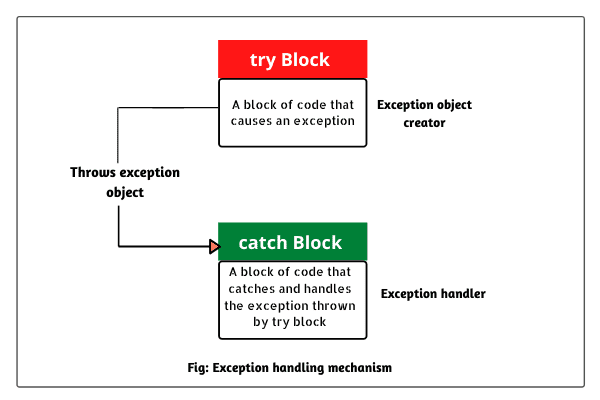
The try-catch block is a construct in Java that allows us to handle exceptions that may occur during program execution.

The try block contains the code that may throw an exception, and the catch block contains the code that handles the exception if it occurs.

If an exception is thrown in the try block, the catch block will execute and handle the exception. Multiple catch blocks can be used to handle different types of exceptions.
Example:

Here’s an example of a try-catch block being used to handle an exception:

public class Example {
    public static void main(String[] args) {
        int[] nums = {1, 2, 3};
        try {
            System.out.println(nums[3]);
        } catch (ArrayIndexOutOfBoundsException e) {
            System.out.println("Index out of bounds!");
        }
    }
}

In this example, we try to access an element in an array that is out of bounds. This will throw an, ArrayIndexOutOfBoundsExceptionwhich we catch in a try-catch block and print a message to the console.

iii — Using Finally

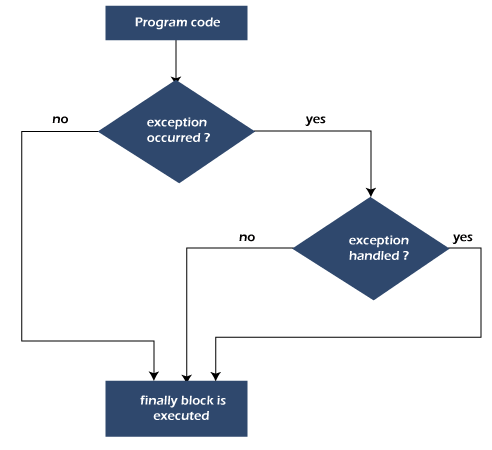
Finally block is a construct in Java that is used to execute code that must be executed regardless of whether an exception is thrown or not.

Finally block is typically used to release resources that were acquired in the try block, such as closing a file or a database connection.

The code in the “finally” block will always execute, even if an exception is thrown or caught.
Example:

Here’s an example of the “finally” block is used to release a resource:

import java.io.*;

public class Example {
    public static void main(String[] args) {
        FileInputStream file = null;
        try {
            file = new FileInputStream("test.txt");
            // Code to read from the file
        } catch (FileNotFoundException e) {
            System.out.println("File not found!");
        } finally {
            try {
                if (file != null) {
                    file.close();
                }
            } catch (IOException e) {
                System.out.println("Error closing file!");
            }
        }
    }
}

In this example, we create a new FileInputStream object to read from a file called "test.txt". We also have a “finally” block that will always execute, even if an exception is thrown or caught.

Exercises:

In Part 1 of our Java course, we covered all the fundamental concepts that are necessary to get started with Java programming.

To ensure that you have understood these concepts thoroughly, we have provided you with a set of exercises that cover all the possible points that you need to practice.

By working through these exercises, you will be able to reinforce your understanding of the concepts and improve your programming skills.

These exercises are designed to be comprehensive and challenging, so you can be confident that you will be mastering Java in no time.

Keep in mind that practice makes perfect, so make sure to take advantage of these exercises and spend time working through them to solidify your knowledge of Java.

3 — Essential Concepts of Java

4 — Object-Oriented Programming in Java

5 — Exception Handling

You can access the exercises by clicking on the heading of the topic that you want to practice. We have included a backlink to the exercise page to make it easier for you to find. Simply click on your desired topic exercise and start practising!

Java
JavaScript
Free Java Course
Javaforbeginners
Codingbootcamp
Recommended from ReadMedium