
The Tailwind CSS “JIT Mode” Bug That Only Happens in Production
In fairness, Adam Wathan & Steve Schoger tried to warn me about this feature of Tailwind CSS’s “Just-in-Time” engine, but I still only caught this bug by accident. Don’t make my mistake!

Can you spot the bug in this React .jsx code using Tailwind CSS? 🐞
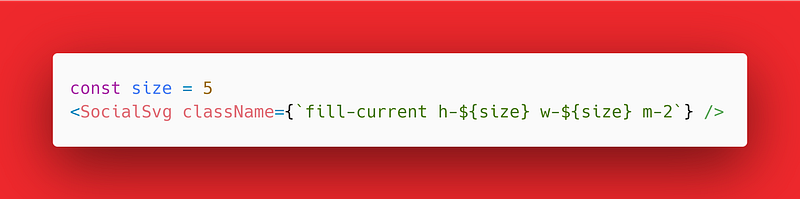
The bug is an easy mistake to make, and it’s sneaky to detect, too.
The issue is that I’m generating dynamic strings to use for my CSS classes, and that is going to break Tailwind, for reasons I’ll explain shortly.
Plus, if I have another h-5 or w-5 somewhere in my local hot reloading cache, then I might see different behavior in production vs. development.
Here’s what that would look like using social SVG icons taken from SimpleIcons.org, a free repository of brand logos in SVG format:


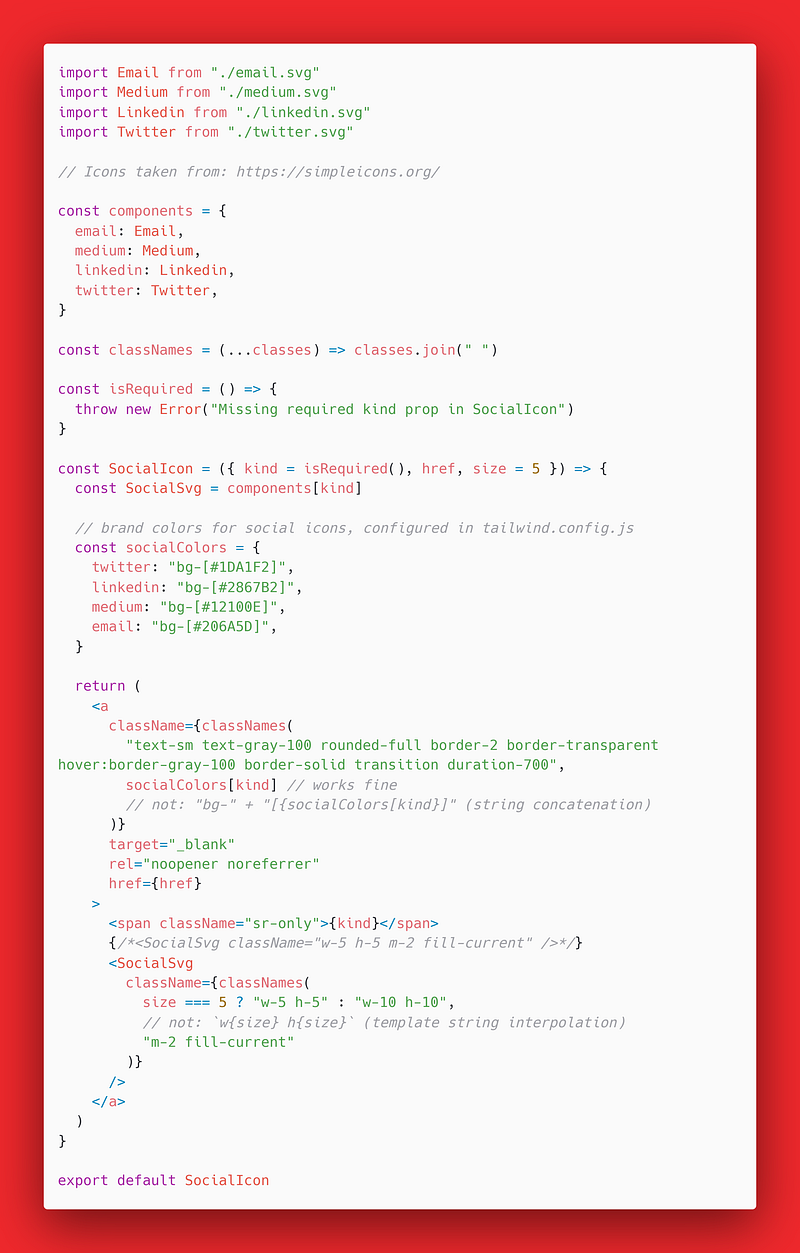
In the code example, I needed to use "h-5 w-5" to specify the width and height, not the dynamic `h-${size} w-${size}` that I tried.
It also won’t work with Tailwind’s awesome “Just-in-Time” (JIT) mode, which allows arbitrary values: h-[1.25rem] w-[1.25rem] will work.
But the alternative, `h-[${size} rem] w-[${size} rem]`, which seems smarter and better, just won’t work with the JIT engine.

What is Tailwind’s Justin Timberlake (JIT) mode?
I’m a big fan of JIT mode and have been using it in production since Adam and Steve introduced it back in March 2021.
“[The] new just-in-time [JIT] compiler for Tailwind CSS […] generates your styles on-demand as you author your templates instead of generating everything in advance at initial build time.”
— Tailwind CSS Docs for “Just-in-Time” Mode
There is a pretty obvious “catch” in the docs, though, and it’s the bug that we looked at before. We need to use the
“❌Don’t use string concatenation to create class names
✅ Do dynamically select a complete class name”
— Tailwind CSS Docs for “Just-in-Time” Mode
In the bug we looked at before, the template literals using `${var}` for variable interpretation were the issue.
These “fancy strings” are also called `` backtick literals in JavaScript, but they won’t work for the on-demand styles we want.
Let’s look at a code example of a React function component to see what this looks like, and why you can’t use string concatenation.

Why this happens with Tailwind CSS JIT
Tailwind isn’t JavaScript and doesn’t run anything, so the magic is happening with this regular expression: /[^<>"'`\s]*[^<>"'`\s:]/g.
“Tailwind doesn’t include any sort of client-side runtime, so class names need to be statically extractable at build-time, and can’t depend on any sort of arbitrary dynamic values that change on the client.” — ibid
To put it another way, the Tailwind parser is really dumb (or should I say, genius?) in how it processes files looking for class names.
That means that lovely template literals, while fun and fancy, are not entirely welcome at Tailwind’s retro-modern web development party.

So what’s the solution for dynamic Tailwind CSS?
If you need a truly dynamic value as a CSS style, it’s not actually super clear how to leverage Tailwind’s JIT mode.
But if you’re thinking that way about how to set a dynamic background color in a React app using Tailwind, you’re forgetting something.
“Use inline styles for these situations, or combine Tailwind with a CSS-in-JS library like Emotion if it makes sense for your project.” — ibid
Right, so you could just use an inline style in React for the dynamic value. Of course, the React docs literally say that classes are better, but hey.
With Tailwind, you get the best of both worlds, and that is helping me develop websites that are easier than ever to maintain. JIT’s fantastic.

What else you should know (Purge CSS)
PurgeCSS, everyone’s favorite tool to remove unused CSS, is sort of where the magic happens with Tailwind, under the hood.
So when you’re using the JIT engine, it’s even more important that PurgeCSS can process your .html, .jsx, .tsx, etc. file correctly.
“You still need to write purgeable HTML when using arbitrary values, and your classes need to exist as complete strings for Tailwind to detect them correctly.” — ibid
PurgeCSS is the reason that it’s important to avoid creating dynamic class strings in your templates with concatenation.
If you’re doing “string arithmetic” with the
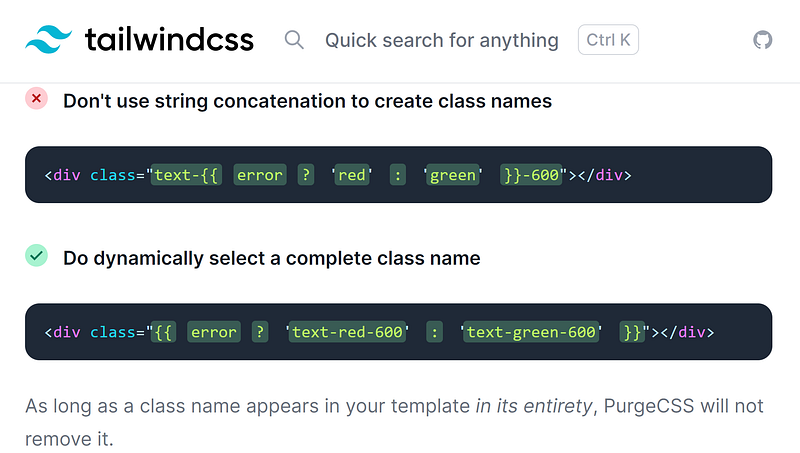
That last bit bears repeating, “As long as a class name appears in your template in its entirety, PurgeCSS will not remove it.”
I hope this article has helped you understand an important rule for “Just-in-Time” Tailwind CSS: Be careful what you concatenate.
And, when in doubt, just write out the entire JIT class exactly how you want it, inside your personal Prettier preference: double or single quotes.
Happy coding! 🎉🛂🥨🚧🏗🎊🧂😵🚧🏗🍾

Dr. Derek Austin is the author of Career Programming: How You Can Become a Successful 6-Figure Programmer in 6 Months, now available on Amazon.


