
The Student’s Guide to LaTeX Markup: What It Is and Why You Want It
With another academic year around the corner, whether classes are in person or online, now is a good time to look into a useful tool that you may come across. LaTeX (pronounced “lay-tek”) is a typesetting tool that is very widely used in academic papers, and many textbooks as well. If you’re studying a math-heavy field, it will save you a lot of frustration.
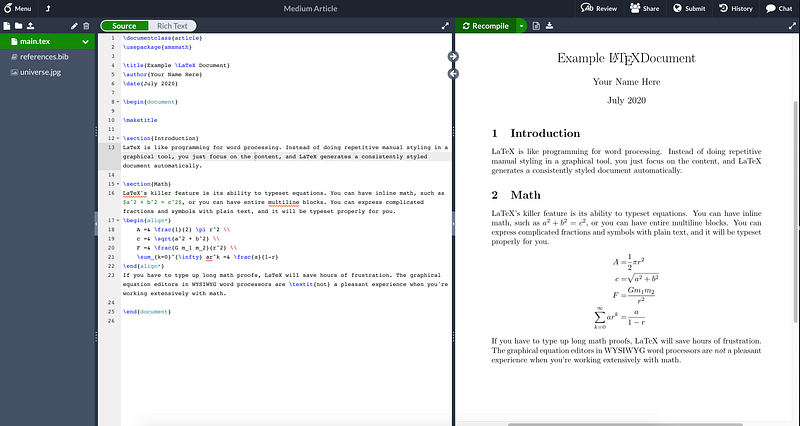
While you’re probably familiar with writing papers in Microsoft Word or Google Docs, LaTeX is a very different beast. Instead of having a graphical interface where you use the mouse to click through menus and manually modify text until it looks how you want (“What You See Is What You Get”), which can be a laborious process for more complicated documents, the LaTeX philosophy is more What You Get Is What You Mean. You write plain text files with special syntax outlining your content, focusing solely on the content, and the software generates a clean, consistently styled document for you. It’s like a programming language (or, more aptly, a markup language like HTML) for professional quality typesetting.
“Why would I want to use something so archaic and unintuitive?” you’re probably thinking. Sure, if you’re just banging out a quick essay for a school assignment, it’s probably best to use what you’re familiar with. But as the scope of what you write becomes larger and more complex, you’ll start becoming frustrated with mainstream word processing software. As your documents grow, going back and altering stylistic decisions can create a lot of repetitive, manual labor to update things across many pages. (Keeping track of references is also awkward in most word processors.) LaTeX mostly saves you from these issues by focusing solely on content: you mark your text up semantically and define a global style, letting it keep everything consistent for you. But where LaTeX really shines is math.
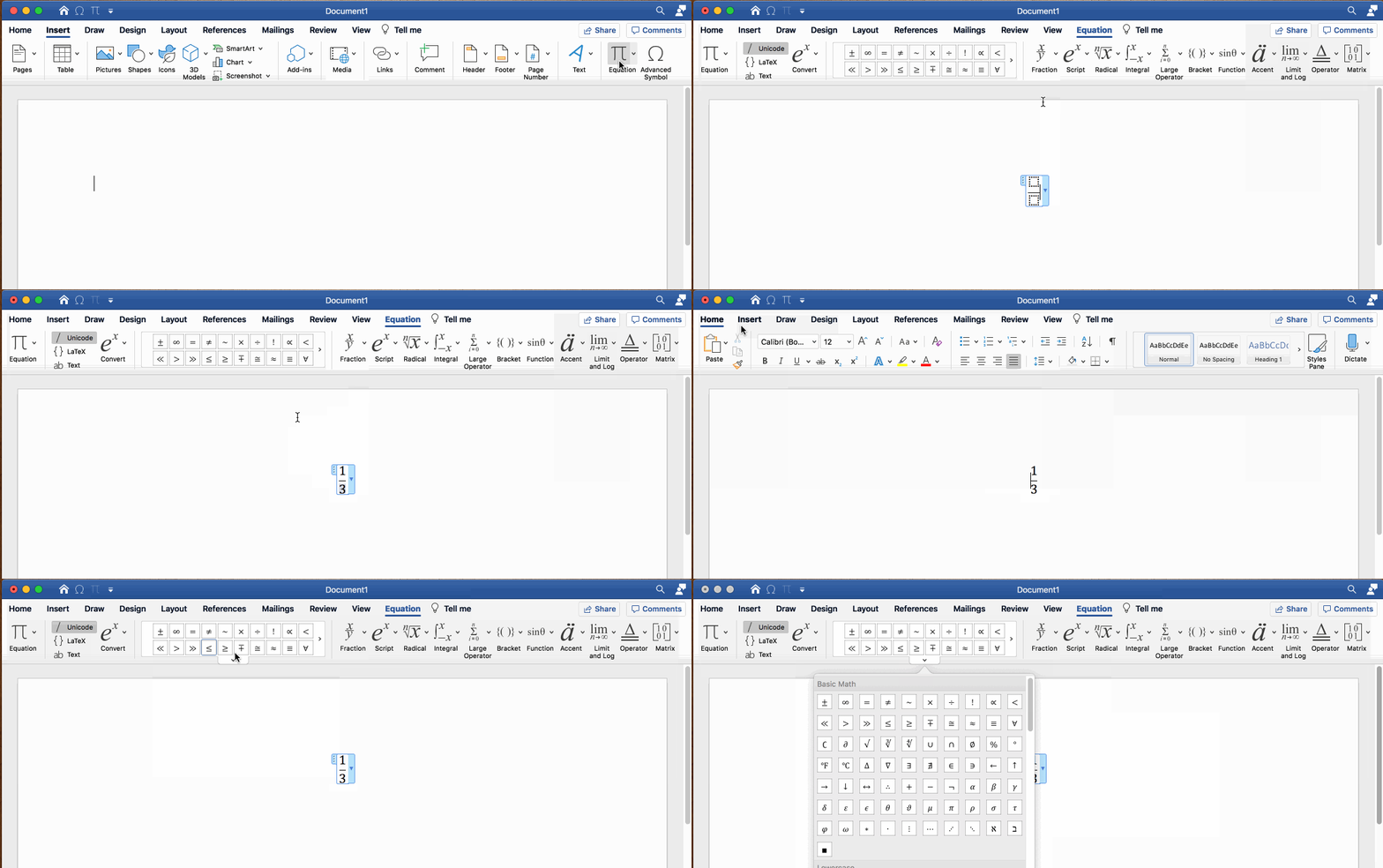
In my freshman year, one of my introductory Computer Science classes had weekly assignments that frequently involved Boolean Algebra or other (fairly simple) math processes. So, with my borderline illegible handwriting, I of course chose to compose my assignments in Word. I quickly realized the issue with this: there is not a graphical equation editor in the world that is anything but incredibly maddening to use when compared to a pen and paper. To cap it all off, I was using esoteric symbols for formal logic, which made it much worse, since there was much more clicking through menus. I knew LaTeX existed, but didn’t feel like investing time into learning it. So I just chugged along with my awkward Word workflow.
The next year, it was time for an in-depth Discrete Math class…which basically meant completing a number of tricky math proofs every week. Oh, and the professor was very adamant that they not be handwritten. He thoroughly recommended LaTeX, because that’s exactly what it’s for: academic writing with math in it. TeX, the typesetting engine that LaTeX is built on, was developed by the legendary computer scientist Donald Knuth when he was writing a book…purely because there was a lack of adequate tools for digitally typesetting math.
If I want to write the formula for the volume of a cone, as the animation above (in only slight exaggeration) illustrates, all I have to do is write \frac{1}{3} \pi r^2 h. Breaking it down, the \frac function takes two parameters for the numerator and denominator (which can be complex, nested expressions). The \pi macro is simply replaced by the Greek symbol, and the ^ operator means the following expression will be in superscript. Subscripts, similarly, can be done with an underscore.
For a more complicated example that shows off more of the power of LaTeX’s equation mode:
\begin{align*}
    A =& \frac{1}{2} \pi r^2 \\
    c =& \sqrt{a^2 + b^2} \\
    F =& \frac{G m_1 m_2}{r^2} \\
    \sum_{k=0}^{\infty} ar^k =& \frac{a}{1-r}
\end{align*}
It looks a bit messy, doesn’t it? It’s very fast to type, however, and gives you this very professional result:
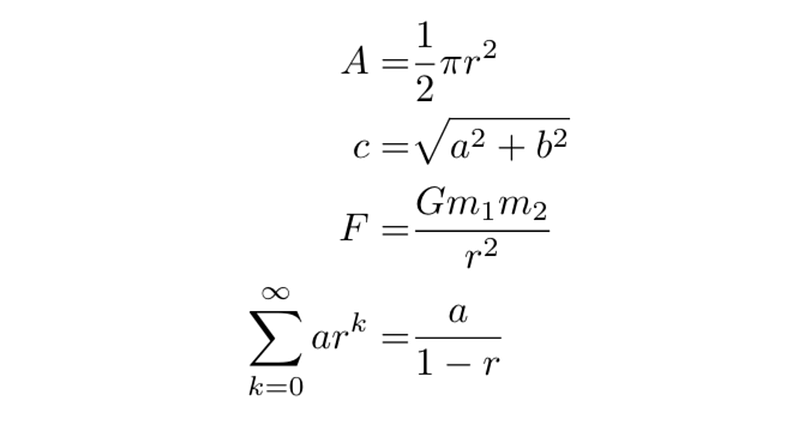
The equation block is delineated by the begin/end statements, though notably I used an “align” block instead of an “equation” one. This is where those ampersand markers by the equal signs comes in: I can make it balance the lines along that mark, keeping my equals signs aligned. Math expressions can also be placed inline in paragraphs by wrapping them in dollar signs, like $1 + 1 = 2$.
It’s probably a lot to take in, especially if you’re not the type who is already accustomed to markup languages, and there is admittedly a bit of a learning curve. It’s well worth giving it a shot if you anticipate needing to write math-heavy things. (If my physics classes weren’t exclusively handwritten homework on green engineering pads, I’d probably have found it useful there too…)
Of course, LaTeX isn’t all about math. It handles lists, tables, picture embeds and many other essential features you’re likely to need when writing…all with (usually) simple text expressions. I’ve found it’s also a good way to maintain a résumé/CV. You can download a template, set it up how you want it to look, and then updating work history is just a matter of changing some text. My experiences with templates for word processors is that they’re fragile and updating things tends to break layouts. LaTeX is more predictable.
LaTeX Editors
If you’re sold on the idea, the first step to trying LaTeX out is to find an editor. Typically it’ll include autocomplete of common commands, and probably some prefab templates to help you get your documents started without too much effort. A few commonly recommended options are:
- Overleaf: A browser-based editor that is probably the closest thing there is to Google Docs in the LaTeX world. Your projects are all stored online, where you can edit them in a two-pane view that shows the source on the left and the rendered output on the right. You can also collaborate with other users in real-time and benefit from a large gallery of templates. This is the starter recommendation I probably see the most now.
- Texmaker: If you’d prefer something offline, Texmaker is a cross-platform environment available on Windows, MacOS and Linux. It has a similar two-pane interface to Overleaf, but includes MS Word-style toolbars that assist in inserting markup.
- Texpad: This one is a first-class Mac and iOS app, designed with those platforms in mind. It’s not free, but it has a slick interface and is probably the best option for iPad use.
Where to Learn the Syntax
Armed with an editor, you can now start experimenting with LaTeX. The how of writing with it is a deep enough subject to be an article or series in itself. Fortunately, others have thoroughly covered the topic. Here are a couple of recommendations to get started:
- Overleaf Documentation: The Overleaf editor includes an extensive knowledge base of articles on LaTeX use. There’s a 30-minute quickstart and many sections on common features you may wish to use.
- Wikibooks: A free book in wiki form. You can also download a PDF version if you wish. Everything is laid out in a nice table of contents, and the chapters contained are very thorough and easy to digest.
While it may seem daunting, it’s not difficult to get started. Becoming proficient may take some practice, but it quickly becomes second nature.


