
The Shocking Discovery of Apple M1 SSD That You Need to Know
What Apple didn’t tell you.

On 29 March 2021, my M1 Macbook Air died. Yes, dead. I sent it to the nearest Apple Store and got it serviced. Two days later, I got it back, and I lost all of my data. Fine, lesson learned — “always back up your data!” so I thought.
You can read the full Story here:
So is that the end of the Story? Unfortunately, NO!
I did more research about M1 devices and tested the repaired unit. As a result, I discovered some surprising truths.
No TBW Specification

Terabytes Written (TBW) is an important indicator of the amount of data that can be written to a Solid State Drive. The bigger its TBW, the more data you can write to it.
Wait, there’s a LIMIT to it? Yes, its underlying technology, the NAND flash memory chips, wears out with use. There is a limit of writing to each cell of every memory chip before it becomes unreliable. Hence, TBW is an important figure so that users can gauge when SSD wears out.
Unlike Apple, other SSD manufacturers such as Samsung will always indicate its SSD’s TBW. The range can fall somewhere between 600 and 4800 TBW, depending on its storage capacity and model.
Other than a specified warranty period, TBW is also used as one of the warranty condition. Your SSD’s warranty ends whichever runs out first (warranty period or TBW). In other words, when you have hit the TBW limit, the warranty is gone even if your SSD is still within the warranty period.
However, Apple didn’t specify any of its SSD’s TBW, so we don’t know its exact figure. There is no way to gauge how long its SSD will last. According to iFixit’s recent teardown, the “best” clue we have was the flash storage model: SDRGJHI4.
Was it made by SanDisk? WD? We don’t know.
Potentially Short Lifespan

Since there is no way to find out Apple’s M1 SSD TBW limit, I got curious about how much data has been written since I got the repaired unit back.
Technically speaking, the M1 Macbook Air that I’m using right now is less than 2-week-old because its motherboard got replaced. Everything felt pretty “new” when I got it back on 31 March 2021.
To be honest, I was still quite afraid of using it for any intense and serious work (such as video editing, simulation, 2D animation and overnight 3D rendering) for a while. I installed all Adobe software and Microsoft Office Applications.
As for my video projects, I did them with a custom-built PC instead. On a daily basis, I have ONLY been working on Medium articles with this M1 Macbook Air, nothing else.
Today, 10 days later, I decided to look into its SSD lifespan, and I was shocked.
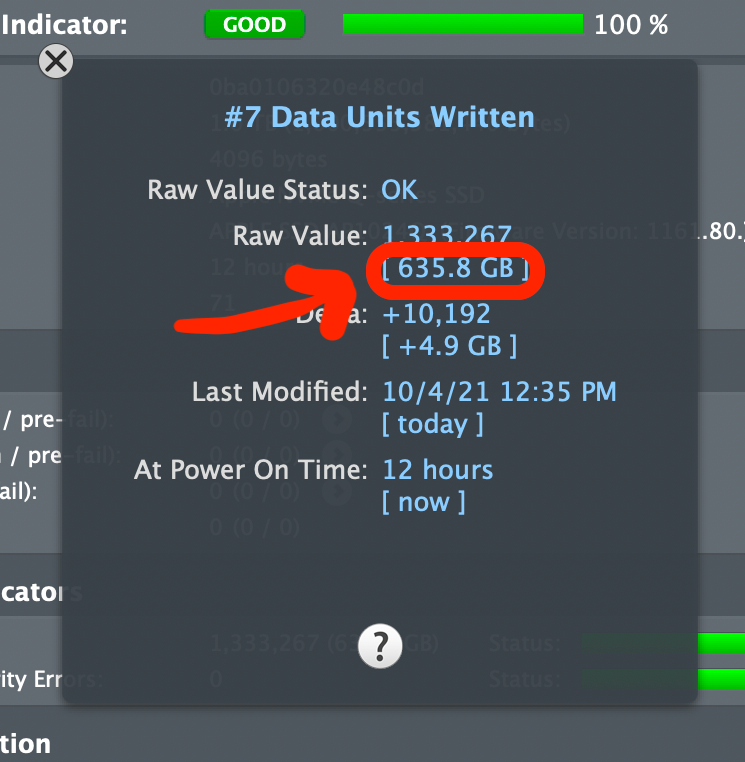
In less than 10 days, this laptop has already written more than 600GB of data! That’s around 60GB of data written every day under extremely light usage.
Without knowing its TBW, this is a very worrying figure because there is no way to gauge its lifespan.
I got even more curious, so I went online to find out if other users did the same test. The results are not good as well. For example, one heavy user showed that his M1 Macbook Pro’s SSD TBW reached 150TB in two months:
You might be wondering what he does with his M1 Macbook Pro, so here’s what he reported:
I estimate that my usage is even higher because I had been running fluid & smoke simulation and overnight 3D rendering. Furthermore, my Adobe Premiere Pro and After Effects (200GB) disk cache is always full. Also, most of my creative apps were Intel-based, resulting in higher TBW than usual, so I’m estimating about 140TBW per month.
Anyway, here’s another report for “normal” usage in about 2 months:
So that’s around 15TB written in 2 months.
With these data, along with some estimates, I have compiled them into a spreadsheet:
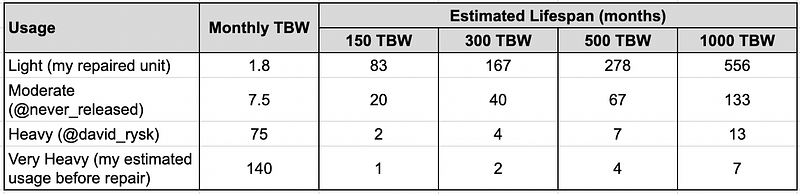
Since Apple didn’t disclose the SSD’s TBW, I’m going to guess them as 150, 300, 500 or 1000 TBW. Please note that there is no “real” science here. I’m just tabulating them based on some assumptions and estimates.
Maybe Apple’s 1TB SSD’s TBW is 500TBW? That’s why my M1 Macbook Air failed after 4 months of heavy use? I don’t know. I can’t be sure of that because I wasn’t told which component failed.
Having said that, I still think that the M1 SSD has a potentially short lifespan.
Concluding Thoughts
Are you an Apple M1 user? If yes, it would be great if you can check your M1 SSD’s TBW and share the data with us. To do so, you can:
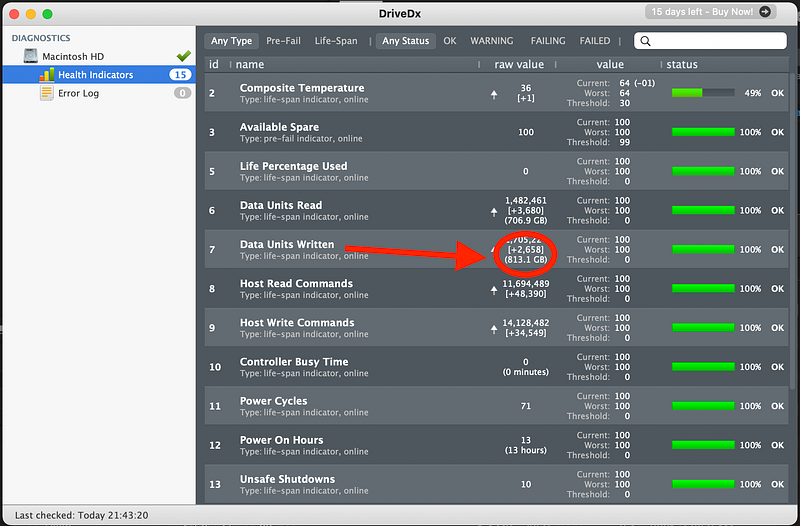
- Download DriveDx here. The trial version is good enough.
- Unzip Zip file.
- Run DriveDx.
- Click “Try Now”.
- Under “DIAGNOSTICS” on the left, click “Health Indicators”.
- Look for “Data Units Written”. You should be able to see how many GB has been written. This is the SSD’s TBW.
- Once you have obtained the TBW, please complete the following survey form:
That’s all! Once I have received enough data, I will be updating and sharing them in this article soon.
UPDATE: The result is out! Check it out here:
About Author
I’m an enthusiastic individual who enjoys self-learning and content creation. I started writing on Medium to share everything that I have learned. To learn more about me and my works, check out this post:
My other popular articles:


