
The Rust Programming Language — Primitives — Booleans, Conditionals, Statements and Expressions
In this article, we are going to learn about subtle nuances of The Rust Programming Language when using Booleans, Conditionals, Statements and Expressions. We’ll also get to learn that Rust omits some of the features from other languages intentionally.
Booleans:
Let us start with Booleans. As all the other languages, we only have true and false. Look at the below code snippet:
fn main() {
    let should_go_fast = true;
    let should_go_slow = false;

    println!("should_go_fast {}", should_go_fast);
    println!("should_go_slow {}", should_go_slow);
}
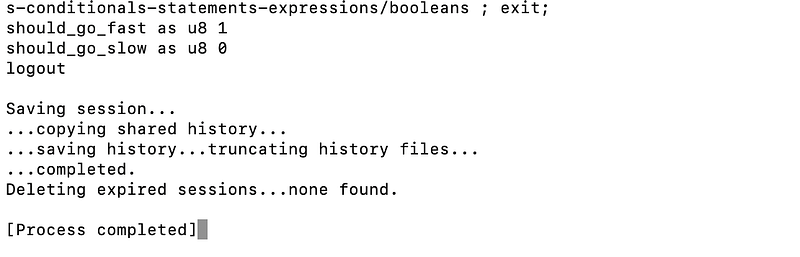
You can also cast the booleans to u8 and the output would be 1 for true and 0 for false. Look at the below code snippet:
fn main() {
    let should_go_fast = true;
    let should_go_slow = false;

    println!("should_go_fast as u8 {}", should_go_fast as u8);
    println!("should_go_slow as u8 {}", should_go_slow as u8);
}
Double Equals == :
There is only == in Rust. But there is no === in Rust. What == does is it structurally compares the Left hand side expressions and Right hand side expressions. Rust does not have referential equality. If you use == it means Rust will go deeply into an object and compare each and every value and return you true or false. Hence, with == only in the programming language, Rust omits the need of ===. So, == is the deep equality in Rust. Look at the below code snippet:
fn main() {
  pritln!("{}", 1==2);
}
Conditionals:
Rust has if which allows you to conditionally execute the statements when running a program. There is some sense of strictness that Rust imposes which we can have a look at the below code snippet:
fn main() {
    let cats = 1050;

    if cats > 1 {
        println!("Multiple cats!");
    } else if cats == 0 {
        println!("No cats!");
    } else {
        println!("Need more cats");
    }
}
Observations from the above code:
- Conditionals
cats > 1don’t need the parenthesis(). Compiler throws the error if you use() - On the contrary to other programming languages, you do need the curly braces
{}. They are mandatory. Compiler throws an error if you don’t use{} - The conditional expression
cats > 1has to be abooleanand cannot be a truthy or falsy value. It has to be atrueorfalsevalue.
Statements vs Expressions
There is a noticeable difference between statements and expressions in Rust. Statements have a semi-colon ; at the end where as expressions don’t have a semi-colon ; at the end.
An expression in Rust is something that evaluates to a value. cats > 1000 is an expression. In fact cats is an expression and 1000 is an expression.
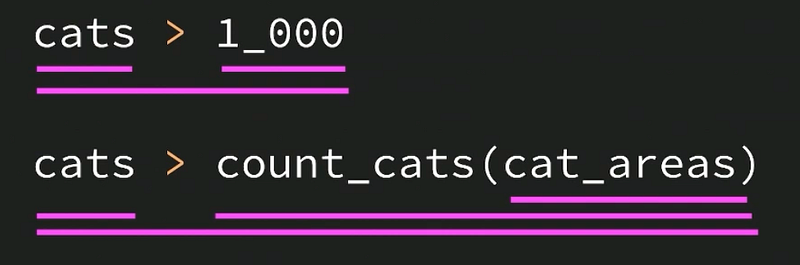
All the highlighted lines above are expressions.
Notice that expressions don’t have semi-colons at the end.
A statement on the other hand does not evaluate to a value.
println!("Multiple cats!");Above statement does not evaluate a value. It also has semi-colon ; at the end which is a clue that it is a statement.
Why does this difference of having a semi-colon or not matter? Rust compiler gives you little conveniences when chosing expression over statements. Take a look at below snippet:
fn multiply_both(x: f64, y: f64) -> f64 {
  return x*y;
}
x*y is an expression
return x*y; is a statement.
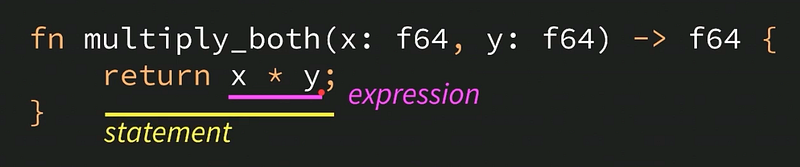
In language like JavaScript, you need return keyword. But in Rust, you can also replace above snippet using below snippet:
fn multiply_both(x: f64, y: f64) -> f64 {
  x*y
}
You can avoid return keyword if the last statement in the function is an expression, i.e. without ;. The compiler simply infers that you want to return the value. If a function ends with an expression, it automatically returns that expression.
Below snippet will throw a compiler error as it does not return any value:
fn multiply_both(x: f64, y: f64) -> f64 {
  x*y;
}
as x*y; is a statement and no longer an expression.
So we can have ternary if written as below:
fn main() {
    let message = if cats > 1 {
        "Multiple cats!"
    } else if cats == 0 {
        "No cats!"
    } else {
        "Need more cats"
    };
}
Notice the ; at the end of the entire if block. It is mandatory.
In cases of automatic returns (i.e. functions without return keyword), the last expression would be automatically returned. Above that expression, there should be only statements, i.e. ending with ;.
If you are trying to make an early return from the function, you do need to specify the return keyword.
I hope you enjoyed this article with the details about Booleans, Conditionals, Statements and Expressions. Please share your feedback in the comments.
You can subscribe to my newsletter about The Rust Programming Language here. You can read about all the articles in this series here.
Rustaceans 🚀
Thank you for being a part of the Rustaceans community! Before you go:
- Show your appreciation with a clap and follow the publication
- Discover how you can contribute your own insights to Rustaceans.
- Connect with us: X | Weekly Rust Newsletter


