
avatarAnkit Tanna

Summary

Free AI web copilot to create summaries, insights and extended knowledge, download it at here

3006

Abstract

/span>: Color = Color::Green;

<span class="hljs-keyword">match</span> current_color {
    Color::Red =&gt; {
        <span class="hljs-built_in">println!</span>(<span class="hljs-string">"The color is Red!"</span>);
    }
    Color::Yellow =&gt; {
        <span class="hljs-built_in">println!</span>(<span class="hljs-string">"The color is Yellow!"</span>);
    }
}

}</pre></div><p id="cf2f">We get below compiler error:</p><figure id="8a44"><img src="https://cdn-images-1.readmedium.com/v2/resize:fit:800/1*-1Ft3kqZM_gWJKSyhQc_BA.png"><figcaption>Error when not covering certain patterns</figcaption></figure><p id="efad">We do need to add all the <code>variants</code> like what below code snippet shows:</p><div id="1b7d"><pre><span class="hljs-keyword">enum</span> <span class="hljs-title class_">Color</span> { Red, Yellow, Green, Custom { red: <span class="hljs-type">u8</span>, green: <span class="hljs-type">u8</span>, blue: <span class="hljs-type">u8</span> } }

<span class="hljs-keyword">fn</span> <span class="hljs-title function_">main</span>() { <span class="hljs-keyword">let</span> <span class="hljs-variable">current_color</span>: Color = Color::Green;

<span class="hljs-keyword">match</span> current_color {
    Color::Red =&gt; {
        <span class="hljs-built_in">println!</span>(<span class="hljs-string">"The color is Red!"</span>);
    }
    Color::Yellow =&gt; {
        <span class="hljs-built_in">println!</span>(<span class="hljs-string">"The color is Yellow!"</span>);
    }
    Color::Green =&gt; {
        <span class="hljs-built_in">println!</span>(<span class="hljs-string">"The color is Green!"</span>);
    }
    Color::Custom { red, green, blue } =&gt; {
        <span class="hljs-built_in">println!</span>(<span class="hljs-string">"The color is Custom with RGB values {}, {}, {}!"</span>, red, green, blue);
    }
}

}</pre></div><p id="1c8a">In some cases, it may not be possible to cover each and every <code>variants</code>. In such case, we can use the match-all/catch-all pattern which can be achieved using <code>_</code>. Take for e.g. below code snippet:</p><div id="0e6c"><pre><span class="hljs-keyword">enum</span> <span class="hljs-title class_">Color</span> { Red, Yellow, Green, Custom { red: <span class="hljs-type">u8</span>, green: <span class="hljs-type">u8</span>, blue: <span class="hljs-type">u8</span> } }

<span class="hljs-keyword">fn</span> <span class="hljs-title function_">main</span>() { <span class="hljs-keyword">let</span> <span class="hljs-variable">current_color</span>: Color = Color::Green;

<span class="hljs-keyword">let</span> <span class="hljs-variable">color_description</span> = <span class="hljs-keyword">match</span> current_color {
    Color::Red =&gt; {
        <span class="hljs-string">"The color is Red!"</span>
    }
    Color::Yellow =&gt; {
        <span class="hlj

Options

s-string">"The color is Yellow!"</span> } _ => { <span class="hljs-string">"The color is a different color!"</span> } }; }</pre></div><h2 id="24c2">Observations:</h2><ol><li>We use <code>_</code> for handling the default cases in other languages when using switch case</li><li>Expression/Statements syntax applies throughout the Rust Language</li><li>We can use <code>match</code> keyword for assigning values to variables instead of <code>if/else</code> statements.</li></ol><p id="7d2e">You can do pattern matching with <code>structs</code> as shown above or with <code>tuples</code> like below code snippet:</p><div id="6aeb"><pre><span class="hljs-keyword">enum</span> <span class="hljs-title class_">Color</span> { Red, Yellow, Green, <span class="hljs-title function_ invoke__">Custom</span>(<span class="hljs-type">u8</span>, <span class="hljs-type">u8</span>, <span class="hljs-type">u8</span>) }

<span class="hljs-keyword">fn</span> <span class="hljs-title function_">main</span>() { <span class="hljs-keyword">let</span> <span class="hljs-variable">current_color</span>: Color = Color::Green;

<span class="hljs-keyword">match</span> current_color {
    Color::Red =&gt; {
        <span class="hljs-built_in">println!</span>(<span class="hljs-string">"The color is Red!"</span>);
    }
    Color::Yellow =&gt; {
        <span class="hljs-built_in">println!</span>(<span class="hljs-string">"The color is Yellow!"</span>);
    }
    Color::Green =&gt; {
        <span class="hljs-built_in">println!</span>(<span class="hljs-string">"The color is Green!"</span>);
    }
    Color::<span class="hljs-title function_ invoke__">Custom</span>(red, green, blue) =&gt; {
        <span class="hljs-built_in">println!</span>(<span class="hljs-string">"The color is Custom with RGB values {}, {}, {}!"</span>, red, green, blue);
    }
}

}</pre></div><p id="7d15">When using <code></code>, there is a small catch here. If you use <code></code>, Rust compiler stops giving you an error saying you missed a certain condition like <code>Color::green</code>. This can be a drawback when you plan to introduce a new <code>variant</code> to your enum <code>identifier</code>.</p><p id="826b">Over all, the <code>match</code> keyword is a great replacement for if/else condition for assigning values to a variable. Also the strictness of the Rust compiler allows you to not miss a <code>variant</code> to be handled.</p><p id="4231">I hope you enjoyed this article about pattern matching. Please share your feedback in the comments section.</p><p id="4aac">You can subscribe to my newsletter about <b>The Rust Programming Language <a href="https://tinyletter.com/ankittanna"></a></b><a href="https://tinyletter.com/ankittanna">here</a>. You can read about all the articles in this series <a href="https://readmedium.com/the-rust-programming-language-4b22bc717ecc">here</a>.</p></article></body>

The Rust Programming Language

The Rust Programming Language — Pattern Matching — Pattern matching using Enums

Enums can be used to match the pattern against literals. Literals are nothing but the variant inside the enum.

Rust provides us with a keyword called match which is basically like a switch case statement in other languages. Using match keyword, you can create blocks of code which should execute when the variable(case) matches the literal value.

Take for e.g. below code snippet:

enum Color {
    Red,
    Yellow,
    Green
}

fn main() {
    let current_color: Color = Color::Green;

    match current_color {
        Color::Red => {
            println!("The color is Red!");
        }
        Color::Yellow => {
            println!("The color is Yellow!");
        }
        Color::Green => {
            println!("The color is Green!");
        }
    }
}

Observations:

  1. We use the match keyword on the variable/case on which we want to execute the pattern matching.
  2. We match on a variable named current_color and we create a pattern matching for each variant of enum Color identifier using namespace

Since Rust is a strict programming language, the only issue with doing pattern matching on an enum is that you need to handle each and every variant. So for the above example, you need to handle case for Color::Red, Color::yellow and Color::Green. If you do not handle each and every variants then the Rust compiler throws an error.

Take for e.g. below snippet where we do not cover Color::Green and Color::Custom{...}:

enum Color {
    Red,
    Yellow,
    Green,
    Custom { red: u8, green: u8, blue: u8 }
}

fn main() {
    let current_color: Color = Color::Green;

    match current_color {
        Color::Red => {
            println!("The color is Red!");
        }
        Color::Yellow => {
            println!("The color is Yellow!");
        }
    }
}

We get below compiler error:
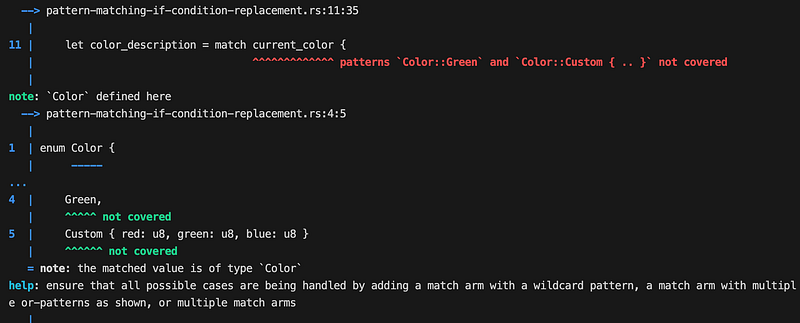
Error when not covering certain patterns

We do need to add all the variants like what below code snippet shows:

enum Color {
    Red,
    Yellow,
    Green,
    Custom { red: u8, green: u8, blue: u8 }
}

fn main() {
    let current_color: Color = Color::Green;

    match current_color {
        Color::Red => {
            println!("The color is Red!");
        }
        Color::Yellow => {
            println!("The color is Yellow!");
        }
        Color::Green => {
            println!("The color is Green!");
        }
        Color::Custom { red, green, blue } => {
            println!("The color is Custom with RGB values {}, {}, {}!", red, green, blue);
        }
    }
}

In some cases, it may not be possible to cover each and every variants. In such case, we can use the match-all/catch-all pattern which can be achieved using _. Take for e.g. below code snippet:

enum Color {
    Red,
    Yellow,
    Green,
    Custom { red: u8, green: u8, blue: u8 }
}

fn main() {
    let current_color: Color = Color::Green;

    let color_description = match current_color {
        Color::Red => {
            "The color is Red!"
        }
        Color::Yellow => {
            "The color is Yellow!"
        }
        _ => {
            "The color is a different color!"
        }
    };
}

Observations:

  1. We use _ for handling the default cases in other languages when using switch case
  2. Expression/Statements syntax applies throughout the Rust Language
  3. We can use match keyword for assigning values to variables instead of if/else statements.

You can do pattern matching with structs as shown above or with tuples like below code snippet:

enum Color {
    Red,
    Yellow,
    Green,
    Custom(u8, u8, u8)
}

fn main() {
    let current_color: Color = Color::Green;

    match current_color {
        Color::Red => {
            println!("The color is Red!");
        }
        Color::Yellow => {
            println!("The color is Yellow!");
        }
        Color::Green => {
            println!("The color is Green!");
        }
        Color::Custom(red, green, blue) => {
            println!("The color is Custom with RGB values {}, {}, {}!", red, green, blue);
        }
    }
}

When using _, there is a small catch here. If you use _, Rust compiler stops giving you an error saying you missed a certain condition like Color::green. This can be a drawback when you plan to introduce a new variant to your enum identifier.

Over all, the match keyword is a great replacement for if/else condition for assigning values to a variable. Also the strictness of the Rust compiler allows you to not miss a variant to be handled.

I hope you enjoyed this article about pattern matching. Please share your feedback in the comments section.

You can subscribe to my newsletter about The Rust Programming Language here. You can read about all the articles in this series here.

Rust
Rustlang
Webassembly
Web Development
Performance
Recommended from ReadMedium