
The right way to place business logic in your React application
Update (May 9 2023): If you’re interested in diving deeper into the subject, I’ve created an online course that covers all the topics discussed in this post and more. This course is designed to be interactive, engaging and packed with practical tips and techniques. By the end of the course, you’ll have a solid understanding of the subject and be able to apply what you’ve learned in your daily life.

Update (Jul 17 2022): I’ve recently summarised patterns I’ve discussed in many articles and published a book about the topic in leanpub.
We’ve been talking about project structures in a React application, how to name our files, when to use hooks to manage side effects and so forth. We even would discuss which programming paradigm we should adopt in our views or so. But we don't touch on one topic in these discussions too much. That is where we should put our business logic into. And part of the reason, I believe, is that we overlooked the fact that React is a library (not a framework) for building views.
On many occasions, developers would write logic into their components. Even experienced developers usually stopped at extracting this computing and logic into a custom hook or some helper functions. But that kind of extraction leaves the problem unsolved. The thing is, even if we have smaller components and moved logic into hooks or helpers, they are literally scattered everywhere unorganised. Take an online shopping application, for example, if we want to change the logic in cart, it's likely we will have to change product and validation modules too. And we usually have to change both helpers and views (not to mention these associated test fixtures).
The Omniview
And we should jump out of the details and review the whole problem in a higher-level perspective. If you look closely at React and accept it’s only responsible for the view part of our application, many problems will be fixed automatically. No matter if we use traditional MVC/MVP patterns or their variant MVVM, if React is the Vobviously we need something else to fill the M or VM role in an application, right?
Among many projects, I also found that many good practices we use in the backend are less noticed/recognised in the frontend world, such as layering, design patterns, etc. One potential reason is that the front end is relatively new and needs some time to catch up.
For instance, in a typical Spring MVC application, we would have controller, service and repository, and every developer accepts the reason behind this separation: controllers don't have business logic, services don't know how a model is rendered or serialised to consumers while repository only care about data access. In frontend applications, however, we compare React applications to Spring somehow. Because of the lack of native support (like no controller or repository out of the box), we write these code instead into components. And that would cause the business logic to be everywhere, along with that slow iteration and lower code quality.
The business logic leakage
We can call it business logic leakage, meaning that the business logic was supposed to be placed somewhere, and for some reason (lousy maintenance or management), was wrongly placed. While we don't have a suitable mechanism for it, the result is that they are written everywhere "convenient" (in components, hooks and helper functions).

Unlike the leaking tap in the real world, it’s a bit difficult to catch this kind of leakage in code. You have to pay more attention to see them. Here are a few common symptoms I found:
- Using transformers
- x.y.z
- Defensive programming
Using transformers
It’s easy to detect this pattern: if you’re doing map to convert data, you probably cross two bounded contexts (which may lead to logic leakage). We all have seen or may have written code like:
fetch(`https://5a2f495fa871f00012678d70.mockapi.io/api/addresses`)
.then((r) => r.json())
.then((data) => {
    const addresses = data.map((datum: RemoteAddress) => ({
        street: datum.streetName,
        address: datum.streetAddress,
        postcode: datum.postCode
})) setAddresses(addresses)
});In the snippet above, what the backend service returns doesn’t exactly match what the frontend consumes, so we need to convert/translate it. We could be using a service developed by another team or consuming a third-party service (such as Google Search API). So the seemingly harmless code violated a few principles here:
- A component need to know
RemoteAddresstype - A component need to define a new type
Address(setAddresses) - data.map is doing some lower-level mapping
The x.y.z symptom (Law of Demeter violation)
If you’re using more than one dot . operator, probably it means some concepts are missing. For example, person.deliveryAddress is better than person.primaryAddress.street.streetNumber + person.primaryAddress.suburbas the former hides the details properly.
The code below shows that ProductDialog knows too much about product, and once the structure of product changed, we have to change a lot of places (the tests and the components)
const ProductDialog = (props) => {
const { product } = props; if(product.item.type === 'Portion') {
//do something
}
}We’re dealing with data, not model here. So product.isPortion() would be more meaningful than the raw data check.
Defensive programming
I’m ok with defensive programming, and I use it occasionally too. But what I found in many projects is people tend to do too much in the component, and that adds a lot noise.
For example:
const ProductDetails = (props) => {
  const { product } = props
  const { item } = product
  const { media } = item as MenuItem

  const title = (media && media.name) || ''
  const description = (media && media.description) || ''
return (
<div>
{/* product details */}
</div>
)
}Note that we’re doing null-checking and fallback stuff in the component, and we should do this type of logic in a dedicated place.
How to fix the problem?
Practically, we can try a two-step approach to resolve the problem.
- Regular refactoring
- Modelling
Regular refactoring
Firstly, we can perform refactoring as we normally would in other cases when we see some logic in React components. For example, by moving logics/calculations from:
- Transformers
- x.y.z
- Defensive programming
into helper functions. Take the transformer above as an example. We can extract the anonymous function into a named function and move it to a separate file:
const transformAddress: Address = (address: RemoteAddress) => {
    return ({
        street: datum.streetName,
        address: datum.streetAddress,
        postcode: datum.postCode
    })
}
//...
const addresses = data.map(transformAddress)It doesn’t look like a big deal in this case. But in most scenarios, we would put a lot of empty checks or fallbacks and so on. And, commonly, we need to do some translation. For example, the state name we fetched from remote is abbreviations like VIC or NSW, but we need to show them in full text on the page as Victoria or New South Wales.
const states = {
  vic: "Victoria",
  nsw: "New South Wales",
  //...
};
const transformAddress: Address = (address: RemoteAddress) => {
return {
street: address.streetName,
address: address.streetAddress,
postcode: address.postCode,
state: states[address.state.toLowerCase()]
};
};Similarly, we can use extract function to make title and description into a function:
const getTitle = (media) => (media && media.name) || ''
const getDescription = (media) => (media && media.description) || ''
As more and more logic like transformAddress and getTitle be moved into helpers.ts, eventually, we will have a huge and do-all-the-things file. That means it'll become unreadable and have high maintenance costs. We can split the file into modules, but the references between these functions can make them hard to understand. It's like the issue we faced before Object Oriented Programming - we have too many modules and functions in each module, and it's too difficult to navigate through them. In other words, we need a better way to organise these helper functions.
Luckily we don’t need to reinvent the wheels. Object Oriented Programming was born for this. By simply using class and encapsulation in OOP, we can easily group these functions and make the code much more readable. The process of grouping is called modelling, meaning we need to establish a better way to organise the data in a way that is easier for UI components to consume.
Modelling
In short, modelling is putting data and behaviour together, hiding the details and providing a common language for consumers. For instance, we should not be using product.item.type === 'Portion', instead, we should create a Product class and it has a isPortion for their consumers. This is very common in backend services but hasn't been widely used in the frontend world.
The reason being, as mentioned above, people overlook that React is only responsible for views. And a healthy frontend application should have other parts, too. It needs models and logic to communicate to the backend, even the logging/routing. But in this article, we'll only focus on modelling and logic.
Back to the example above, by defining a Address class to replace the anonymous function inside data.map, we get:
class Address {
  constructor(private addr: RemoteAddress) {}
get street() {
return this.addr.streetAddress;
} get postcode() {
return this.addr.postcode;
}
}There is no difference in the usage:
const AddressLine = ({ address }: { address: Address }) => (
  <li>
    <div className="result">{address.street}</div>
  </li>
);
The only thing needs to be changed is to replace transformAddress with new Address:
const addresses = data.map((addr: RemoteAddress) => new Address(addr))And for the private member/function for state name translation:
private readonly states = {
    vic: "Victoria",
    nsw: "New South Wales",
    //...
  };
get state() {
return this.states[this.addr.state.toLowerCase()];
}The structure is much more precise now. states is now a private member of class Address. The good thing about class is that it aggregates all the related logic into one piece, making it isolated and easy to maintain.
Placing all the related logic into one place has other benefits too. Firstly, this separation makes testing easy and reliable, as components depend on the model (not the raw data).
We don’t need to prepare null-value or out-of-bound data for the component tests. Similarly, the testing model focuses more on data and logic (empty value, validation and fallback). Secondly, coherence makes it more likely to be reused in other scenarios. Lastly, if we need to switch to another 3rd party service, we only need to modify the models, and views can remain intact.
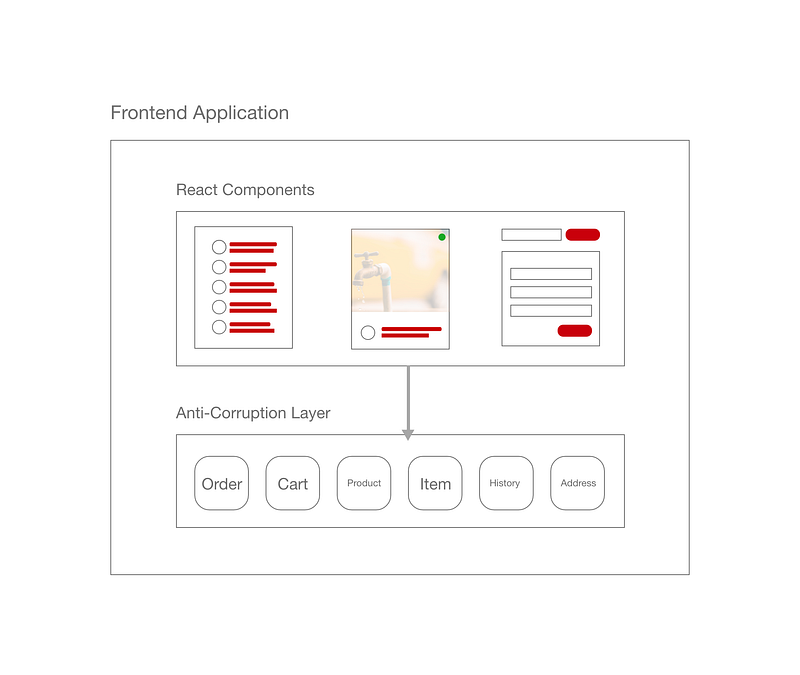
As more and more models are created, we may need a whole layer for them. This part of the code isn’t aware of the existence of UI components and purely around the business logic. We call the layer an anti-corruption layer — it prevents the unreliable 3rd party data structure from corrupting our views. Through this intermediate layer, the only thing we need to change is the transformers in the model.
Summary
Encapsulating business logic, even in the context of thin clients, is a relatively big topic. In this article, we discussed several symptoms of the business logic leak and how we can deal with them.
By doing regular refactoring, we can ensure that components are only responsible for rendering data and should not be doing any calculations or data mapping. We should separate this logic into pure JavaScript files (not the jsx/tsx). And by modelling, we can only use objects to hide details getter to access data. It encapsulates all the logic inside the model and allows viewers to do their work much more straightforwardly.
The benefits of this approach are much easier testing for both model and views, easier to track business requirement changes, and much more straightforward code in views (as most of this is done in models).
References
If you like the reading, please Sign up for my mailing list. I share Clean Code and Refactoring techniques weekly via blogs, books and videos.


