
The Right Way to Log in Python (Don’t Use Print)
There are tons of ways to log in Python. Until recently, I was still logging using print which is obviously a bad practice.
Instead, you can use logging , a Python module from the standard library. I’m going to talk about it today.
The Logging Library
The logging library in Python is a built-in module that provides a flexible and powerful framework for generating log messages from your Python programs.
It allows you to record events, errors, and informational messages during the execution of your code. The logging library is part of the Python Standard Library.
It implements some components:
- Loggers: Loggers are the main entry point for logging messages. They provide a way to create and manage log records. Each logger is identified by a unique name and can be configured independently.
- Handlers: Handlers determine where the log messages are sent. They define the output destinations, such as the console, files, or network sockets. You can configure multiple handlers for a single logger.
- Formatters: Formatters specify the layout of log messages. They define the structure and content of log records. You can customize the format of log messages by specifying different formatters for each handler.
- Log Levels: Log levels define the severity of log messages. There are several predefined log levels, such as DEBUG, INFO, WARNING, ERROR, and CRITICAL. Log messages with a level below the specified threshold are ignored.
Logging’s Hello World
Here is a sample code to get started with logging :
import logging

# Create a logger
logger = logging.getLogger('my_logger')

# Create a file handler
handler = logging.FileHandler('log.txt')

# Create a formatter and set it for the handler
formatter = logging.Formatter('%(asctime)s - %(name)s - %(levelname)s - %(message)s')
handler.setFormatter(formatter)

# Add the handler to the logger
logger.addHandler(handler)

# Set the log level
logger.setLevel(logging.DEBUG)

# Log messages
logger.debug('Debug message')
logger.info('Info message')
logger.warning('Warning message')
logger.error('Error message')
logger.critical('Critical message')
If we run this code, it creates a file named log.txt containing logs:
2023-07-14 17:27:23,145 - my_logger - DEBUG - Debug message
2023-07-14 17:27:23,145 - my_logger - INFO - Info message
2023-07-14 17:27:23,145 - my_logger - WARNING - Warning message
2023-07-14 17:27:23,145 - my_logger - ERROR - Error message
2023-07-14 17:27:23,145 - my_logger - CRITICAL - Critical message
Log Levels
Let’s take back our sample code, but instead of setting the log level to DEBUG , we’ll set it to ERROR .
logger.setLevel(logging.ERROR)
Let’s run our code again and check the output:
2023-07-14 17:27:23,145 - my_logger - DEBUG - Debug message
2023-07-14 17:27:23,145 - my_logger - INFO - Info message
2023-07-14 17:27:23,145 - my_logger - WARNING - Warning message
2023-07-14 17:27:23,145 - my_logger - ERROR - Error message
2023-07-14 17:27:23,145 - my_logger - CRITICAL - Critical message
2023-07-14 17:30:01,066 - my_logger - ERROR - Error message
2023-07-14 17:30:01,066 - my_logger - CRITICAL - Critical message
First, you can see there are still the previous logs. It’s because our FileHandler is configured to don’t recreate our logs file, but just append the new logs. If we want to change this behavior, we can provide a mode parameter:
handler = logging.FileHandler('log.txt', mode='w') # mode='a' to append (default behavior)Now, if we run our code again, a new file will be created:
2023-07-14 17:35:18,475 - my_logger - ERROR - Error message
2023-07-14 17:35:18,476 - my_logger - CRITICAL - Critical message
In this file, there are only 2 messages now. It’s because we’ve changed the logging level so that only the messages above the ERROR level are logged. The hierarchy is: DEBUG < INFO < WARNING < ERROR < CRITICAL.
Formatting the Logs
To format our logs, we need to configure our formatter:
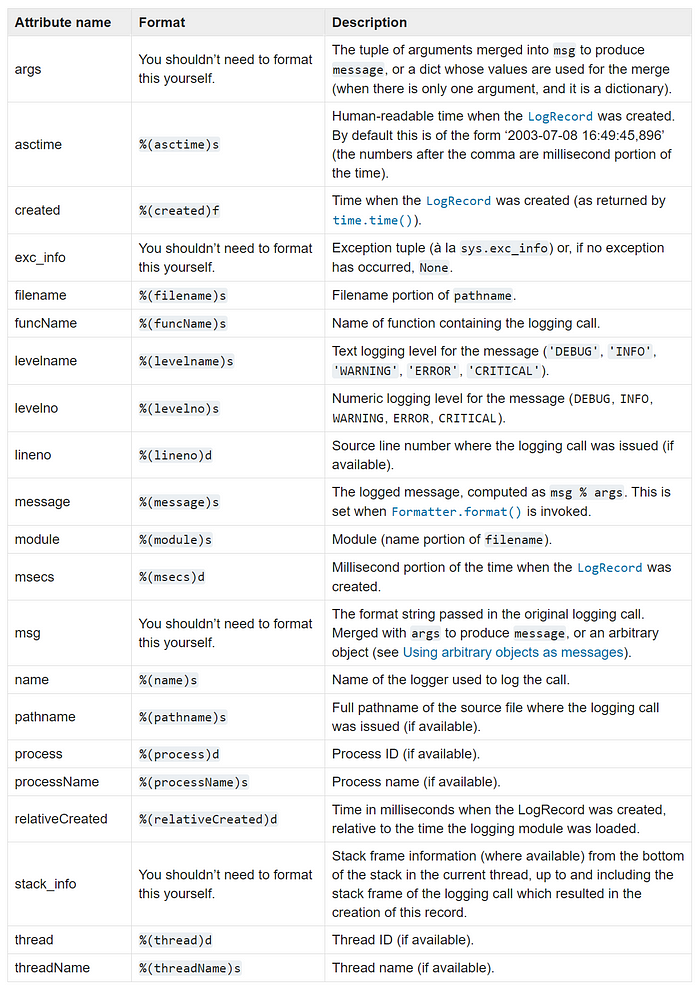
formatter = logging.Formatter('%(asctime)s - %(name)s - %(levelname)s - %(message)s')As you can see, we just have to pass a string to configure it. This string is special because you can include attributes that will be parsed by logging .
Here, we’ve used:
- %(asctime)s: time when the logs were created
- %(name)s: name of our logger
- %(levelname)s: level of the logs
- %(message)s: logs messages
There are more attributes, you can find all of them in the logging’s documentation (or in the image below):
Handlers
There are a lot of handlers. But the most useful are the FileHandler we’ve seen previously, and the StreamHandler , wich allows to log to the console.
handler = logging.StreamHandler()
You can find the whole list in the doc.
You can also create your own handlers. For example I’m thinking about writing a MongoDB handler as I use MongoDB a lot and storing logs into a database may be convenient.
Advanced Use Case
I’ll show you how you can use several handlers. For example, we’ll imagine you want to log important messages to the console, and to record info logs and more into a file.
We can use only one logger to do this, but we’ll need 2 handlers. Here is the code, and then I’ll explain it:
import logging


logger = logging.getLogger("my_logger")
logger.setLevel(logging.NOTSET)

file_handler = logging.FileHandler("info.log")
file_handler.setLevel(logging.INFO)
file_handler.setFormatter(logging.Formatter("%(asctime)s | %(pathname)s - %(lineno)d | %(levelname)s: %(message)s"))
logger.addHandler(file_handler)

stream_handler = logging.StreamHandler()
stream_handler.setLevel(logging.ERROR)
stream_handler.setFormatter(logging.Formatter("%(asctime)s | %(levelname)s: %(message)s"))
logger.addHandler(stream_handler)

logger.info("This is an info message")
logger.error("This is an error message")
logger.warning("This is a warning message")
logger.debug("This is a debug message")
logger.critical("This is a critical message")
First, we create our logger, and set its leve l to NOTSET , meaning it will log absolutely everything.
Then, we create our handlers, and we use setLevel to set their levels. Indeed, we can specify the level directly at the handler-level.
Finally, we just create some logs. Here is the console output:
2023-07-14 18:00:55,474 | ERROR: This is an error message
2023-07-14 18:00:55,474 | CRITICAL: This is a critical message
And here the file output:
2023-07-14 18:00:55,474 | /run/media/estebanthilliez/Documents/CODE/Playground/logging_article.py - 18 | ERROR: This is an error message
2023-07-14 18:00:55,474 | /run/media/estebanthilliez/Documents/CODE/Playground/logging_article.py - 19 | WARNING: This is a warning message
2023-07-14 18:00:55,474 | /run/media/estebanthilliez/Documents/CODE/Playground/logging_article.py - 21 | CRITICAL: This is a critical message
Final Note
Once you know logging , it becomes easy to log in Python and to avoid print . But a lot of people don’t know logging exists, just like me a few weeks ago. So I hope you’ll use this library, it really makes the logging process easy!
Thanks for reading! Here are some links that may interest you:


