e>Hello World</code></li></ol><p id="889c">Backticks also work better for HTML:</p>
<figure id="bb1d">
<div>
<div>
<iframe class="gist-iframe" src="/gist/djD-REK/640b1f99bb2980ba4d48450770950b1f.js" allowfullscreen="" frameborder="0" height="undefined" width="undefined">
</div>
</div>
</figure></iframe></div></div></figure><p id="2c8e">Backtick literals are <a href="https://readmedium.com/are-backticks-slower-than-other-strings-in-javascript-ce4abf9b9fa"><b>just as fast </b>as other string literals</a>, whether or not you <a href="https://readmedium.com/does-compiling-javascript-code-using-babel-make-backtick-literals-as-fast-as-regular-quotes-cd1f29906691">compile them using Babel</a>. So why not use backticks <code>``</code> instead? 😊</p><figure id="6062"><img src="https://cdn-images-1.readmedium.com/v2/resize:fit:800/1*zdhXtCj1-be1YW0Rbk71eA.png"><figcaption>Photo by <a href="https://unsplash.com/@lionsdenpro?utm_source=medium&utm_medium=referral">Greg Raines</a> on <a href="https://unsplash.com?utm_source=medium&utm_medium=referral">Unsplash</a></figcaption></figure><h1 id="125d">Don’t forget about JSON</h1><p id="1d84">JavaScript Object Notation <a href="https://www.json.org/">(JSON</a>), the lightweight data storage format, only allows double quotes.</p><p id="bb62">If I happen to be copying back-and-forth from JavaScript to JSON files, using just double quotes helps me stay consistent.</p><p id="31f0">This is pretty rare — I just try to remember to not use single quotes in JSON.</p><p id="6004">When handling JSON files from within JavaScript, the <a href="https://readmedium.com/how-to-use-stringify-and-parse-in-javascript-6b637b571a32">stringify() and parse()</a> functions know about the double quotes already:</p>
<figure id="ddf3">
<div>
<div>
<iframe class="gist-iframe" src="/gist/djD-REK/619651d380d18f35ac4f9523151e8529.js" allowfullscreen="" frameborder="0" height="undefined" width="undefined">
</div>
</div>
</figure></iframe></div></div></figure><p id="5864">As you can see from the code snippet, single quotes break JSON parsing.</p><p id="25d5">The technical reason has to do with the JSON specification (<a href="https://tools.ietf.org/html/rfc7159#page-8">RFC 7159</a>), which requires double quotes as the JSON string character.</p><figure id="389d"><img src="https://cdn-images-1.readmedium.com/v2/resize:fit:800/0*2IuzTlixUqL-xbAj"><figcaption>Photo by <a href="https://unsplash.com/@kylebroad?utm_source=medium&utm_medium=referral">Kyle Broad</a> on <a href="https://unsplash.com?utm_source=medium&utm_medium=referral">Unsplash</a></figcaption></figure><h1 id="f23f">What is wrong with using all 3?</h1><p id="716c">Yes, there would be nothing wrong with using “ ” by default, ‘ ’ for strings including double-quotes, and ` ` for including variables or multi-lines.</p><p id="c2ac">It comes down to personal preference, though many people lobby for picking one and using it consistently when creating JavaScript strings.</p><p id="982e">For example, <a href="https://github.com/airbnb/javascript#strings--quotes">Airbnb’s style guide</a> prefers single quotes (‘ ’), avoids double quotes (“ ”), and uses backtick literals (` `) sparingly:</p><p id="1527" type="7">6.1 Use single quotes '' for strings. — Airbnb</p>
<figure id="e892">
<div>
<div>
<iframe class="gist-iframe" src="/gist/djD-REK/89e3ce4d7cc775a9922c7c987261d98c.js" allowfullscreen="" frameborder="0" height="undefined" width="undefined">
</div>
</div>
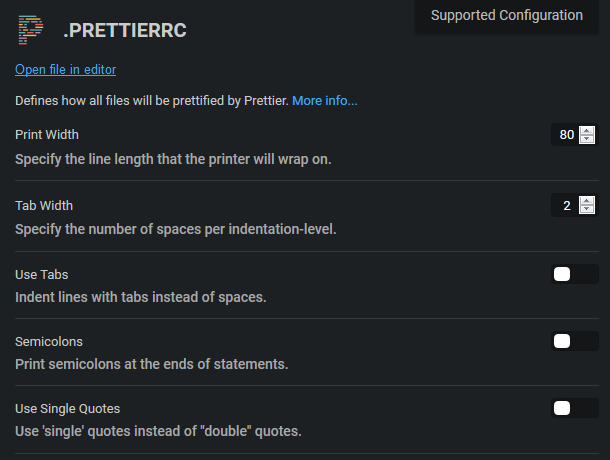
</figure></iframe></div></div></figure><figure id="235f"><img src="https://cdn-images-1.readmedium.com/v2/resize:fit:800/0*tku32ZQEUK3BLGFt"><figcaption>Photo by <a href="https://unsplash.com/@wellingtonsanipe?utm_source=medium&utm_medium=referral">Wellington Sanipe</a> on <a href="https://unsplash.com?utm_source=medium&utm_medium=referral">Unsplash</a></figcaption></figure><h1 id="9f43">Use ESLint for consistency</h1><p id="6be5">If consistent quote style in JavaScript is important to you, like it is to the engineers at Airbnb, then it is easy to fix with <a href="https://eslint.org/">ESLint</a>:</p><ul><li>The ESLint <a href="https://eslint.org/docs/rules/quotes.html"><code>quo</code>tes</a> rule can require the use of double quotes (default), single quotes, or backticks whenever possible.</li><li>The quotes rule can also enforce one type of quote except when the string contains a quote character that would have to be escaped otherwise.</li><li>And finally, ESLint can require single or double quotes but still allow strings to use backtick literals.</li></ul><figure id="7cca"><img src="https://cdn-images-1.readmedium.com/v2/resize:fit:800/0*cPXEjo1pqZcOlWTI"><figcaption>Photo by <a href="https://unsplash.com/@samule?utm_source=medium&utm_medium=referral">Samule Sun</a> on <a href="https://unsplash.com?utm_source=medium&utm_medium=referral">Unsplash</a></figcaption></figure><h1 id="fb94">Use prettier and stop worrying about it</h1><p id="25ef">An easier (or supporting) solution to using ESLint to keep quote styles consistent is to use <a href="https://prettier.io/">prettier</a> for automatic formatting.</p><figure id="71a4"><img src="https://cdn-images-1.readmedium.com/v2/resize:fit:800/1*8pZIo5vTHUfyDg1BbMJqiQ.png"><figcaption></figcaption></figure><p id="eef2">With prettier on, the default is double quotes, but
Options
requiring single quotes is just a toggle away — at least when using prettier at <a href="http://CodeSandbox.io">CodeSandbox.io</a>.</p><p id="249e">There is also a <a href="https://marketplace.visualstudio.com/items?itemName=esbenp.prettier-vscode">VSCode extension available for prettier</a>.</p><figure id="913f"><img src="https://cdn-images-1.readmedium.com/v2/resize:fit:800/0*w3jWYx2qSpy4q6MM"><figcaption>Photo by <a href="https://unsplash.com/@freestocks?utm_source=medium&utm_medium=referral">freestocks.org</a> on <a href="https://unsplash.com?utm_source=medium&utm_medium=referral">Unsplash</a></figcaption></figure><h1 id="b75d">My personal preference</h1><p id="3938">I tend to mix double quotes and backtick literals in my code, although I have considered using backtick literals exclusively.</p><p id="bc58">I use prettier with the default double quote (“ ”) setting, which I am used to.</p><p id="10a4">While I understand the usefulness of consistency in coding, I do not think quote characters matter too much in the grand scheme of things.</p><p id="d170">If anything, we should consistently pick backtick literals () for their advantages around interpolation and multi-line strings.</p><figure id="0b36"><img src="https://cdn-images-1.readmedium.com/v2/resize:fit:800/0*TmZhQJeZP6Io23Zv"><figcaption>Photo by <a href="https://unsplash.com/@elidefaria?utm_source=medium&utm_medium=referral">Eli DeFaria</a> on <a href="https://unsplash.com?utm_source=medium&utm_medium=referral">Unsplash</a></figcaption></figure><h1 id="594a">Additional resources</h1><ul><li><a href="undefined">Panu Pitkämäki</a> wrote <a href="https://bytearcher.com/articles/single-or-double-quotes-strings-javascript/">at ByteArcher</a> about quoting style in JavaScript:</li></ul><div id="28d0" class="link-block">
<a href="https://bytearcher.com/articles/single-or-double-quotes-strings-javascript/">
<div>
<div>
<h2>Should I use 'single' or "double-quotes" for strings in JavaScript</h2>
<div><h3>You've seen both 'single quotes' and "double quotes" used for writing strings in JavaScript. You're wondering if they…</h3></div>
<div><p>bytearcher.com</p></div>
</div>
<div>
<div style="background-image: url(https://miro.readmedium.com/v2/resize:fit:320/0*GJHa_w5GgYBsCEng)"></div>
</div>
</div>
</a>
</div><ul><li><a href="https://slate.com/human-interest/2014/10/single-quotes-or-double-quotes-its-really-quite-simple.html">Slate</a> explained single and double quote use in English, in plain English:</li></ul><div id="5bca" class="link-block">
<a href="https://slate.com/human-interest/2014/10/single-quotes-or-double-quotes-its-really-quite-simple.html">
<div>
<div>
<h2>Single Quotes or Double Quotes? It's Really Quite Simple.</h2>
<div><h3>If you are an American, using quotation marks could hardly be simpler: Use double quotation marks at all times unless…</h3></div>
<div><p>slate.com</p></div>
</div>
<div>
<div style="background-image: url(https://miro.readmedium.com/v2/resize:fit:320/0*RCwf_sh_fcEZEAz4)"></div>
</div>
</div>
</a>
</div><ul><li><a href="undefined">Tania Rascia</a> wrote <a href="https://www.digitalocean.com/community/tutorials/how-to-work-with-strings-in-javascript">at DigitalOcean</a> about how to use JavaScript strings:</li></ul><div id="b52f" class="link-block">
<a href="https://www.digitalocean.com/community/tutorials/how-to-work-with-strings-in-javascript">
<div>
<div>
<h2>How To Work with Strings in JavaScript | DigitalOcean</h2>
<div><h3>A string is a sequence of one or more characters that may consist of letters, numbers, or symbols. Strings in…</h3></div>
<div><p>www.digitalocean.com</p></div>
</div>
<div>
<div style="background-image: url(https://miro.readmedium.com/v2/resize:fit:320/0*BWMLBkkpc6lMCKiQ)"></div>
</div>
</div>
</a>
</div><ul><li>W3Schools lists all the backslash (escape) characters in JavaScript:</li></ul><div id="d210" class="link-block">
<a href="https://www.w3schools.com/js/js_strings.asp">
<div>
<div>
<h2>JavaScript Strings</h2>
<div><h3>Well organized and easy to understand Web building tutorials with lots of examples of how to use HTML, CSS, JavaScript…</h3></div>
<div><p>www.w3schools.com</p></div>
</div>
<div>
<div style="background-image: url(https://miro.readmedium.com/v2/resize:fit:320/0*j9uRNxQfFE6Ts2js)"></div>
</div>
</div>
</a>
</div><figure id="b312"><img src="https://cdn-images-1.readmedium.com/v2/resize:fit:800/0*H2cL0Q2nzp4ma3dE"><figcaption>Photo by <a href="https://unsplash.com/@paul_nic?utm_source=medium&utm_medium=referral">Paolo Nicolello</a> on <a href="https://unsplash.com?utm_source=medium&utm_medium=referral">Unsplash</a></figcaption></figure><p id="efbe"><a href="https://www.linkedin.com/in/derek-austin/">Dr. Derek Austin</a> is the author of <a href="https://www.amazon.com/dp/B0BRJDLJ43"><i>Career Programming: How You Can Become a Successful 6-Figure Programmer in 6 Months</i></a>, now available on Amazon.</p></article></body>
The real difference between ‘single quotes’ and “double quotes” in JavaScript
Should I use ‘ ’ or “ ” for strings in JavaScript? The answer surprised me: either quote character is identical except for when escaping itself.

“Single quotes and double quotes behave in exactly the same way in JavaScript.” — Matthew Holman in CloudBoost
Both single quotes ('') double quotes ("") are used frequently in JavaScript to create a string literal.
A literal is another word for a value, as opposed to a reference, which would be indicated by the variable name.
There is only one difference between the use of single quotes ('') and double quotes ("") in JavaScript, and it comes down to which quote character you have to escape using the backslash (\) character: \' or \".

An ES6 feature called template literals, backtick literals, or backticks uses backticks `` instead of a single '' or double quote "".
“Template literals are string literals allowing embedded expressions. You can use multi-line strings and string interpolation features with them.” — MDN Docs