
The Power Duo: Databricks Auto Loader and Delta Live Tables

In my last two posts, I explained the benefits of using autoloader for your data pipelines with Databricks. A lot can be said that this is a very efficient way to handle incoming data batches for your ingestion process. The power of your data pipeline doesn’t stop there. Even if autoloader simplifies the process of ingesting large volumes of data into Databricks Delta Lake, we have the ability to take batch processing and allow real-time data streams instead. This is where Databricks Delta Live Tables comes in.
What are Delta Live Tables or DLTs?
Delta Live Tables or DLTs for short allows you to create data pipelines that are managed real-time. This will make ETL development easier to execute and maintain when the goal of your ETL involves data coming in with high volume and velocity. It is important to understand the difference between Delta Tables and Delta “Live” Tables before you proceed.
Delta Tables are a way to store your data as tables in Databricks while Delta Live Tables are a way to introduce how data flows within these tables. Whereas Delta Tables provide a table architecture, DLTs are a data pipeline framework that you can use when building your ETL pipeline.
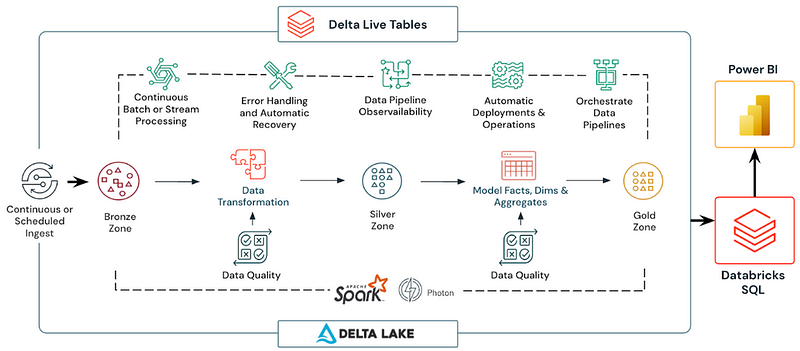
How can we incorporate Delta Live Tables into our data pipelines?
Creating Delta Live Tables involves working with the medallion or multi-hop architecture that I explained in my previous post, Databricks Autoloader and Medallion Architecture… Pt 2. Below is an example incorporating the bronze, silver, and gold layers of this architecture within your Databricks notebooks. SQL will be used in this example although the same can be accomplished with pyspark/python.
- Create Bronze Layer Tables: Here we are creating a live table called bronze_table and defining the schema/data source. You can also add comments for reference as you create each live table.
-- Bronze Layer Table

CREATE OR REFRESH STREAMING LIVE TABLE bronze_table
COMMENT "This is a sample table"
AS SELECT * FROM cloud_files("${file_path}/table_name_1", "delta",
                            map("schema", "col_name_1 STRING, col_name_2 LONG"))
2. Create Silver Layer Tables: The next level table involves adding a constraint, expectation, and join to pull specific information for our silver_table. Please note, we are using constrant violation DROP ROW and FAIL UPDATE to discard records or fail pipeline. Databricks allows us to define our constraints with expectations for data quality checks.
-- Silver Layer Table

CREATE OR REFRESH STREAMING LIVE TABLE silver_table (
  CONSTRAINT valid_col_name EXPECT (col_name_3 IS NOT NULL) ON VIOLATION DROP ROW
)
TBLPROPERTIES (
  "comment" = "Only valid column names with valid_col_name"
)
AS
SELECT
  col_name_3,
  b.col_name_4,
  col_name_5,
  c.col_name_6 AS name,
  c.col_name_7 AS number,
  CAST(time_period(timestamp, 'yyyy-MM-dd HH:mm:ss') AS TIMESTAMP) AS new_timestamp
FROM
  STREAM(LIVE.silver_table) a
LEFT JOIN
  LIVE.name b
ON
  a.col_name_4 = b.col_name_4;
3. Create Gold Layer Tables: The last level table involves selecting a specific subset of data from our bronze and silver layers that contains particular columns we would like to select for given requirements. Please note, the LIVE in LIVE.silver_table is what activates the Delta Live Table in our data pipeline and not having that provided will not allow you to execute your pipeline.
-- Gold Layer Table

CREATE OR REFRESH LIVE TABLE gold_table
COMMENT "Final results from Bronze/Silver Layers"
AS
  SELECT col_name_3, name, number, col_name_5, TIMESTAMP
  FROM LIVE.silver_table
  WHERE id = 'x'
  GROUP BY col_name_3, name, number
This is a brief example of how you can incorporate your medallion or multi-hop architecture from autoloader’s cloud files into Delta Live Tables. This can open up a realm of possibilities for your real-time data. By simplifying architecture, ensuring data quality, and delivering high performance, Delta Live Tables can allow you to make informed decisions swiftly and accurately.
Please note, this was an example of Delta Live Table creation in your Databricks notebooks and not covering the aspect of running your pipeline in Databricks UI. More information and documentation regarding that can be found here. Below is an example snapshot from Databricks of a pipeline in Databricks UI:
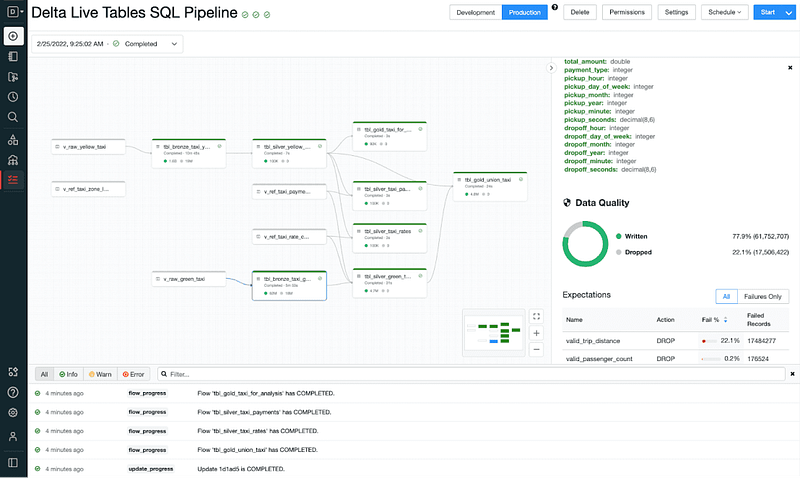
(Disclaimer: Please refer to the official Databricks documentation and resources for the most up-to-date information on Delta Live Tables and related features.)
Delta Live Tables SQL Reference: https://docs.databricks.com/en/delta-live-tables/sql-ref.html
Delta Live Tables Python Reference: https://docs.databricks.com/en/delta-live-tables/python-ref.html
SQL Tutorial: https://docs.databricks.com/en/delta-live-tables/tutorial-sql.html
Python Tutorial: https://docs.databricks.com/en/delta-live-tables/tutorial-python.html


