
The Perfect Message Queue Solution Based on the Redis Stream Type
Build your own system easily

Redis 5.0 brings the Stream type. Literally, it is a stream type, but in fact, from a functional point of view, it should be a perfect implementation of Redis for message queues (MQ, Message Queue).
Anyone who has used Redis as a message queue knows that there are many implementations of message queues based on Reids, such as:
- PUB/SUB, subscribe/publish model.
- Implementation of List-based LPUSH+BRPOP.
- Implementation based on Sorted-Set.
Each implementation has typical features and problems.
The Stream type released in Redis 5.0 is also used to implement a typical message queue. The appearance of the Stream type almost satisfies all the contents of the message queue, including but not limited to:
- Serialization generation of the message ID.
- Message traversal.
- Blocking and non-blocking reads of messages.
- Packet consumption of messages.
- Processing of outstanding messages.
- Message queue monitoring.
The message queue has producers and consumers. Let’s experience the wonderfulness of the Stream type.
Production News
The XADDcommand is used to append a message to a stream (stream data), as shown below:
127.0.0.1:6379> XADD memberMessage * user reggie msg Hello
"1553439850328-0"
127.0.0.1:6379> XADD memberMessage * user dwen msg World
"1553439858868-0"
The syntax format is:
XADD key ID field string [field string ...]You need to provide the key, message IDscheme, and message content, where the message content is key-valuedata.
ID, the most commonly used*, indicates that the message ID is generated by Redis, which is also a strongly recommended scheme.field string[field string], is the content of the current message, consisting of one or more key values.
In the above example, the message user reggiemsg Hellois added to the key memberMessage.
Redis generates message IDs using millisecond timestamps and sequence numbers. At this point, a message is available in the message queue.
Consuming Messages
XREAD, read messages from Stream, demonstrated as follows:
127.0.0.1:6379> XREAD streams memberMessage 0
1) 1) "memberMessage"
   2) 1) 1) "1553439850328-0"
         2) 1) "user"
            2) "reggie"
            3) "msg"
            4) "Hello"
      2) 1) "1553439858868-0"
         2) 1) "user"
            2) "dwen"
            3) "msg"
            4) "World"
The above command is to read all messages from the message queue memberMessage.
XREADsupports many parameters, the syntax format is:
XREAD [COUNT count] [BLOCK milliseconds] STREAMS key [key ...] ID [ID ...]COUNT countused to limit the number of messages obtained.BLOCK millisecondsused to setXREADto blocking mode, default is the non-blocking mode.IDwhich is used to set which message ID to start reading from. Use0to start with the first message.0is used in this example, It should be noted here that the message queue ID is monotonically increasing, so by setting the starting point, it can be read backward. In blocking mode,$can be used to represent the latest message ID.$has no meaning in non-blocking mode.XREADis divided into blocking and non-blocking modes when reading messages. The BLOCK option can be used to indicate blocking mode, and the blocking duration needs to be set. In non-blocking mode, it returns immediately after reading (even if there is no message), while in blocking mode, if no content can be read, it blocks and waits.
A typical blocking mode usage is:
127.0.0.1:6379> XREAD block 1000 streams memberMessage $
(nil)
(1.07s)
We use the Block mode, with $as the ID, to read the latest message, if there is no message, the command will block. During the waiting process, other clients append messages to the queue, and they will be read immediately.
Therefore, a typical queue is XADDcompleted with XREADBlock. XADDis responsible for generating messages, and XREADis responsible for consuming messages.
Message-ID Description
The 1553439850328–0 generated by XADDis the message ID generated by Redis, which consists of two parts: timestamp-serial number.
The timestamp is in milliseconds and is the time of the Redis server that generated the message. It is a 64-bit integer (int64).
The sequence number is the sequence number of the message at this millisecond time point, and it is also a 64-bit integer. Seriously speaking, the sequence number may overflow, but is it really possible?
The increment of the sequence number can be verified by multi-batch processing:
127.0.0.1:6379> MULTI
OK
127.0.0.1:6379> XADD memberMessage * msg one
QUEUED
127.0.0.1:6379> XADD memberMessage * msg two
QUEUED
127.0.0.1:6379> XADD memberMessage * msg three
QUEUED
127.0.0.1:6379> XADD memberMessage * msg four
QUEUED
127.0.0.1:6379> XADD memberMessage * msg five
QUEUED
127.0.0.1:6379> EXEC
1) "1553441006884-0"
2) "1553441006884-1"
3) "1553441006884-2"
4) "1553441006884-3"
5) "1553441006884-4"
Since the execution of the Redis command is very fast, it can be seen that within the same timestamp, the message is represented by an incrementing sequence number.
In order to ensure that the messages are ordered, the IDs generated by Redis are monotonically increasing in order. Since the ID contains the timestamp part, in order to avoid problems caused by server time errors (for example, the server time is delayed), each Stream type data of Redis maintains a latest_generated_id attribute, which is used to record the ID of the last message.
If it is found that the current timestamp is backward (less than that recorded by latest_generated_id), the scheme in which the timestamp is unchanged and the sequence number is incremented is used as the new message ID (this is also the reason why the sequence number uses int64 to ensure that there are enough sequence numbers), Thereby ensuring the monotonically increasing nature of ID.
It is strongly recommended to use the Redis scheme to generate message IDs because this monotonically increasing ID scheme of timestamp + sequence number can almost meet all your needs.
But at the same time, remember that IDs are customizable, don’t forget!
Consumer Group Model
When multiple consumers consume a message queue at the same time, they can consume the same message repeatedly, that is, there are ten messages in the message queue, and all three consumers can consume these ten messages.
But sometimes, we need multiple consumers to cooperate to consume the same message queue, that is, there are ten messages in the message queue, and three consumers consume some of them respectively.
For example, consumer A consumes messages 1,2,5,8 , consumer B consumes messages 4,9,10, and consumer C consumes messages 3,6,7.
That is, three consumers cooperate to complete the consumption of messages, and this mode can be used when the consumption capacity is insufficient, that is, the efficiency of the message processing program is not high.
This pattern is the consumer group pattern. As shown below:
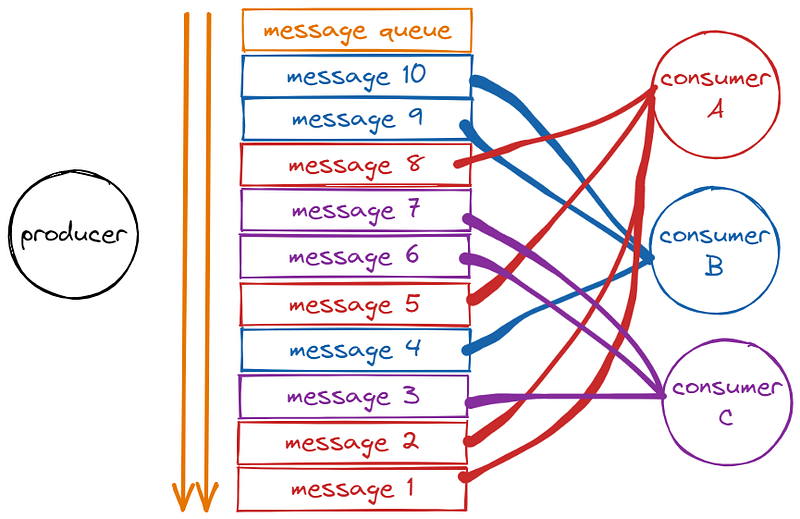
The support of the consumer group mode is mainly implemented by two commands:
XGROUP, for managing consumer groups, providing operations such as creating groups, destroying groups, and updating group starts message IDs.XREADGROUP, group consumption message operation.
For the demonstration, five messages are used in the demonstration. The idea is to create a Stream message queue, and the producer generates five messages.
Create a consumer group on the message queue, and three consumers in the group consume messages:
# Producer generates 5 messages
127.0.0.1:6379> MULTI
127.0.0.1:6379> XADD mq * msg 1
127.0.0.1:6379> XADD mq * msg 2
127.0.0.1:6379> XADD mq * msg 3
127.0.0.1:6379> XADD mq * msg 4
127.0.0.1:6379> XADD mq * msg 5
127.0.0.1:6379> EXEC
 1) "1553585533795-0"
 2) "1553585533795-1"
 3) "1553585533795-2"
 4) "1553585533795-3"
 5) "1553585533795-4"

# Create a consumer group mqGroup
127.0.0.1:6379> XGROUP CREATE mq mqGroup 0 # Create a consumer group mgGroup for message queue mq
OK

# Consumer A, Consumption Article 1
127.0.0.1:6379> XREADGROUP group mqGroup consumerA count 1 streams mq > #Consumer A in the consumer group reads a message from the message queue mq
1) 1) "mq"
   2) 1) 1) "1553585533795-0"
         2) 1) "msg"
            2) "1"
# Consumer A, Consumption Article 2
127.0.0.1:6379> XREADGROUP group mqGroup consumerA COUNT 1 STREAMS mq >
1) 1) "mq"
   2) 1) 1) "1553585533795-1"
         2) 1) "msg"
            2) "2"
# Consumer B, Consumption Article 3
127.0.0.1:6379> XREADGROUP group mqGroup consumerB COUNT 1 STREAMS mq >
1) 1) "mq"
   2) 1) 1) "1553585533795-2"
         2) 1) "msg"
            2) "3"
# Consumer A, Consumption Article 4
127.0.0.1:6379> XREADGROUP group mqGroup consumerA count 1 STREAMS mq >
1) 1) "mq"
   2) 1) 1) "1553585533795-3"
         2) 1) "msg"
            2) "4"
# Consumer C, Consumption Article 5
127.0.0.1:6379> XREADGROUP group mqGroup consumerC COUNT 1 STREAMS mq >
1) 1) "mq"
   2) 1) 1) "1553585533795-4"
         2) 1) "msg"
            2) "5"
In the above example, when three consumers A, B, and C in the same group of mqGroupconsuming messages (the consumer can specify it at the time of consumption, no need to create it in advance), they have the principle of mutual exclusion. The consumption plan is, A->1 , A->2, B->3, A->4, C->5.
XGROUP create mq mqGroup 0 is used to create a consumption group mqGroupon the message queue mq. The last parameter is 0, which means that the group starts to consume from the first message. The meaning is consistent with the 0of XREAD).
In addition to supporting CREATE, it also supports SETIDto set the starting ID, DESTROYto destroy the group, DELCONSUMER deleted the consumers in the group and other operations.
XREADGROUP group mqGroup consumerA count 1 streams mq >, used for consumerA in the group mqGroup to consume in the queue mq, the parameter >indicates the start message that has not been consumed in the group, and the parameter count 1 indicates to get one.
The syntax is basically the same as XREAD, but the concept of groups is added.
The basic principle of intra-group consumption is that the STREAM type will record a last processed (delivered) message ID (last_delivered_id) for each group so that when consuming in the group, you can start reading from the back of this value to ensure no Repeat consumption.
The above is the basic operation of the consumer group.
In addition, when a consumer group consumes, there is another issue that must be considered, that is, if a consumer consumes a message, but does not process it successfully (for example, the consumer process is down), the message It may be lost because other consumers in the group cannot consume the message again.
The discussion of the solution continues below.
Waiting Message List
In order to solve the problem of message loss caused by the consumer crash during the reading of messages in the group, STREAM designed a Pending list to record the messages that were read but not processed.
The command XPENDING is used to get the unprocessed messages of the consumer group or consumer within the consumer. The demo is as follows:
127.0.0.1:6379> XPENDING mq mqGroup
1) (integer) 5 # 5 messages read but not processed
2) "1553585533795-0" # begin ID
3) "1553585533795-4" # end ID
4) 1) 1) "consumerA" # consumer A have 3 messages
      2) "3"
   2) 1) "consumerB" # consumer B have 1message
      2) "1"
   3) 1) "consumerC" # consumer C have 1message
      2) "1"

127.0.0.1:6379> XPENDING mq mqGroup - + 10 # Use the start end count option for details
1) 1) "1553585533795-0" # Message ID
   2) "consumerA" # consumer
   3) (integer) 1654355 # It has been 1654355ms from reading to now, IDLE
   4) (integer) 5 # The message was read 5 times,delivery counter
2) 1) "1553585533795-1"
   2) "consumerA"
   3) (integer) 1654355
   4) (integer) 4
# A total of 5, the remaining 3 omitted ...

127.0.0.1:6379> XPENDING mq mqGroup - + 10 consumerA # Add the consumer parameter to get the Pending list of a specific consumer
1) 1) "1553585533795-0"
   2) "consumerA"
   3) (integer) 1641083
   4) (integer) 5
# A total of 3, the remaining 2 omitted ...
Each Pending message has four properties:
Message-ID- The
consumer IDLE, the time elapsed- Delivery counter, the number of times the message has been read
From the above results, we can see that the messages we read before are all recorded in the Pending list, indicating that all the read messages have not been processed, but only read.
So, how does it indicate that the consumer has finished processing the message?
Use the command XACK completion to tell the message processing is complete.
The demo is as follows:
127.0.0.1:6379> XACK mq mqGroup 1553585533795-0 # Notify message processing end, identified by message ID
(integer) 1

127.0.0.1:6379> XPENDING mq mqGroup # Check the Pending list again
1) (integer) 4 # The messages read but not processed have become 4
2) "1553585533795-1"
3) "1553585533795-4"
4) 1) 1) "consumerA" # Consumer A, there are 2 message processing
      2) "2"
   2) 1) "consumerB"
      2) "1"
   3) 1) "consumerC"
      2) "1"
127.0.0.1:6379>
With such a Pending mechanism, it means that after a consumer reads the message but does not process it, the message will not be lost.
After waiting for the consumer to go online again, you can read the Pending list and continue to process the message to ensure that the message is ordered and not lost.
There is another problem at this time, that is, if a consumer has no way to go online after it goes down, it needs to transfer the Pending message of the consumer to other consumers for processing, which is message transfer.
Message Transfer
During the operation of message transfer, a message is transferred to its own Pending list.
To use the syntax XCLAIM, you need to set the group, the target consumer, and the message ID of the transfer, and you need to provide IDLE (the length of time that has been read). Only after this length of time can it be transferred.
# The message currently belonging to consumer A is 1553585533795-1, which has been unprocessed for 15907,787ms
127.0.0.1:6379> XPENDING mq mqGroup - + 10
1) 1) "1553585533795-1"
   2) "consumerA"
   3) (integer) 15907787
   4) (integer) 4

# Transfer message 1553585533795-1 over 3600s to consumer B's Pending list
127.0.0.1:6379> XCLAIM mq mqGroup consumerB 3600000 1553585533795-1
1) 1) "1553585533795-1"
   2) 1) "msg"
      2) "2"

# Message 1553585533795-1 has been transferred to Consumer B's Pending.
127.0.0.1:6379> XPENDING mq mqGroup - + 10
1) 1) "1553585533795-1"
   2) "consumerB"
   3) (integer) 84404 # IDLE, it's reset
   4) (integer) 5 # The number of reads is also accumulated by 1
The above code completes a message transfer. In addition to specifying the ID, the transfer also needs to specify the IDLE to ensure that the transfer is not processed for a long time.
The IDLE of the transferred message will be reset to ensure that it will not be transferred repeatedly. It is thought that there may be concurrent operations to transfer expired messages to multiple consumers at the same time. If IDLE is set, the subsequent transfer can be avoided. will succeed because IDLE does not satisfy the condition.
For example, in the following two consecutive transfers, the second one will not succeed.
127.0.0.1:6379> XCLAIM mq mqGroup consumerB 3600000 1553585533795-1
127.0.0.1:6379> XCLAIM mq mqGroup consumerC 3600000 1553585533795-1
This is a message transfer. So far, we have used the ID of a Pending message, the attributes of the consumer and the IDLE to which it belongs, and another attribute are the number of times the message has been read, the delivery counter. The function of this attribute is to count the number of times the message has been read, including the transfer.
This property is mainly used to determine whether it is wrong data.
Dead Letter Problem
As mentioned above, if a message cannot be processed by consumers, that is, cannot be XACKed, it will be in the Pending list for a long time, even if it is repeatedly transferred to various consumers.
At this time, the delivery counter of the message will be accumulated (the example in the previous section can be seen), and when it accumulates to a certain threshold value we preset, we consider it to be bad news (also called dead letter, DeadLetter, undeliverable). news), because of the judgment conditions, we can just deal with the bad news and delete it.
To delete a message, use XDEL syntax, as demonstrated below:
# delete message from queue
127.0.0.1:6379> XDEL mq 1553585533795-1
(integer) 1
# Check that there is no more message in the queue
127.0.0.1:6379> XRANGE mq - +
1) 1) "1553585533795-0"
   2) 1) "msg"
      2) "1"
2) 1) "1553585533795-2"
   2) 1) "msg"
      2) "3"
Note that in this example, the messages in the Pending are not deleted so if you view the Pending, the messages are still there. XACK can be executed to mark its completion!
Information Monitoring
Stream provides XINFO to monitor server information, which can be queried:
# View queue information
127.0.0.1:6379> xinfo stream mq
...
# Consumer group information
127.0.0.1:6379> xinfo groups mq
...# Consumer Group Member Information
127.0.0.1:6379> xinfo consumers mq mqGroup
...At this point, the operation description of the message queue is generally over.
Let’s use Golang to implement a Redis stream message queue.
Thank you for reading this article.
Stay tuned for more.


