avatarNiharikaa Kaur Sodhi

Free AI web copilot to create summaries, insights and extended knowledge, download it at here

3298

Abstract

s://readmedium.com/how-i-built-a-business-using-twitter-82e11e50a66d">I promote</a> freebies, e.g. “comment with an emoji to get my checklist.” And they get a message in their DM automatically.</li><li><b>Scheduled Retweets</b>: helps my tweet get a second life by popping into a different time zone.</li></ul><p id="7f21">Of course, my favourite part is that it helps me save so much time and <a href="https://bettermarketing.pub/3-and-a-half-secrets-to-getting-insane-traction-on-twitter-51a5d8f267fe">builds my audience</a>.</p><p id="f666">It’s also super neat:</p><figure id="deec"><img src="https://cdn-images-1.readmedium.com/v2/resize:fit:800/1*hT3-_tjAabXSo8TVaqiYxg.png"><figcaption>Image by the author</figcaption></figure><p id="49d6">→You can check it out <a href="https://hypefury.com/">here</a>.</p><h2 id="2d39">Zoom Pro</h2><p id="886c">My course has weekly calls and my course’s paying alumni members have monthly calls.</p><p id="60d5">Google Meet isn’t the best with large group calls. The interface isn’t as sleek either.</p><p id="23a1">So while Zoom Pro is a bit pricey, and it hurts a bit when money gets deducted each month, it’s required.</p><p id="6303"><b>It provides my students with a seamless experience.</b></p><p id="9f4f">Earlier, we would conduct a meeting for 40 minutes, after which everybody would rejoin.</p><p id="0e5e">This is because Zoom’s free version only gives 40 minutes to group calls.</p><p id="39f6">If I was paying hundreds of dollars for an online course, this probably wouldn’t be a great experience.</p><p id="515b">So kind of felt it was my responsibility to do so.</p><p id="8ea1">→ Check it out <a href="https://zoom.us/">here</a>.</p><h2 id="c07f">YouTube Premium</h2><p id="72a7">Before you point it out, I use an ad blocker on my laptop.</p><p id="153d">However, I recently bought an iPad.</p><p id="2e92"><b>You see, when you’re working at home and are self-employed, it’s easy for the space between work and home to fade.</b> My bed is only 5 steps away!</p><p id="5096">As a result, I’d slip into ‘work mode’ when I read articles or watched videos on my laptop. The only alternate was watching stuff on my phone, which is uncomfortable.</p><p id="ba6a">Now, YouTube premium takes care of it. No more annoying ads and I can shut my device and listen to stuff on the go.</p><p id="cf13">→ Check it out <a href="https://www.youtube.com/premium">here</a>.</p><h1 id="8bd5">3 Paid Tools That Aren’t Worth It</h1><p id="919b" type="7">Marketing strategies are sometimes aimed to make you feel you need 38474 cool features when you don’t.</p><p id="31c0">Some tools are all fluff. People are promoting them everywhere — good for them.</p><p id="e572">But I personally found it to be a complete waste.</p><p id="cc7c">That being said, it depends on your requirements. It’s just that as a writer and creator, they don’t give me any ROI.</p><p id="c23b">But for other professions, they for sure could.</p><h2 id="6e2c">Shield Analytics</h2><p id="1999">It helps you track your LinkedIn metrics. Stuff like:</p><ul><li>follower growth</li><li>impressions trend graph</li><li>post metrics: engagement, views, comments</li><li>and much more.</li></ul><p id="8999">It costs $12/month in the ‘creator’ tier, which is the middle one.</p><p id="12b3"

Options

I had a coupon code for 25% off but I cancelled my free trial a few minutes before writing this post. Even with the discount, it isn’t worth it.</p><p id="1760">Why?</p><p id="2969">Because LinkedIn gives you these analytics, for free. Check it out:</p><figure id="953a"><img src="https://cdn-images-1.readmedium.com/v2/resize:fit:800/1*JygUS7hCUCUl7h48DUnbrA.png"><figcaption>Screenshot by the author</figcaption></figure><p id="9b1b">It’s not as ‘detailed’ and won’t show me top posts.</p><p id="a94e">But I don’t think I need to see my top posts because I love experimenting and finding new ways to write.</p><h2 id="b22d">Slack Premium</h2><p id="1f83">I conducted my course on Slack. During the previous cohort, Slack gave me a premium trial free of cost.</p><p id="b5a3">I didn’t bother using it.</p><p id="2d30">Sure, sending voice notes would be cool instead of typing one long-ass paragraph. But I just didn’t feel the need to use any pro features…</p><p id="b3c5">Marketing strategies are sometimes aimed to make you feel you need 38474 cool features when you don’t. Don’t fall for it.</p><h2 id="b806">Calendly Pro</h2><p id="0cfd">If you have a lot of calls, this may be worth it.</p><p id="43fd">For me, I run away from calls. I want as few calls as possible because during my 9–5 I was in way too many meaningless calls.</p><p id="541c">So I probably don’t need features like:</p><ul><li>flexibility to book 15/ 30/ 60 minute calls: I just share the link individually</li><li>payment button: I have a consultation page on Gumroad</li><li>follow up emails: because I hardly do calls</li><li>connect to different calendars: I just use one calendar</li></ul><p id="1e13">The integrations are pretty cool, I won't lie. But they don’t work for <i>me.</i></p><p id="ec10">However, the features may be beneficial for you if you’re a coach or a full-time consultant. Or do any work that revolves around booking meetings.</p><h1 id="382f">Last</h1><p id="982c">If spending helps you make money, it’s an investment.</p><p id="25cb" type="7">Use my technique — put money in tools that help you make money. This separates it from being an investment instead of an expense.</p><p id="bc87">Before you hop onto these tools because people around you are doing it, try free versions and see if you really need paid features.</p><p id="4cbc">Will it really make a difference in your life? Will it help you grow your business?</p><p id="7922">Only after that, pay for it.</p><p id="24e7">Hope this helps!</p><h2 id="3277">Click here to grab your free Side Hustler Checklist.</h2><h2 id="5d6c">Enjoy reading on Medium? Buy a membership for full access.</h2><div id="4d70" class="link-block"> <a href="https://bettermarketing.pub/more-people-should-use-twitter-to-earn-money-fd2cde56fbc0"> <div> <div> <h2>More People Should Use Twitter To Earn Money</h2> <div><h3>It’s helped me earn more than freelancing.</h3></div> <div><p>bettermarketing.pub</p></div> </div> <div> <div style="background-image: url(https://miro.readmedium.com/v2/resize:fit:320/1*_5kIBKhjlsLyMioluyuaKg.jpeg)"></div> </div> </div> </a> </div></article></body>

The Only Paid Tools I Use as a Solopreneur

And the ones that aren’t worth it.

Image by the author

You probably don’t need most tools you see others using. Please don’t waste your money.

It's simple psychology: you look up to somebody. They share about their tools and techniques, and you feel using them will help you get closer to being like them.

It taps into your aspirations.

Now that's all good because some of them may help. But don’t just buy stuff blindly.

Use my technique — put money in tools that help you make money. This separates it from being an investment instead of an expense.

Here are the tools I use as a full-time writer and creative entrepreneur that can help you elevate your game.

4 Paid Tools That Are Worth It

When it comes to paying, I look at it in terms of ROI (return on investment).

If a $20/ month tool or a $500 online course gives me back 2x the return (if not 10x), I’m in.

If it helps me create wealth, I’m putting money in.

Canva Pro

I didn’t want to pay for this at first.

Until a few months ago, when my course content needed revamping. Just putting my Google Docs content into Canva gave made it look cleaner and more professional.

Since then, I use it for:

  • product cover pages
  • eBook covers
  • Product page infographics

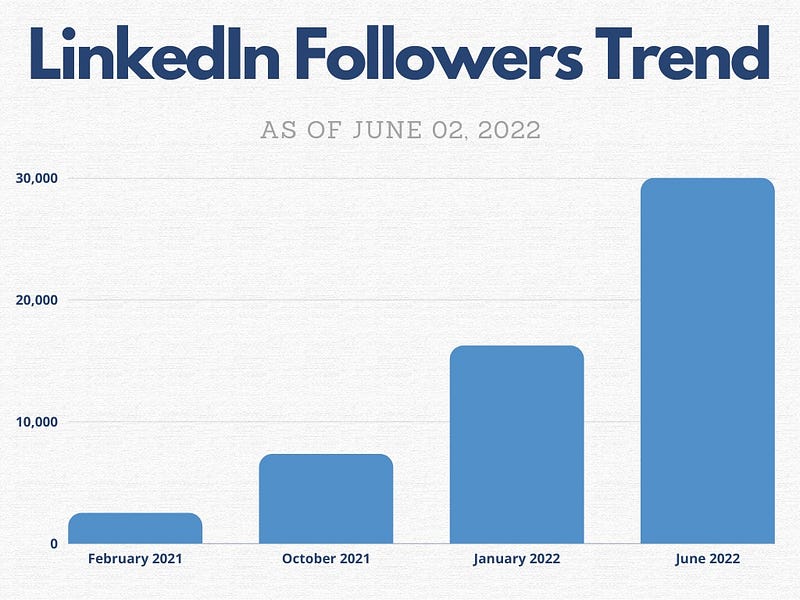
Check out the graph I made on Google Sheets versus Canva for a product page:
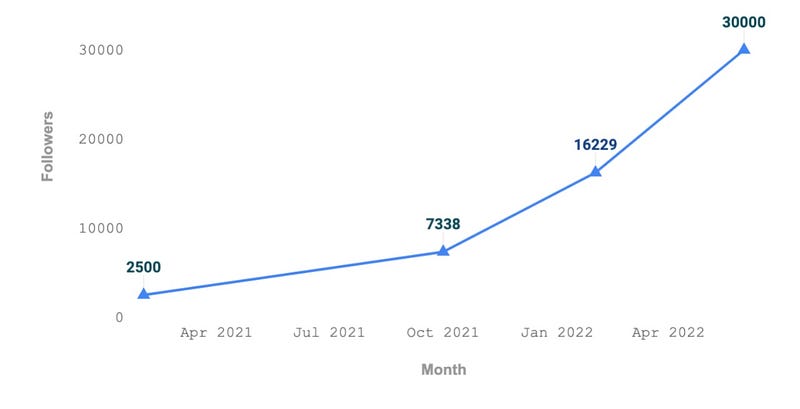
Left: Google Sheets; Right: Canva

I used it for the first time yesterday to create a video thumbnail for my first ever LinkedIn video. It took me under 5 minutes and made my video look a lot cooler.
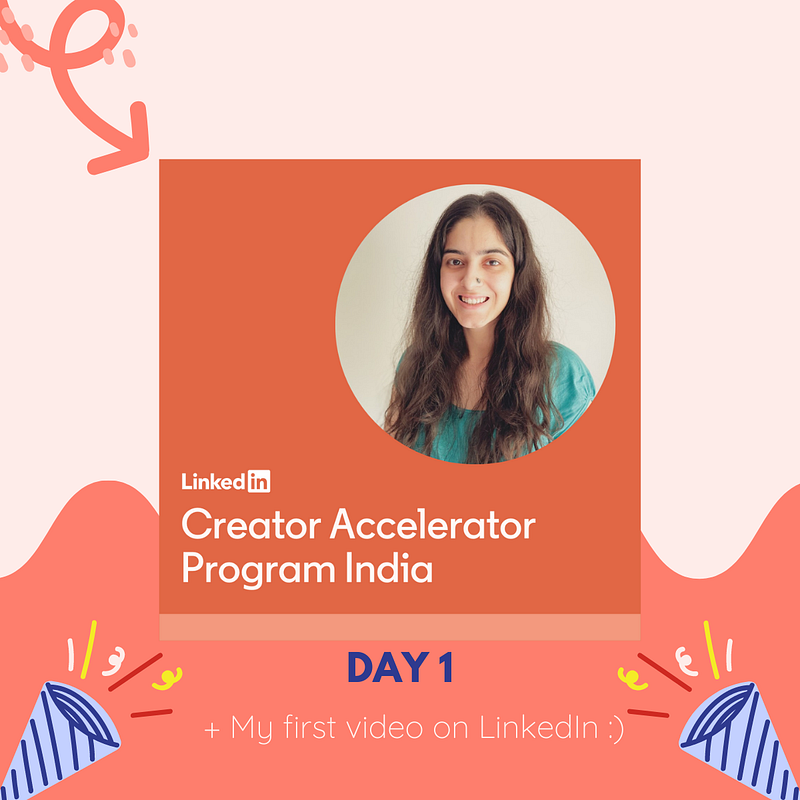
Image by the author via canva

Also, the video got over 39,000 views in 30 hours.

→ You can check it out here.

HypeFury

I love Hypefury.

It helps me build my personal brand even when I’m sleeping. What more would I want?

Yesterday, I scheduled tweets for the coming 10 days because I’m travelling this weekend. It took me about 80 minutes.

So while I travel or don’t even show up to work, my content mill is still moving and churning out content.

Some other features I like:

  • Auto-DMs: help me reach hundreds of people. I use it when I promote freebies, e.g. “comment with an emoji to get my checklist.” And they get a message in their DM automatically.
  • Scheduled Retweets: helps my tweet get a second life by popping into a different time zone.

Of course, my favourite part is that it helps me save so much time and builds my audience.

It’s also super neat:
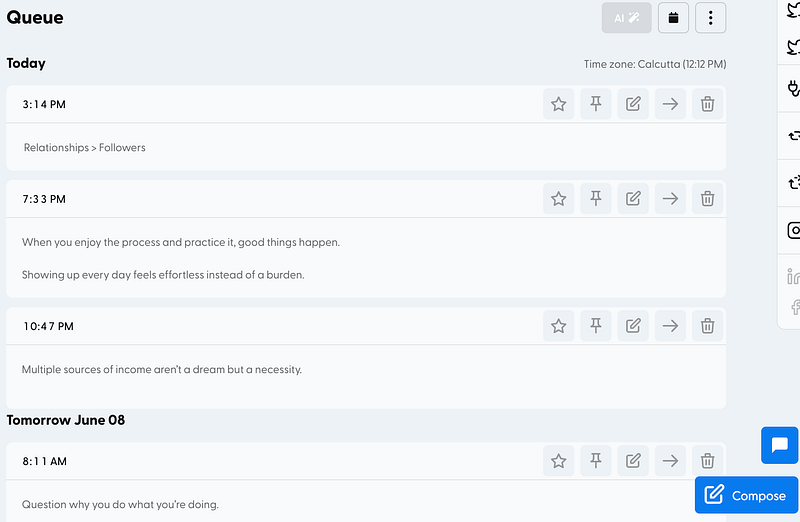
Image by the author

→You can check it out here.

Zoom Pro

My course has weekly calls and my course’s paying alumni members have monthly calls.

Google Meet isn’t the best with large group calls. The interface isn’t as sleek either.

So while Zoom Pro is a bit pricey, and it hurts a bit when money gets deducted each month, it’s required.

It provides my students with a seamless experience.

Earlier, we would conduct a meeting for 40 minutes, after which everybody would rejoin.

This is because Zoom’s free version only gives 40 minutes to group calls.

If I was paying hundreds of dollars for an online course, this probably wouldn’t be a great experience.

So kind of felt it was my responsibility to do so.

→ Check it out here.

YouTube Premium

Before you point it out, I use an ad blocker on my laptop.

However, I recently bought an iPad.

You see, when you’re working at home and are self-employed, it’s easy for the space between work and home to fade. My bed is only 5 steps away!

As a result, I’d slip into ‘work mode’ when I read articles or watched videos on my laptop. The only alternate was watching stuff on my phone, which is uncomfortable.

Now, YouTube premium takes care of it. No more annoying ads and I can shut my device and listen to stuff on the go.

→ Check it out here.

3 Paid Tools That *Aren’t* Worth It

Marketing strategies are sometimes aimed to make you feel you need 38474 cool features when you don’t.

Some tools are all fluff. People are promoting them everywhere — good for them.

But I personally found it to be a complete waste.

That being said, it depends on your requirements. It’s just that as a writer and creator, they don’t give me any ROI.

But for other professions, they for sure could.

Shield Analytics

It helps you track your LinkedIn metrics. Stuff like:

  • follower growth
  • impressions trend graph
  • post metrics: engagement, views, comments
  • and much more.

It costs $12/month in the ‘creator’ tier, which is the middle one.

I had a coupon code for 25% off but I cancelled my free trial a few minutes before writing this post. Even with the discount, it isn’t worth it.

Why?

Because LinkedIn gives you these analytics, for free. Check it out:
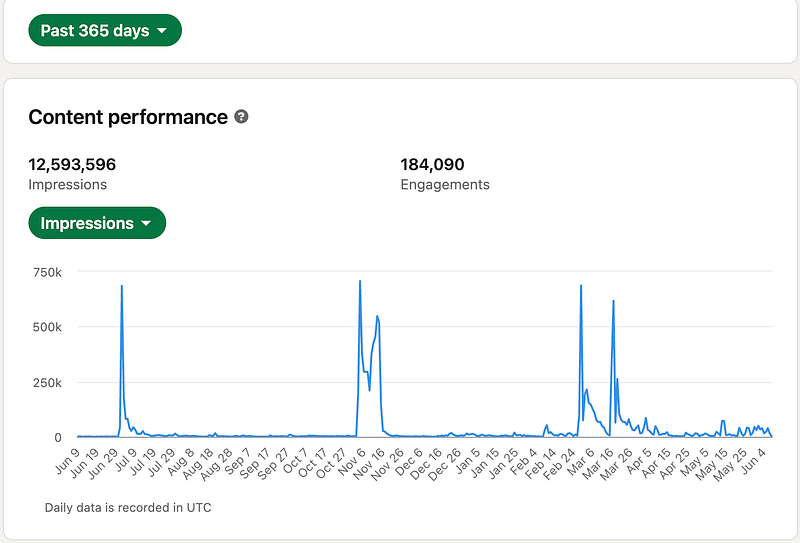
Screenshot by the author

It’s not as ‘detailed’ and won’t show me top posts.

But I don’t think I need to see my top posts because I love experimenting and finding new ways to write.

Slack Premium

I conducted my course on Slack. During the previous cohort, Slack gave me a premium trial free of cost.

I didn’t bother using it.

Sure, sending voice notes would be cool instead of typing one long-ass paragraph. But I just didn’t feel the need to use any pro features…

Marketing strategies are sometimes aimed to make you feel you need 38474 cool features when you don’t. Don’t fall for it.

Calendly Pro

If you have a lot of calls, this may be worth it.

For me, I run away from calls. I want as few calls as possible because during my 9–5 I was in way too many meaningless calls.

So I probably don’t need features like:

  • flexibility to book 15/ 30/ 60 minute calls: I just share the link individually
  • payment button: I have a consultation page on Gumroad
  • follow up emails: because I hardly do calls
  • connect to different calendars: I just use one calendar

The integrations are pretty cool, I won't lie. But they don’t work for me.

However, the features may be beneficial for you if you’re a coach or a full-time consultant. Or do any work that revolves around booking meetings.

Last

If spending helps you make money, it’s an investment.

Use my technique — put money in tools that help you make money. This separates it from being an investment instead of an expense.

Before you hop onto these tools because people around you are doing it, try free versions and see if you really need paid features.

Will it really make a difference in your life? Will it help you grow your business?

Only after that, pay for it.

Hope this helps!

Click here to grab your free Side Hustler Checklist.

Enjoy reading on Medium? Buy a membership for full access.

Work
Tools
Internet
Advice
Writing
Recommended from ReadMedium