
The Only 45 Methods You Should Master To Become A NumPy Pro
After using NumPy for over three years, here are the 45 methods I have used almost all the time

NumPy (or Numeric Python) sits at the core of every data science and machine learning project.
The whole data-driven ecosystem is in some way or the other dependent upon NumPy and its core functions. This makes it one of the most important and game-changing libraries ever built in Python.
Given that NumPy holds wide applicability in industry and academia due to its unparalleled potential, a firm acquaintance with its methods and syntax is an utmost necessity for python programmers.
However, if you are a newbie and trying to get a firm hold on the NumPy library, things can appear very daunting and overwhelming at first if you start with NumPy’s official documentation.
Having been there myself, this blog is intended to assist you in getting started with NumPy.
In other words, in this blog, I will reflect on my 3+ years of experience using NumPy and share those 45 specific methods that I have used almost all the time.
You can refer to the code for this article here.
Let’s begin 🚀
Importing the library
Of course, if you want to use the NumPy library, you should import it.
The widely-adopted convention here is to set the alias of numpy as np. We will also use pandas here and there so let’s import that too.
1–10) NumPy array creation methods
Below are some of the most common ways to create a NumPy array.
#1) From a python list
To convert a python list to a NumPy array, use the np.array() method:
We can verify the datatype of the object created using the type method available in Python:
In the above demonstration, we created a one-dimensional array.

However, we can also create a multidimensional NumPy array using a list of lists with the np.array() method:
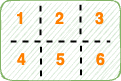
To create a NumPy array of a specific datatype, pass the dtype argument:
#2) Create a NumPy array of Zeros
It is common to create a NumPy array filled with zeros. This is possible using the np.zeros() method in NumPy as follows:
For multidimensional NumPy arrays:
#3) Create a NumPy array of ones
Instead of zeros, if you want to create an array filled with ones, use the np.ones() method instead:
#4) Create an Identity NumPy Array
In an identity matrix, the diagonal is filled with “1” and all entries except the diagonal are “0”, as shown below:
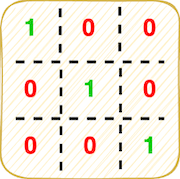
Use thenp.eye() method to create the identity matrix.
#5) Create an equally spaced NumPy Array with a specific step

To generate equally spaced values within a given interval, use the np.arange() method:
- Generate values from
start=0tostop=10withstep=1:
- Generate values from
start=5tostop=11withstep=1:
- Generate values
start=5tostep=11withstep=2.
The
stopvalue is not included in the final array and by default,step=1.
#6) Create an equally spaced NumPy Array with a specific array size
This is similar to np.arange() discussed above but with np.linspace(), you can generate num numbers in an interval and the numbers are evenly spaced.
#7–8) Generate a random NumPy array
- To generate a random array of integers, use the
np.random.randint() method:
- To generate random float samples, however, use the
np.random.random() method:
#9–10) Generate NumPy Array from a Pandas Series
If you want to convert a Pandas’ series to a NumPy array, you can do that using either np.array() or np.asarray() method:
11–21) NumPy Array Manipulation Methods
Next, we’ll discuss some of the most widely-used methods to manipulate a NumPy array.
#11) Shape of the NumPy Array
You can determine the shape of the NumPy array using the np.shape() method of the ndarray.shape attribute of the NumPy array as follows:
#12) Reshape the NumPy Array
Reshaping refers to giving a new shape to your NumPy array without changing its data.
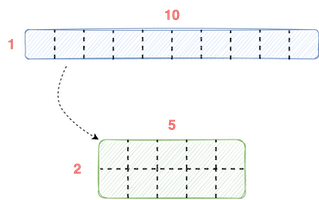
You can alter the shape using the np.reshape() method:
#13–14) Transpose the NumPy Array
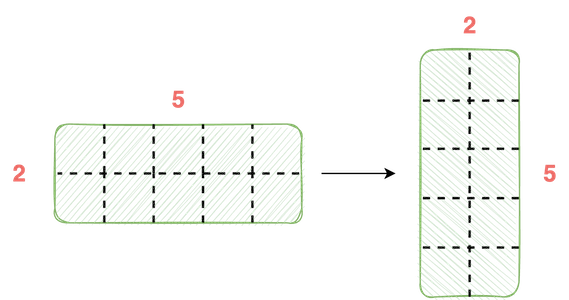
If you want to transpose a NumPy array, you can do so using the np.transpose() method or ndarray.T as demonstrated below:
#15–17) Concatenate multiple NumPy arrays to form one NumPy Array
You can use the np.concatenate() method to join a sequence of arrays and obtain a new NumPy array:
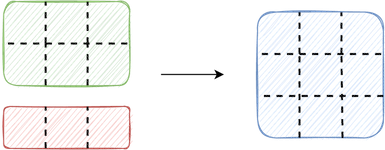

axis=0is same asnp.vstack().axis=1is same asnp.hstack().
#18) Flatten NumPy Array

If you want to collapse the entire NumPy array into a single dimension, you can use the ndarray.flatten() method as shown below:
#19) Unique Elements of a NumPy Array
To determine the unique elements of a NumPy array, use the np.unique() method as demonstrated below:
#20) Squeeze a NumPy Array
If you want to remove axes of length one from your NumPy array, use the np.squeeze() method. This is illustrated below:
#21) Transform NumPy Array to Python List
To obtain a python list from a NumPy array, use the ndarry.tolist() method as shown below:
22–33) Mathematical Operations on NumPy Arrays
NumPy offers a wide variety of element-wise mathematical functions you can apply to NumPy arrays. You can read all the mathematical operations available here. Below, let’s discuss some of the most commonly used ones.
#22–24) Trigonometric Functions
#25–28) Rounding Functions
- Return the element-wise floor using the
np.floor() method. - Return the element-wise ceiling using the
np.ceil() method. - Round to the nearest integer using the
np.rint() method.
- Round to a given number of decimals using the
np.round_() method:
#29–30) Exponents and logarithms
- Calculate the element-wise exponential using the
np.exp() method. - Calculate the element-wise natural logarithm using the
np.log() method.
#31–32) Sum and Product
- Use the
np.sum() method to calculate the sum of array elements:
- Use the
np.prod() method to calculate the product of array elements:
#33) Square Root
Use the np.sqrt() method to compute the square root of array elements:
34–36) Matrix and Vector Operations
#34) Dot Product
If you want to calculate the dot product of two NumPy arrays, use the np.dot() method:
#35) Matrix Product
To calculate the matrix product of two NumPy arrays, use thenp.matmul() or the @ operator in Python:
Note: The output of
np.matmul()andnp.dot()are the same in this case but they can differ significantly. You can read their differences here.
#36) Vector Norm
Vector norms represent a set of functions used to measure a vector’s length. I already have a post on vector norm, which you can read below:
Use the np.linalg.norm() method to find the matrix or vector norm:
37–38) Sorting Methods
#37) Sort a NumPy Array
To sort the array in-place, use the ndarray.sort() method.
#38) Order of Indices in a Sorted NumPy Array
To return the order of the indices that would sort the array, use the np.argsort() method:
39–42) Searching Methods
#39) Indices corresponding to Maximum Values
To return the indices of the maximum values along an axis, use the np.argmax() method as demonstrated below:
To find the index in a non-flattened array, you can do the following:
#40) Indices corresponding to Minimum Values
Similarly, if you want to return the indices of the minimum values along an axis, use the np.argmin() method as demonstrated below:
#41) Search based on a condition
If you want to select between two arrays based on a condition, use the np.where() method as shown below:
#42) Indices of Non-Zero Elements
To determine the indices of non-zero elements in a NumPy Array, use the np.nonzero() method:
43–45) Statistical Methods
Next, let’s look at the methods to compute standard statistics on NumPy Arrays. You can find all the statistical techniques supported by NumPy here.
#43) Mean
To find the mean of the values in a NumPy array along an axis, use the np.mean() method as demonstrated below:
#44) Median
To compute the median of a NumPy array, use the np.median() method.
#45) Standard Deviation
To compute the standard deviation of a NumPy array along a specified array, use the np.std() method.
Congratulations 🎊, you have just learned about the 45 most useful methods in NumPy.
I can confidently say that you will likely use these methods 90% of the time working with NumPy.
The claim is backed by my own experience as well as working with fellow data scientists.
I did a similar post on the Pandas library as well. You can read that article below:
Thanks for reading. I hope this post was helpful.


