avatarSumesh P

Free AI web copilot to create summaries, insights and extended knowledge, download it at here

1817

Abstract

back then.</p><p id="7a8d">However, over the years it has been natively integrated with many Azure services.</p><p id="0255">You might have noticed, the Logs option under the resource blade of most services, using which you can easily access the Logs for the resource in the Log Analytics Workspace.</p><figure id="536e"><img src="https://cdn-images-1.readmedium.com/v2/resize:fit:800/1*n8aSncnS3YLBfONNed0foQ.png"><figcaption>Logs option in the Resource blade of a Virtual Machine <b>(Image by Sumesh P)</b></figcaption></figure><p id="3fb2"><b>So, how does learning Log Analytics add value?</b></p><p id="01df">The technology behind Azure Log Analytics workspace is not just utilized by Azure Monitor Logs, it is used by other services such as</p><p id="5e61">· Azure Security Center · Azure Alerts · Azure Sentinel · Application Insights · Service Map · Azure Migrate · Network Watcher · Change Tracking & Inventory</p><p id="db5b">and more (Logic Apps, Dashboards) ….</p><p id="2aef">Some of these services were earlier Log Analytics solutions which have grown into their own independent offerings. So that tells you something!</p><figure id="e408"><img src="https://cdn-images-1.readmedium.com/v2/resize:fit:800/1*8hn2gwTqL9Vjrkr7pRaphQ.jpeg"><figcaption>(<b>Image by Sumesh P) </b>Azure Monitor & Log Analytics Integration Scenarios</figcaption></figure><p id="edce">Being able to integrate Log Analytics with other services like Logic Apps or Azure DevOps opens a whole new spectrum of possibilities!!!</p><p id="a43f">Wait there’s more… the <b>Kusto Query Language (KQL)</b> that you will be learning as part of Log Analytics is also used in a variety of other services like</p><p id="fad9">· Application Insights · Azure Data Explorer · Azure Resource Graph · Azure Workbooks etc.</p><p id="a6c7">The

Options

best part is KQL is quite easy to learn and there are free resources available to get started.</p><p id="934f">So, what does it all mean to you?</p><h1 id="f047">This means that the knowledge that you acquire will not only help you in being an expert in Log Analytics but also it will lay a solid foundation for you to be an expert on other technologies mentioned above.</h1><p id="da02">Last but not least who in your organization doesn’t like insightful dashboards and reports that give you a much deeper understanding of the application and infrastructure performance.</p><p id="6394">Using the new visualization options in Log Analytics, you can create wonderful reports and dashboards and impress your superiors and executives alike.</p><p id="d99f">Bottom line, learning Azure Log Analytics has a lot more advantages than is apparent, i.e. more bang for the buck.</p><blockquote id="1624"><p>I can tell you from personal experience, learning Log Analytics has turned out to be one of the best investments I have done for my career and has helped me stand out!</p></blockquote><p id="16b4">I recommend the same for you!</p><p id="337f"><b>Learn More:</b></p><p id="bb9b"><i>· <a href="https://www.udemy.com/course/azure-log-analytics/?referralCode=0386E6DD355FB696D930">Udemy Course: Azure LOG ANALYTICS Inside-Out [created Jan 2020]</a> 5 hours of valuable content Disclaimer: Course authored by self · <a href="https://azure.microsoft.com/en-in/updates/free-query-language-course-la-ai/">Free course on the Log Analytics query language (KQL) </a> </i>· <a href="https://docs.microsoft.com/en-us/azure/azure-monitor/log-query/get-started-portal">Tutorial: Get started with Log Analytics queries</a> · <a href="https://github.com/microsoft/AzureMonitorCommunity">Azure Monitor Community</a></p></article></body>

One Azure Technology That Can Boost Your Career, But You Blissfully Ignore

Learn this Azure Technology and be an expert on many Azure services and keep yourself ahead of your colleagues.

Photo by Clark Tibbs on Unsplash

Do you know what are the Azure foundational services?

They are basic services that form the building block for other sophisticated services or services that you ‘need’ for creating anything in Azure.

They are Compute, Storage, and Networking.

Since they are everywhere, it makes sense to invest more time understanding more about them; it will give you more bang for the buck.

Can you think for a moment and tell me what other service is so omnipresent in Azure?

You are now thinking of maybe, Backup …. Security … IAM / RBAC ……. Azure Monitor…. almost there… Azure Monitor Logs or more commonly known as Log Analytics.

Surprised?

Read on to understand why I believe learning Log Analytics will set you apart from the crowd!

Log Analytics has been there for a few years in azure, it was made popular as part of the now-defunct Operations Management Suite aka OMS.

For those of you who tried it out earlier, you needed an agent to be installed on the VMs to send data to the Log Analytics Workspace and analyze it; only a few services were supported back then.

However, over the years it has been natively integrated with many Azure services.

You might have noticed, the Logs option under the resource blade of most services, using which you can easily access the Logs for the resource in the Log Analytics Workspace.
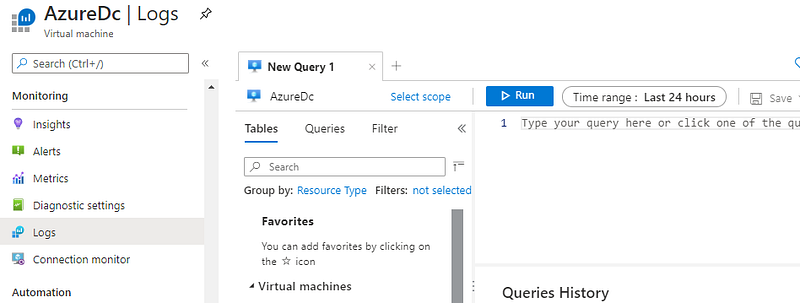
Logs option in the Resource blade of a Virtual Machine (Image by Sumesh P)

So, how does learning Log Analytics add value?

The technology behind Azure Log Analytics workspace is not just utilized by Azure Monitor Logs, it is used by other services such as

· Azure Security Center · Azure Alerts · Azure Sentinel · Application Insights · Service Map · Azure Migrate · Network Watcher · Change Tracking & Inventory

and more (Logic Apps, Dashboards) ….

Some of these services were earlier Log Analytics solutions which have grown into their own independent offerings. So that tells you something!
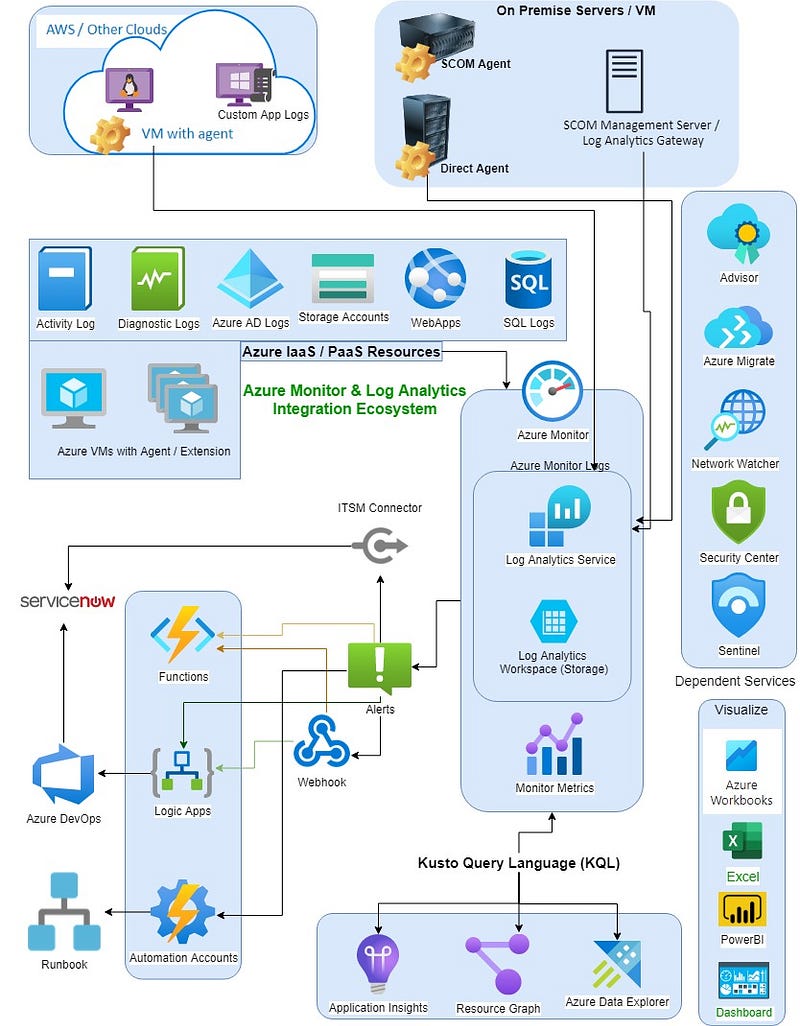
(Image by Sumesh P) Azure Monitor & Log Analytics Integration Scenarios

Being able to integrate Log Analytics with other services like Logic Apps or Azure DevOps opens a whole new spectrum of possibilities!!!

Wait there’s more… the Kusto Query Language (KQL) that you will be learning as part of Log Analytics is also used in a variety of other services like

· Application Insights · Azure Data Explorer · Azure Resource Graph · Azure Workbooks etc.

The best part is KQL is quite easy to learn and there are free resources available to get started.

So, what does it all mean to you?

This means that the knowledge that you acquire will not only help you in being an expert in Log Analytics but also it will lay a solid foundation for you to be an expert on other technologies mentioned above.

Last but not least who in your organization doesn’t like insightful dashboards and reports that give you a much deeper understanding of the application and infrastructure performance.

Using the new visualization options in Log Analytics, you can create wonderful reports and dashboards and impress your superiors and executives alike.

Bottom line, learning Azure Log Analytics has a lot more advantages than is apparent, i.e. more bang for the buck.

I can tell you from personal experience, learning Log Analytics has turned out to be one of the best investments I have done for my career and has helped me stand out!

I recommend the same for you!

Learn More:

· Udemy Course: Azure LOG ANALYTICS Inside-Out [created Jan 2020] 5 hours of valuable content Disclaimer: Course authored by self · Free course on the Log Analytics query language (KQL) · Tutorial: Get started with Log Analytics queries · Azure Monitor Community

Azure
Microsoft
Log Analytics
Learn Cloud Computing
Cloud
Recommended from ReadMedium