
Humor
The Mystery of The Missing Private Note
And other such noteworthy unsolved mysteries
Many months ago, I was a newbie swimming in the vastness of the Medium ocean, looking for light.
A kind person gave me some feedback on one of my early posts. I was elated. Someone was reading my post and actually taking the time to provide feedback? How cool is this community! 💕
I got a notification on my phone app that he had left a note for me. Medium refers to private comments as Private Notes. Public comments are called Responses.
It was early days. Any such notification got my adrenaline pumping. A year later, nothing has changed. I still get just as excited.
I rushed to open my laptop to view the private note. I scrolled up and down, and again down and up.
The private note was nowhere to be found.
Was it so private that it was hidden from view?! I found myself gulping. What do I do now? How do I look for it? Who do I ask? Did I do something wrong and lose the note? Can I go back to the kind soul who gave me feedback and say, “Erm, I lost your note!” Would that make me look stupid?
After an agonizing wait for the elusive note to show up, I decided to ask the person who left the note for me. Leaving a note for him was out of the question because I did not trust notes anymore. Luckily I had his email ID.
“Sir, could you tell me what you had noted? I seem to have lost the note.”
He replied instantly. He said he was sorry because he had probably dismissed the note by mistake.
What?
I was notified about a note. Then the noter dismissed the note on his screen. Now the notee — me — has no access to the note anymore.
Having faced many such strange mysteries shrouding the elusive Private Note, I decided to educate others about it.
Have no fear — there is a note about Dismiss Note later in this post!
What is a Private Note?
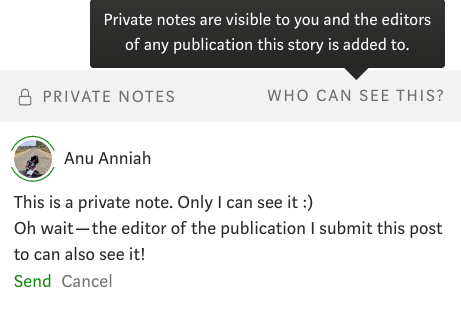
Anyone can leave private notes on your post. You can leave private notes on anyone’s post. Only the writer of that post and ‘all editors of the publication’ can see those cute private notes. You begin to question the meaning of the word private.
How on earth do I insert a private comment?
- Select any word or words or sentences on a post. A set of dark and dangerous-looking icons will appear. Fear not! They are harmless.

- Click on the lock icon trapped in a callout. I think the lock was trying to say something. In a flash of brilliance, they enclosed it in a callout. Now we will never know.
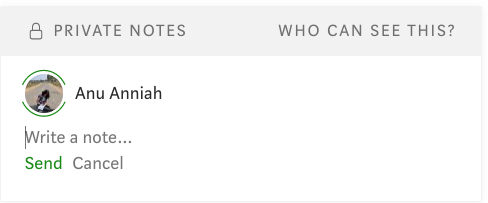
- A really neat looking pane appears. It looks so inviting you are tempted to write in it. ‘Write a note’ it says, and waits.
- Start typing your deepest thoughts to the person whose post you are on. It is all very private — except for those snoopy editor folks.
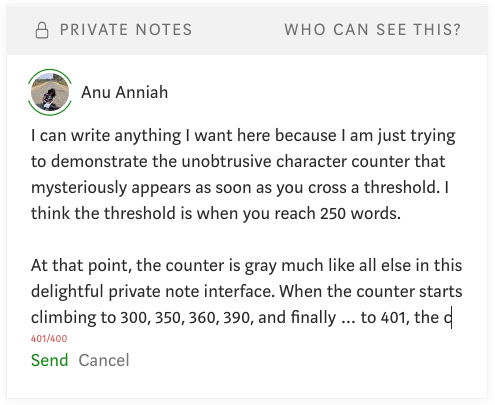
- Each initial note can handle a maximum of 400 characters. So think twice before you wax eloquent. Brevity is the need of the hour. If you type more than 400 words, you will see a nifty character counter in red color at the bottom. Once this turns red, you can click Send till eternity and nothing will happen.
- Be brave. You have come this far. Click Send and wait with bated breath for the target of your private note to respond with a fervor that matches your own.
Note: Many a match has been made and deals struck because of the private note feature. I use the word ‘fervor’ for a reason and I am sticking to it!
- If you are not satiated with 400 characters, don’t worry. Medium has it covered. They know private matters cannot be sorted in a mere 400 characters. You can click Reply and continue as if nothing has happened. You will be replying to your own note, but hey, we know writer types talk to themselves — a lot! The character limit is 200 for notes after the initial 400 character note.
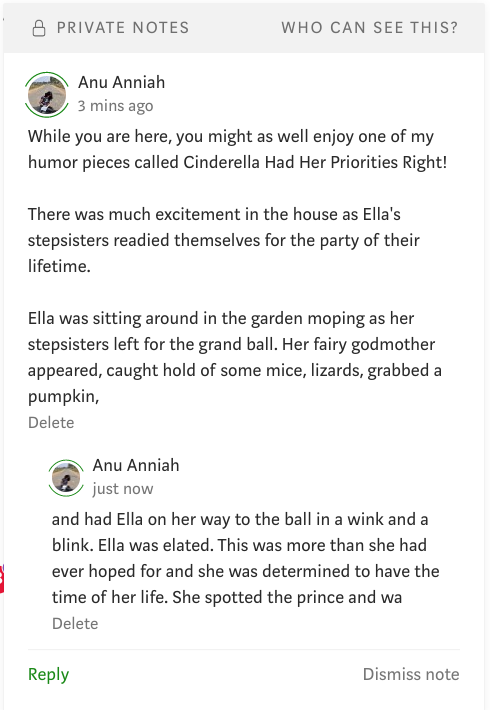
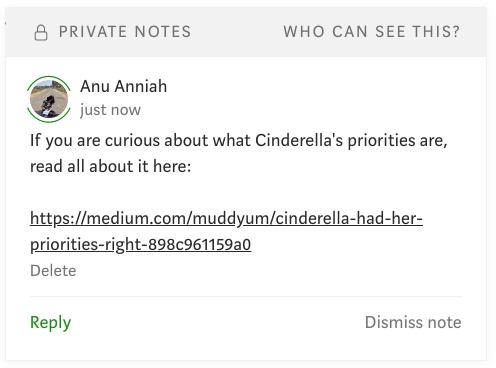
- Oh, and the best part? You can include links to articles in your private notes. People have been known to use this feature to their advantage. They publish poetry pouring out their undying love. Then they subtly add a link to the poem in a private note to the target of their feelings. Ta da! Message conveyed!
Beware of the ‘dismiss note’ feature
This is the tricky one. Or maybe one of the tricky ones.
After a particularly long chat with someone via private notes, I found the recurring * symbols all over my post a bit annoying. So I used the Dismiss Note option to clean up.
Suddenly I heard a scream! The person I was privately corresponding with could no longer see the notes either. She had meant to make note of some of the stuff we had discussed, but alas, our conversation was lost forever.
Think twice, then two more times before you click Dismiss Note. You are prompted to undo the dismissal. But if you do not know the double-edged consequences of a simple Dismiss Note, it is unlikely that you will use the undo feature.
Never ever use the Esc key
After having painstakingly typed out some feedback to a writer, I made the mistake of pressing the Esc key. Oh no! All 400 characters in the note were wiped out. Gone. Not even a small word was left behind. It was a clean job. This one has no undo. So, be careful!
Ok, but where is that private note?
You woke up, opened your laptop, clicked the green notification icon with glee, and saw that someone left you a private note. You salivated.
You clicked on the link and rushed to the post. Great! But you saw no note anywhere on your post. What gives?
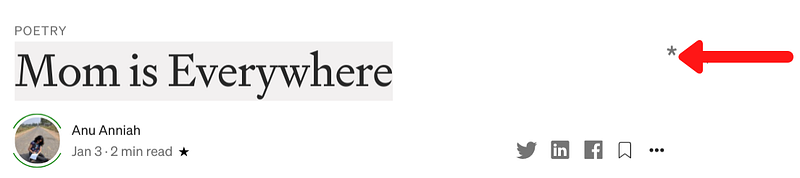
- As you scroll up and down your post, look for these tiny gray asterisks. * They are the guardians of the private notes.
- Position the mouse pointer carefully on the asterisk and click on it to reveal the private note. I make sure to wear my glasses so as not to spend ten minutes clicking above and below the tiny asterisk.
It is perfectly possible that someone left you a note, you got notified, and then they changed their mind and dismissed the note. Hahahaha — keep scrolling up and down — you’ll never know what it said.
How to disallow those pesky private notes?
If you are among those who value your privacy too much and abhor the thought of strangers leaving you notes, you can disable private notes.
- Go to Settings in your profile and scroll down until you see an option called Allow private notes.

- Switch the darn thing off. That’s it.
Note: There is a downside to this harsh decision though. If you plan on submitting to various publications, the editors will never be able to leave any comments or reach out to you in any way. Your only editors will be me, myself, and I.
Private notes do not announce themselves in the mobile app
If you have submitted an article to a publication and are waiting to hear from them, do check on the desktop site. Private notes may or may not show up in your mobile app.
Better yet, scroll through the post you have submitted to spot the asterisks. I’ve feverishly checked the app for notifications only to find later that an editor had left me a private note nearly a week ago!
You are now the recipient of information about one of the most interesting features of this platform.
With great knowledge comes great responsibility. Use this feature wisely!