
The Mystery Behind Java’s ClassLoaders: Unravelling the Core

A Puzzling Encounter: The Day ClassLoaders Saved the Project
Picture this: I’m working on a critical Java application for a significant client. The launch date is approaching, and the pressure is rising. My team and I have been coding tirelessly, pulling long nights and early mornings to ensure everything is perfect. Finally, the application seems ready, robust, and foolproof — or so we thought.
During the final rounds of testing, when we’re about to pat ourselves on the back, a mysterious ClassNotFoundException appears. Panic rises. The class causing the error, let’s call it com.ourapp.utils.SpecialFormatter is right there in our codebase, sitting innocently in its package. Yet, the JVM stubbornly insists it’s missing.
In my decade of Java development, I’ve faced many mysterious cases, but this was a very special. Here, we had a complex application, a looming deadline, and an error that defied logic. After hours of head-scratching, reviewing the codebase, and double-checking our build configurations, the solution emerged from an unlikely hero: Java’s ClassLoaders.
Understanding ClassLoaders is often overlooked, but it was the key to unraveling this mystery. I realized that while the class SpecialFormatter was present, it wasn’t being loaded as expected, and then I proved my guess with the log tracing.
Here’s the revelation: our project was structured into multiple modules, each being built into its JAR file. SpecialFormatter resided in a utility module, say utils.jar, which was a dependency for our main application module. However, due to a recent restructuring of our project, the classpath referenced in the manifest of our main application, JAR, was outdated. It pointed to an old version of utils.jar that didn’t contain SpecialFormatter.
The ClassLoader was diligently doing its job, searching for SpecialFormatter in the locations specified by the classpath. However, since it looked in the wrong version of utils.jar, it couldn’t find the class, leading to the ClassNotFoundException.
The fix? Once I identified the discrepancy, I updated the classpath in the manifest file of our main application, JAR, to reference the correct version of utils.jar. This seemingly small change was like turning a key in a lock. Suddenly, the ClassLoader could locate SpecialFormatter, and just like that, the application sprung to life, error-free.
This experience was a vivid reminder of the difficulties of Java ClassLoaders. Their role might seem behind the scenes, but they are significant in how applications run. By delving into the depths of ClassLoaders and understanding their behavior, I could trace and resolve what seemed like an untraceable issue. It saved our project from potential disaster and saved my sanity as well.
ClassLoaders: Java’s Unsung Heroes
So, what exactly is a ClassLoader? A ClassLoader in Java is like a librarian in a vast library. Just like a librarian fetches the book you need from stacks of shelves, a ClassLoader fetches the classes when the JVM needs them. It’s like saying, “Hey, ClassLoader, I need this class. Can you grab it for me?” the ClassLoader scurries off into the depths of your code and libraries to find and load that class.
Here’s a simple code example to illustrate this:
public class MyClass {
    public static void main(String[] args) {
        // We are asking the ClassLoader to find and load the class named "MyClass"
        ClassLoader classLoader = MyClass.class.getClassLoader();
        try {
            Class<?> aClass = classLoader.loadClass("MyClass");
            System.out.println("Class Loaded: " + aClass.getName());
        } catch (ClassNotFoundException e) {
            e.printStackTrace();
        }
    }
}
In this code snippet, we ask the ClassLoader to find and load the class named “MyClass”. It prints out “Class Loaded: MyClass” if all goes well. If not, well, you might have a mystery to solve!
Why Are ClassLoaders Important?
- Organization: Imagine a library with no librarians. Books (classes) would be everywhere, making it impossible to find anything.
ClassLoaderskeep your classes organized. - Security:
ClassLoadersact like security guards, ensuring that only safe and authorized classes are loaded into the JVM. - Efficiency: They only load a class when it’s needed. This lazy loading helps manage memory more efficiently, which is crucial for large applications.
So, while ClassLoaders seem like background characters in the grand play of Java development, they ensure your application runs smoothly and securely. Understanding them can be your secret weapon in unraveling many Java mysteries.
Java ClassLoaders Demystified
Understanding ClassLoaders in Java can seem very complicated at first, but at the end of the day, it’s a pretty straightforward process. Let’s demystify this concept and make it as simple as possible.
Definition and Primary Function of ClassLoaders in Java
A ClassLoader in Java is essentially a part of the Java Runtime Environment (JRE) that dynamically loads Java classes into the Java Virtual Machine (JVM). It is a bridge that brings classes from your code into the JVM, just like a transporter that carries goods from one place to another.
How ClassLoaders Bring Classes into the JVM
When your Java program runs, it doesn’t know about all the classes it will need. The ClassLoader steps in and loads these classes dynamically, on demand.
Imagine you have a class named Greeting:
public class Greeting {
    public void sayHello() {
        System.out.println("Hello!");
    }
}
public class Main {
    public static void main(String[] args) {
        Greeting greeting = new Greeting();
        greeting.sayHello();
    }
}
When the Main class is executed, the JVM doesn’t initially know about the Greeting class. As soon as the line new Greeting() is reached, the ClassLoader jumps into action and loads the Greeting class into the JVM to be used.
The Concept of the Class Namespace
In Java, each ClassLoader has its namespace. This means that two classes with the same name can exist if they are loaded by different ClassLoaders, much like how two people can have the same name but are distinct because they have different home addresses.
ClassLoader classLoaderA = new CustomClassLoader();
ClassLoader classLoaderB = new CustomClassLoader();
Class<?> classA = classLoaderA.loadClass("com.example.MyClass");
Class<?> classB = classLoaderB.loadClass("com.example.MyClass");
System.out.println(classA == classB); // This will print 'false'
In this example, even though MyClass is loaded by both ClassLoaders, they are treated as different classes in the JVM because they belong to different namespaces (different ClassLoaders).
The Hierarchy of ClassLoaders
The world of Java’s ClassLoaders is structured like a family tree, with each ClassLoader having a specific role and place in the hierarchy.
Visual
To visualize the hierarchy, imagine a pyramid:
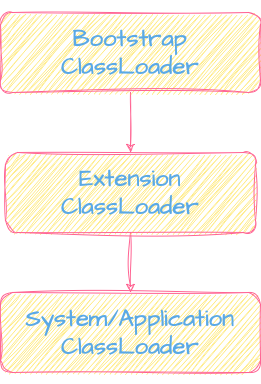
- The Bootstrap ClassLoader sits at the top, like the pyramid's peak.
- The Extension ClassLoader forms the middle layer.
- The System/Application ClassLoader forms the base where most of your application’s action happens.
Understanding this hierarchy is crucial because it dictates how classes are loaded and in what order. It ensures that core Java classes are given priority and that the correct versions of classes are loaded without conflicts.
Bootstrap ClassLoader: The Foundation
At the top of the ClassLoader hierarchy sits the Bootstrap ClassLoader. It’s the ‘grandparent’ of all ClassLoaders. This ClassLoader is so fundamental that it’s part of the Java Runtime Environment (JRE). It’s responsible for loading the core Java classes, like java.lang.String or java.util.List. Think of it as the ClassLoader that loads the classes that make Java, well, Java.
Here’s a little snippet to see it in action:
Class<String> stringClass = String.class;
ClassLoader bootstrapClassLoader = stringClass.getClassLoader();
System.out.println("Bootstrap ClassLoader: " + bootstrapClassLoader);
Running this, you’ll notice it prints null. In Java, the Bootstrap ClassLoader is represented as null because it’s part of the native code, not the Java code.
Extension ClassLoader: Extending the Basics
Next in line is the Extension ClassLoader. This one is like the ‘parent’ in the hierarchy. It loads classes that are extensions of the standard core Java classes. These are typically the classes that reside in the JRE/lib/ext folder or any other path specified by the java.ext.dirs system property.
To see the Extension ClassLoader at work, you can use:
ClassLoader extensionClassLoader = ClassLoader.getSystemClassLoader().getParent();
System.out.println("Extension ClassLoader: " + extensionClassLoader);
This code retrieves the parent of the System ClassLoader, which is the Extension ClassLoader.
System/Application ClassLoader: The Most Common ClassLoader
Finally, we have the System or Application ClassLoader, the ‘child’ in the family. This is the ClassLoader that application developers interact with the most. It loads classes found in the classpath environment variable or those specified by the -cp or -classpath option when running a Java application.
Here’s how you can get the System ClassLoader:
ClassLoader systemClassLoader = ClassLoader.getSystemClassLoader();
System.out.println("System/Application ClassLoader: " + systemClassLoader);
This code will fetch the ClassLoader that’s loading your application’s classes.
Delegating Model of ClassLoaders
In the ClassLoaders family, a unique tradition is followed — the Parent Delegation Model. This model is like a family rule, guiding how classes are loaded in Java.
Parent Delegation Model: A Family Tradition
When a ClassLoader needs to load a class, it doesn’t rush to find it immediately. Instead, it delegates the task to its parent ClassLoader. This delegation continues up the hierarchy until the Bootstrap ClassLoader is reached. If the parent can’t find the class, the responsibility returns to the original ClassLoader.
Here’s a simple example to demonstrate this:
public class MyClass {
    public static void main(String[] args) {
        ClassLoader classLoader = MyClass.class.getClassLoader();
        while(classLoader!= null) {
            System.out.println("ClassLoader: " + classLoader);
            classLoader = classLoader.getParent();
        }
        System.out.println("Reached Bootstrap ClassLoader (represented as null)");
    }
}
This code prints the hierarchy of ClassLoaders for the MyClass class, showing the delegation from the System ClassLoader up to the Bootstrap ClassLoader.
Advantages of the Parent Delegation Model
Security
By always starting with the parent, Java ensures potentially harmful classes do not override core java.lang.String with the same name.
Performance
This model avoids reloading classes already loaded by parent ClassLoaders, thus saving time and resources.
Custom ClassLoaders
Sometimes, the standard ClassLoaders in Java just don’t fit the unique requirements of your project, much like how a standard-sized shoe might not suit everyone’s feet perfectly. In such cases, creating a custom ClassLoader becomes necessary. Let’s explore why and how to do this.
Why and When You Need a Custom ClassLoader
Custom ClassLoaders are needed when you have specific class loading requirements that the standard ClassLoaders can’t fulfill. It’s like needing a unique tool for a job when the regular ones in your toolbox won’t work.
Scenarios:
- Loading Classes from Non-Standard Sources: If you need to load classes from sources other than the local file system, like a database or a network source.
- Implementing Hot Deployment: Reloading classes on the fly without restarting the application is helpful in development environments.
- Enhancing Security: To create a secure environment by only allowing certain classes to be loaded.
Essential Steps to Create a Custom ClassLoader
Here’s how you can create one:
Step 1: Extend ClassLoader
You start by extending the java.lang.ClassLoader class.
public class MyClassLoader extends ClassLoader {
  // …
}
Step 2: Override the findClass Method
The crucial part is to override the findClass method. This is where you define how your ClassLoader will find and load the class.
public class MyClassLoader extends ClassLoader {
    @Override
    protected Class<?> findClass(String name) throws ClassNotFoundException {
        byte[] b = loadClassData(name);
        return defineClass(name, b, 0, b.length);
    }
    private byte[] loadClassData(String name) {
      // Implementation to load class data (e.g., reading from a file, database, etc.)
    }
}
Step 3: Use Your Custom ClassLoader
Now, you can use your custom ClassLoader to load classes.
MyClassLoader myClassLoader = new MyClassLoader();
Class<?> myClass = myClassLoader.loadClass("com.example.MyCustomClass");
Real-World Scenarios: Case Studies or Examples
Case Study 1: Loading Classes from a Database
Imagine you need to load classes that are stored in a database. The standard ClassLoader won’t work here, so create a custom one. Why would anyone ever want that, you may wonder.
There are different cases. For example, consider a software product that supports plugins or extensions like web browsers do. Developers can write plugins; instead of distributing them as files, they can be uploaded to a centralized database.
When a user wants to enable a particular plugin, the application can fetch the relevant class files from the database and load them into the running application. This setup can simplify the distribution and updating of plugins and enhance security by controlling which plugins are available and ensuring they are up-to-date.
Case Study 2: Implementing Hot Deployment
You might want to reload classes in the application in a development environment. A custom ClassLoader can facilitate this.
Custom ClassLoaders allow you to load classes in unique and specific ways, just as an artisan might need special tools for particular tasks. They open up possibilities for loading classes from unconventional sources, implementing advanced features, and enhancing the security of your Java applications.
Common Issues and Troubleshooting in Java’s ClassLoaders
Navigating the world of Java’s ClassLoaders can sometimes feel like walking through a maze. You might encounter some pesky issues along the way. Let’s highlight some common problems and how to find your way out.
ClassNotFound vs. NoClassDefFoundError
These two exceptions often baffle Java beginners because they sound similar but are different.
You can also read about them in my article about Java Exceptions:
ClassNotFoundException
This exception occurs when the ClassLoader is unable to find a particular class. It’s like reaching for a book on a shelf only to find it’s not there. This often happens when there’s a discrepancy in the class path.
One of the most common scenarios where developers might encounter this exception is when trying to connect to a database using JDBC.
     try {
      Class.forName("com.mysql.cj.jdbc.Driver");
      Connection connection = DriverManager.getConnection("jdbc:mysql://localhost:3306/mydatabase", "user", "password");
     } catch (ClassNotFoundException e) {
       e.printStackTrace();
     }
In the code above, if the MySQL JDBC driver jar isn’t included in the classpath, then the call to Class.forName() will throw a ClassNotFoundException.
NoClassDefFoundError
This error is thrown when the ClassLoader finds the class at compile time, but it went missing at runtime. It’s like marking a page in a book, but when you return, the page is gone.
A classic scenario for having this error is when you have two versions of the same library in the classpath. One might override the other, leading to situations where the class might be loaded from a different version than the one you expected, potentially causing NoClassDefFoundError if there are significant differences between those versions.
Common Pitfalls and How to Avoid Them
Pitfall 1: Incorrect Classpath
Not setting the classpath correctly is like giving the ClassLoader an inaccurate map. Always double-check your classpath settings.
Pitfall 2: Conflicting Libraries
Including different versions of the same library can lead to unexpected behaviors. Ensure you have the correct and consistent versions of libraries. Especially follow how you manage the dependencies from external libraries. For example, you might have two libraries depending on Apache Commons Lang, and they can have different versions depending on it, so you probably can have one version of Apache Commons Lang for your project and exclude it from original library dependencies to avoid errors.
Pitfall 3: Overlooking Package Names
Java is case-sensitive and precise about package names. Ensure your package names are accurate and consistent. Good that in our days IDEs like IntelliJ IDEA or Eclipse check it for us!
Tools for Diagnosing ClassLoader-Related Issues
Tool 1: Verbose Class Loading
Enable verbose class loading to see which classes are being loaded. Run your application with the -verbose:class JVM argument.
Tool 2: JVisualVM
This free tool that comes with the JDK can help you monitor what’s going on in your JVM.
Navigating ClassLoader-related issues can be tricky, but with the right understanding and tools, you can solve these puzzles and keep your Java application running smoothly.
ClassLoaders in Modern Java
As Java continues to evolve, it introduces changes that can significantly affect how ClassLoaders behave. One of the most notable changes in recent years has been the introduction of the Java Platform Module System (JPMS) in Java 9. This has redefined the way Java handles classes and modules, impacting ClassLoaders along the way.
Java Platform Module System (JPMS)
Introducing modules in Java 9 is similar to reorganizing a cluttered library into a neatly structured archive with clearly defined sections. It allows developers to encapsulate their code and explicitly define which parts of the code are accessible to other parts of the application or other modules.
How It Affects ClassLoaders
With JPMS, each module has its own ClassLoader. This means that classes in one module are not visible to another module unless explicitly exported. It’s like having separate rooms in a house, where each room has its own set of items, invisible to the other rooms unless you share them.
Example Scenario:
Let’s create a simple module and see how it works with ClassLoaders:
Create a module descriptor (module-info.java):
module com.example.myModule {
exports com.example.myModule;
}
This descriptor defines a module named com.example.myModule and exports the package with the same name.
Create a class in the module:
package com.example.myModule;
public class MyClass {
    public void printMessage() {
        System.out.println("Hello from myModule!");
    }
}
Compile and run the module:
javac -d out - module-source-path src src/com.example.myModule/module-info.java src/com.example.myModule/com/example/myModule/MyClass.java
java - module-path out - module com.example.myModule/com.example.myModule.MyClass
This compiles the module and runs MyClass. Notice how the module path is specified, indicating the modular structure.
With modules, ClassLoaders have to navigate not only the class hierarchy but also the module boundaries. This adds an extra layer of complexity but also offers more control and encapsulation.
Impact on ClassLoader Behavior
- Encapsulation: Classes in one module are not automatically accessible to classes in another module, enhancing encapsulation.
- Visibility: ClassLoaders now must consider module boundaries when loading classes, which can affect class visibility across modules.
- Dependency Management: Modules allow more explicit dependency management, reducing classpath-related issues.
The introduction of modules in Java 9 has brought a paradigm shift in how ClassLoaders operate, emphasizing encapsulation and explicit module dependencies. Understanding these changes is crucial for developers to manage classes and dependencies in modern Java applications effectively.
Under-the-Hood Mechanisms of ClassLoaders
ClassLoaders in Java don’t just load classes; they perform complex and critical operations under the hood. These mechanisms ensure not only the functionality but also the security and integrity of Java applications.
Bytecode Loading
When ClassLoaders load a class, they don’t just read the class file; they transform it into something the Java Virtual Machine (JVM) can understand — the bytecode.
Suppose you have a class named HelloWorld:
public class HelloWorld {
    public static void main(String[] args) {
        System.out.println("Hello, World!");
    }
}
When you compile this class (javac HelloWorld.java), it generates a HelloWorld.class file containing the bytecode. The ClassLoader reads this .class file and converts it into bytecode that the JVM can execute.
Verification
Once the bytecode is loaded, the ClassLoader performs verification to ensure that the code is structurally correct and adheres to the JVM’s rules.
The JVM verifies various aspects of the loaded class, such as:
- Format: Ensuring the bytecode adheres to the class file format.
- Checks: Ensuring the code doesn’t violate Java’s type system.
- Security: Ensuring the code doesn’t perform any illegal operations that could compromise security.
This process is mostly internal and automated by the JVM, but it’s crucial for maintaining the integrity and security of the application.
The Role of ClassLoaders in the Security Model of Java
ClassLoaders are gatekeepers in Java’s security model. They ensure that classes are loaded from trusted sources and that potentially harmful code doesn’t get executed.
ClassLoaders and Code Sources
ClassLoaders can differentiate between classes loaded from secure, trusted locations and those loaded from potentially unsafe places.
Security Managers and Permissions
Java’s Security Manager works hand in hand with ClassLoaders to grant or restrict access to particular operations based on where the class was loaded from.
public class RestrictedAction {
    public static void main(String[] args) {
        SecurityManager securityManager = System.getSecurityManager();
        if (securityManager!= null) {
            securityManager.checkPermission(new RuntimePermission("examplePermission"));
        }
// Perform some sensitive operations
    }
}
In this example, the code checks whether it has permission to perform certain operations. The permissions granted can depend on the ClassLoader that loaded this class.
Best Practices
Working with ClassLoaders effectively can be the difference between a smooth-running application and a tangled mess of class-loading issues. Let’s explore some best practices to keep your class loading clean and efficient.
Guidelines for Working Effectively with ClassLoaders
Understand ClassLoader Hierarchy
Before you start manipulating or creating custom ClassLoaders, it’s crucial to understand the existing hierarchy. This includes knowing the roles of the Bootstrap, Extension, and System ClassLoaders.
Avoid Unnecessary Complexity
Only create custom ClassLoaders when absolutely necessary. The more complexity you introduce, the more potential for issues.
Be Cautious with Static Variables
Static variables are shared among classes loaded by the same ClassLoader. If you’re using multiple ClassLoaders, this can lead to unexpected behaviors.
public class SharedResource {
  public static int counter = 0;
}
In this case, if SharedResource is loaded by different ClassLoaders, each will have its own version of the countervariable.
Manage Dependencies Wisely
Be mindful of the libraries and dependencies your application uses. Conflicts or multiple versions of the same library can lead to class loading issues.
Tip:
When using a build tool like Maven or Gradle to manage your dependencies and avoid version conflicts, be the one who is responsible for dependencies. Do not blindly rely on those and be aware that they cannot fix all dependency issues for you. They cover a lot, but still can cause troubles.
Tips for Maintaining Clean and Efficient Class Loading
1. Keep the Classpath Clean
Ensure that your classpath is as clean and concise as possible. Only include directories and JAR files that are necessary.
2. Monitor Performance
If your application is large, class loading can impact performance. Monitor and profile your application to identify any bottlenecks.
3. Use Lazy Loading Wisely
Lazy loading of classes can improve startup time but might affect runtime performance. Use it judiciously based on your application’s needs.
Lazy loading can be implemented using the java.lang.Class.forName(String name, boolean initialize, ClassLoader loader) method with initialize set to false.
4. Handle Exceptions Gracefully
When dealing with ClassLoaders, exceptions like ClassNotFoundException can occur. Handle these exceptions gracefully and provide meaningful error messages.
5. Test Across Different Environments
Class loading issues can vary across environments. Test your application in different environments to catch any ClassLoader-related issues.
Following these best practices and tips can help you navigate the world of ClassLoaders more effectively, ensuring that your Java applications are robust, efficient, and easy to maintain.
Conclusion
ClassLoaders in Java are quite crucial for understanding how the whole process of code running works. They might not be used directly in your daily routines, but they do the job for you every time you run the code. So, they deserve being known and understood. And who knows, this knowledge might save you hours of debugging!
Until next time, keep coding, innovating, and never stop learning. Cheers, fellow developers!
If you enjoyed reading my artcile, please consider buying me a coffee 💗 and stay tuned to more articles about Java, tech and AI 👩🏻💻


