
The Minimalist Approach to Note-Taking (With Examples)

Don’t overdo your notes
Finding your way through the information chaos demands a note-taking approach that’s straightforward — clear, concise, and leading you straight to victory.
Notes don’t need to be novels.
You could be working on a novel, but that’s a different project.
Notes aren’t novels. Instead, it’s about clarity and quick hits.
The minimalist way isn’t just about being neat; it’s about making your notes sing with clarity and simplicity.
We’re not talking rocket science here.
By focusing on the essentials, you can pave the way for a more meaningful and effective approach to keeping your notes free and clear.
1. Cut through verbal jungle
Your notes should act as navigational guides, not dense thickets to get lost in.
It’s about creating a streamlined narrative that speaks volumes without drowning your thoughts in a sea of words. Remember that before you write or jot something down.
2. Distill the information into small pieces
Think of distilling information as your ninja moves in the art of note-taking.
Like a skilled martial artist, the more you take notes, the more you’ll learn to trim away the excess, leaving only the essential elements.
You’re focusing your mental energy to make decisions on what’s important in the moment.
This involves condensing complex concepts into bite-sized, digestible pieces without losing the nuance. It’s about achieving clarity without sacrificing depth.
3. Bold, italics, and bullet points — the rockstars of minimalist note-taking
Like if you only had a three-piece rock band, these are your essential instruments.
Bullet Points:
- Use bullet points when presenting a list of items, steps, or concepts.
- Ideal for breaking down information into digestible, organized chunks.
- Bullet points are effective for emphasizing key points within a section.
- Use bullet points when presenting a comparison or contrast between different items.
- They help create a clear and visually distinct structure.
Italics:
- Italics are excellent for emphasizing specific words, phrases, or titles.
- Use them to highlight terms or concepts you want to stand out.
- When including a quote or referencing a specific text, use italics.
- Sets quoted text apart from the rest of your notes.
- Also use it for emphasizing names of publications or significant terms.
Bold Text
- Use bold sparingly
- Reserve bold for truly important elements to avoid diminishing its impact.
- Overusing bold can dilute its effectiveness.
- In Notion or other digital note-taking apps, bold is easily noticeable
The bold text serves as a visual cue, guiding your eyes through your content and highlighting essential information
4. Be precise and concise
Precision is the hallmark of effective note-taking. It’s not about being terse; it’s about delivering information with a clarity that resonates, leaving no room for ambiguity.
5. Inject a touch of flair
Add your own personal reflection as you take notes. Summarize in your own words. Notes are not just about capturing information; they’re a snapshot of your intellectual fingerprint.
6. Create a narrative flow
A well-structured narrative makes it easier to revisit your notes later and reconstruct the thought process. You may want to use arrows, squares, and other shapes to help you mind-map the flow of information
DWAFOMOT: Don’t Worry About The Fear of Missing Out on Tools
Before you get lost in the digital tool carnival, let’s chat about starting simple.
It’s not about missing out; it’s about finding your rhythm without drowning in options.
Find the basic tools that work for you. My note-taking tech stack includes Google Keep on my phone, Apple Notes locally on my laptop, and Notion in the cloud. That’s for personal work.
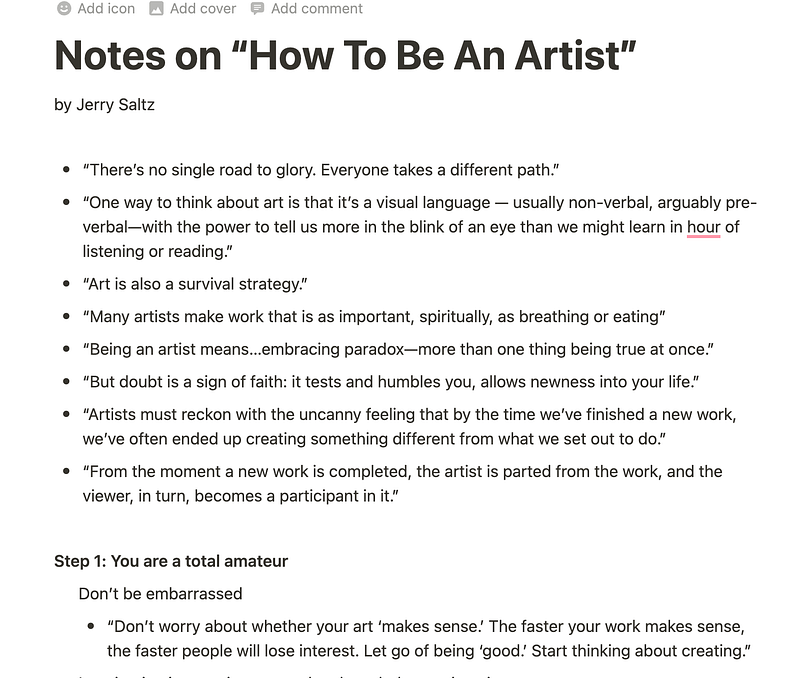
Note-taking Example: Raw notes on a book
This book is called How To Be an Artist by Jerry Saltz. He’s an art critic for New York magazine and a few other publications.
A few years ago he wrote a book about being an artist and I thought it had a lot of good quotes. Most of the notes are quotes.
But you can see how I structured it within sections and bullet points.
It’s also okay to go back and clean up your notes later to help yourself get the most value from them.
Click here to see all of the notes.
If you don’t know where to start, the sentence note-taking method is really the easiest.
You just number down the page and write one sentence on each line. For digital note-taking apps, only have one line, and then hit enter.
How to Be a Note-Taking Minimalist with Digital Tools
No matter which digital too you’re using for notes (Notion, Evernote, Roam, Apple Notes), these pointers will still keep you in line.
I may go deeper in another article, specifically about Notion, because the functionality of these will change depending on the tool.
- Begin by adopting a smart tagging system, assigning broad yet relevant tags for efficient categorization.
- Optimize your organizational structure by utilizing folders or notebooks, mirroring the physical act of segmenting notes in a notebook for clarity. The notion has really good categories for this.
- Embrace simplicity in formatting with minimal bold, italics, and bullet points to avoid visual clutter in your digital notes. Talked about that above!
- Use a lot of keywords. You may even want to “keyword stuff” your page title or write random words in a paragraph just to find it easier.
- Opt for distraction-free interfaces to enhance focus during note-taking sessions, creating a tranquil digital space. Again, this is why I like Notion. Super simple, black and white, and all the bells and whistles are hidden.
With minimalist note-taking, you prioritize clarity and relevance, distilling complex ideas into succinct, digestible formats.
Want more from your notes? Get my quick note-taking template and cheat sheet for free.


