The Midjourney Cheat Sheet (V5)
From prompts to parameters and weights, all in one place
EDIT: updated version is Midjourney Cheat Sheet (V5.2)
You know how it is: every now and then we have to dig through the Midjourney documentation to check a parameter’s value range or to find out whether the latest version (V5) allows us to use the cool “ — video” feature as V3 did! Opening a new tab. Navigating through the docs. Annoying!
That’s why I created this little cheat sheet. Pretty handy if you print it out and put it next to your workstation.
It should cover the basic stuff and point out some advanced concepts.
If you think something is missing, please let me know in the comments. I will update this every time new features are added to V5.
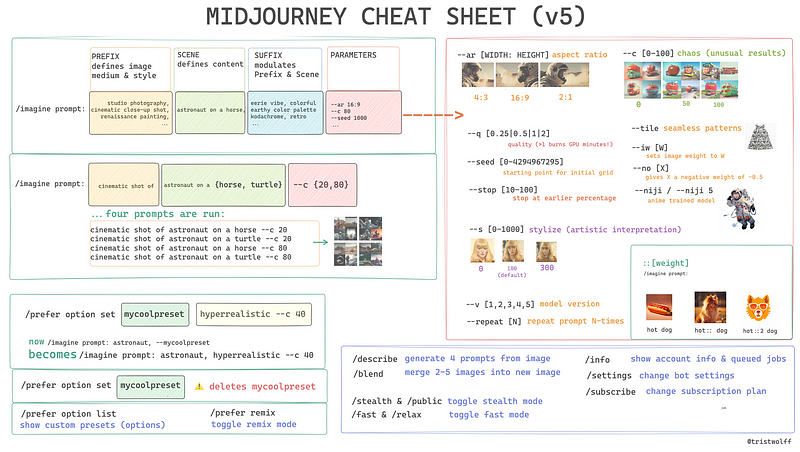
Here’s the text version in case you want to work on it with ChatGPT:
Basic Prompt Anatomy:
/imagine prompt: [PREFIX] [SCENE] [SUFFIX] [Parameters]
PREFIX defines image medium & style
SCENE defines content
SUFFIX modulates Prefix & Scene
(in actual practice these categories overlap)

Permutation Prompt Example:
/imagine prompt: cinematic shot of astronaut on {horse, turtle} --c {20,80}
...gets translated into four prompts:
->   cinematic shot of astronaut on a horse --c 20
     cinematic shot of astronaut on a turtle --c 20
     cinematic shot of astronaut on a horse --c 80
     cinematic shot of astronaut on a turtle --c 80


Parameters:
--ar [WIDTH:HEIGHT]   (=aspect ratio)
--c [0-100]           (=chaos, unusual results)
--q [.25|.5|1]        (=quality/time spent generating the image, 1=default)
--seed [0-4294967295] (=starting point for initial grid)
--stop [10-100]       (=stop at earlier percentage)
--s [0-1000]          (=stylize, artistic interpretation)
--tile                (=seamless patterns)
--iw [W]              (=sets image weight to W)
--no [X]              (=gives X a negative weight of -0.5)
--niji / --niji 5     (anime trained model)
--v [1,2,3,4]         (=model versiom)
--repeat [N]          (=repeat prompt N-times)

Weights:
/imagine prompt:       hot dog
                       hot:: dog
                       hot::2 dog

Option Commands:
/prefer option set [NAME OF OPTION] [VALUE]
  ... e.g:
  ->     /prefer option set mycoolpreset dadaism --c 80
         ...now
         /imagine prompt: an astronaut, --mycoolpreset
         ...becomes
         /imagine prompt: an astronaut, dadaism --c 80

/prefer option set mycoolpreset
     ...deletes mycoolpreset!
/prefer option list
     ... shows presets
/prefer option remix
     ... toggles remix mode
/prefer suffix
     ... suffix to add to the end of every prompt
/prefer auto_dm
     ... automatically send DM when jobs complete

More Commands:
/describe
/blend
/stealth & /public    (=toggle stealth mode)
/fast & /relax        (=toggle fast mode)
/info                 (=show account info & queued jobs)
/settings             (=change bot settings)
/subscribe            (=change subscription plan)
If you feel like diving into more advanced topics, I’ve got you covered too. Here are some places to start from, happy exploring! 🚀
➡️ For more information about AI & Creativity, follow me on Twitter or Medium (use my referral link to get full access to all my articles and those of thousands of other writers).
➡️ If you like my content, why not leave a “clap” at the end of this article, so more people can see it?