
The Memory Component of LangChain for ChatGPT Conversations
LangChain extends the abilities of large language models.

LangChain is a development framework for creating applications with large language models (LLMs). It currently has Python and JavaScript packages.
LangChain works by combining modular components into more functional chains. The modular structure of chains makes them easier to interact with and thus, allows for a simpler process to create LLM-based applications.
LangChain’s modular components are:
- Models: ChatGPT or other LLMs
- Prompts: Prompt templates and output parsers
- Indexes: Ingests external data such as document loaders and vector stores
- Chains: Combines components to create end-to-end use cases. An example of a simple chain can be Prompt + LLM + Output Parser
- Agents: Makes LLMs use external tools
In this article, we’ll learn the Memory component and how to implement it into conversation chains.
Setting up the API key
We’ll use OpenAI’s ChatGPT as our LLM so we need to set up an API key.
import os
import openai

from dotenv import load_dotenv, find_dotenv
_ = load_dotenv(find_dotenv())
openai.api_key = os.environ['OPENAI_API_KEY']
For this code to work and set up the API key, you need to create an environment variable named OPENAI_API_KEY, which holds the API key you obtained from the API Keys menu on OpenAI website.
LLM + Memory
The following image illustrates a very simple chain with a memory and an LLM component.
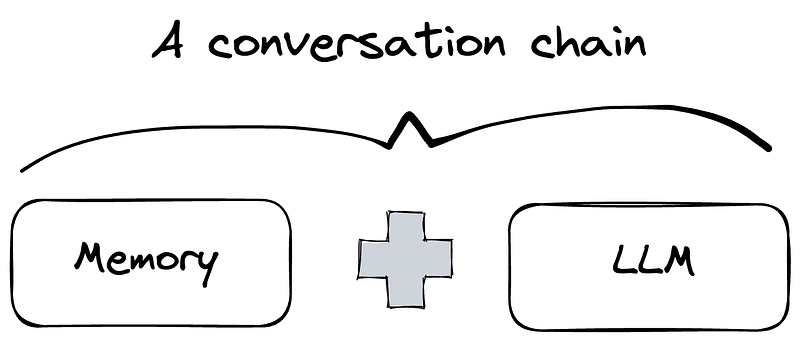
Let’s start by creating this chain with ConversationBufferMemory as the memory component and ChatGPT as the LLM component.
from langchain.chat_models import ChatOpenAI
from langchain.chains import ConversationChain
from langchain.memory import ConversationBufferMemory

# creating the LLM
# ChatOpenAI is LangChain's abstraction for OpenAI's ChatGPT API endpoint
llm = ChatOpenAI(temperature=0.0)

# creating the memory
memory = ConversationBufferMemory()

# creating the chain
conversation = ConversationChain(
    llm=llm,
    memory=memory
)
We’ll start a friendly discussion (or chat):
conversation.predict(input="Hi, my name is John.")
"Hello John, it's nice to meet you. My name is AI. How can I assist you today?"

conversation.predict(input="What are the ingredients to make a chocolate cake?")
"To make a chocolate cake, you will need flour, sugar, cocoa powder, baking powder, baking soda, salt, eggs, milk, vegetable oil, vanilla extract, and hot water. Would you like me to provide you with a specific recipe?"

conversation.predict(input="What is my name?")
"Your name is John."
The model remembers the name given at the beginning of the conversation because it has a memory component.
Memory component
We can also interact with the memory component separately. For instance, the buffer attributes output what’s stored in the memory, which is the entire conversation:
memory.buffer

# output
"Human: Hi, my name is John.\nAI: Hello John, it's nice to meet you. My name is AI. How can I assist you today?\nHuman: What are the ingredients to make a chocolate cake?\nAI: To make a chocolate cake, you will need flour, sugar, cocoa powder, baking powder, baking soda, salt, eggs, milk, vegetable oil, vanilla extract, and hot water. Would you like me to provide you with a specific recipe?\nHuman: What is my name?\nAI: Your name is John."
We can create a memory component from scratch and add conversations to it:
memory = ConversationBufferMemory()

memory.buffer

# output
''
It’s currently empty. Conversations can be added with the save_context method as follows:
memory.save_context(
    {"input": "My name is Jane and I'm 28 years old."},
    {"output": "Ok"}
)

memory.buffer

# output
"Human: My name is Jane and I'm 28 years old.\nAI: Ok"
The input key represents human and the output key represents AI (i.e. the model). We can implement this memory into a conversation chain directly:
llm = ChatOpenAI(temperature=0.0)

new_conversation = ConversationChain(
    llm=llm,
    memory=memory,
    verbose=True
)
The verbose parameter (when set as True) shows the formatted prompt, which is good for debugging.
The new_conversation is a chat with memory.
new_conversation.predict(input="What is my age?")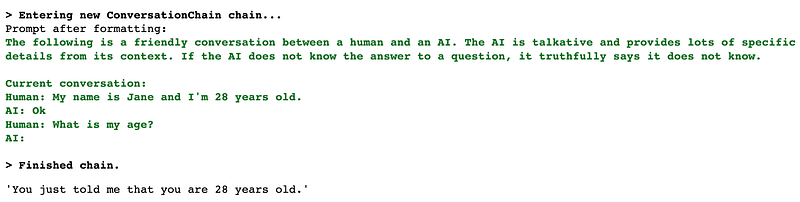
As we see in the output, the chat was able to answer a question based on the information in the given memory. The current conversation represents the memory of the chat.
We can also add Human and AI pieces of conversation separately.
# create memory
memory = ConversationBufferMemory()

memory.chat_memory.add_user_message("Hi! My name is Soner.")
memory.chat_memory.add_user_message("I'm a data scientist.")
memory.chat_memory.add_user_message("I like writing about data science.")

# create chain
llm = ChatOpenAI(temperature=0.0)

new_conversation = ConversationChain(
    llm=llm,
    memory=memory
)

# start conversation
new_conversation.predict(input="What is my profession?")

# output
'Your profession is data science. You mentioned that you are a data scientist and you enjoy writing about data science, so it seems like a safe assumption that this is your profession.'
Different memory types
In the examples up to this point, we’ve used the ConversationBufferMemory , which is the basic memory type. It stores all of the messages and extracts them in a variable.
LangChain has many different memory types such as:
ConversationBufferMemoryConversationBufferWindowMemoryConversationTokenBufferMemoryConversationSummaryMemoryConversationEntityMemory
We’ll go through the similarities and differences between these memory types in a separate article.
Memory is an important component in conversations with AI. Let’s say you create a customer service agent or a chatbot for your business. Customers would expect it to remember the things they talked about in the earlier part of the conversation. Otherwise, it’d be annoying to have to tell the same things over and over. By providing memory types with different features, LangChain makes it easy to implement memory components into your applications.
Thank you for reading. Please let me know if you have any feedback.