
The Medium Homepage Got a Face-lift!
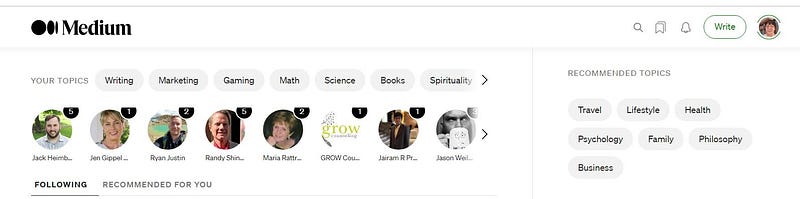
In May 2021 the homepage changed
Medium has been listed by Buffer as being one of the top 21 used social media sites in 2018. See here: https://buffer.com/library/social-media-sites/
I like the new homepage display, and discovered that the names of the people and Publications you are following, do appear under the Avatars.
If you don’t see them on the screen of your browser, what you do is to click in the area of the Avatars and scroll down a bit! When using Firefox, you can see a scroll bar, but not when using Chrome.
It’s essential, I think, to see the names as I for one can’t remember names to match the Avatars. Maybe that strip with the round icons (avatars) will be made a bit higher (row height made higher) by the Medium programmers.
Anyhow, before the change there were a few story titles at the top-left instead of Topics / People / Publications you have chosen to follow. These looked good with their images, but there were only about 5 of them, and speaking for myself, I like the ease of scrolling right through the Topics and who I’m following, by those “bars” being at the very top.
For now Recommended Topics are at the top-right and that’s fine with me, because if I want something new I can go to one of those. This area changes sometimes to ask you if you want to connect to Twitter. If you don’t, just click on Maybe Later.
If you want to filter items that you’re following to either just Publications or Writers, you can do that by going to your “About” page and clicking on “Following.”
Plus underneath “Recommended Topics”, are 3 possibilities of “Who to Follow” and then my “Reading List.” I always have a lot in my Reading List (as I bookmark stories to read later) so this long Reading List on the homepage comes in handy!
I also like that the right-hand side is in a frame, so locked into place with an ending. That strip ends in links to Medium’s official Blog and to other goodies.
I’m happy that the story titles in the list on the left are available via perpetual scrolling. I can easily whizz down and find several story titles that I want to read. In fact, I wish there were several of me to read a lot more than I do read.
Also, before this change, you couldn’t bookmark the story titles in the top section, for some reason, but that doesn’t matter now as the top no longer shows story titles. You can bookmark any story title now, plus click on the 3 little dots to choose from “Dismiss this story” or “Mute publication” or “Mute story”. [
[ Note: these options are context specific plus keep changing! Context specific means for example if you are following a person you get the option Un-follow the person ]
Dismiss this story means remove the story title from your homepage.
Mute publication means stop seeing stories in that Publication on your homepage.
Mute author means stop seeing stories from that author on your homepage.
So if you see something that you don’t like, you can mute the Publication or the Author. Muting is not the same as blocking.
If you block a Publication or Writer, then their stories will never appear.
So, if you search upon key words or tags, or otherwise may have come across stories in Publications or by Writers that you’ve blocked, those stories won’t even be found. The blocked writer will not see any of your stories either.
Click on the link below to go to Medium’s help page on the Mute function.
You also have the choice to block a writer/author via clicking on the 3 little dots of any story title on the Medium homepage. The link below shows you have blocking works.
https://help.medium.com/hc/en-us/articles/217048077-Block-a-user
I also like that the homepage has a “tab” for “Recommended for you” as well as for “Following”.
The Following list contains stories of individual people and Publications that you have actively set up to follow (via “Control your recommendations” under your Avatar, or by clicking on the Follow button of a Publication or a Writer).
The “Recommended” list includes Editor’s Picks and stories based upon your reading history.
In my opinion, the arrangement of the Medium homepage is very tidy and economical now.
Each story title has one Tag Name allocated to it (perhaps the least popular/written about tag at the time, who knows) which you can click on to go to stories with that Tag. This is neat, I think.
I noticed a few story titles don’t have an Asterisk next to the Tag Name, and by testing I’ve found out that this means that the Story has not been “locked”. The writer didn’t tick the box to put the story behind the paywall, so they are letting non-paying members read the story (as well as paying members).
I joined Medium in November 2018. I am a happy camper in Medium-land, now that the Searching is great, and that there are so many stories easily and nicely arranged on my homepage — -for me to read!
Thanks for reading. You may be interested in the following story.


