avatarCasey Botticello

Free AI web copilot to create summaries, insights and extended knowledge, download it at here

2503

Abstract

ium.com/v2/resize:fit:800/1*z3BIFWTybQ7xGoZkkqiMFA.png"><figcaption></figcaption></figure><p id="cb2f">With the addition of the follow feature, the limit was firmly established at 30,000. However, users who had more than 30,000 connections were allowed to keep their connections during the transition. This is likely when you saw users with connections over 30,000 and the source of the confusion.</p><p id="c097">Once the site update was completed, all connections over 30,000 were removed as 1st degree connections, and were converted to followers of that user.</p><p id="2eed"><b>The limit on invitations sent to other users is now 3,000.</b> However, you can request an increase by contacting LinkedIn Support. If your acceptance rate is high enough (indicating you actually know the people you are connecting to and are not spamming random people) LinkedIn may reset your 3,000 limit on invitations. However, your account may be restricted if you try to connect with a large number of users over a short period of time.</p><p id="bcea"><a href="undefined">Casey Botticello</a></p><p id="9c90"><i>Thanks for reading this article! Leave a comment below if you have any questions, and if you want to learn more about blogging, content marketing, or subscription newsletter strategy, be sure to sign up for the <a href="https://bloggingguide.substack.com"><b>Blogging Guide Newsletter</b></a>!</i></p><div id="6c7e" class="link-block"> <a href="https://bloggingguide.substack.com"> <div> <div> <h2>Blogging Guide</h2> <div><h3>Learn how to make money writing online and navigate the digital publishing landscape! ✔️ Medium ✔️ Substack ✔️ Amazon…</h3></div> <div><p>bloggingguide.substack.com</p></div> </div> <div> <div style="background-image: url(https://miro.readmedium.com/v2/resize:fit:320/0*AAcjK3UII8QUo4u9)"></div> </div> </div> </a> </div><h2 id="f68a">If you liked this article, here are some other articles you may enjoy:</h2><div id="2d41" class="link-block"> <a href="https://bloggingguide.com/how-to-claim-social-media-handles/"> <div> <div> <h2>How to Claim Social Media Handles - Blogging Guide</h2> <div><h3>The next step is to actually go through the list of social media sites you plan to use (and those included in the next…</h3></div>

Options

        <div><p>bloggingguide.com</p></div>
          </div>
          <div>
            <div style="background-image: url(https://miro.readmedium.com/v2/resize:fit:320/0*xCTfbYeX8nqDJqd8)"></div>
          </div>
        </div>
      </a>
    </div><div id="8425" class="link-block">
      <a href="https://bloggingguide.com/grow-by-mediavine-review/">
        <div>
          <div>
            <h2>Grow by Mediavine Review - Blogging Guide</h2>
            <div><h3>Still wondering if you should get on the Grow train? There are many other tools that you could use to bring in more…</h3></div>
            <div><p>bloggingguide.com</p></div>
          </div>
          <div>
            <div style="background-image: url(https://miro.readmedium.com/v2/resize:fit:320/0*--OqxhEDKYZZ_lKB)"></div>
          </div>
        </div>
      </a>
    </div><figure id="04d0"><img src="https://cdn-images-1.readmedium.com/v2/resize:fit:800/0*jxGUDN_JEbAGoOsa.png"><figcaption></figcaption></figure><p id="1c21"><a href="http://www.caseybotticello.com"><b>Casey Botticello</b></a> is an internet entrepreneur and the founder of <a href="https://bloggingguide.com"><b>Blogging Guide</b></a>, an online community of writers with an<b> <a href="https://bloggingguide.substack.com">award-winning newsletter</a></b>. He is also the creator of the popular <a href="https://gumroad.com/l/medium-course"><b>Medium Writing Course</b></a><b> and the <a href="https://bloggingguide.gumroad.com/l/substack-course">Substack Newsletter Course</a>.</b></p><p id="2a73">Casey previously worked at several tech startups, a lobbying &amp; strategic communications firm, and has created several businesses of his own. He is a graduate of The University of Pennsylvania, where he received his B.A. in Urban Studies.</p><blockquote id="a35d"><p><i>You can connect with him on <a href="https://www.linkedin.com/in/caseybotticello/"><b>LinkedIn</b></a>, <a href="https://twitter.com/blogging__guide"><b>Twitter</b></a>, <a href="https://www.facebook.com/groups/mediumwriting"><b>Facebook</b></a>, follow his Medium publications, <a href="https://medium.com/digital-marketing-lab"><b>Digital Marketing Lab</b></a><b> </b>and <a href="https://medium.com/blogging-guide"><b>Medium Blogging Guide</b></a><b>, </b>or reach out to him directly on his<b> <a href="http://www.caseybotticello.com">personal website</a>.</b></i></p></blockquote></article></body>

The Maximum Number of Connections and Invitations on LinkedIn

What are the limits on connections and invitations on LinkedIn?
Source: Casey Botticello of Blogging Guide

Your LinkedIn profile is the best platform to promote yourself as a professional. You can highlight your achievements, job experience and topics which interest you. It can be used as a platform to advertise your skills, build credibility as a professional, and increase your visibility. Videos and images in the summary and experience fields can truly develop a three-dimensional view of your brand, painting a compelling picture of who you are in the real world.

Perhaps the biggest asset of a meticulously curated LinkedIn account is your network. On LinkedIn, people in your network are called connections. Your network is made up of your 1st-degree, 2nd-degree, and 3rd-degree connections, as well as fellow members of your LinkedIn groups. You can build your network by sending invitations to connect with other LinkedIn members and your email contacts, or by accepting invites from others. The degree of connection you have with another member affects how you can interact with them on LinkedIn.

Having worked on reverse-engineering a number of search algorithms, some of the most common questions I have been asked are:

Is there a limit on the number of LinkedIn connections I can have? Why do some people seem to have a higher limit of connections and invitations than me?

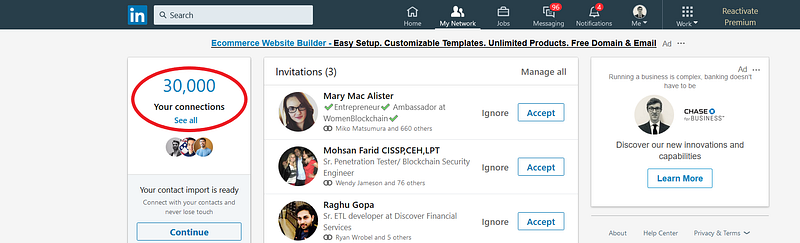
LinkedIn users can now have a maximum of 30,000 1st-degree connections. LinkedIn previously had a 30,000 connection limit, but it was unenforced for a long time. During that time, several people accrued a very large number of connections. This was before the “follow” feature was added, so there really wasn’t any other way to connect people and so exceeding the limit was tolerated.

Not only is this now addressed in LinkedIn’s Help Section, but I can personally attest to the 30,000 connection limit:
With the addition of the follow feature, the limit was firmly established at 30,000. However, users who had more than 30,000 connections were allowed to keep their connections during the transition. This is likely when you saw users with connections over 30,000 and the source of the confusion.

Once the site update was completed, all connections over 30,000 were removed as 1st degree connections, and were converted to followers of that user.

The limit on invitations sent to other users is now 3,000. However, you can request an increase by contacting LinkedIn Support. If your acceptance rate is high enough (indicating you actually know the people you are connecting to and are not spamming random people) LinkedIn may reset your 3,000 limit on invitations. However, your account may be restricted if you try to connect with a large number of users over a short period of time.

Casey Botticello

Thanks for reading this article! Leave a comment below if you have any questions, and if you want to learn more about blogging, content marketing, or subscription newsletter strategy, be sure to sign up for the Blogging Guide Newsletter!

If you liked this article, here are some other articles you may enjoy:

Casey Botticello is an internet entrepreneur and the founder of Blogging Guide, an online community of writers with an award-winning newsletter. He is also the creator of the popular Medium Writing Course and the Substack Newsletter Course.

Casey previously worked at several tech startups, a lobbying & strategic communications firm, and has created several businesses of his own. He is a graduate of The University of Pennsylvania, where he received his B.A. in Urban Studies.

You can connect with him on LinkedIn, Twitter, Facebook, follow his Medium publications, Digital Marketing Lab and Medium Blogging Guide, or reach out to him directly on his personal website.

LinkedIn
Linkedin Marketing
Side Hustle
Social Media
Entrepreneurship
Recommended from ReadMedium