
Tana Weekly 2023–12–16: Tana Updates, Annual Review, Formulas, Tana clicked, Tana Commands and AI, Why Tana, Data Calculations and more
Hi Everyone,
With only about 10 more days to Christmas, I am sure we all have the turkey and spuds sorted out, the presents are bought (or at least we know what you need to buy) and we can put our feet up with a nice mulled wine. Now, in reality, I am sure we all left it to the last minute and are having to rush around shopping malls to find the last turkey in the market. And even after reading this, we will still do nothing until next week.
In all the rushing, hopefully, you have a few minutes spare to read this week’s Tana Weekly, which is filled with amazing content from the community.
Release
We had a surprise release this week with Headings, which improves how you work with long-form text in Tana, and Better Node Selection, which is a step-change in clarity when working with nodes.
Twitter seems to be playing up, so you can use this alternative Reddit link for a breakdown.
As usual, you can find the latest release notes below or in-app.
Tana Weekly
A really simple Yearly Review with Tana + Template!
Cortexfutura posts a great video on doing a simple yearly review and even includes the template. Check it out here:
Formulas in Tana
Winston posts a great notion-like formula workaround in Tana:
While hoping Tana does come up with a notion-like formula that works natively to tana (support the upvote of the feature here), I decided, with my basic coding skills, to write some makeshift prototype code to use notion-like formulas in Tana.
Check out the Tana publish page here for templates, instructions, use cases: https://tana.pub/9gvvFgyRXQ_I/formulae-tag-documentation
P.S. I can’t promise that it’s bug-free or the most efficient code, but I’ll work on it. It supports nearly all of what Notion can do, including “progress bars” :)
I finally understand Tana
OP posts a video showcasing why Tana is so good and why it may have finally clicked with them.
Tana Commands & AI — Edition #9 — December 2023
Interested in Tana Commands and AI? Then look no further than Tana Nodes and their latest video
Surprise Next Week?
After the great Headings and Node Selection release this week, Brage teases us with “You’re gonna love next week. :)”
Can’t wait to see what Tana has in store for us.
What I like / Dislike about Tana
OP post a great write up about their likes and friction points when it comes to Tana — and have to admit I agree with most of the narrative. Check it out in full here.
What I liked
It’s almost become a cliché, but “everything’s a node.” And I love that about Tana. I can zoom in on each node and work distraction free.
And each node can be assigned a supertag. Supertags give my text a whole new dimension. Every node can be given any number of fields, like a database, and you can also do a quick search to find nodes with a specific supertag, or even specific fields within a certain supertag.
If you know Tana, you’ll likely be able to explain this far better than me. Anyway — the concept of nodes with supertags was groundbreaking for me.
Publish. This is a recent addition to Tana. When you select publish on a node, you get a preview window on the right which enables you to see what it will look like on the internet when you press publish. It’s clean, attractive, and incredibly easy to produce stunning looking websites.
Tana Capture on my Android phone is lovely. It enables me to add information on the fly, even a voice note. This feature made Tana even more usable for me.
Tana looks and feels amazing. It’s fast, polished and smooth. For that reason alone, I’d have been happy to use it through next year.
Friction points
Unfortunately, it’s not easy at all to export my data into other apps. I can export it as a JSON file, but that’s not particularly useful to me. In addition to that, it’s not possible to export to PDF. This is crucial for me, and I can’t exclusively use an app which doesn’t do this.
I can’t get rid of the bullet points! I get that everything’s a node, and I hugely appreciate that. But it would be nice to write an article in Tana and not have a bullet point at the start of every new line.
I can’t use it on my mobile. Well, I could, but it was tiny on my screen. Too tiny. That’s all.
What made you pick Tana
Sticking with note tool selection, a great Reddit question was posted:
What made you pick Tana?
Many people are looking for a new notes app these days for many different reasons and I am one of them. I have noticed that Tana, Capacities and Anytype seem to the “hot” ones currently and I am wondering what made you pick Tana over the alternatives.
https://www.reddit.com/r/TanaInc/comments/18ih3py/what_made_you_pick_tana/
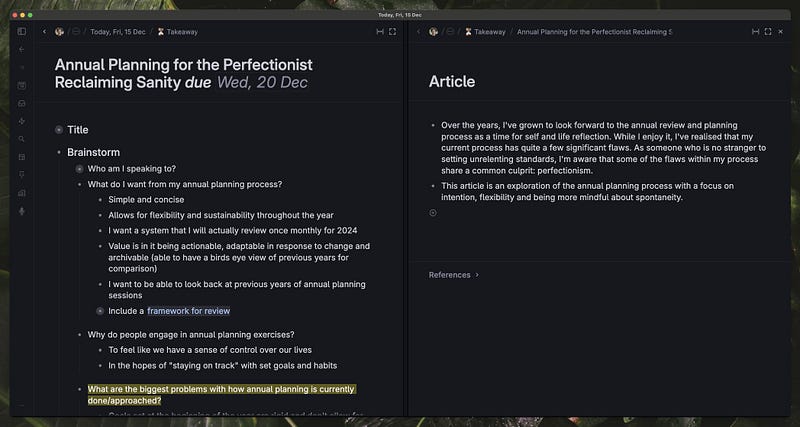
Perfect use of Headers?
https://pro.twitter.com/reneedefour/status/1735773431457550432/photo/1
Date Calculation in Tana
Stian posts a nice little nugget of information:
Did you know that you can do date calculations in Tana? Well you can now
It’s still a bit awkward — we are planning future improvements, but you can still set up some pretty cool workflows.
Until Next Time
I hope you found this blog post helpful. If you have any comments or questions, please let me know.
Thanks again for reading, and I look forward to chatting with you again next week.
Originally published at https://www.tanaweekly.com on December 16, 2023.


