
The Keywording Ghosts That No Longer Haunt Me
My Quest to Trust Object Recognition for Finding My Photos
The room lights were dimmed low, and I could barely read my notepad. Fortunately, a glow from the stage cascaded just enough brightness for me to scribble down a few helpful gems from the speaker.
Photographer Seth Resnick was before me, standing in front of a giant screen showing his highly organized photo library. It was clean and tidy, like a furniture showroom floor.
As beautiful as the form was, the function was even more impressive. My jaw dropped as he was able to summon any image he wanted. It was like watching a wizard perform — gold coins from thin air.
“Wow!” I thought. “This is amazing.”
Before my eyes, a gallery containing thousands of photographs was quickly reduced to just a dozen pictures portraying the exact objects he desired. And the best part, he was going to share his secret with all of us.
“I can’t wait to see how he does this,” I thought.
About halfway through his talk he pulled back the curtain and revealed the magic. Except there was no magic, just labor-intensive data entry. It was called keywording, the practice of adding text tags to an image to help you later find those pictures among the thousands in your photo library.
Seth had worked out an extensive list of descriptive tags for his Lightroom catalog. And he meticulously applied multiple keywords to every photo in his library. And I mean every photo.
He would keyword in the coffee shop, on the plane, and probably in the dentist’s waiting room as well.
I kept waiting for some type of automation to be revealed. Maybe speaking to your computer and telling it how to label the photos while sipping on a mocha latte. But that wasn’t the case. If I wanted the results, I had to do the work. And that meant typing keywords.
“Oh, my God. I could never do this,” I thought. “I would go insane. I’m doomed.”
When the lights came up and Seth stepped down from the stage to meet his fans, I folded my notebook and headed for the next conference session.
I knew at that moment that I would never corral my photo library. Like thousands of others, I would continue to scroll through rows of thumbnails in search of images captured from my past. Minutes, maybe hours would pass before I found what I was looking for. It was like searching for the other sock in a college dorm room.
I realized that day I would never be Seth Resnick.
Early Steps to a Better Solution
Little did I know then, there was magic brewing, just not in the halls where I was roaming. In 2002, technologists were making progress in face detection, and broadening those techniques into other areas that led to impressive object recognition a few years later.
The applications for this technology were quickly blossoming. One area that became vital to me personally unfolded in 2016 when Apple included object recognition in macOS and iOS.
What does this mean? Instead of manually adding text to the metadata of a picture to describe its contents — a.k.a. keywording and IPTC data — the computer could automatically identify objects and display them as search results.
Apple is very good at keeping its technology under wraps, so there was a bit of mystery about how this all worked. And for a first effort, it performed well. But there were still improvements to be made.
Common Objects in Context Dataset
We can gain some possible insights into the mechanics of Apple’s endeavor via the Common Objects in Context dataset (COCO) released just a few years earlier.
As described in the Amikelive Technology Blog, “COCO was an initiative to collect natural images, the images that reflect everyday scenes and provide contextual information. In everyday scenes, multiple objects can be found in the same image and each should be labeled as a different object and segmented properly. The COCO dataset provides the labeling and segmentation of the objects in the images. A machine learning practitioner can take advantage of the labeled and segmented images to create a better-performing object detection model.”
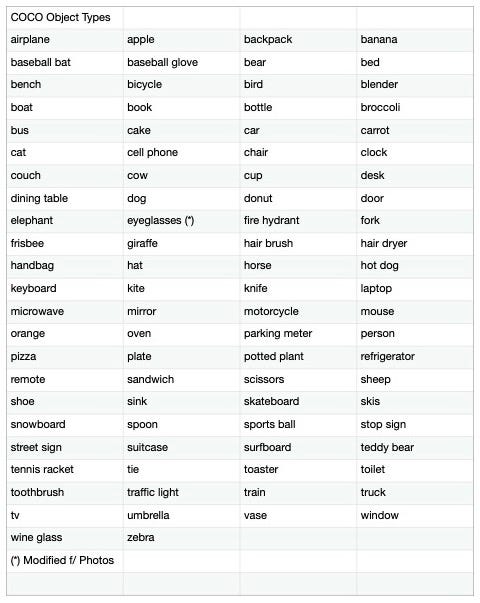
COCO includes items such as bed, car, cat, chair, and more, which are searchable object terms that work in Photos and any other application that has incorporated similar datasets.
Apple Photos Continues to Evolve
Since 2016, Photos for macOS and iOS have improved with each release. It’s become good enough, or so I hope, that I no longer add keywords to my pictures to retrieve them. The computer does it for me. I take the pictures; the software finds (most of) them on demand. That’s what I’ve always wanted.
What a godsend for anyone who captures hundreds and thousands of pictures with their iPhones and who doesn’t want to manually tag each one of them. Interestingly enough, many photographers still don’t realize this capability is available.
For those in the Apple ecosystem, iPhone images are automatically saved to the Photos app. And as a result, they are available for object search.
For example, to find that tasty sandwich I photographed during lunch last month, I just enter “sandwich” in the search box of my Photos app.
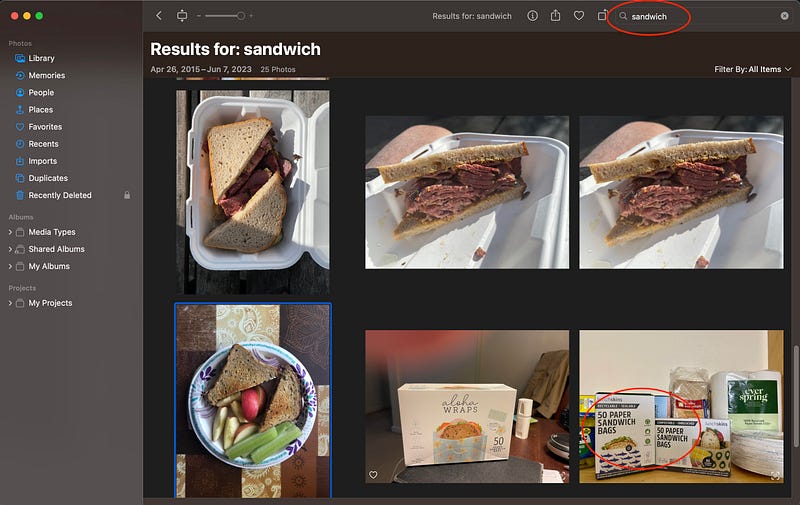
Not only will Photos find images with actual sandwiches in them, but it will also use its Live Text technology to find the word sandwich in the pictures. And if I don’t remember where I enjoyed that delicious lunch, the iPhone also records the location data for the image, which can be viewed using the Get Info button located at the top of the interface.
(Photos is just one example of this technology in action. Google, Adobe, Microsoft, ON1, and others are also leveraging it in their software. Photographers who use Lightroom (cloud version) can also tap into object recognition for search. Unfortunately, another app that I use often, Capture One Pro, doesn’t natively include this capability — more on that in a moment.)
Yet, the Voices Persisted
Even with the progress we’ve made, not all my ghosts were left behind. I still heard voices from photographers of the past echoing in my head: “But the results are not complete. They are not accurate. You must do the work to reap the rewards. No pain, no gain. Keyword my son, keyword.”
Stop! It was time to exercise those doubts from my mind once and for all. Maybe I could do that by testing the current state of object recognition. Then I could separate the actual results from my wishful thinking.
So I went back to Photos, where it all began for me, and entered several terms from the COCO dataset. I figured that was a good baseline.
Were the results perfect? No, they were not. The software did miss objects in my catalog and misidentified others. But those inconsistent results were just after a single attempt to find a specific picture.
Then I had an epiphany. I figured out that I could work around the shortcomings by performing a second search using a related object.
“Why didn’t I think of that before!”
For example, earlier, there was a particular sandwich photo that I was looking for that didn’t appear in my initial results. Then I remembered seeing a knife in the picture, so I searched for “knife,” and lo and behold, the image I wanted appeared.
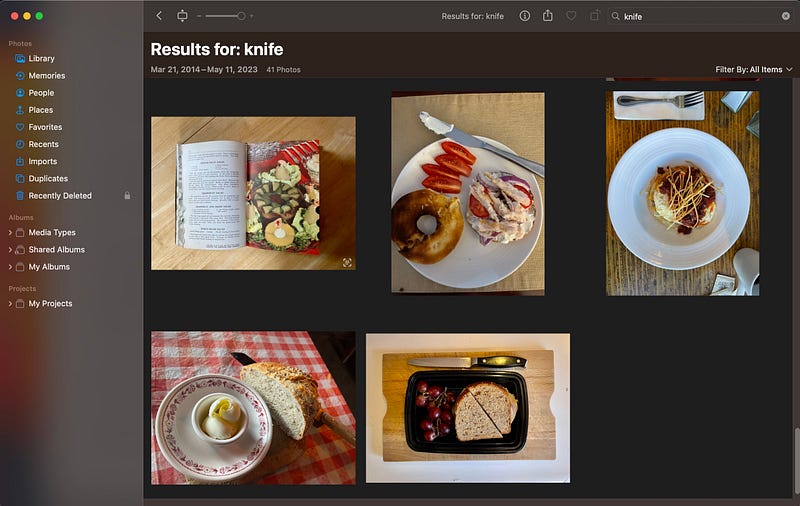
In other words, additional common objects are often associated with the ones we’re looking for. In the case of a sandwich, those could be a knife, a napkin, or a plate. Who knows, maybe “tablecloth” will do the trick. So if one search doesn’t give me what I want, looking for a different object just might.
And if I want to hedge my bets to ensure that I’m able to find certain prized pictures, there’s still the keyword field in the Photos Get Info box. I can enter a couple of descriptors there.
The computer will use any bit of information available to help me find what I want. What’s different today, is that there’s more to work with than just metadata text.
I now have more confidence in this evolving technology. The remaining problem is, Photos isn’t the only app I use to manage my pictures.
ON1 Releases Photo Keyword AI
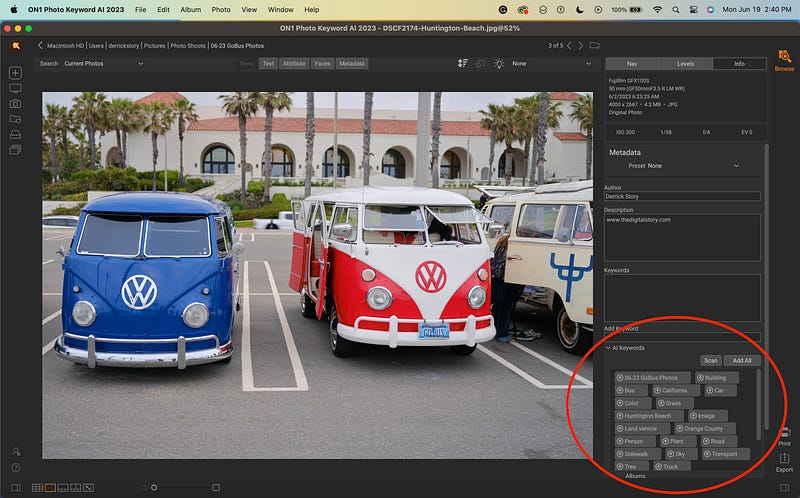
Photographers who don’t use Photos for macOS or don’t care for the cloud-only version of Lightroom may feel excluded from the object recognition party. Thanks to the folks at ON1 Software, everyone can now have an invitation.
They’ve just released Photo Keyword AI that brings this power to Lightroom Classic, Capture One Pro, and ON1 Photo RAW. Or if you wish, you can use the software as a standalone application. Here’s what they have to say about it:
“ON1 Photo Keyword AI’s automatic keyword generation feature will allow users to bid farewell to the tedious task of manually tagging photos. The advanced machine learning algorithms scan each image, recognizing over 800 objects and photo elements. Additionally, related keywords are added automatically, ensuring more accurate search results. This is accomplished locally, using on-device intelligence, without uploading your photos to the cloud.”
ON1 Photo Keyword AI debuted on June 19, 2023. And essentially, it brings AI search to every photographer who uses a computer.
It’s taken two decades to get here, but finally, my dream is realized. And those keyword-typing ghosts no longer haunt me.
If I Had Only Known Then
I wish the 2023 version of me could have consoled that deflated photographer back in the early 2000s. Maybe as we walked down the hallway together to the next conference session, I could have put my arm around his shoulder and quietly shared:
“Keep taking pictures kid. It’s all going to work out just fine.”
===========
Author’s Note: If you’re interested in learning more about ON1 Photo Keyword AI, you can tune in to The Digital Story Podcast titled, The End of Keywording as We Know It — ON1 Photo Keyword AI. Photos and illustrations by Derrick Story.
Meet the Live View Writers
Live View features a dozen authors from a variety of backgrounds who share a passion for photography. You can meet them all, read their stories, and follow them by visiting the Live View About page.