avatarNikhil Vemu

Free AI web copilot to create summaries, insights and extended knowledge, download it at here

4380

Abstract

less distracting.</p><h1 id="cac5">#3. A New Wallpaper that has a Back Story</h1> <figure id="ae62"> <div> <div> <img class="ratio" src="http://placehold.it/16x9"> <iframe src="https://cdn.embedly.com/widgets/media.html?type=text%2Fhtml&amp;key=a19fcc184b9711e1b4764040d3dc5c07&amp;schema=twitter&amp;url=https%3A//twitter.com/jacklroberts/status/1544740154191101955&amp;image=https%3A//i.embed.ly/1/image%3Furl%3Dhttps%253A%252F%252Fabs.twimg.com%252Ferrors%252Flogo46x38.png%26key%3Da19fcc184b9711e1b4764040d3dc5c07" allowfullscreen="" frameborder="0" height="281" width="500"> </div> </div> </figure></iframe></div></div></figure><p id="7d27">This Clownfish Wallpaper is the first ever wallpaper set on an iPhone, used by Steve Jobs when the original iPhone was introduced back in 2007.</p><p id="e182">Personally, I wasn’t able to see it on my iPhone, just as many other developers. Some excited twitterati posted screenshots on getting this. Maybe we’ll all get it in the next beta or public release.</p><figure id="75e0"><img src="https://cdn-images-1.readmedium.com/v2/resize:fit:800/0*Eud_-EHu02l7JtGO.jpeg"><figcaption>Apple.com in 2007 (Screenshot by the author from <a href="https://web.archive.org/web/20070127014459/http://www.apple.com/">Wayback Machine</a>)</figcaption></figure><h1 id="e954">#4. Health Changes</h1><h2 id="fbec">#I. AFib History</h2><figure id="5bb7"><img src="https://cdn-images-1.readmedium.com/v2/resize:fit:800/1*EJx09cpytFFpXne3FkCgGw.jpeg"><figcaption>Screenshot by the author (Edited)</figcaption></figure><p id="3f32">The AFib History (Atrial Fibrillation) feature teased at WWDC22 finally gets live. Find this on <code>Health ❤️ < Heart ❤️ < AFib (or AF) History</code> .</p><p id="49b3">This requires an Apple Watch and represents how often your heart is in AFib, a common irregular rhythm. If you’re already diagnosed with it, you’ll receive an AFib History estimate each week.</p><h2 id="134c">#II. New Icon for Health Data</h2><figure id="5d54"><img src="https://cdn-images-1.readmedium.com/v2/resize:fit:800/1*J1sJfhIsX4Fz2oWE1vOlkQ.jpeg"><figcaption>Screenshot by the author from <a href="https://youtu.be/pMClCRHGwDs">Zollotech</a></figcaption></figure><p id="ce09">Some developers are able to see a new icon for Health — and now ‘Health’ is renamed to ‘Health Data’.</p><p id="3175">The older one looks good imo.</p><h1 id="91eb">#5. Accessibility Changes</h1><h2 id="effc">#I. Live Captions get more Accessible</h2><figure id="414d"><img src="https://cdn-images-1.readmedium.com/v2/resize:fit:800/1*XpMB3CU89-sI7TmZxZhN8w.jpeg"><figcaption>Screenshot by the author from <a href="https://youtu.be/TPxJeQ24VFI">Brandon Butch</a></figcaption></figure><p id="a5ae">Live Captions can now be set to be <b>bold</b>. And there’s a slider for <code>Idle Opacity</code> to set the level of fade when they’re not in use.</p><h2 id="1a72">#II. New Options for LED Flash for Alerts</h2><figure id="fcb3"><img src="https://cdn-images-1.readmedium.com/v2/resize:fit:800/1*1GNiFPcZH9Z7dFdvFAFZng.jpeg"><figcaption>Screenshot by the author</figcaption></figure><p id="2878">Back in the days, you could only toggle on/off for LED Flash for Alerts. Now, you get two additional options if you turn it on.</p><ul><li>Flash While Unlocked</li><li>Flash in Silent Mode</li></ul><p id="07b8">To use it, go to <code>Settings ⚙️ < Accessibility 🚹 < Audio/Visual 🔉👁 < LED Flash for Alerts</code> .</p><h1 id="3012">#6. iCloud Shared Photo Library gets Live</h1><figure id="b8f6"><img src="https://cdn-images-1.readmedium.com/v2/resize:fit:800/1*fOkNfEvE1HEZfUpI7j7HyQ.png"><figcaption>Image courtesy of <a href="https://www.apple.com/newsroom/2022/06/apple-unveils-new-ways-to-share-and-communicate-in-ios-16/">Apple</a></figcaption></figure><p id="3cf1">This was teased on WWDC22 and I was longing for this feature for our trip to Himalayas.</p><p id="64c9">This feature gets operational with Beta 3 and you can use it if you and your friends/family are currently on developer beta.</p><h2 id="3f6b">Read more about it in #9 of this article:</h2><div id="476b" class="link-block"> <a href="https://readmedium.com/these-are-ios-16s-coolest-new-features-373c74506c3b"> <div> <div> <h2>The

Options

se Are iOS 16’s Coolest New Features</h2> <div><h3>You iPhone’s gonna love it</h3></div> <div><p>medium.com</p></div> </div> <div> <div style="background-image: url(https://miro.readmedium.com/v2/resize:fit:320/1*Pg1uzf4nOxAlfCzRSIUC8Q.jpeg)"></div> </div> </div> </a> </div><h1 id="ab3a">#7. Software Version page goes a level deep</h1><p id="3506">Till iOS 15 and 16 Beta 2, the Software Version only showed the iOS version and its build number (with a tap).</p><figure id="0f77"><img src="https://cdn-images-1.readmedium.com/v2/resize:fit:800/1*sybr9raVSRthpnvsBglQEA.jpeg"><figcaption>Screenshot by the author</figcaption></figure><p id="5e69">However, you’ll now be able to read the detailed release notes on a new page by clicking on it.</p><h1 id="4312">#8. Include Due Today</h1><figure id="1b2c"><img src="https://cdn-images-1.readmedium.com/v2/resize:fit:800/1*ru-u8UR17NS6eQ8-Q-7iKg.jpeg"><figcaption>Screenshot by the author</figcaption></figure><p id="291c">Reminders gets a new feature — ‘Include Due Today’.</p><p id="cbdb">If you turn this on at <code>Settings ⚙️ < Reminders ✔️ < Include Due Today</code> . This will not only set today’s items in badge count, but also overdue items.</p><h1 id="609d">#9. Use Apple Pay When Available</h1><figure id="bde1"><img src="https://cdn-images-1.readmedium.com/v2/resize:fit:800/1*EihovbpxenJeG9VmCi6LwQ.jpeg"><figcaption>Screenshot by the author from <a href="https://youtu.be/pMClCRHGwDs">Zollotech</a></figcaption></figure><p id="0824">There’s a new option in Wallet — Use Apple Pay When Available <code>(Settings ⚙️ < Wallet 👜 < Use Apple Pay When Available)</code> . If you toggle this on, your saved cards in Safari Autofill will be verified with compatibility with Apple Pay.</p><p id="d7e8">The latter payment method will be used with your compatible cards.</p><h1 id="b18b">#10. And this long-term bug seems to have been fixed</h1><div id="1f72" class="link-block"> <a href="https://nikhilvemu.medium.com/have-you-been-observing-this-bug-on-safari-lately-53e2e48cf34f"> <div> <div> <h2>Have You Been Observing This Bug On Safari Lately?</h2> <div><h3>Why isn’t Apple removing it?</h3></div> <div><p>nikhilvemu.medium.com</p></div> </div> <div> <div style="background-image: url(https://miro.readmedium.com/v2/resize:fit:320/0*dTUAzQuSYyUTUMN6)"></div> </div> </div> </a> </div><p id="5317"><b>If you liked this story, you might also like:</b></p><div id="1318" class="link-block"> <a href="https://nikhilvemu.medium.com/list/bfb16160e680"> <div> <div> <h2>All iOS 16 Features</h2> <div><h3> </h3></div> <div><p>iOS 16 Features nikhilvemu.medium.com</p></div> </div> <div> <div style="background-image: url(https://miro.readmedium.com/v2/resize:fit:320/0*4d8025e8041ccb58695638dbb4d59868f1aaa05c.jpeg)"></div> </div> </div> </a> </div><p id="033c"><i>Hey! If you enjoyed this story, join <b>105+</b> others to <a href="https://nikhilvemu.medium.com/subscribe"><b>get notified</b></a> whenever I publish a new story.</i></p><p id="681d"><i>Grab my <b>NEW & UPDATED</b> ebook <b><a href="https://nikhilvemu.gumroad.com/l/atbg">A Tech Blogger’s Guide</a></b>. Use code <b>“50OFFATBG”</b> for <b>50% exclusive discount</b>. Applies for next 10 purchases only!</i></p><div id="29eb" class="link-block"> <a href="https://nikhilvemu.medium.com/membership"> <div> <div> <h2>Join Medium with my referral link - Nikhil Vemu</h2> <div><h3>Read every story from Nikhil Vemu (and thousands of other writers on Medium). Your membership fee directly supports…</h3></div> <div><p>nikhilvemu.medium.com</p></div> </div> <div> <div style="background-image: url(https://miro.readmedium.com/v2/resize:fit:320/0*xj6p9tvAqJ4v2Gj6)"></div> </div> </div> </a> </div></article></body>

The iOS 16 Update Just Got An Extreme Security Feature

The Lockdown mode is game-changing
Image courtesy of CNET

Apple disappoints public beta testers yet again with iOS 16 Beta 3, as every previous year, the first public beta arrived alongside Beta 2. It should have arrived by now, at least.

Anyways, the third beta of iOS 16 power-packs some awe-inspiring features & changes which you might have never expected.

Here they are.

#1. Lockdown Mode (An Extreme Security Feature)
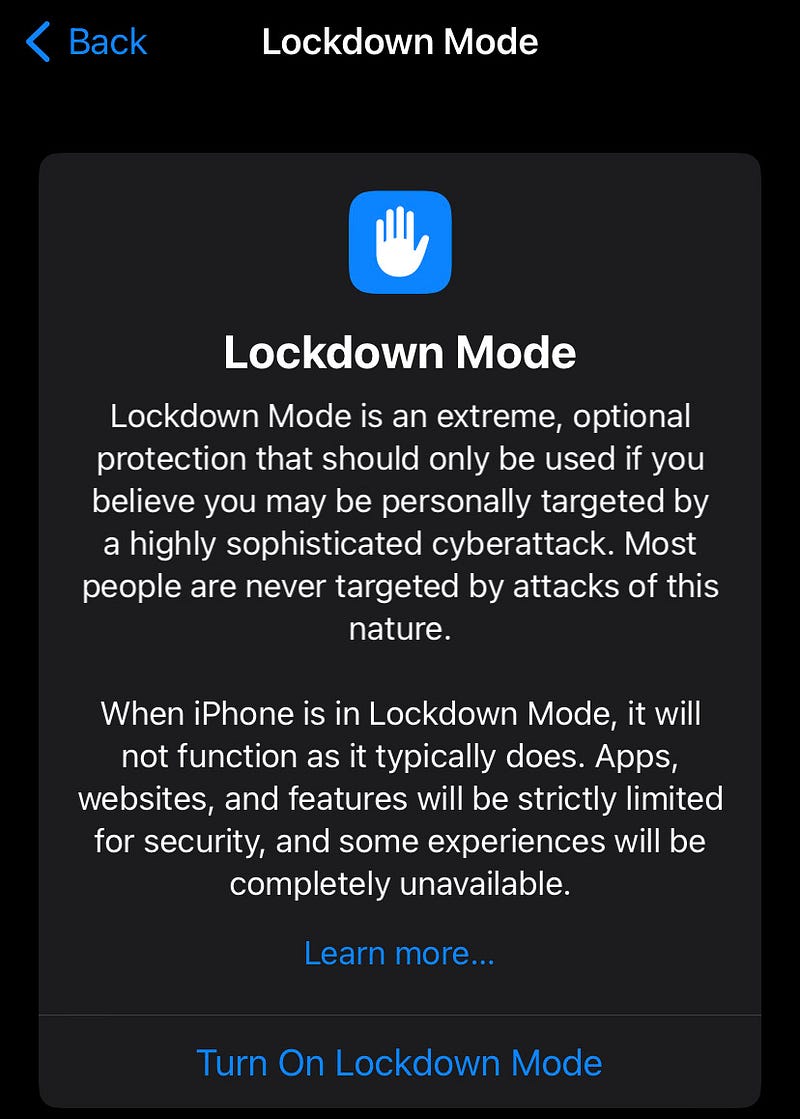
Screenshot by the author

Apple’s security witness its biggest ever leap yet — with the new Lockdown Mode. You can find it in Settings ⚙️ < Privacy & Security ✋ < Lockdown Mode .

When should you use it? Only when you believe you’re being targeted by a highly sophisticated cyber attack.

What does it do? All apps, websites, and features get strictly limited so no spyware will be able to creep into your system.

Exact information:

  • Message attachments, including some additional features, will be blocked.
  • Incoming FaceTime calls from unknown people (only those you previously didn’t contact) are blocked.
  • Some web technologies and browsing features will be blocked. You can exclude websites you trust.
  • Existing Shared Albums will be deleted and new requests for Shared Albums will be blocked. (See #5 for more information about Shared Albums)
  • Wired connections while your device is locked will be blocked.
  • Incoming invitations for all Apple Services from unknown people (those whom you’ve not previously invited) will be blocked.
  • Additional configuration profiles can’t be installed.

Here’s an Apple Newsroom article if you want to know more.

More other features & changes…

#2. Lock Screen & Widget Changes

#I. New Thinner Fonts for Lock Screen Time Widget
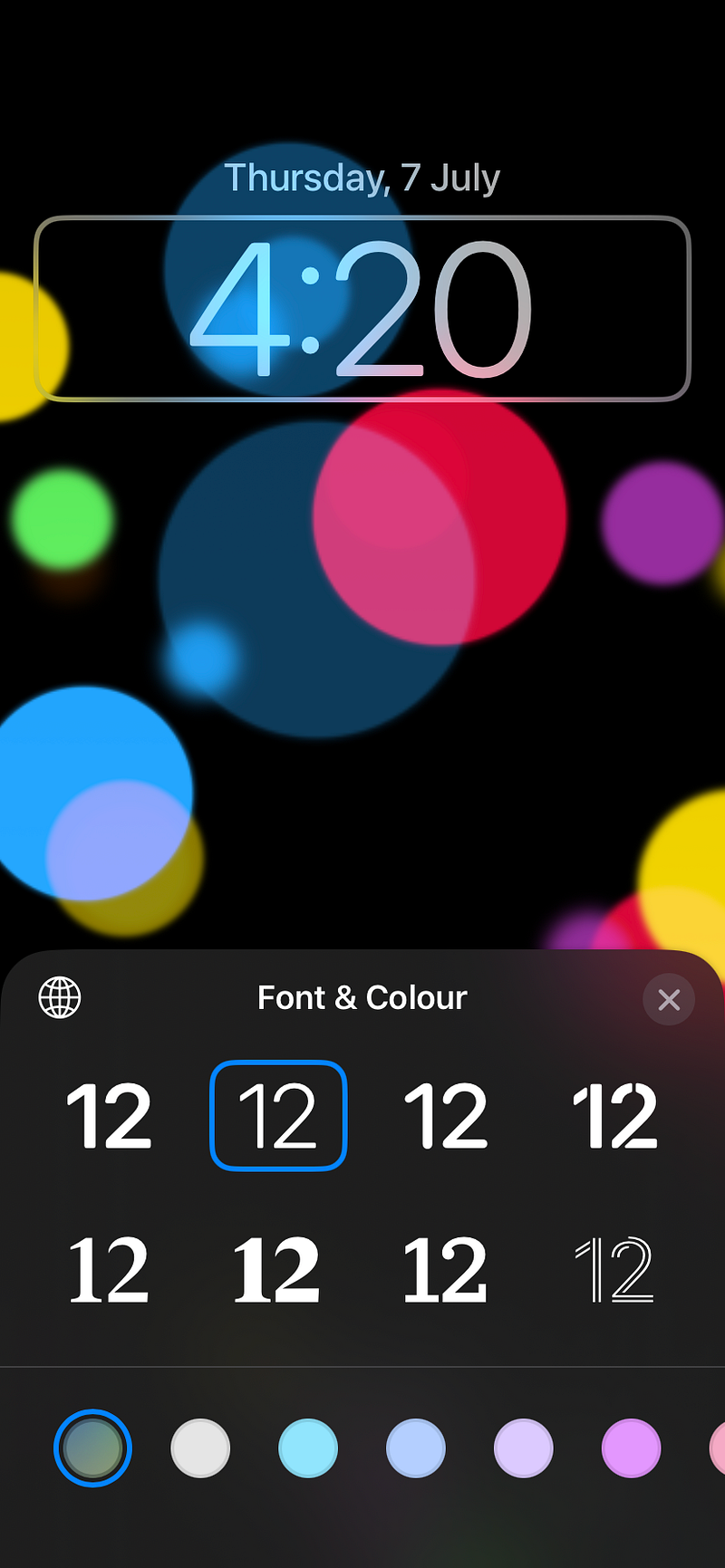
See the selected thin font (Screenshot by the author)

The first-ever customisable Lock Screen on iOS 16 featured only bold fonts for Time.

Don’t like them? With Beta 3, you have new thinner fonts.

#II. Calendar Events Blurred On Lock(ed) Screen
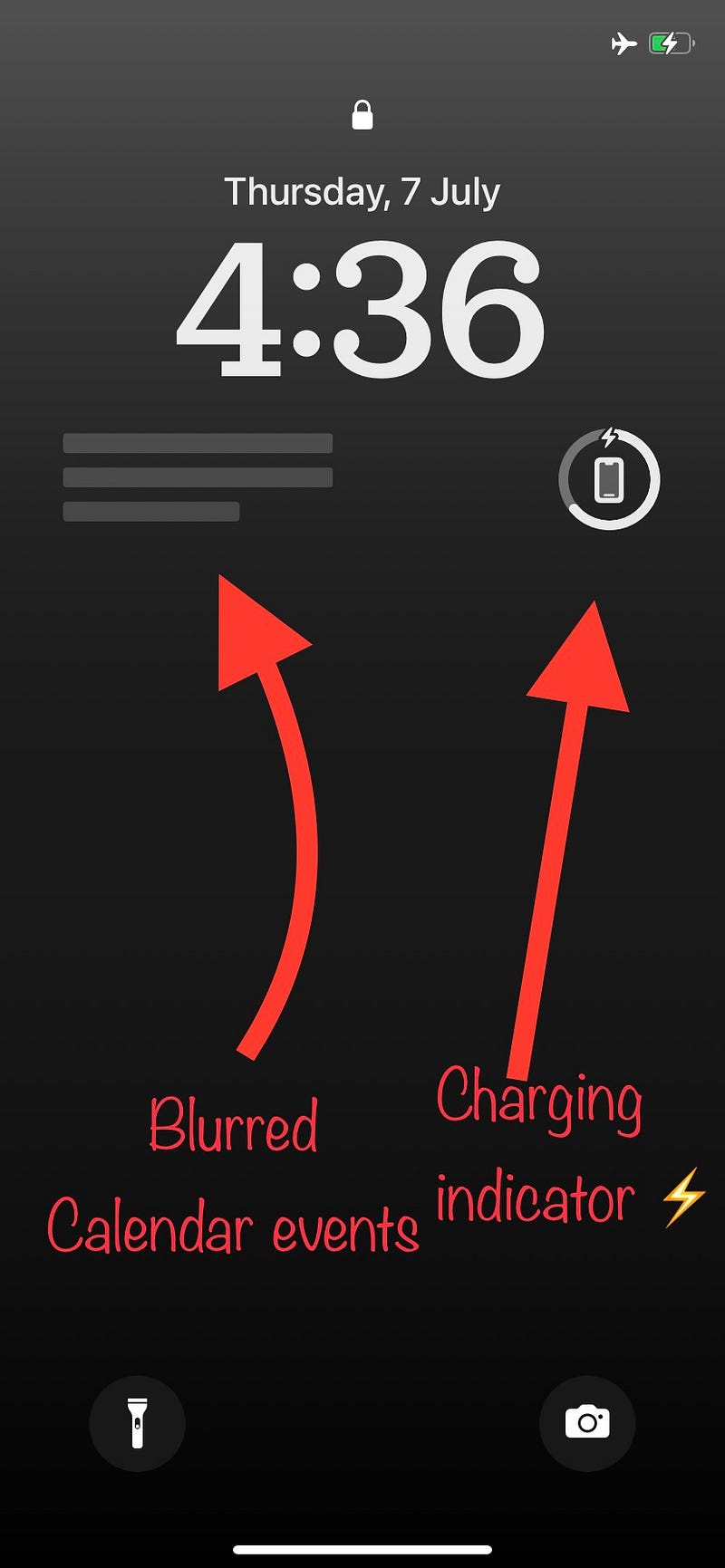
Screenshot by the author (Edited)

If you have Calendar events widget on lock screen, it’ll now blur your next event when the iPhone’s locked.

It gets readable only after you unlock it with Face ID.

#III. Battery Widget Now Shows “Charging” Status

Before, the battery widget only showed the charge percentage of your devices. Now, it additionally indicates if it’s currently charging with a ⚡️ glyph.

#IV. Invisible App Icons & Widgets in Home Screen Customisation
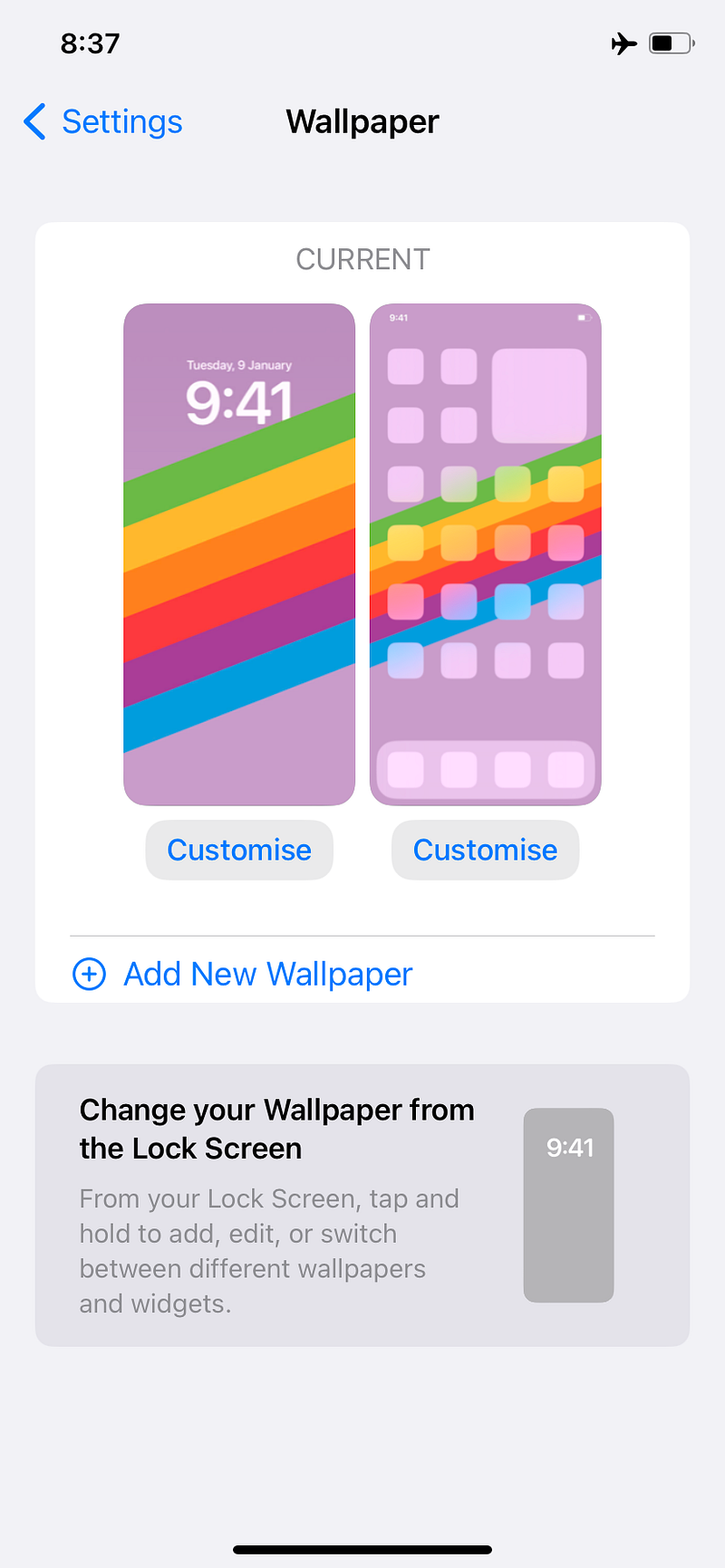
Screenshot by the author

This is a rather small change. While customising the Home Screen, previously, you had all the existing app icons and widgets showing up.

Now, they get invisible and you can only see the layout. This actually looks less distracting.

#3. A New Wallpaper that has a Back Story

This Clownfish Wallpaper is the first ever wallpaper set on an iPhone, used by Steve Jobs when the original iPhone was introduced back in 2007.

Personally, I wasn’t able to see it on my iPhone, just as many other developers. Some excited twitterati posted screenshots on getting this. Maybe we’ll all get it in the next beta or public release.
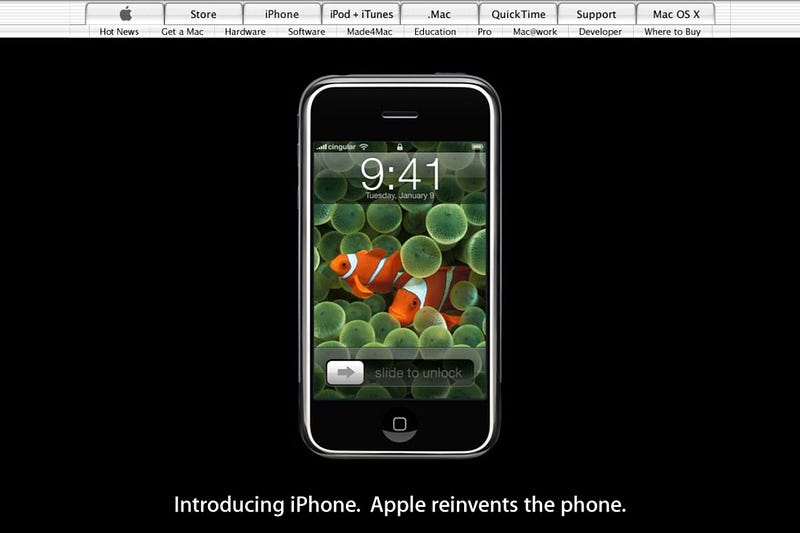
Apple.com in 2007 (Screenshot by the author from Wayback Machine)

#4. Health Changes

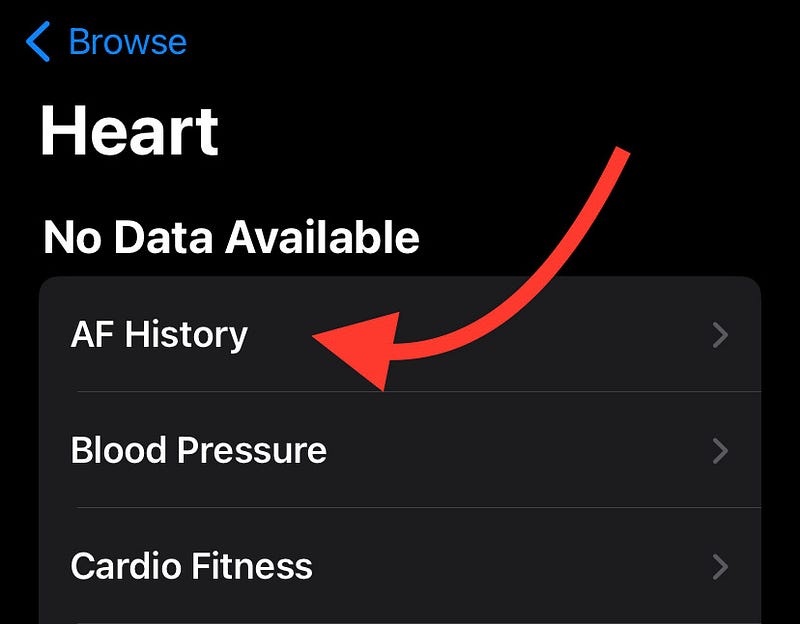
#I. AFib History

Screenshot by the author (Edited)

The AFib History (Atrial Fibrillation) feature teased at WWDC22 finally gets live. Find this on Health ❤️ < Heart ❤️ < AFib (or AF) History .

This requires an Apple Watch and represents how often your heart is in AFib, a common irregular rhythm. If you’re already diagnosed with it, you’ll receive an AFib History estimate each week.

#II. New Icon for Health Data
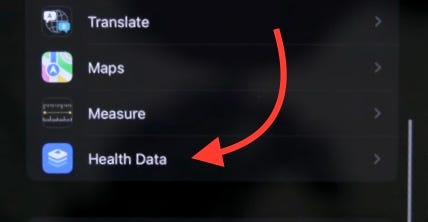
Screenshot by the author from Zollotech

Some developers are able to see a new icon for Health — and now ‘Health’ is renamed to ‘Health Data’.

The older one looks good imo.

#5. Accessibility Changes

#I. Live Captions get more Accessible
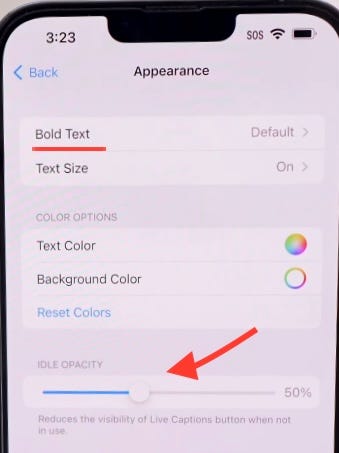
Screenshot by the author from Brandon Butch

Live Captions can now be set to be bold. And there’s a slider for Idle Opacity to set the level of fade when they’re not in use.

#II. New Options for LED Flash for Alerts
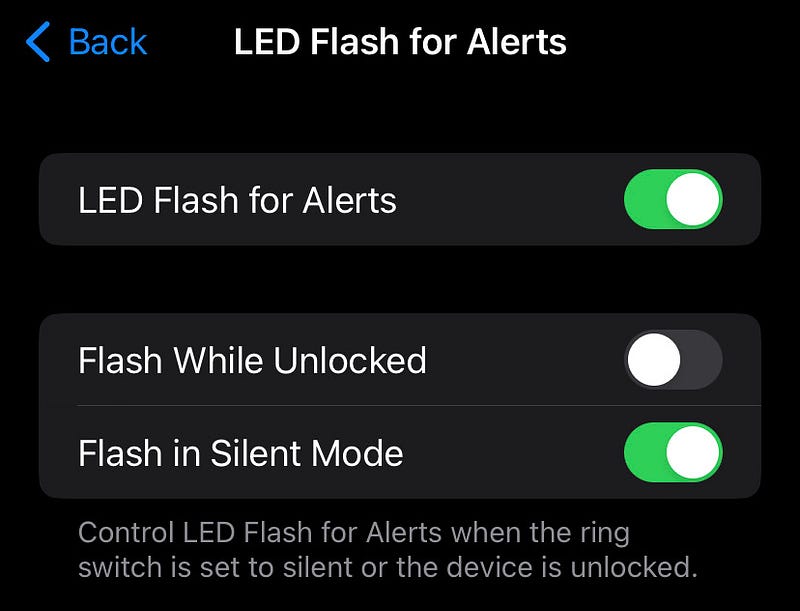
Screenshot by the author

Back in the days, you could only toggle on/off for LED Flash for Alerts. Now, you get two additional options if you turn it on.

  • Flash While Unlocked
  • Flash in Silent Mode

To use it, go to Settings ⚙️ < Accessibility 🚹 < Audio/Visual 🔉👁 < LED Flash for Alerts .

#6. iCloud Shared Photo Library gets Live
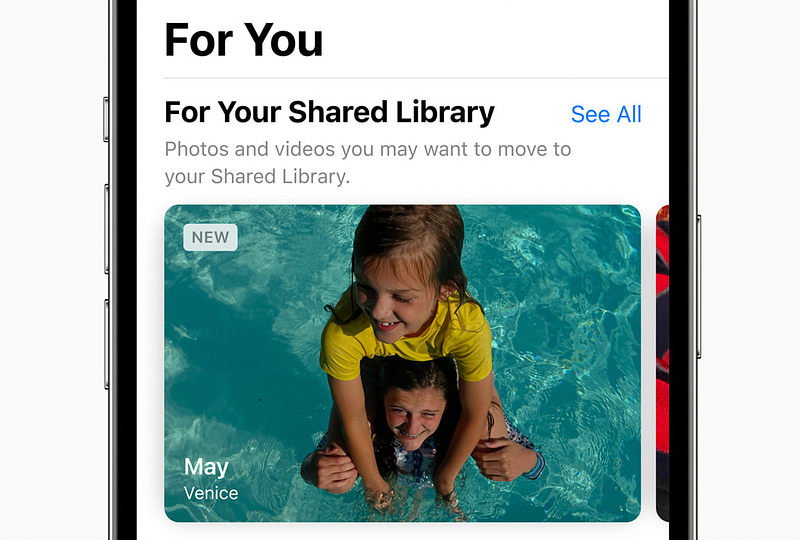
Image courtesy of Apple

This was teased on WWDC22 and I was longing for this feature for our trip to Himalayas.

This feature gets operational with Beta 3 and you can use it if you and your friends/family are currently on developer beta.

Read more about it in #9 of this article:

#7. Software Version page goes a level deep

Till iOS 15 and 16 Beta 2, the Software Version only showed the iOS version and its build number (with a tap).
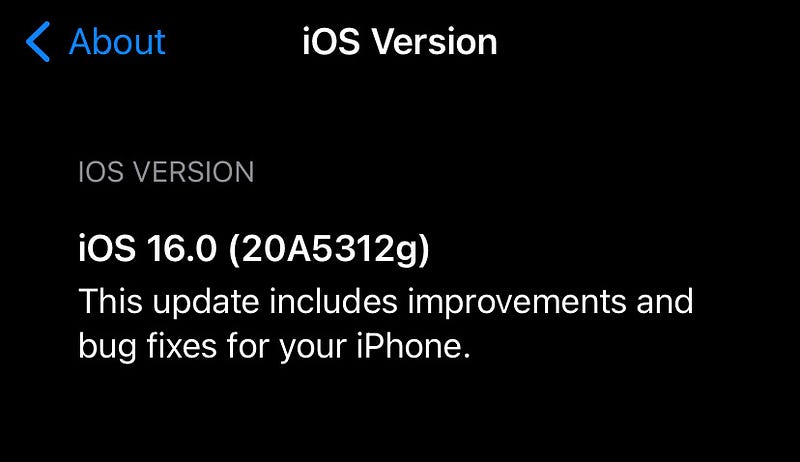
Screenshot by the author

However, you’ll now be able to read the detailed release notes on a new page by clicking on it.

#8. Include Due Today
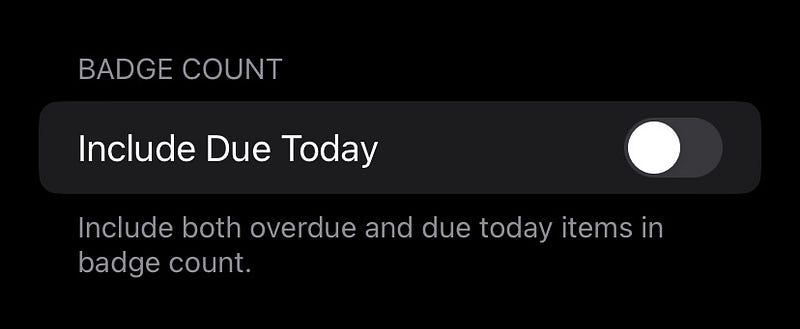
Screenshot by the author

Reminders gets a new feature — ‘Include Due Today’.

If you turn this on at Settings ⚙️ < Reminders ✔️ < Include Due Today . This will not only set today’s items in badge count, but also overdue items.

#9. Use Apple Pay When Available
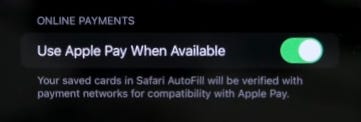
Screenshot by the author from Zollotech

There’s a new option in Wallet — Use Apple Pay When Available (Settings ⚙️ < Wallet 👜 < Use Apple Pay When Available) . If you toggle this on, your saved cards in Safari Autofill will be verified with compatibility with Apple Pay.

The latter payment method will be used with your compatible cards.

#10. And this long-term bug seems to have been fixed

If you liked this story, you might also like:

Hey! If you enjoyed this story, join 105+ others to get notified whenever I publish a new story.

Grab my NEW & UPDATED ebook A Tech Blogger’s Guide. Use code “50OFFATBG” for 50% exclusive discount. Applies for next 10 purchases only!

Cybersecurity
Technology
Privacy
Mobile
Apple
Recommended from ReadMedium