
The Haversine Formula: A Must-Have for Geospatial Reporting
Determining the Distance from Point A to Point B using SQL

If you’ve ever been tasked with sales territory mapping, logistics planning, or general geospatial reporting, you’ve likely needed to calculate the distance from point A to point B. Sure, you can pull distance calculations from the Google Maps API, but who needs to worry about rate limits or budgeting for another API connection when you can just apply logic in your code?
Income the Haversine Formula — a powerful formula using spherical trigonometry that you can quickly implement to calculate distances in scale. This formula takes into account earth’s curvature when given latitude and longitude inputs, where the output can be expressed in the measurement of your choosing (miles / kilometers etc.)
The Formula
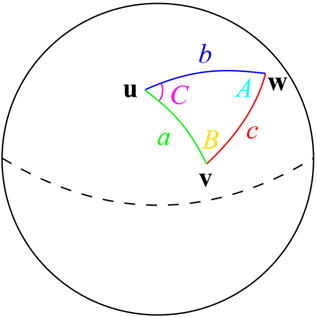
The haversine formula can be expressed in 3 calculations:
a = sin²(φB — φA/2) + cos φA * cos φB * sin²(λB — λA/2) c = 2 * atan2( √a, √(1−a) ) d = R ⋅ c
a, c, and d represent a series of calculations built on top of each other, where we will need to plug in both series of our latitude and longitude points and apply some trigonometry calculations to them.
To make these mathematical symbols more accessible, let’s break them down in the following section, especially if you’re not familiar with trigonometric notation.
Understand how to calculate these:
π = The value of Pi, or 3.141592653589793238462643383279502884197
√ = The Square Root
- The Square root denotes what number multiplied by itself will equal the given number.
φ = latitude in radians
- A radian is a measurement of angles but uses the properties of circles instead of straight lines.
- So, in this case φ = latitude * (π / 180)
- simplified further: φ = latitude * (3.1415 / 180)
- simplified once more: φ = latitude * 0.017453
λ = longitude in radians
- λ = latitude * (π / 180)
R = earth’s average radius, expressed in miles or kilometers of your choosing
- 3958.8 is earth’s average radius in miles.
- 6371.04 is earth’s average radius in kilometers.
Use your programming language to calculate these:
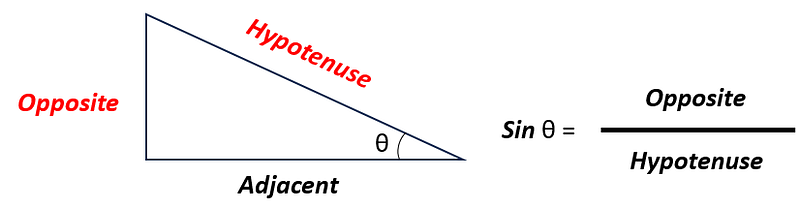
sin²( ) = The squared sine of the value within the parenthesis
- The sine function shows the ratio of the length of the side opposite to an angle to the length of the hypotenuse in a right triangle.
- In the haversine formula, it enables us to calculate the angular distance between the points, which is crucial for determining their great-circle distance (shortest distance) accurately.
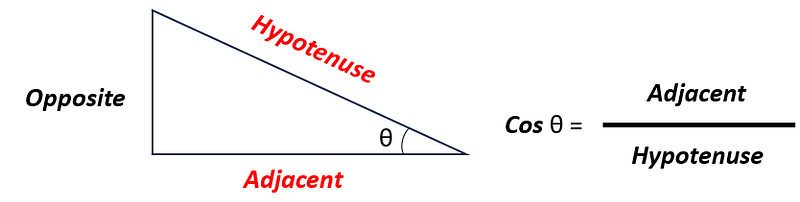
cos = the cosine
- The cosine is the ratio of the length of the adjacent side to the length of the hypotenuse in a right triangle
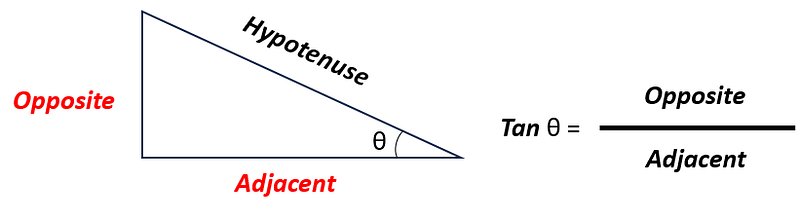
atan2 = The arctangent of the ratio from 2 arguments
- The arctangent is also known as the inverse of the tangent.
- a Tangent is the ratio of the length of the side opposite to an angle to the length of the adjacent side in a right triangle.
Disclaimers
The Haversine formula isn’t perfectly accurate, but it's very close.
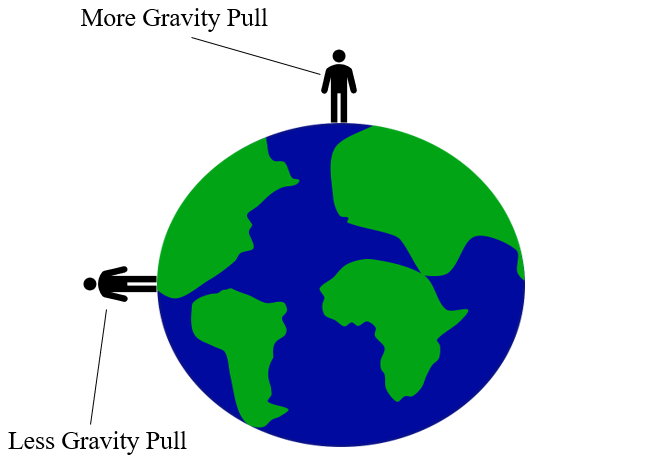
You’ll notice I mentioned Earth’s average radius above. We use the average because the formula assumes that Earth is a perfect sphere. While it is a sphere (hopefully you can agree with this), it's not a perfect sphere. Earth is actually considered an oblate spheroid, which means it is mostly spherical but slightly flattened. This is due to earth’s rotation, which causes Earth to slightly flatten at the poles and bulge at the equator.
The Haversine Formula calculates “Great Circle Distance”, not “Driving Distance”
These are two separate metrics.
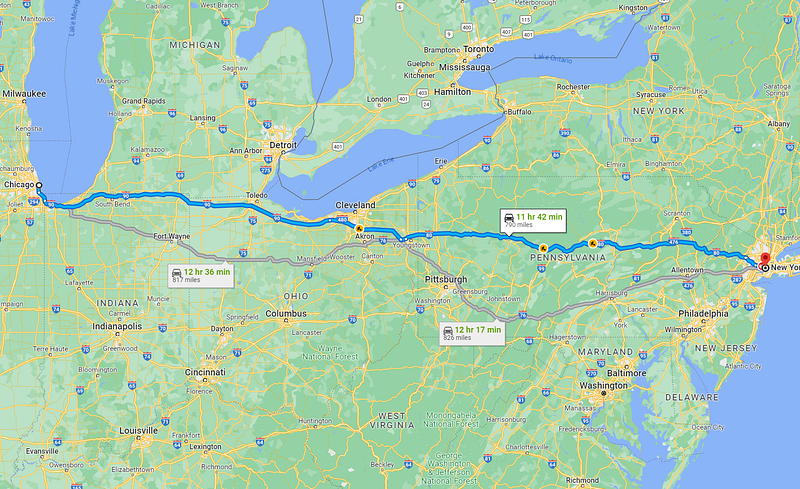
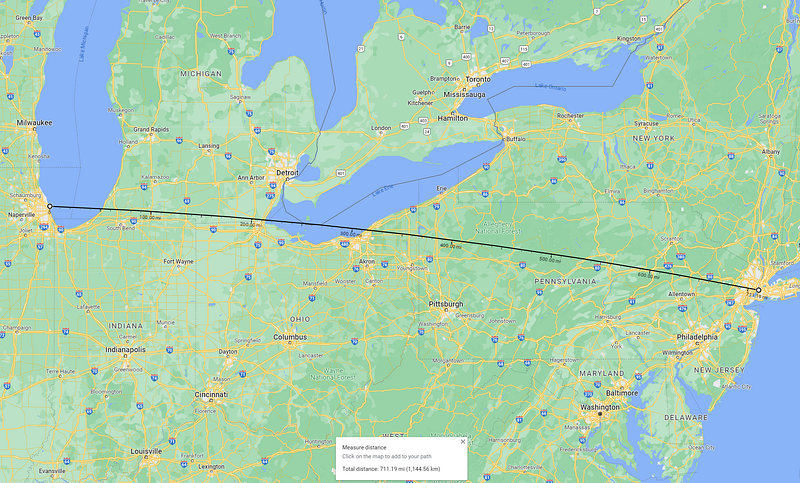
The Great Circle Distance calculates distances as a plane would fly from point A to point B and does not factor in available roadways. You can't calculate driving distance with a standalone formula- so if that's what you need, you’re best suited using a tool like the Google Maps API. As a general rule, the Great Circle Distance will always be less than or equal to the Driving Distance. See the below example of calculating distances from New York, NY to Chicago, IL to illustrate this:
Driving Distance: 790 Miles / 1271.38 Kilometers
Great Circle Distance: 711.19 Miles / 1144.54936 Kilometers
A full example using SQL against 2 location-based datasets
We can follow the below template using BigQuery SQL to execute the Haversine formula:
SELECT
latitude_1
, longitude_1
, latitude_2
, longitude_2
, ROUND(3958.8 * ACOS(COS(latitude_1 * 0.017453) * COS(latitude_2 * 0.017453) * COS((longitude_1 - longitude_2) * 0.017453) + SIN(latitude_1 * 0.017453) * SIN(latitude_2 * 0.017453)), 2) AS haversine_distance_in_miles
, ROUND(6371.04 * ACOS(COS(latitude_1 * 0.017453) * COS(latitude_2 * 0.017453) * COS((longitude_1 - longitude_2) * 0.017453) + SIN(latitude_1 * 0.017453) * SIN(latitude_2 * 0.017453)), 2) AS haversine_distance_in_kilometers
FROM table_with_locations
In the following example, I make use of the following BigQuery public datasets to determine the nearest New York City Subway station against a given New York City Citibike station:
Table 1: a list of NYC Citibike stations with their corresponding latitude and longitude
`bigquery-public-data.new_york_citibike.citibike_stations`
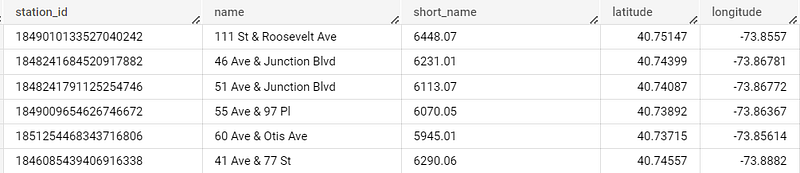
Table 2: a list of NYC Subway stations with their corresponding latitude and longitude
`bigquery-public-data.new_york_subway.station_entrances`
The below query is the full example of how I determine the closest subway station for every citibike station:
WITH distances AS (
  SELECT
  cb.station_id AS citibike_station_id
  , cb.name AS citibike_station_name
  , cb.latitude AS citibike_lat
  , cb.longitude AS citibike_lon
  , sub.station_name AS subway_station_name
  , sub.entrance_lat AS subway_lat
  , sub.entrance_lon AS subway_lon
  , ROUND(3958.8 * ACOS(COS(cb.latitude * 0.017453) * COS(sub.entrance_lat * 0.017453) * COS((cb.longitude - sub.entrance_lon) * 0.017453) + SIN(cb.latitude * 0.017453) * SIN(sub.entrance_lat * 0.017453)), 2) AS haversine_distance_in_miles
  , ROUND(6371.04 * ACOS(COS(cb.latitude * 0.017453) * COS(sub.entrance_lat * 0.017453) * COS((cb.longitude - sub.entrance_lon) * 0.017453) + SIN(cb.latitude * 0.017453) * SIN(sub.entrance_lat * 0.017453)), 2) AS haversine_distance_in_kilometers
  FROM `bigquery-public-data.new_york_citibike.citibike_stations` cb
  CROSS JOIN `bigquery-public-data.new_york_subway.station_entrances` sub
)

, distances_with_min AS (
  SELECT
  *
  , MIN(haversine_distance_in_miles) OVER (PARTITION BY citibike_station_id) AS min_distance_cal
  FROM distances
)

SELECT
citibike_station_id
, citibike_station_name
, citibike_lat
, citibike_lon
, subway_station_name AS nearest_subway_station_name
, subway_lat
, subway_lon
, haversine_distance_in_miles
, haversine_distance_in_kilometers
FROM distances_with_min
WHERE haversine_distance_in_miles = min_distance_cal
ORDER BY citibike_station_name
Breaking this query down:
- In the distances common table expression, I perform a cross join to get both tables into one output, creating the cartesian product of all rows. Within this, I create two columns using the haversine formula haversine_distance_in_miles and haversine_distance_in_kilometers.
- Then in distances_with_min, I determine the minimum value in miles of a related subway location to a given citibike station using a windows function. I gave it an alias of min_distance_cal.
- Finally, I return all related fields from distances_with_min, and filter the output where the haversine_distance_in_miles = min_distance_cal. This only takes rows with the smallest distance between each set of latitude and longitude, effectively giving us the closest subway station to each citibike station.
Proof that this checks out:
Let's compare one record to ensure that we’re accurate — according to my query the Citi Bike station at Troy Ave & Park Pl, Brooklyn, NY 11213 is closest to the Utica Ave Subway Station on Utica Ave, Brooklyn, NY 11213. The query also outputs a value of 0.26 miles.
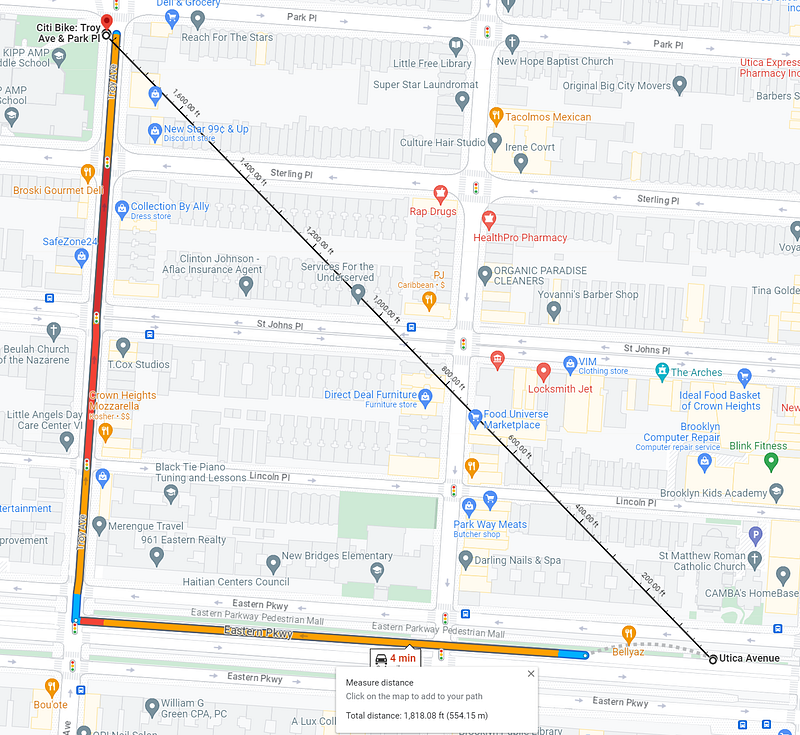
Google Maps calculates the distance as 1,818.08 feet or .0287 miles. The small delta between these numbers could be due to a number of factors:
- The exact coordinates of where I placed each pin manually in the Google Maps UI (I couldn’t type in the coordinates for the “Measure Distance” option)
- The rounding of the Pi value within my SQL query (I'd suggest using a Pi function if there is one available in your SQL environment, BigQuery Standard SQL doesn't explicitly have one, and I rounded the values for simplicity)
- Small differences in recorded coordinate values in the latitude and longitude within the BigQuery datasets.
Conclusion
The Haversine formula is an invaluable tool in data analysis for logistics planning. Its ability to accurately calculate distances between geographical coordinates helps logistics professionals make informed decisions regarding route optimization, resource allocation, and hotspot identification. By leveraging this formula, organizations can streamline their operations, reduce costs, and enhance overall efficiency in the complex landscape of logistics management. Its simplicity and accuracy make it a dependable asset to navigate the challenges of geospatial planning with greater precision and effectiveness.


