avatarKainos

Free AI web copilot to create summaries, insights and extended knowledge, download it at here

4623

Abstract

was my first time to test a software in beta before its official release! Later I realized that Pedraal, the guy who sent me the guest link, is in fact a French developer who works with the famous Twitch streamer & YouTuber <a href="http://twitch.tv/ponce">Ponce</a> in my country.</p><blockquote id="25f0"><p><i>🤔</i> OK, Kainos! We understood that it was something special when you got the link. But can you tell us exactly why Arc will make us all forget about Google Chrome?</p></blockquote><p id="9006">Patience, dear readers… We’ll get there!</p><h1 id="a12f">5 main features of Arc</h1><p id="733f">If you haven’t watched the video above <i>(because it’s in French, I know </i>🙃<i>)</i>, now is the time to discover the features of this revolutionary web browser.</p><figure id="f22c"><img src="https://cdn-images-1.readmedium.com/v2/resize:fit:800/1*wyrl0m7kLr3ziay3_vh9lA.png"><figcaption><b>The world’s most beautiful and powerful web browser. You’ll soon see why. If you don’t like the black theme, you can choose from the infinite possibilities Arc offers. </b>(Yes, that’s a long caption, but who cares? 🤪)<b> </b>| © Screenshot by <a href="http://bento.me/kainos">Kainos</a>.</figcaption></figure><p id="50c8"><b>1 — Arc Sidebar 🗂️</b></p><figure id="9eb1"><img src="https://cdn-images-1.readmedium.com/v2/resize:fit:800/1*ECQqVEPOfD339dtHfTufMQ.png"><figcaption><b>Arc’s Sidebar is a game changer 😎!</b> | © Screenshot by <a href="http://bento.me/kainos">Kainos</a>.</figcaption></figure><p id="6f57">Forget the navigation bar with the URL and your too many tabs at the top of your screen. On Arc, it’s an aesthetic and very powerful Sidebar that you have on the left.</p><p id="b834">This is where you navigate, have all your favorites, pinned sites, and navigation tabs.</p><p id="96d4">If you don’t want to see it, it’s really easy to just type command + S and hide it. If you want to see it again, either use the same command or move your cursor to the left side of the browser to temporarily see it.</p><figure id="aa42"><img src="https://cdn-images-1.readmedium.com/v2/resize:fit:800/1*YdcjeAL9vFtAMq1hgS_xsg.png"><figcaption><b>Yes, this is still Arc Browser, with the hidden Sidebar. See how focused you can be?</b> | © Screenshot by <a href="http://bento.me">Kainos</a>.</figcaption></figure><p id="7dab"><b>2 — Arc Spaces 🪐</b></p><p id="abfc">Arc Spaces are workspaces. Simple, in the sidebar you have all of the above, in their you can change your Space you’re in.</p><ul><li>Imagine a workspace called <i>“Side Hustles”</i> with all your websites pinned to it.</li><li>Then you swipe left and you are in your <i>“Home”</i> workspace, with all the useful links you know to do your home stuff.</li><li>Swipe left again and here you are in a room called <i>“Secret Project”</i> with all the golden websites you have found, gathering all the information you need to put together the project you want to create.</li></ul><p id="58ec">These are all Arc Spaces. In the same web browser. Without any complications. You can customize the color for each workspace.</p><p id="ab20"><b>3 — Split Views 👀</b></p><p id="1cf8">With this feature, you can double your productivity without leaving your browser. Simply drag and drop the tab you want to split with another tab.</p><p id="be5d">Here is an example:</p><figure id="2a7d"><img src="https://cdn-images-1.readmedium.com/v2/resize:fit:800/1*1sfFdSmIy9tW5UhesPTP9Q.png"><figcaption><b>With Arc, you can split your screen into as many screens as you need, with Split Views.</b> | © Screenshot by <a href="http://bento.me/kainos">Kainos</a>.</figcaption></figure><p id="d09d">In this example above, I have split my Arc browser into two parts:</p><ol><li>The embedded Arc Notes application of the browser,</li><li>A YouTube video.</li></ol><p id="f1d6">As you can see, I don’t have to go to the trouble of leaving the browser, then opening a note-taking application, then going back to my web browser, then cropping the screen to make it look the way I want. With just one click, very easily, my web browser splits into two screens.</p><p id="a5c2">Isn’t it awesome?</p><p id="0c62"><b>4 — Notes & Easels 🎨</b></p><p id="1f4c">Well, on the screenshot above, you already saw to what looks like the embedded Notes app in Arc, so now, let’s see what an Easel is.</p><figure id="11b0"><img src="https://cdn-images-1.readmedium.com/v2/resize:fit:800/1*PSEDi5IWLS_tU_-phrNEDw.png"><figcaption><b>Easel is a great embedded creative tool.</b> | Screenshot by <a href="http://bento.me/kainos">Kainos</a>.</figcaption></figure><p id="637c">Think of an

Options

Easel as a board. A board where you can write things, put some parts of websites you want to watch (called Captures). In the screenshot above, you can see that there are two Captures: one for my X followers and one for my Medium followers.</p><p id="f38d">On this Easel, I have a simple view of my follower count. Simple, isn’t it? I created this thanks to the embedded Easel tool. Again, I didn’t have to leave the browser. It was all so easy to do.</p><p id="1ded">I can also add pictures, draw some shapes, <i>etc</i>… The sky is the limit!</p><p id="6117"><b>5 — Command Bar</b></p><figure id="4504"><img src="https://cdn-images-1.readmedium.com/v2/resize:fit:800/1*RzNxEnEaDuSYk_uceXtdVg.png"><figcaption><b><i>Just type command + T and this powerful Command Bar appears, ready to serve your needs.</i></b> | © Screenshot by <a href="http://bento.me/kainos">Kainos</a>.</figcaption></figure><p id="d905">The command bar allows you to search the web directly using the search engine of your choice, but not only. You can enter a URL, or you can just access the Notes application. Or you can go to anything, really.</p><p id="dd5e">If you have an iPhone or a Mac, it works like Spotlight.</p><p id="498b">Recently they put some steroids on this feature. You can ask ChatGPT something directly. Or better yet, you can even make a research and directly access the best recommended website that will best answer your question.</p><h2 id="9400">The beginning of a new Internet era!</h2><p id="b7ce">In fact, on February 1, 2024, Arc will become the first browser in Mankind’s history to be the browser that browses for you.</p><p id="4a31">I want you to see for yourself, by watching The Browser Company’s video, all the things you can do with Arc, a web browser that browses for you. <i>(Really, you have to watch it, or you’ll miss a huge revolution in Internet history. And I specify that Arc didn’t pay me one penny for this article. Actually, they don’t even know that I exist on this planet.)</i></p> <figure id="cbac"> <div> <div> <img class="ratio" src="http://placehold.it/16x9"> <iframe class="" src="https://cdn.embedly.com/widgets/media.html?src=https%3A%2F%2Fwww.youtube.com%2Fembed%2FWIeJF3kL5ng%3Fstart%3D93%26feature%3Doembed&amp;display_name=YouTube&amp;url=https%3A%2F%2Fwww.youtube.com%2Fwatch%3Fv%3DWIeJF3kL5ng&amp;image=https%3A%2F%2Fi.ytimg.com%2Fvi%2FWIeJF3kL5ng%2Fhqdefault.jpg&amp;key=d04bfffea46d4aeda930ec88cc64b87c&amp;type=text%2Fhtml&amp;schema=youtube" allowfullscreen="" frameborder="0" height="480" width="854"> </div> </div> </figure></iframe></div></div></figure><h2 id="00a9">To download Arc</h2><p id="d01d">You can download Arc browser on your Mac on Arc’s official <a href="http://arc.net">website</a>.</p><p id="f35c">For Windows, you have to <a href="https://resources.arc.net/hc/en-us/articles/19400082392215-Arc-for-Windows">join a waiting list</a> to <i>(maybe)</i> get the beta link.</p><blockquote id="a990"><p>For the pocket version of Arc called “Arc Search” that Josh Miller is talking about in this video, you can <a href="https://apps.apple.com/app/apple-store/id6472513080?pt=120729021&amp;ct=arcnet-homepage&amp;mt=8">download it</a> on your iPhone. (Sorry Android phones)</p></blockquote><h2 id="72de">Conclusion</h2><p id="062d">You have to absolutely test it in order to understand what I’m writing about here.</p><p id="557e">2024 is a true revolution for technology. With the rise of AI, the possibilities of creation have been multiplied almost infinitely. Combining AI + web browser + search engine, you have a real assistant in your pocket at all times.</p><p id="8de4">I don’t know what generation you are, but this has reshuffled the deck. Even for me, who belongs to Generation Z (1996–2010), and who is familiar to technology: I see this as a revolution.</p><blockquote id="cd39"><p>And you, what do you think? I would love to have your feedback in the comments section <i>💬</i>.</p></blockquote><p id="db58">Sincerely yours,</p><figure id="97df"><img src="https://cdn-images-1.readmedium.com/v2/resize:fit:800/0*TaapZ9HYRNePrKBr.png"><figcaption><b>Author’s signature.</b> | © Designed by <a href="http://bento.me/kainos">Kainos</a>.</figcaption></figure><figure id="9922"><img src="https://cdn-images-1.readmedium.com/v2/resize:fit:800/0*7ptkklIlNzsbnN2C.png"><figcaption><b>Click this button to access my X, Instagram, BuyMeACoffee, Fiverr, and more…</b> | © Designed by <a href="http://bento.me/kainos">Kainos</a>.</figcaption></figure></article></body>

The Future of the Internet Starts Now

Farewell Google Chrome, Edge, Opera, etc…
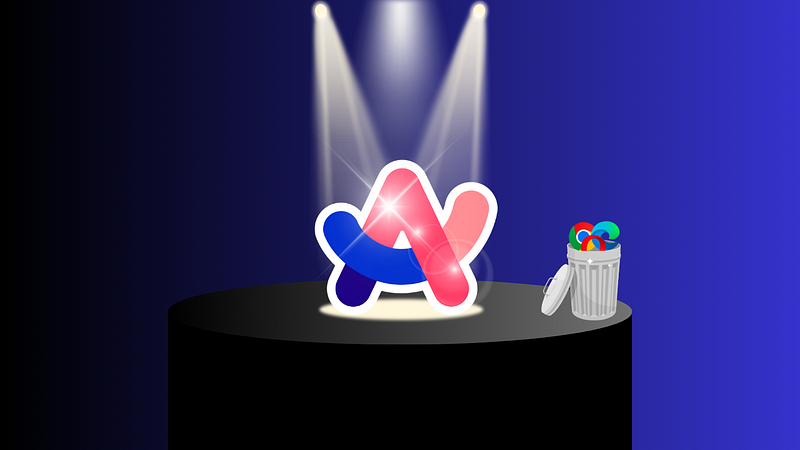
Ladies and gentlemen, let me introduce you to the future of the Internet! (In the trash, just in case you were wondering, you can find Chrome, Edge, Opera and all the other old web browsers…) | © Designed by Kainos.

An era of Internet is ending, a new one is beginning. Spoiler alert: it’s dope 🤩! (Read to the end to not miss the 5 Arc mindblowing features!)

If you’re looking for THE software that will radically change the way we use the Internet, you’ve come to the right place.

Arc, released in beta on April 19, 2022 by “The Browser Company 🔵”, founded by Josh Miller & Hursh Agrawal, is THE web browser to have on your computer AND on your iPhone (hopefully you have an iPhone!) in 2024.

It’s not just another browser that does the same things as the others, but in a different way. NO: It’s a new way of using the Internet.

I’ve been using it since January 13, 2023. At that time, you could only download it if one of the beta testers sent you one of their 5 links. Let me explain how I got the generous opportunity to use it…

How I discovered Arc

I’ve heard of it for the first time on YouTube! It was January, 5th 2023.

What a shocking video title for this time 🤯! This man explains how Arc will kill Google Chrome. Chrome has always been known for its efficiency, reliability, aesthetic design, etc… It’s the leader in the browser market. So I watched the whole video to understand what was going on!

As a technical person, my curiosity was piqued. I wanted to know more. After watching it, I went straight to the Internet to try to get a download link: there was no way. On Arc’s website you couldn’t even download it, you had to enter your email address to receive an email when it was released to the public. Only if you had a MacBook Pro, of course.

By the way, I’m so glad I had a MacBook Pro by this time. I bought it in December 2022. Otherwise, I couldn’t even hope to try Arc anytime soon. It was in Beta for MacOS only. For Windows, no version was available by then.

My special guest invitation

I didn’t even have to wait for Arc to send me the download link!

8 days after the video, I was watching my favorite UX/UI streamer on Twitch. I asked him in chat if he had heard of Arc Browser. He said he had heard of it, but hadn’t tried it. But someone else in the chat seemed to know more about it. A guy behind the username “Pedraal” whispered a very rare guest link to me.
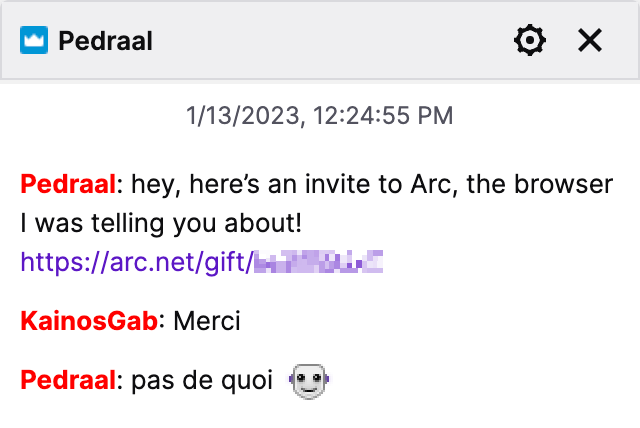
The most random and generous gift I’ve ever received from a stranger on the Internet! Thanks Pedraal. | © Screenshot from the Whispered Conversation with Pedraal on Twitch, by Kainos.

You can see the date: January 13, 2023, 12:24:55 PM. I didn’t wait too long to download it.

On Arc, you have your own personal badge with the date you downloaded it. | © Screenshot of Kainos’s Arc Member badge.

This is the power of the Internet. It was my first time to test a software in beta before its official release! Later I realized that Pedraal, the guy who sent me the guest link, is in fact a French developer who works with the famous Twitch streamer & YouTuber Ponce in my country.

🤔 OK, Kainos! We understood that it was something special when you got the link. But can you tell us exactly why Arc will make us all forget about Google Chrome?

Patience, dear readers… We’ll get there!

5 main features of Arc

If you haven’t watched the video above (because it’s in French, I know 🙃), now is the time to discover the features of this revolutionary web browser.
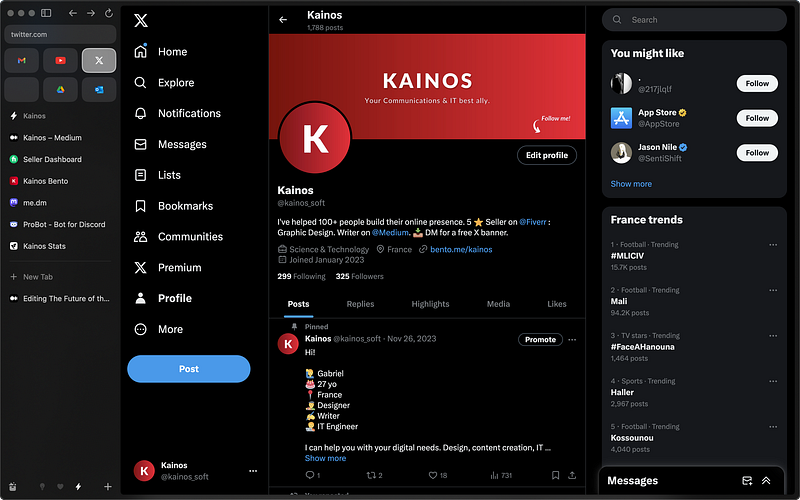
The world’s most beautiful and powerful web browser. You’ll soon see why. If you don’t like the black theme, you can choose from the infinite possibilities Arc offers. (Yes, that’s a long caption, but who cares? 🤪) | © Screenshot by Kainos.

1 — Arc Sidebar 🗂️

Arc’s Sidebar is a game changer 😎! | © Screenshot by Kainos.

Forget the navigation bar with the URL and your too many tabs at the top of your screen. On Arc, it’s an aesthetic and very powerful Sidebar that you have on the left.

This is where you navigate, have all your favorites, pinned sites, and navigation tabs.

If you don’t want to see it, it’s really easy to just type command + S and hide it. If you want to see it again, either use the same command or move your cursor to the left side of the browser to temporarily see it.
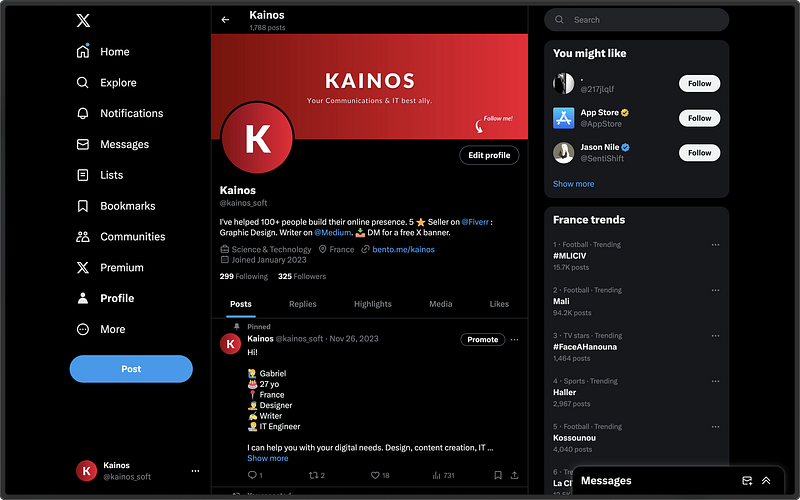
Yes, this is still Arc Browser, with the hidden Sidebar. See how focused you can be? | © Screenshot by Kainos.

2 — Arc Spaces 🪐

Arc Spaces are workspaces. Simple, in the sidebar you have all of the above, in their you can change your Space you’re in.

  • Imagine a workspace called “Side Hustles” with all your websites pinned to it.
  • Then you swipe left and you are in your “Home” workspace, with all the useful links you know to do your home stuff.
  • Swipe left again and here you are in a room called “Secret Project” with all the golden websites you have found, gathering all the information you need to put together the project you want to create.

These are all Arc Spaces. In the same web browser. Without any complications. You can customize the color for each workspace.

3 — Split Views 👀

With this feature, you can double your productivity without leaving your browser. Simply drag and drop the tab you want to split with another tab.

Here is an example:
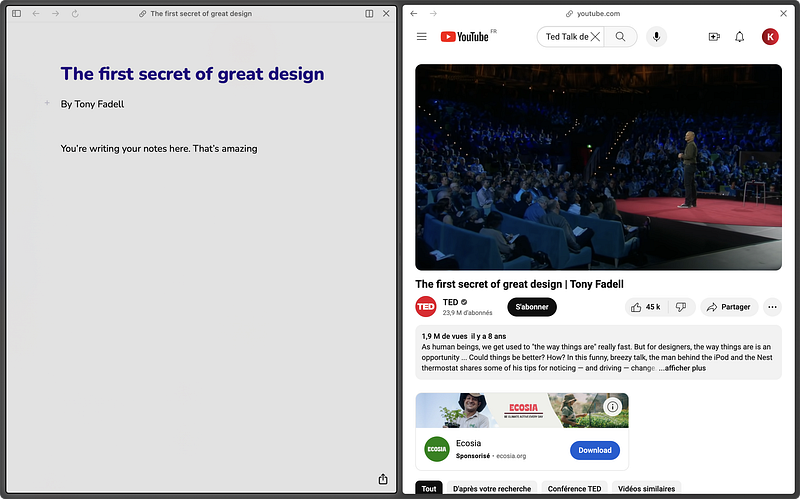
With Arc, you can split your screen into as many screens as you need, with Split Views. | © Screenshot by Kainos.

In this example above, I have split my Arc browser into two parts:

  1. The embedded Arc Notes application of the browser,
  2. A YouTube video.

As you can see, I don’t have to go to the trouble of leaving the browser, then opening a note-taking application, then going back to my web browser, then cropping the screen to make it look the way I want. With just one click, very easily, my web browser splits into two screens.

Isn’t it awesome?

4 — Notes & Easels 🎨

Well, on the screenshot above, you already saw to what looks like the embedded Notes app in Arc, so now, let’s see what an Easel is.
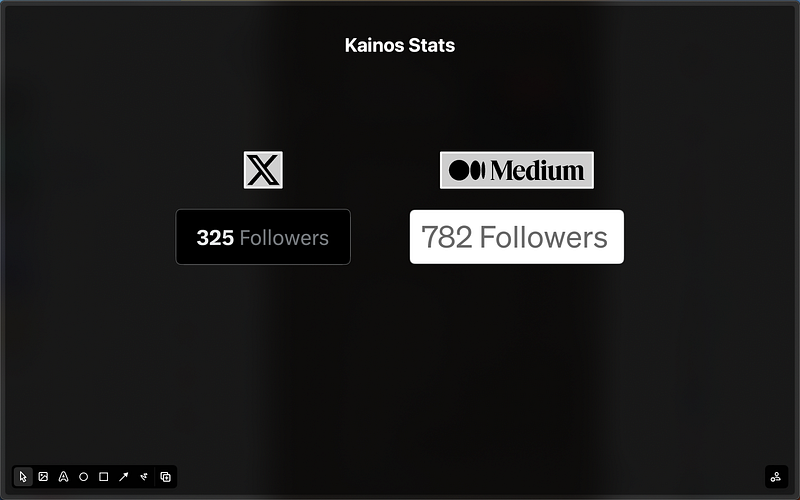
Easel is a great embedded creative tool. | Screenshot by Kainos.

Think of an Easel as a board. A board where you can write things, put some parts of websites you want to watch (called Captures). In the screenshot above, you can see that there are two Captures: one for my X followers and one for my Medium followers.

On this Easel, I have a simple view of my follower count. Simple, isn’t it? I created this thanks to the embedded Easel tool. Again, I didn’t have to leave the browser. It was all so easy to do.

I can also add pictures, draw some shapes, etc… The sky is the limit!

5 — Command Bar
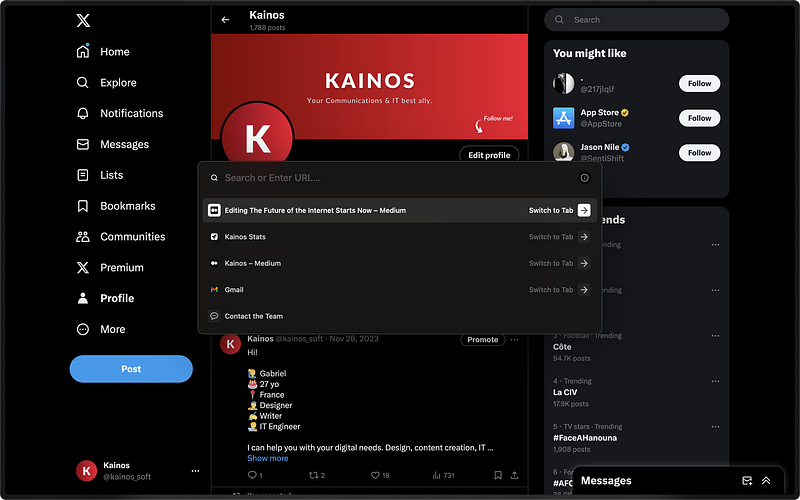
Just type command + T and this powerful Command Bar appears, ready to serve your needs. | © Screenshot by Kainos.

The command bar allows you to search the web directly using the search engine of your choice, but not only. You can enter a URL, or you can just access the Notes application. Or you can go to anything, really.

If you have an iPhone or a Mac, it works like Spotlight.

Recently they put some steroids on this feature. You can ask ChatGPT something directly. Or better yet, you can even make a research and directly access the best recommended website that will best answer your question.

The beginning of a new Internet era!

In fact, on February 1, 2024, Arc will become the first browser in Mankind’s history to be the browser that browses for you.

I want you to see for yourself, by watching The Browser Company’s video, all the things you can do with Arc, a web browser that browses for you. (Really, you have to watch it, or you’ll miss a huge revolution in Internet history. And I specify that Arc didn’t pay me one penny for this article. Actually, they don’t even know that I exist on this planet.)

To download Arc

You can download Arc browser on your Mac on Arc’s official website.

For Windows, you have to join a waiting list to (maybe) get the beta link.

For the pocket version of Arc called “Arc Search” that Josh Miller is talking about in this video, you can download it on your iPhone. (Sorry Android phones)

Conclusion

You have to absolutely test it in order to understand what I’m writing about here.

2024 is a true revolution for technology. With the rise of AI, the possibilities of creation have been multiplied almost infinitely. Combining AI + web browser + search engine, you have a real assistant in your pocket at all times.

I don’t know what generation you are, but this has reshuffled the deck. Even for me, who belongs to Generation Z (1996–2010), and who is familiar to technology: I see this as a revolution.

And you, what do you think? I would love to have your feedback in the comments section 💬.

Sincerely yours,

Author’s signature. | © Designed by Kainos.
Click this button to access my X, Instagram, BuyMeACoffee, Fiverr, and more… | © Designed by Kainos.
Technology
Innovation
Ideas
Future
Software
Recommended from ReadMedium