
The fastest way to fetch BigQuery tables
A benchmark of the fastest methods used to fetch tables from BigQuery. Also introducing bqfetch: an easy-to-use tool for fast fetching.
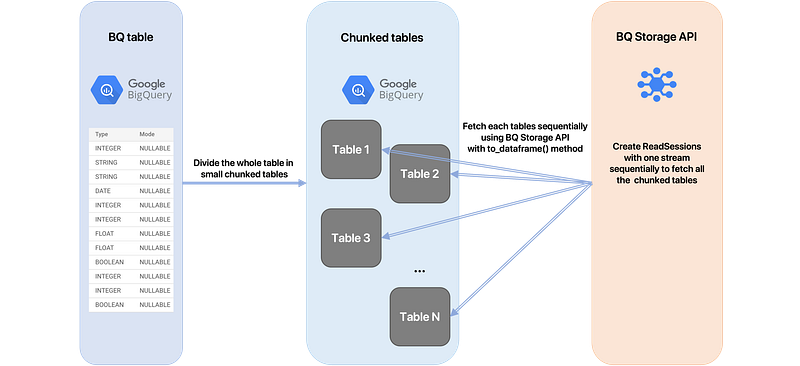
As a Data Engineer, I wanted to fetch as quickly as possible tables from BigQuery. I also needed to fetch these tables as pandas DataFrames. So I considered a lot of alternatives, I have tested and benchmarked many implementations using multiple frameworks, and I will show you in this article a tool I have built that allowed me to get the best performance for fetching BQ tables as DataFrames.
All the following recommandations are based on benchmarks tested on Google Compute Engines (GCE), it might be possible that some better implementations exist according to the machine you use and the Internet bandwidth.
Old method
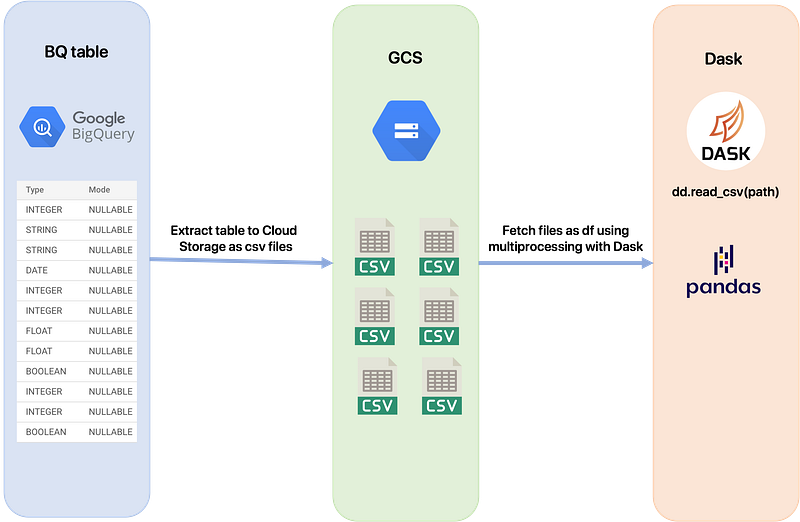
One of the well known method used to fetch data from BigQuery works as follow:
- Extract the table to Google Cloud Storage using GZIP compression. It will create multiple csv files, each containing some rows of the table, compressed using the GZIP format. This action has no cost using the BigQuery API.
- Using Dask framework, use the
read_csv(path_to_gcs_bucket)method to fetch all the files in the bucket using multiprocessing with all the available cores on the machine. This method returns a lazy Dask.DataFrame which fits into memory because of the laziness. Thecompute()method can then be used if you need to load the full df into memory.
This method can achieve suitable results but there are two main bottlenecks:
- We have to use GCS in order to convert the table to multiple files so we feel that it’s not the most suitable way to fetch the data, we should have an easier and faster method. Also, the compression of the table and its extraction to GCS takes time so we definitely want to delete this part.
- Using this method, the whole table is fetched at the same time, if the
compute()method of Dask is not used we can’t use properly the DataFrame and if we use it, the df has to fit into memory.
New method
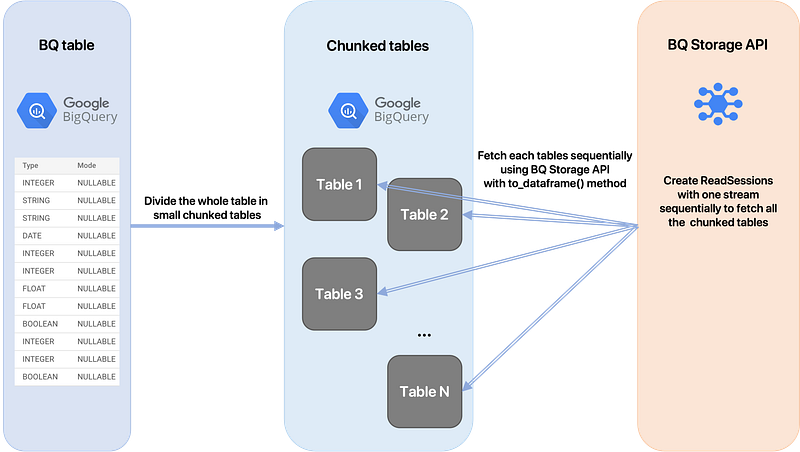
Despite its limitations, BigQuery Storage API has the advantage to fetch directly the table, so we don’t have to worry about the GCS part which annoyed us using the first method.
Explanations of the method using an example:
- Let’s say we have a machine with 16GB of available memory. In order to use this memory efficiently, we would like to fetch data up to the maximum available space, then process it, and repeat this process until the table is entirely fetched. So the first step is to divide the whole table in multiple tables of size <16Gb. However, a DataFrame object is greater than the raw fetched data (basically 1/3 bigger than the fetched data). We can now say that if we fetch ~10.7GB of data we’ll have a DataFrame of size 16GB that will fit into memory. So the idea is to chunk the whole table in N tables of size ~10.7GB. Ex: for a table of size 200GB we’ll create 19 tables of size ~10.7GB.
- Once we have created all the chunked tables, we just have to fetch them sequentially using the BigQuery Storage API.
But wait, why do we have do divide the main table in chunked tables? Why can’t we just use a filter with an “IN” SQL statement in order to select only some rows at each time? Here is the reason.
The filter bottleneck
The following code uses BigQuery Storage API to fetch a table by applying a row filter (only select some rows that match a certain condition in the table). Thus, only the rows that match the SQL expression given in the TableReadOptions constructor will be fetched. The table is of size 220GB and the estimated size of the rows that match a product_id = 1 or 2 is ~2GB.
Now when looking at the network usage of the compute engine, we figured out that when fetching this chunk of size 2GB from the table of 220GB, the bandwidth peak is only at 2MB/s.
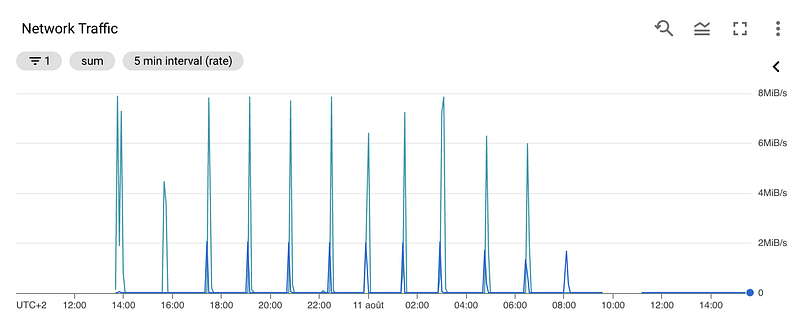
However, when fetching a small table of 22GB, the network peaks 130MB/s.
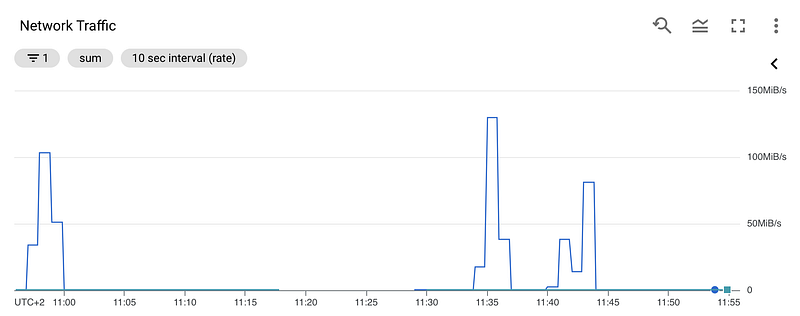
This is due to the limitations of BigQuery Storage Read API. More precisely, it is because we are using a filter (“IN” clause in SQL) and the API restricts this filter size to 10MB and thus the performance is bad for big tables.
Conclusion: fetching a table with a row filter using this API is way better when tables are small (~≤4GB).
Benchmark of the time to fetch 750k rows using the row filter, among multiple tables:
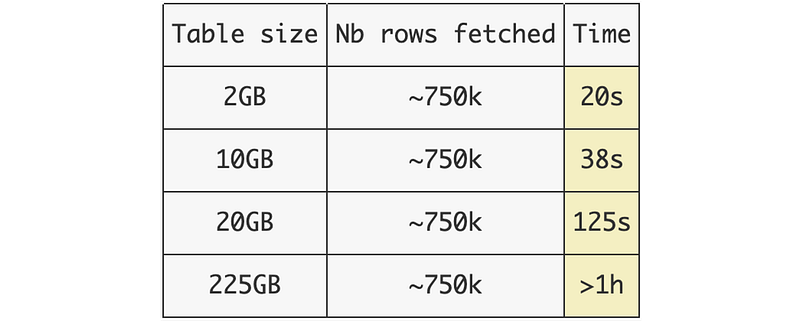
This is why the solution I propose to bypass this limitation is to divide the original table in smaller tables that can be fetched faster. Using this method, dividing your table in smaller tables allow you to fetch your selected rows using the same time (20s in the previous examples).
Introducing bqfetch
Hopefully, I already created a tool using this previous technique, which I’m using in my new projects.

I really encourage you to visite the Github page to check the documentation.
The idea behind this tool is the same we described earlier, with some particularities:
- From the whole table, choose an
index columnwith the most distinct values (a column we can easily split in many chunks of approximatively the same size). A good column could be an ID column or a column containing for each distinct value approx. the same number of rows. - Then a
SELECT DISTINCT index_columnis done in order to get an. estimation for the number of elements in the table. - The size in GB of the whole table is computed and a formula is applied to find the number of chunks we need to have to divide the table using the available memory on the machine. All this complicated stuff is done in background, you only have to specify an index_column used to divide the table by chunks of this column.
- Now that we have the number of chunks, the algorithm returns a list of chunks each containing multiple values of the index_column.
- By looping over these chunks, we just have to fetch each chunk. After each fetch, the chunk is divided in an optimal number of tables which are created in BigQuery, in the same dataset used by the table. Then, the tables are fetched using BigQuery Storage API (with or without multiprocessing). Finally, the previously created tables are deleted.
- Using this technique, the memory will be used optimally and will not overflow if you specify the correct chunk size.
Demo
- First, we have to create a
BigQueryTableobject which contains the path to the BigQuery table stored in GCP. - A fetcher is created, given in parameter the absolute path to the service_account.json file, the file is mandatory in order to do operations in GCP.
- Chunks the whole table, given the
columnname and thechunk size. In this case, choosing the “id” column is perfect because each value of this column appears the same number of times: 1 time. Concerning the chunk size, ifby_chunk_size=2, each chunk that will be fetched on the machine will be of size 2GB. Thus it has to fit into memory. You need to save 1/3 more memory because the size of a DataFrame object is larger than the raw fetched data, as we have seen earlier. - For each chunk, fetch it.
nb_cores=-1 will use the number of cores available on the machine.parallel_backend='billiard' | 'joblib' | 'multiprocessing' specify the backend framework to use. Ifby_chunk_size=2, then the returned DataFrame size will be ~2,66 (2+2*(1/3)) (it depends a lot on the schema of the table so make your own tests before).
Multiprocessing
Yes, this tool implements multiprocessing using billiard, joblib and multiprocessing backends. You just have to set nb_cores and the fetching will be launch using nb_cores processes. Each chunk will be divided in the number of processes and each process will run a BQ Storage ReadSession and apply a row filter containing the values in each chunks.
However, I highly recommend you to read my previous article on the benchmark of BigQuery Storage using multiprocessing before you start using it.
Anyway, here is an example of multiprocessing implementation using bqfetch.
Conclusion
After many researches and benchmarks, I figured out that the BigQuery Storage API implementation using chunked tables was (for my use cases) the most performant way to fetch tables from BigQuery. I have divided by a factor of 6 the time of fetching on my main project using the tool I showed you and I hope it can help other Data Engineers in their work. I’m really open to improvement suggestions or contribution requests on GitHub so do not hesitate to reach me if you want to chat about that.


