
The Fastest Collection In C# Is This 1 That You Probably Barely Ever Used
See a comparison of all built-in collections in .NET

Collections should be an essential element of your .NET dev toolbelt. But choosing the right one is a different challenge and crucial in performance.
The knowledge about them is what each developer should have. Wasting resources by making the wrong choice is made quickly and mostly hidden.
How often did you simply choose List<T> and waste important resources?
Which One is the Fastest?
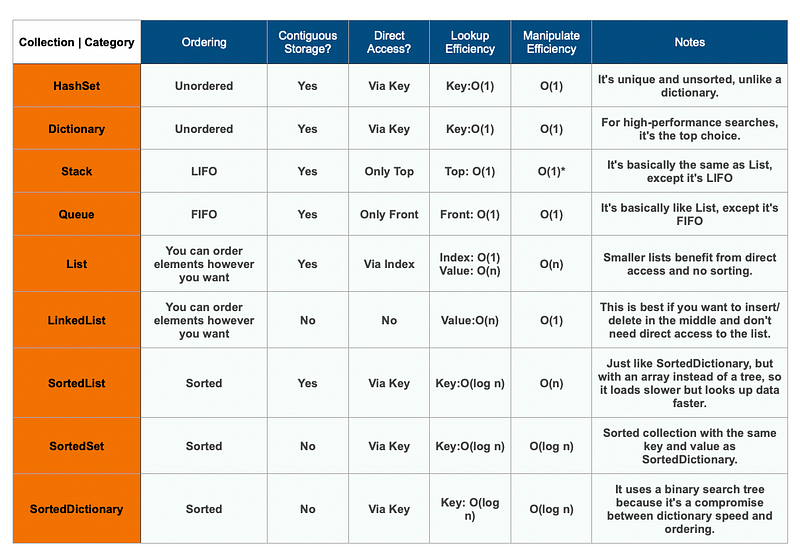
You came here for the result, and you’ll find the answers in the table below.
Before you take a look, use the paragraphs below to get detailed information about the most important collections for everyday problems.
HashSet<T>
What’s your favorite collection?
I bet 100 bucks it is List<T>. Most of the time, it is certainly often in the first place. For me, the decision is quite obvious. HashSet<T> is an everyday companion.
HashSet<T> is very similar to List<T>. The only difference is that no entry in this collection can be duplicated:
var hashset = new HashSet<Item>();
var item = new Item();

hashset.Add(item);
hashset.Add(item);
hashset.Add(item);
hashset.Add(item);

Console.WriteLine("How many items does my Hashset have? {0}!", hashset.Count);
Can you already guess the printout? Correct, you’ll get a 1 as an output. Internally, a hash code is calculated using the function GetHashCode() to determine a bucket.
That’s a subset of objects with the same hash code. Because the hashcode is only an Int32collisions are inevitable. The system searches for identical entries within a bucket to prevent the same thing from getting added twice.

But “same” doesn’t necessarily mean the same thing, but here again, “equals” plays a role. Keyword: Reference vs. Value Comparison.
It is fast because adding just requires hash calculation and bucket management, so the HashSet is less complicated. All entries in a HashSet are simply output in order.
Dictionary<TKey, TValue>
Another underestimated collection is Dictionary<TKey, TValue>.
It is very similar to HashSet<T>. There’s one big difference: it takes two generic arguments.
It’s one thing to have a key (Tkey) and another thing to have a value (TValue). The key is unique and only occurs once in the dictionary, similar to a HashSet<T>:
var dictionary = new Dictionary<int, Item>();

var item = new Item();
dictionary.Add(1, item);
dictionary.Add(2, item);
dictionary.Add(3, item);
dictionary.Add(4, item);
dictionary.Add(5, item);

Console.WriteLine("How many items does my Dictionary have? {0}!", dictionary.Count);
A dictionary thus guarantees the uniqueness of its keys. However, the actual purpose is not this guarantee at all. The main purpose is to search for this key.
When this happens, a Dictionary
I’ve found that not using this collection builds up a lot of performance debt. Because: If one looks for an entry in a
List<T>, in the worst case all entries must be searched one after the other. Many CPU cycles are wasted when there’s a lot of data or nesting.
However, adding to a Dictionary<TKey, TValue> takes a little more work than adding to a primitive List<T>. When it comes to specific searches, Dictionary<TKey, TValue> is a strong companion.
LinkedList<T>
If your favorite still might be List<T> check out LinkedList<T>.
This collection can exist as long as it’s clear why the list is useful. This is the only list that doesn’t store data in an internal array. Since no array has to be created or expanded in case of capacity overflow, LinkedList<T> stores large amounts of data very efficiently.
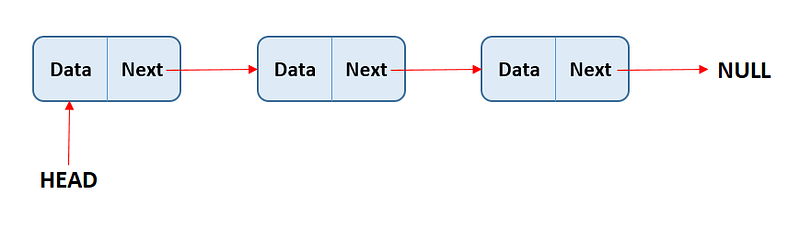
Instead of using an array, the entries are linked together and put into context. This list is unbeatable regarding memory requirements and effort when adding an element.
var linkedList = new LinkedList<Item>();
var item = new Item();

linkedList.AddLast(item);
linkedList.AddLast(item);
linkedList.AddLast(item);
linkedList.AddLast(item);
linkedList.AddLast(item);

Console.WriteLine("How many items does LinkedList have? {0}!", linkedList.Count);
This code fragment outputs 5.

Caution! A downside with this collection is that adding is only fast if you add new elements at the beginning or end. Use AddFirst() and AddLast().
When you add somewhere in the middle, it is slow.
Here, the LinkedList<T> does not know where an element is located. Therefore, it must iterate through all entries from start to finish to find an element. This is why using AddBefore() and AddAfter() are complicated.
When you want to find a specific element or detect if an element is in the set, you always have the overhead of iterating through the entire set.
Stack<T>
Next is Stack<T> and in some cases, this collection is a great help.
In contrast to all previous collections, a stack follows the LIFO principle (Last-In-First-Out). The lastly added element also gets removed first.
The example shows that the forEach loop outputs the elements in Stack<T> in the reverse order in which they were added.
var stack = new Stack<int>();
stack.Push(11);
stack.Push(22);
stack.Push(33);
stack.Push(44);
stack.Push(55);

foreach (var integer in stack)
{
    Console.WriteLine(integer);
}

Console.WriteLine("How many items does my Stack have? {0}!", stack.Count);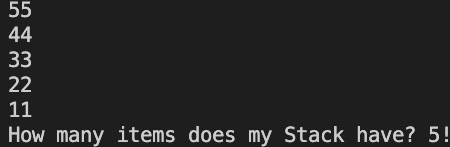
Stacks work like lists in this case, and they work pretty much the same way when adding. Even the logic behind Push() is similar to Add() of List<T> The entries are also stored in an array.
Queue<T>
The last type in our series isn’t for everyday use. But when you need to use it, you’d better know about it and its sweet perks.
Queue<T> queues entries using the FIFO (First-In-First-Out) principle. The entries are taken out in the order they were added:
var queue = new Queue<int>();

queue.Enqueue(11);
queue.Enqueue(22);
queue.Enqueue(33);
queue.Enqueue(44);
queue.Enqueue(55);

foreach (var integer in queue)
{
    Console.WriteLine(integer);
}

Console.WriteLine("How many items does my Queue have? {0}!", queue.Count);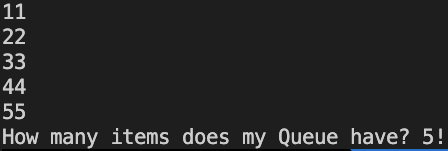
Queues have their advantages. It’s easy to remove the first entry from the queue withDequeue().
In comparison to List<T> when you remove the first entry from a list, you must move all the remaining entries, which is performance intense.
Final Thoughts & More To Explore
If the standard collections are not enough for you, you can consume many other collections via NuGet.
But just the knowledge about the .NET collections is what each developer should memorize. Too often, did I, and probably also you, give away performance and waste resources by making the wrong choice.


