
The Exact Steps I Took to Rank #1 on Google in Less than 15 Hours
This strategy works well even for small sites with low domain authority

Recently, I published a new post on my fitness blog, thefitcareerist.com, feeling relatively confident that it would rank on page one. I was overjoyed when I awoke the following day to find that it was not only on page one, but it was ranking at the top, and it had become the featured snippet.
In an effort to protect my site from “keyword poachers,” I won’t share what the post is. However, here’s a screencap of the Google SERPs showing my website and time to back up my claim:
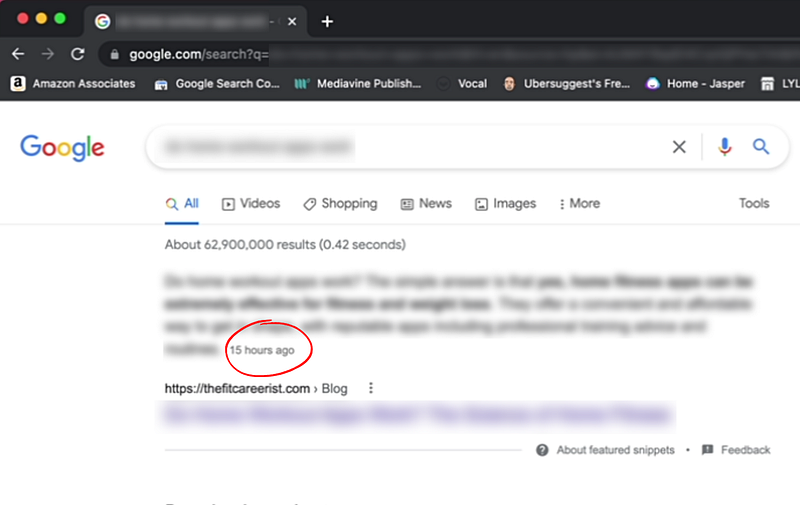
The search was in incognito mode for non-biased results, and a time stamp on the blog post shows it was 15 hours old. According to the Keywords Everywhere extension, the keyword phrase has a search volume of 210 per month. Granted, that’s a modest volume, but it’s enough to add a steady trickle of new hits to my site. (It’s also important to note that volume tools only provide estimates, and the real number is often much higher.)
The results came a little slower on mobile, landing the top spot on Google within two days of publishing.
But although these particular results were better than I had expected, it’s not the first time I’ve been able to rank on page one quickly using a certain strategy. And my site is small; at the time of this writing, my site’s Moz domain authority is 23, which is relatively low by any standards.
If you’d like to try it for yourself, here are the exact steps I took.
(Disclosure: There are affiliate links in the article below, which means that if you click on one and make a purchase, I may earn a commission.)
Step One: Go for Informational Content
It’s not enough to target a certain keyword phrase; you need to understand its intent. For example, when people search for “how to start a blog,” they are in the beginning stages of research and are looking for general information. On the other hand, someone who searches for “best WordPress hosting” is further along in their research and is looking to make a purchase.
A solid part of any blogging strategy is to hone in on keywords with buying intent because those are the posts that will house your affiliate links and produce conversions.
However, a well-rounded blog should also have lots of informational posts. These are harder to monetize with affiliate links, but they can still be a great way to increase revenue if you run display ads on your site.
That’s why I’ve been focusing primarily on informational posts to bolster traffic and ad income.
My favorite kind of informational posts to write are the ones that answer a specific question. For example:
- Are squats the best leg exercise?
- What can you not eat on keto?
- Is HIIT or LISS better for weight loss?
Questions like these are perfect because they aren’t too general, which means they are less likely to have thousands of posts dedicated to answering them.
But now, we need to find out what questions people are actually asking.
Step 2: Find Keyword Ideas with Answer the Public
There are many ways to find good keyword ideas, but one of my favorite approaches is through a website called Answer the Public. This website is free to use up to three searches per day, which is more than enough to give you a goldmine of ideas.
The site is straightforward; you type in your main niche topic or a related subject and click search.
In just a few seconds, you’ll get hundreds of phrases that people are searching for related to that topic — dozens of which are in question form.
At the top of the screen, you’ll see a button where you can export the information as a CSV, which you can then import to Google Sheets or Excel. From here, I sort the sheet by modifier type and look through all the questions, highlighting the ones I think would be the most interesting to my audience.
Remember to check the search intent here; questions like “what are the best workout shorts” have commercial intent. For this strategy, we want to stick to questions that provide information only.
Step 3: Zone in on the Best Keyword with Moz and Keywords Everywhere
Now that you’ve narrowed down your list of questions, it’s time to figure out the best keyword phrases to optimize your chances of ranking on page one.
For this step, I use two chrome extensions:
Moz
You can create a free Moz community account which gives you limited access to some of its analysis tools. Once you create your account, download and enable the MozBar Chrome extension.
This tool lets you see the domain authority and page authority of every website you visit or search for on Google.
Keywords Everywhere
Keywords Everywhere is one of my favorite SEO tools! The free version allows you to see alternative search terms on the Google SERPs, and for $10, you get 100,000 credits that show you the search volume for each keyword phrase.
Once you have these two tools set up, enable them both on your Chrome bar and head over to Google Search. Type in your first question and check out the results.
There are two things to look for:
- The search volume of the keyword.
- The domain authority of the pages ranking on page 1.
Ideally, the higher the search volume, the better. However, there’s no need to shy away from low-volume keywords because they often bring in much more traffic than estimated.
Underneath each search result, you’ll see the MozBar that shows the DA (domain authority) and PA (page authority). The higher these numbers, the more Google trusts the site, and the harder it will be for you to compete with them.
Ideally, you want to see pages with a DA of 30 or lower. However, it’s also essential to check that they are direct competitors — i.e., blogs and not e-commerce stores.
If you see a lot of big sites like Forbes, Quora, etc., this does not mean you can’t rank for these keywords. User-generated content and large sites that write about everything are not specialized in your niche, which means you still have a shot at outranking them.
However, if you see lots of blog posts in the 60s and up, you may have a tough time competing.
If you don’t see a low-DA site on page 1, look on the right-hand side where Keywords Everywhere will have lists for related keywords. Click on one and check the search results again. Repeat this process until you find the keyword phrase with the most low-DA sites on page 1.
Congratulations, you have just found your target keyword!
Step 4: Write the Blog Post
Now it’s time to write the blog post. First, note how long the competing website’s blog posts are and what talking points they cover, and structure an outline that will make your blog post more comprehensive.
For example, if you’re writing a blog post answering the question, “are squats the best leg exercises,” and all the ranking sites talk only about squat variations, you could make sure that your blog post also has a section about the best alternative leg exercises.
The other key to writing informational posts is ensuring you’re answering the question simply and directly in the first couple of paragraphs. Then use the rest of the blog post to expand on the question and answer related ones.
My favorite way to write killer blog posts quickly is to use Jasper AI, an AI writing assistant. I use a Jasper recipe I created, which is essentially a template with prewritten instructions and commands designed to help me quickly bang out a rough draft.
Then, I edit it to sound like me, rephrasing boring, awkward, or overly verbose passages and adding personal anecdotes and fresh ideas to create a polished piece of quality, original content.
Step 5: Optimize the Post with Surfer SEO and Yoast
Once you’re happy with your blog post draft, it’s time to bring in the big guns, aka Surfer SEO. This tool takes all the guesswork out of your on-page SEO and can dramatically boost your chances of ranking.
From your Surfer dashboard, create a content editor containing your keyword phrase. You can then cut and paste your article into the editor, and the optimization gauge and to-do list will appear on the right-hand side. Or, if you used Jasper to write your draft, you can toggle on the Surfer SEO integration to bring up the same optimization tools right within the Jasper editor.
You’ll see everything you need to do to optimize the content, including how long the article should be, how many paragraphs and images it should have, and what related keyword terms need to be included.
As you update your blog post with Surfer’s suggestions, you’ll see the needle move on your SEO score. Once you’ve hit the green zone, you’re good to go!
I don’t worry about including every single term or getting the score to 100; in fact, there is such a thing as over-optimizing your content. So if a term doesn’t fit in your piece, it’s better to leave it out than to force it in unnaturally.
Once you optimize with Surfer SEO, transfer the blog post to your WordPress editor. I use the free Yoast SEO plugin as a checklist for fine-tuning my on-page SEO. For example, it helps me remember to optimize my slug, meta title, and alt descriptions.
Last but not least, I do some strategic linking, including at least two external links to reputable websites that support my claims and 2–3 internal links to relevant blog posts on my site. If you have an affiliate link that relates well to the article, you can add it as a no-follow link.
Step 6: Publish and Index
At this stage, you’re finally ready to publish your blog post! To optimize your chances of getting it to rank as quickly as possible, head to your Google Search Console and submit your URL for indexing.
And that’s it! In the best-case scenario, I’ve had results show up in the search results within a few hours, but it doesn’t always work, so don’t despair if you don’t see results right away.
In almost every case, expect that your rankings will bounce around for a month or two before settling. For example, sometimes my post will rank on page one right away, then completely disappear and reappear after a few weeks.
Other times, my posts will kick around on pages 2 or 3 for a few months before finally creeping up to page 1.
If you still don’t see results after a couple of months, you could try running a page audit with Surfer to see if there’s anything you can do to give it a boost. Otherwise, it might just be that you don’t have enough backlinks to rank.
Also, keep in mind that if you have a newer site less than a year old, you may be waiting longer for your content to show up in the rankings as it takes time for Google to trust your site and factor it into the SERPs.
Final Thoughts
While this is by no means a fail-proof method, it can work very well when executed properly. Write a series of targeted informational posts, and you’ll see your traffic start to climb as you rank for more and more keywords.
If you’d like a more in-depth tutorial on this strategy, check out this playlist on my YouTube channel, where I go through the process step-by-step!


