
The Easiest Way To Remove Checked In Credentials From A Git Repo
Using An Open Source Utility — BFG
Sometime you may get into a situation where someone might accidentally or unknowingly end up committing credentials, passwords, secrets, etc. in a git repository. In one of my previous articles, I had talked about how to prevent committing secrets using pre-commit hooks. Even by taking such precautions if the credentials get committed then there is no easy way to remove these credentials. If you just remove the credentials or the file itself and commit again, the credentials can be seen in the history easily.
There are other options like git-filter-branch but you need real good git expertise to use it. In this article, we will be using an open-source utility that will help us achieve this.
Introduction to BFG
BFG is a repo cleaner, open-source utility. It is written in Scala. Apart from credentials clean up, it can also help us remove large blobs from the Git. You can download BFG JAR and it is ready to use —
wget https://repo1.maven.org/maven2/com/madgag/bfg/1.13.0/bfg-1.13.0.jarchmod +x bfg-1.13.0.jarClone Repo
Next, you need to clone the repo from which you need to remove the credentials. Here I am using my sample repo in which I had password checked in into application.properties file.
git clone https://[email protected]/tadeshpande/MyFirstProject/_git/MyFirstProjectFor safety, it is recommended to copy your repo before running BFG command.
cp -R MyFirstProject MyFirstProjectCopyCreate a Password File
We need to create a file in which we need to give the password string to be matched into the actual repo. BFG uses this string to be removed from the Git Repo.
vi password.txtRun BFG Command To Check Passwords
Now, you need to run the BFG to first check if there are matching strings as given in the password file.
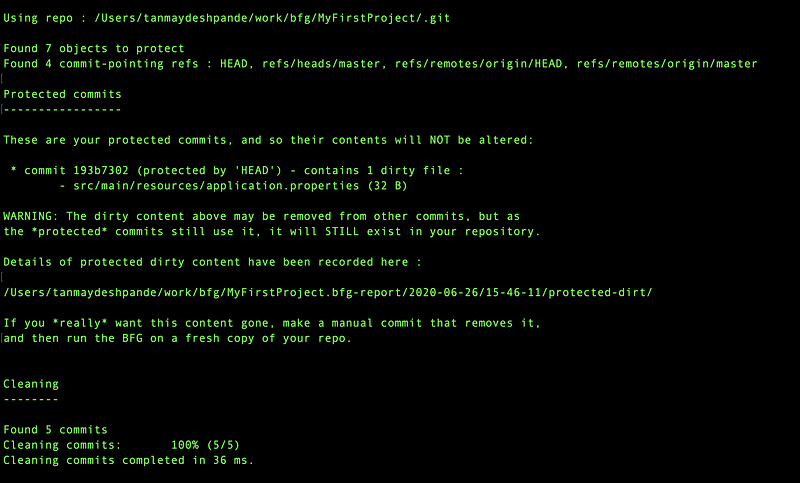
java -jar bfg-1.13.0.jar --replace-text passwords.txt MyFirstProjectThis will NOT remove the password as it is in the HEAD . You will see the message as shown below
Manually Remove the Credentials
As we can see in the message, we need to manually remove the credentials and check-in first.
vi MyFirstProject/src/main/resources/application.propertiesRemove the password and save the file.
git add src/main/resources/application.propertiesgit commit -m "Updated application.properties"git push origin masterThis will remove the password from the file but will still stay in history. Here I am directly committing to the master branch. but you should never do that in the actual world.
Run BFG To Remove Password
Now, its time to run the BFG to actually remove the password from the git history.
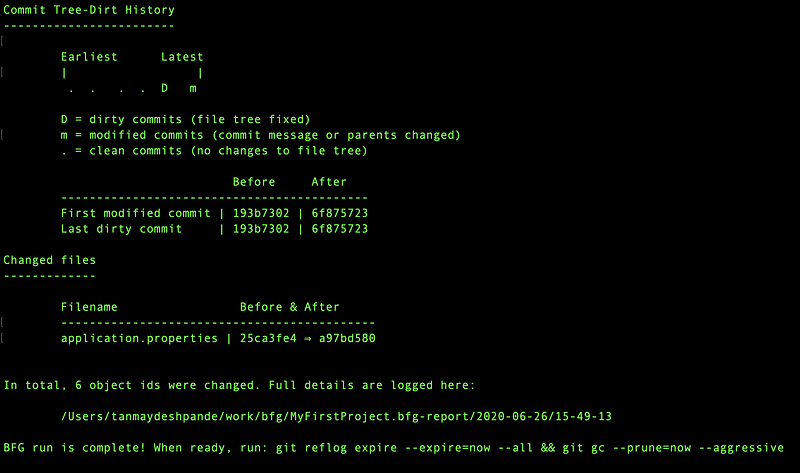
java -jar bfg-1.13.0.jar --replace-text passwords.txt MyFirstProject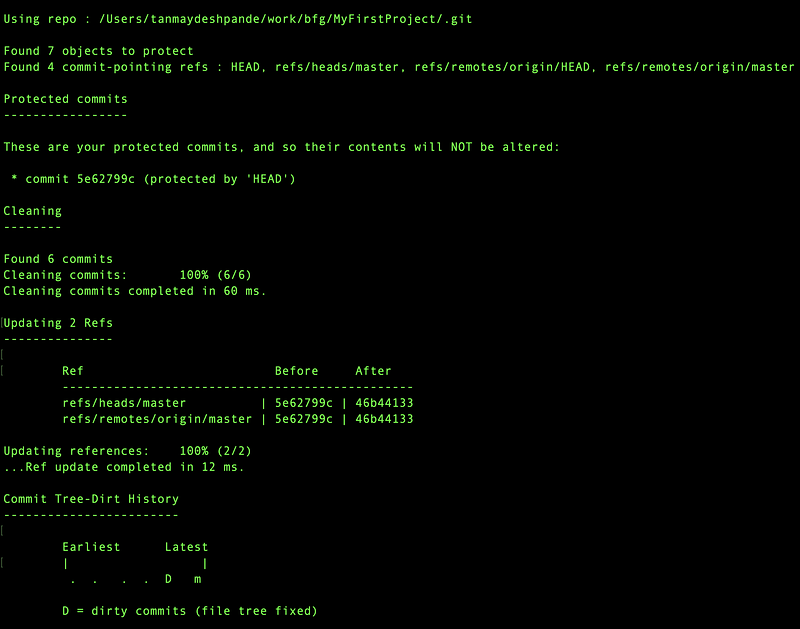
Push the Git Repo
Now, we just need to prune the git reference logs and we are good to push.
git reflog expire --expire=now --all && git gc --prune=now --aggressiveand then
git push --all --forceHere we need to do force push as remote repo will not allow merging. Usually, the command refuses to update a remote ref that is not an ancestor of the local ref used to overwrite it. This flag disables these checks, and can cause the remote repository to lose commits; use it with care.
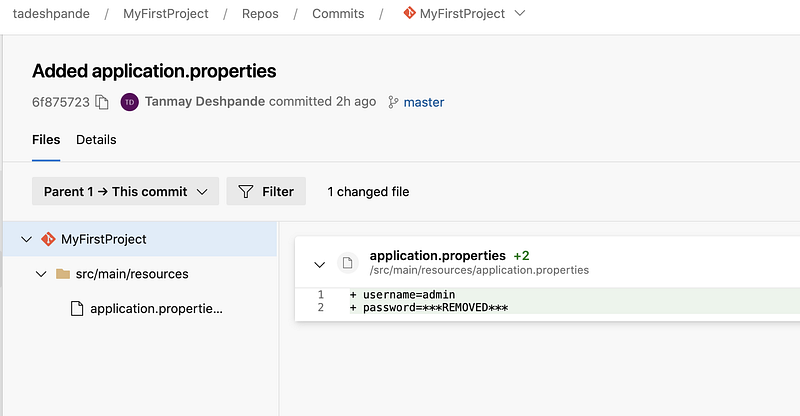
Now if you go back to your repo and look for commit history, you will see the password text will be replaced with ***Removed***.
Likewise, you can also delete credentials files using the BFG command.
Please keep in mind, if you see any instance of credentials/files getting checked in, consider them as exposed and change those right a way. None of the above methods will be able to stop any misuse if the credentials were already copied somewhere.

Hey, if you enjoyed this story, check out Medium Membership! Just $5/month!
Your membership fee directly supports me and other writers you read. You’ll also get full access to every story on Medium.


