
The Easiest Way to Deal With Dates and Times in JavaScript
An introduction to Day.js with examples of useful functions

Dealing with dates and times in JavaScript is famously challenging. That’s why a library like Moment.js has almost 15 million weekly downloads on npm.
However, if you check the documentation of Moment.js, you will see that even they recommend some alternatives when it comes to modern development. One of the issues with Moment.js is the bundle size. If you need internationalization or time zone support, the bundle size can get quite large.
One alternative is the Day.js package, which is only 2kb.
Day.js is a minimalist JavaScript library that parses, validates, manipulates, and displays dates and times for modern browsers with a largely Moment.js-compatible API.
If you used Moment.js before, using Day.js will feel very comfortable for you.
In this article, we will take a look at the Day.js package with some examples of the most common functions you will use.
Using Day.js
For our example, we will be working in a React application with JavaScript.
To get started with Day.js, install the package into your project.
npm install dayjsImport dayjs and you can now use it in your file.
import dayjs from 'dayjs';Now
To get the current date, call dayjs(). If we try to render this to the page, however, we will get an error. This is because Day.js creates a wrapper for the Date object.
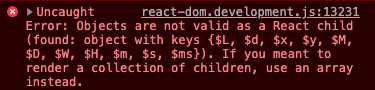
To see the date and time in ISO8601 format, chain a .format() to the end of the dayjs() function call.
dayjs().format(); // 2021-05-26T07:43:28+09:00Format
We can pass arguments to the .format() function to change the date and time into a more readable string.
For example, if we call .format("YYYY-MM-DD"), we will see the following:
dayjs().format("YYYY-MM-DD"); // 2021-05-26You can change “YYYY-MM-DD” to any other format that is available. Check the documentation to see a full list.
Get
If you want to get just one value of the date or time, you can call one of the getter methods.
For example, to get the year, add a .year() to the end of a dayjs() function call. This returns the number 2021, which represents the current year.
dayjs().year(); // 2021Alternatively, you can also call a string getter to return the same information.
dayjs().get('year'); // 2021Set
Every unit that you can get, you can also set.
If we want to set the year to be 2025, pass 2025 to the .year() function as an argument. This will set the year to be 2025.
dayjs().year(2025).format('YYYY'); // 2025Alternatively, you can also call .set() which accepts a unit as the first argument, and a value as the second argument.
dayjs().set('year', 2025).format('YYYY'); // 2025You can get and set the date and time for the following units:
- millisecond
- second
- minute
- hour
- date of month
- day of week
- month
- year
Add
Let’s say you want to get the date 1 year from the current date. You can do so using the .add() function. This function takes a value as the first argument and a unit as the second argument.
For example, to get the date 1 year from now, call .add(1, 'year').
dayjs().add(1, 'year').format("YYYY-MM-DD"); // 2022-05-26Subtract
Similar to add, we can do the same with subtract.
For example, if you want to get the date from 1 month ago, call .subtract(1, 'month').
dayjs().subtract(1, 'month').format("YYYY-MM-DD"); // 2021-04-26For a list of all available units check out the list here.
Conclusion
Thanks for reading! These are just a few of the functions that I found myself using most when it came to Day.js.
In the future, there is another API in the works called Temporal. It will be a new global object in JavaScript that acts as a top-level namespace, similar to Math. Temporal is currently at Stage 3 of the TCP39 process, so it is not ready to be used in production yet, but maybe soon. Hopefully, this will make it easier to work with dates and times in JavaScript. But for now, check out Day.js for your next project.
If you want to read about another useful JavaScript library, check out the article below to learn about Chroma.js.


