
The Consequences of Ignoring the Best Practices in Design
An exercise to better understand why UX Design Patterns matter

You must have heard about solving design problems through design patterns, their implementation steps, and some problems that can arise from them. But do you realize the impact these patterns have on the user experience? A few weeks ago, I didn’t at all.
After finishing the UX Nanodegree by Udacity and landing a new role as UX Engineer, I decided to continue with my education on the matter. So, I decided to join the Interaction Design Foundation (IDF) which offers several online courses with certification at a very affordable membership price.
Disclaimer: This post contains one affiliate link however, this is not a solicited post by the Interaction Design Foundation. I am just a regular member who paid for his membership and since I am very satistfied with their resources, I decided to recommend them by my own will.
So when it was time to chose which course to enroll in, I decided on the UI Design Patterns for Successful Software in order to get deeper into the right approach to solve common design problems affecting user interfaces.
User interface (UI) design patterns are reusable/recurring components which designers use to solve common problems in user interface design. For example, the breadcrumbs design pattern lets users retrace their steps. Designers can apply them to a broad range of cases, but must adapt each to the specific context of use. — Source: IDF
During the lessons, I was challenged to complete several exercises exploring the structure of visual frameworks, content organization, navigation, data entries, and so on. One exercise, in particular, was so insightful I considered it worthy to share.
This exercise consisted of selecting one website of my choice to perform something that seemed to be very strange at first: sketching one version without any navigation design patterns. Then, I had to select one task for a user to perform when visiting this website, this time, without any design pattern he could reach for. From this experience, I should take some notes and considerations to better understand users' perception of design patterns and how they are essential for the designer work.
If you are curious about how this exercise came up, please continue reading.
Reddit App

I chose Reddit app to work on. My choice was simply because this is a website I visit often and I knew most of my friends — who I would have to ask to test my prototypes — would be familiar with as well.
On Reddit’s main page I identified the following design patterns for navigation: - Search Box; - Global Navigation Bar; - Site Map Footer (not visible in the screenshot)
The “Pattern-Free” Solution
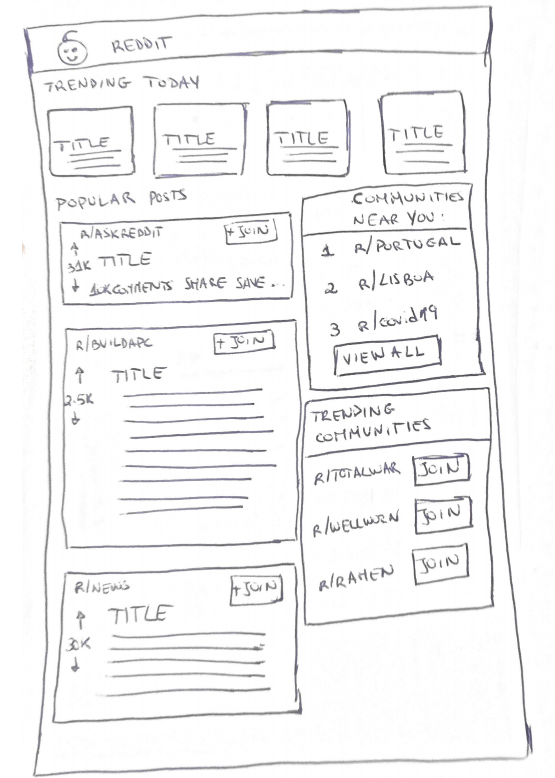
I sketched how Reddit’s main page would look like without this design pattern and reached the following solution:
User Testing
I asked a friend of mine, who is a frequent Reddit user, to accomplish the main feature on Reddit: Login and create a post.
His immediate reaction was to ask me if I have forgotten to include some buttons on the navbar so he could log in. I was not surprised by his question. UX Design Patterns create interactions the users are familiar with, so they usually do not have to think about how to accomplish mundane tasks, as is the case of a Login.
After I explained to him the navbar was correctly designed to not include the authentication buttons, he wondered how was he supposed to find the Log In button then. I found it funny to see how making just a simple change could create such confusion in the user's mind.
He decided to click on the “+ Join” button of one of the posts on the screen, expecting he would be redirected to a Login page. I gave in the sketch for the resulting interaction, which is the Sign Up page, instead. This is exactly what happens in the real Reddit app.
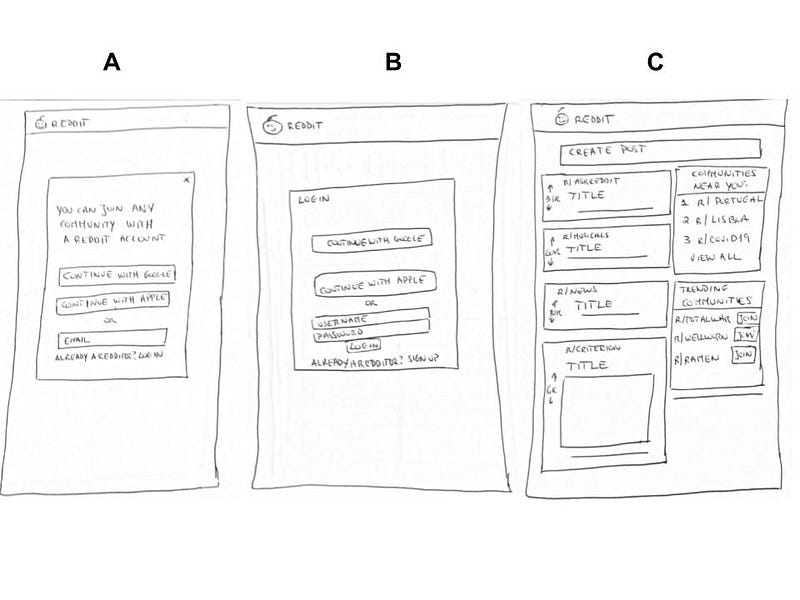
He knew what to do on this screen (Fig. A): to click on the “Log In” link to be redirected to the Login screen. However, at this moment he sighted and was visibly tired from having to go through this extra step to accomplish such a simple assignment.
On the Login screen (Fig B), he was able to perform the desired task by inserting his credentials and clicking the “Log In” button. After this, he was finally able to view the “Create Post” field in the Home Screen and continue to the post creation (Fig. C).
Lessons Learned
In this exercise, I turned the design process upside down by taking an implemented design and remove all the design patterns I could find on it. This experience was very insightful about the real importance of design patterns, both for the user and the designer.
For the user:
- Design Patterns, as is the case of global navigation, are familiar solutions for frequent problems. If a user has to think about how to accomplish mundane tasks, he gets frustrated and tired easily.
For the designer:
- Design patterns help to save time in ideating interactions and in testing them. Most of the time, it is not worthy to innovate in new forms of interaction because they will be more prone to user error but probably require explanation, while classic solutions are already familiar to the user.