avatarAndre Ye

Free AI web copilot to create summaries, insights and extended knowledge, download it at here

3730

Abstract

<span class="hljs-number">5</span> <span class="hljs-attr">a</span> = c*<span class="hljs-number">5</span> + c/<span class="hljs-number">4</span></pre></div><p id="f2a5">By assigning <code>(b+5)</code>to one variable, it is calculated only once instead of multiple times.</p><h1 id="d7c4">Testing on Python Lists and Built-In Functions</h1><p id="4a63">Here’s one test for computation time that uses several common built-in Python functions like <code>str()</code>, list indexing, and mathematical operations:</p><div id="c304"><pre><span class="hljs-function"><span class="hljs-title">float</span><span class="hljs-params">(int(str(alist[::-<span class="hljs-number">1</span>][<span class="hljs-number">0</span>])</span></span><span class="hljs-selector-class">.split</span>()<span class="hljs-selector-attr">[::-1]</span><span class="hljs-selector-attr">[0]</span>)/<span class="hljs-built_in">int</span>(alist<span class="hljs-selector-attr">[:4]</span><span class="hljs-selector-attr">[0]</span>))/<span class="hljs-number">3</span></pre></div><p id="9486">Which was alternatively written cleanly as:</p><div id="09a9"><pre><span class="hljs-selector-tag">var</span> = <span class="hljs-built_in">str</span>(alist<span class="hljs-selector-attr">[::-1]</span><span class="hljs-selector-attr">[0]</span>)<span class="hljs-selector-class">.split</span>() <span class="hljs-selector-tag">var</span> = <span class="hljs-built_in">int</span>(<span class="hljs-selector-tag">var</span><span class="hljs-selector-attr">[::-1]</span><span class="hljs-selector-attr">[0]</span>) <span class="hljs-selector-tag">var</span> /= <span class="hljs-built_in">int</span>(alist<span class="hljs-selector-attr">[:4]</span><span class="hljs-selector-attr">[0]</span>) <span class="hljs-selector-tag">var</span> = <span class="hljs-attribute">float</span>(var)/<span class="hljs-number">3</span></pre></div><p id="b68b"><code>alist</code>” is generated as:</p><div id="ac61"><pre><span class="hljs-attr">alist</span> = [random.randint(<span class="hljs-number">1</span>,<span class="hljs-number">10</span>) for j in range(<span class="hljs-number">100</span>)]</pre></div><p id="b444">The time used to generate the list was not included in the timing. The only operation that was timed was the line(s) of code that ran the test operations.</p><p id="4be0">This operation was run 5,000,000 times with a differently generated <code>alist</code> for each run.</p><p id="589e">The average was taken every 100,000 times and plotted, where “cleaned” denotes the four-line version of the target code and “shortened” denotes the one-line version of the target code:</p><figure id="9d12"><img src="https://cdn-images-1.readmedium.com/v2/resize:fit:800/1*LQ-DgXxFAWUcbzcQoiOiRw.png"><figcaption></figcaption></figure><p id="d66c">The shortened version clearly performs almost universally in a faster time, but on such a small scale, it wouldn’t be very beneficial at all.</p><p id="7c54">The average shortened version time to run was 0.000005521, and the average clean version time to run was 0.000005733. The difference is 0.000005521.</p><p id="11c4">That means that in order to see a one-minute difference in operation time, the process would need to be iterated at least 10,867,596 times. To see an hour difference in operation time, the process would need to be iterated at least 652,055,786 times.</p><h1 id="b59c">Testing on Pandas DataFrames</h1><p id="ab3f">A secondary test would be to perform operations not only on Python lists, but Python Pandas DataFrames. These are the essential data type of machine learning and data science in Python and resemble an Excel spreadsheet.</p><p id="edb6">The test operation is:</p><div id="e23c"><pre>df<spa

Options

n class="hljs-selector-class">.loc</span><span class="hljs-selector-attr">[1:100]</span><span class="hljs-selector-attr">[df.loc[1:100]</span> > <span class="hljs-number">5</span>]<span class="hljs-selector-attr">[‘b’]</span><span class="hljs-selector-class">.dropna</span>()<span class="hljs-selector-class">.std</span>() — df<span class="hljs-selector-class">.loc</span><span class="hljs-selector-attr">[1:100]</span><span class="hljs-selector-attr">[df.loc[1:100]</span> < <span class="hljs-number">5</span>]<span class="hljs-selector-attr">[‘a’]</span><span class="hljs-selector-class">.dropna</span>()<span class="hljs-selector-class">.mean</span>()</pre></div><p id="78fc">Where <code>df</code> is the DataFrame. Some documentation:</p><ul><li><code>data.loc[x:y]</code> selects the rows of data whose indices are between x and y, inclusive.</li><li><code>data[data[‘column’] > 5]</code> selects the rows of data whose column, in this case named <code>column</code>, is larger than five (or some other condition) and returns <code>nan</code> for rows that do not meet the criteria.</li><li><code>data.dropna()</code> drops any row that has an <code>nan</code> value.</li><li><code>column.std()</code> takes the standard deviation of a column/series of numbers.</li><li><code>column.mean()</code> takes the mean of the column/series of numbers.</li></ul><p id="9713">The test operation can be split into six lines with three variables:</p><div id="9afe"><pre><span class="hljs-attr">result0</span> = df.loc[<span class="hljs-number">1</span>:<span class="hljs-number">100</span>] <span class="hljs-attr">result</span> = result0[result0 > <span class="hljs-number">5</span>][‘b’] <span class="hljs-attr">result</span> = result.dropna().std() <span class="hljs-attr">result2</span> = result0[result0 < <span class="hljs-number">5</span>][‘a’] <span class="hljs-attr">result2</span> = result2.dropna().mean() <span class="hljs-attr">result</span> = result — result2</pre></div><p id="74c3">The test operation was performed on a randomly generated DataFrame with two columns, <code>a</code> and <code>b</code>, and 200 rows. All the values were randomly selected from 1 to 10, inclusive.</p><p id="9ff3">The test operation, in both the cleaned and shortened versions, was run 50,000 times, with an average taken every 1,000 times. Every repetition was performed on a new, randomly generated DataFrame.</p><figure id="1c23"><img src="https://cdn-images-1.readmedium.com/v2/resize:fit:800/1*VsGAxpNisvcrn2mEfGllfA.png"><figcaption></figcaption></figure><p id="90ea">Interesting! The cleaned (expanded) code performs, on average, better than the shortened code.</p><p id="d02c">The average shortened was 0.0111 per iteration, and the average cleaned run was 0.0106. The 0.0005 difference means that by writing clean code when dealing with DataFrame operations, 120,000 iterations could save one minute of computing time. 7,200,000 iterations will save one hour of computing time.</p><h1 id="df41">Conclusion</h1><p id="891a">The lesson to learn — write cleanly! Don’t be afraid of increased computational time because of multiple variable assignment. Not only does using it increase clarity of code, it can, in some cases, (as demonstrated by the Pandas DataFrame experiment) improve computational performance.</p><p id="f365">If you want to replicate these experiments, the source code and outputs are available on Kaggle here:</p><ul><li><a href="https://www.kaggle.com/washingtongold/faster-computation-time">Experiment with Python Lists</a></li><li><a href="https://www.kaggle.com/washingtongold/comp-time-test-2">Experiment with Pandas DataFrames</a></li></ul><p id="7570">Thanks for reading!</p></article></body>

The Computational Cost of Writing Clean Code

Performing tests on the computational cost of repeated variable assignment
Photo by Pankaj Patel on Unsplash

Why do people sometimes write code like this?

var = float(str(alist[::-1][0]).split()[1:4])/3+float(alist[4:])

The answer: to save computational time. When the code could be instead expanded with only three lines more…

var = alist[::-1][0]
var = str(var).split()[1:4]
var = float(var)/3
var += float(alist[4:]

…the computational cost budgeteers shake their head and opt for the former.

Repeated variable assignment takes up computational space, they say, so much that with the number of iterations in their code it makes a significant difference.

In this article, I’ll explore what the true computational cost is of writing code cleanly with multiple variable assignment with multiple tests.

First — The Benefits of Multiple Variable Assignment

Especially in a language like Python, where there are at least ten ways to write anything, developers will often cram several operations into one line.

Multiple variable assignment allows the reader to take in the functions applied in smaller batches. Additionally, it makes it easier to pick through the layers of parenthesis present when more than three Python functions are applied:

list(str(int(x)+1)+'1') #the scope is incredible difficult to read.

More so, it is difficult to track the state of the variable when it is all crammed into one line. It’s like teaching maths — the teacher starts with arithmetic first, then calculus later, instead of teaching both simultaneously.

Multiple variable assignment means the reader can track what happens to the variable and what status the variable is in, much more easily in four lines than one line.

In many cases, multi-variable assignment saves computational time. Take, for example:

a = (b+5)*5 + (b+5)/4

which could alternatively be written as

c = b+5
a = c*5 + c/4

By assigning (b+5)to one variable, it is calculated only once instead of multiple times.

Testing on Python Lists and Built-In Functions

Here’s one test for computation time that uses several common built-in Python functions like str(), list indexing, and mathematical operations:

float(int(str(alist[::-1][0]).split()[::-1][0])/int(alist[:4][0]))/3

Which was alternatively written cleanly as:

var = str(alist[::-1][0]).split()
var = int(var[::-1][0])
var /= int(alist[:4][0])
var = float(var)/3

alist” is generated as:

alist = [random.randint(1,10) for j in range(100)]

The time used to generate the list was not included in the timing. The only operation that was timed was the line(s) of code that ran the test operations.

This operation was run 5,000,000 times with a differently generated alist for each run.

The average was taken every 100,000 times and plotted, where “cleaned” denotes the four-line version of the target code and “shortened” denotes the one-line version of the target code:
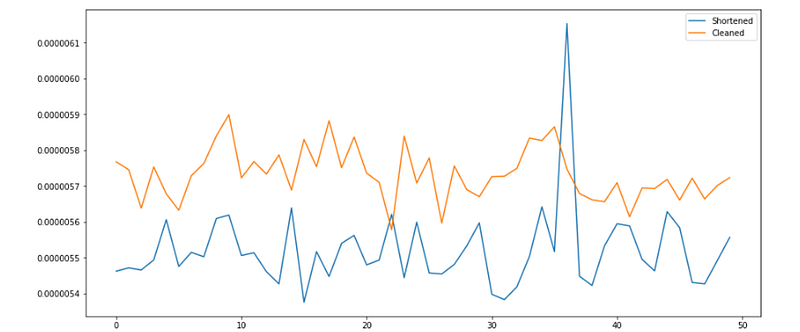
The shortened version clearly performs almost universally in a faster time, but on such a small scale, it wouldn’t be very beneficial at all.

The average shortened version time to run was 0.000005521, and the average clean version time to run was 0.000005733. The difference is 0.000005521.

That means that in order to see a one-minute difference in operation time, the process would need to be iterated at least 10,867,596 times. To see an hour difference in operation time, the process would need to be iterated at least 652,055,786 times.

Testing on Pandas DataFrames

A secondary test would be to perform operations not only on Python lists, but Python Pandas DataFrames. These are the essential data type of machine learning and data science in Python and resemble an Excel spreadsheet.

The test operation is:

df.loc[1:100][df.loc[1:100] > 5][‘b’].dropna().std() — df.loc[1:100][df.loc[1:100] < 5][‘a’].dropna().mean()

Where df is the DataFrame. Some documentation:

  • data.loc[x:y] selects the rows of data whose indices are between x and y, inclusive.
  • data[data[‘column’] > 5] selects the rows of data whose column, in this case named column, is larger than five (or some other condition) and returns nan for rows that do not meet the criteria.
  • data.dropna() drops any row that has an nan value.
  • column.std() takes the standard deviation of a column/series of numbers.
  • column.mean() takes the mean of the column/series of numbers.

The test operation can be split into six lines with three variables:

result0 = df.loc[1:100]
result = result0[result0 > 5][‘b’]
result = result.dropna().std()
result2 = result0[result0 < 5][‘a’]
result2 = result2.dropna().mean()
result = result — result2

The test operation was performed on a randomly generated DataFrame with two columns, a and b, and 200 rows. All the values were randomly selected from 1 to 10, inclusive.

The test operation, in both the cleaned and shortened versions, was run 50,000 times, with an average taken every 1,000 times. Every repetition was performed on a new, randomly generated DataFrame.
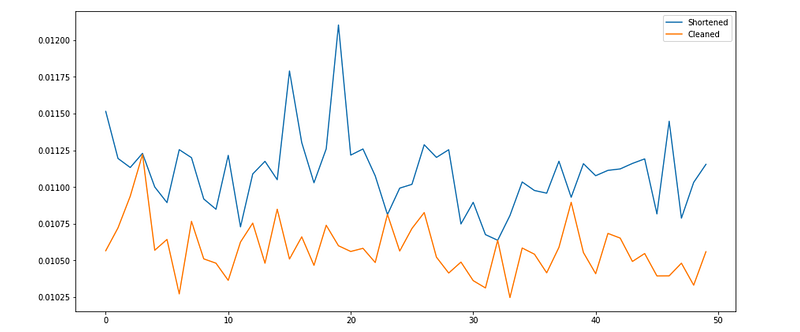
Interesting! The cleaned (expanded) code performs, on average, better than the shortened code.

The average shortened was 0.0111 per iteration, and the average cleaned run was 0.0106. The 0.0005 difference means that by writing clean code when dealing with DataFrame operations, 120,000 iterations could save one minute of computing time. 7,200,000 iterations will save one hour of computing time.

Conclusion

The lesson to learn — write cleanly! Don’t be afraid of increased computational time because of multiple variable assignment. Not only does using it increase clarity of code, it can, in some cases, (as demonstrated by the Pandas DataFrame experiment) improve computational performance.

If you want to replicate these experiments, the source code and outputs are available on Kaggle here:

Thanks for reading!

Pandas
Data Analysis
Testing
Python
Programming
Recommended from ReadMedium