avatarFrancesco Arcieri

Free AI web copilot to create summaries, insights and extended knowledge, download it at here

6778

Abstract

-variable language_">console</span>.<span class="hljs-title function_">error</span>(error); } }; </script>

<div class="container"> <div> <label for="title"><b>Title</b></label> <input type="text" placeholder="Enter Title" name="title" required bind:value={title} /> <br><br> <label for="content"><b>Content</b></label> <input type="text" placeholder="Enter Content" name="content" required bind:value={content} /> <br><br> <button type="submit" on:click={() => addPost(title, content)}>Add Post</button> </div> </div></pre></div><h1 id="cb29">Delete a post</h1><div id="a5f6"><pre><script lang=<span class="hljs-string">"ts"</span>> <span class="hljs-keyword">import</span> { <span class="hljs-title class_">DataStore</span> } <span class="hljs-keyword">from</span> <span class="hljs-string">'@aws-amplify/datastore'</span>; <span class="hljs-keyword">import</span> { <span class="hljs-title class_">Post</span> } <span class="hljs-keyword">from</span> <span class="hljs-string">'../../../models'</span>;

<span class="hljs-keyword">let</span> postId = <span class="hljs-string">''</span>;

<span class="hljs-keyword">const</span> <span class="hljs-title function_">deletePost</span> = <span class="hljs-keyword">async</span> (<span class="hljs-params">postId: string</span>) => { <span class="hljs-keyword">try</span> { <span class="hljs-keyword">const</span> modelToDelete = <span class="hljs-keyword">await</span> <span class="hljs-title class_">DataStore</span>.<span class="hljs-title function_">query</span>(<span class="hljs-title class_">Post</span>, postId); <span class="hljs-title class_">DataStore</span>.<span class="hljs-title function_">delete</span>(modelToDelete); } <span class="hljs-keyword">catch</span> (error) { <span class="hljs-variable language_">console</span>.<span class="hljs-title function_">error</span>(error); } }; </script>

<div class="container"> <div> <label for="postId"><b>postId</b></label> <input type="text" placeholder="Enter postId" name="postId" required bind:value={postId} /> <br><br> <button type="submit" on:click={() => deletePost(postId)}>Delete Post</button> </div> </div></pre></div><h1 id="65e2">Query one post</h1><div id="a9fd"><pre><script lang=<span class="hljs-string">"ts"</span>> <span class="hljs-keyword">import</span> { <span class="hljs-title class_">DataStore</span> } <span class="hljs-keyword">from</span> <span class="hljs-string">'@aws-amplify/datastore'</span>; <span class="hljs-keyword">import</span> { <span class="hljs-title class_">Post</span> } <span class="hljs-keyword">from</span> <span class="hljs-string">'../../../models'</span>;

<span class="hljs-keyword">let</span> queriedPost = <span class="hljs-literal">null</span>; <span class="hljs-keyword">let</span> postId = <span class="hljs-string">''</span>;
<span class="hljs-keyword">let</span> showPost = <span class="hljs-literal">false</span>;

<span class="hljs-keyword">const</span> <span class="hljs-title function_">queryOnePost</span> = <span class="hljs-keyword">async</span> (<span class="hljs-params">postId: string</span>) => { <span class="hljs-keyword">try</span> { queriedPost = <span class="hljs-keyword">await</span> <span class="hljs-title class_">DataStore</span>.<span class="hljs-title function_">query</span>(<span class="hljs-title class_">Post</span>, postId); showPost = <span class="hljs-literal">true</span>; } <span class="hljs-keyword">catch</span> (error) { <span class="hljs-variable language_">console</span>.<span class="hljs-title function_">error</span>(<span class="hljs-string">'Error quering post:'</span>, error); } } </script>

<div class="container"> <div> <label for="postId"><b>postId</b></label> <input type="text" placeholder="Enter postId" name="postId" required bind:value={postId} /> <br><br> <button type="submit" on:click={() => queryOnePost(postId)}>Query One Post</button> </div> </div> <br> <br>

{#if showPost} <table> <thead> <tr> <th>ID</th> <th>Title</th> <th>Content</th> </tr> </thead> <tbody> <tr> <td>{queriedPost.id}</td> <td>{queriedPost.title}</td> <td>{queriedPost.content}</td> </tr> </tbody> </table> {:else} <p>No posts found.</p> {/if}</pre></div><h1 id="4a9a">Query all posts</h1><div id="07a2"><pre><script lang=<span class="hljs-string">"ts"</span>> <span class="hljs-keyword">import</span> { <span class="hljs-title class_">DataStore</span> } <span class="hljs-keyword">from</span> <span class="hljs-string">'@aws-amplify/datastore'</span>; <span class="hljs-keyword">import</span> { <span class="hljs-title class_">Post</span> } <span class="hljs-keyword">from</span> <span class="hljs-string">'../../../models'</span>;

<span class="hljs-keyword">let</span> posts = []; <span class="hljs-keyword">let</span> showTable = <span class="hljs-literal">false</span>;

<span class="hljs-keyword">const</span> <span class="hljs-title function_">queryAllPosts</span> = <span class="hljs-keyword">async</span> (<span class="hljs-params"></span>) => { <span class="hljs-keyword">try</span> { posts = <span class="hljs-keyword">await</span> <span class="hljs-title class_">DataStore</span>.<span class="hljs-title function_">query</span>(<span class="hljs-title class_">Post</span>); } <span class="hljs-keyword">catch</span> (error) { <span class="hljs-variable language_">console</span>.<span class="hljs-title function_">error</span>(<span class="hljs-string">'Error fetching posts:'</span>, error); } }; </script>

<span class="language-xml"><span class="hljs-tag"><<span class="hljs-name">div</span>></span> <span class="hljs-tag"><<span class="hljs-name">button</span> <span class="hljs-attr">on:click</span>=<span class="hljs-string">{()</span> =></span> { showTable = !showTable; if (showTable) { queryAllPosts (); } }}> {showTable ? "Hide All Posts" : "Show All Posts"} <span class="hljs-tag"></<span class="hljs-name">button</span>></span> <span class="hljs-tag"></<span class="hljs-name">div</span>></span></span>

{#<span class="hljs-keyword">if</span> showTable} {#<span

Options

class="hljs-keyword">if</span> posts.<span class="hljs-property">length</span> > <span class="hljs-number">0</span>} <table> <span class="language-xml"><span class="hljs-tag"><<span class="hljs-name">thead</span>></span> <span class="hljs-tag"><<span class="hljs-name">tr</span>></span> <span class="hljs-tag"><<span class="hljs-name">th</span>></span>ID<span class="hljs-tag"></<span class="hljs-name">th</span>></span> <span class="hljs-tag"><<span class="hljs-name">th</span>></span>Title<span class="hljs-tag"></<span class="hljs-name">th</span>></span> <span class="hljs-tag"><<span class="hljs-name">th</span>></span>Content<span class="hljs-tag"></<span class="hljs-name">th</span>></span> <span class="hljs-tag"></<span class="hljs-name">tr</span>></span> <span class="hljs-tag"></<span class="hljs-name">thead</span>></span></span> <span class="language-xml"><span class="hljs-tag"><<span class="hljs-name">tbody</span>></span> {#each posts as post} <span class="hljs-tag"><<span class="hljs-name">tr</span>></span> <span class="hljs-tag"><<span class="hljs-name">td</span>></span>{post.id}<span class="hljs-tag"></<span class="hljs-name">td</span>></span> <span class="hljs-tag"><<span class="hljs-name">td</span>></span>{post.title}<span class="hljs-tag"></<span class="hljs-name">td</span>></span> <span class="hljs-tag"><<span class="hljs-name">td</span>></span>{post.content}<span class="hljs-tag"></<span class="hljs-name">td</span>></span> <span class="hljs-tag"></<span class="hljs-name">tr</span>></span> {/each} <span class="hljs-tag"></<span class="hljs-name">tbody</span>></span></span> </table> {:<span class="hljs-keyword">else</span>} <p><span class="hljs-title class_">No</span> posts found.</p> {/<span class="hljs-keyword">if</span>} {/<span class="hljs-keyword">if</span>}

<style> table { <span class="hljs-attr">width</span>: <span class="hljs-number">100</span>%; border-<span class="hljs-attr">collapse</span>: collapse; } th, td { <span class="hljs-attr">border</span>: 1px solid #ddd; <span class="hljs-attr">padding</span>: 8px; text-<span class="hljs-attr">align</span>: left; } th { background-<span class="hljs-attr">color</span>: #f2f2f2; } </style></pre></div><h1 id="ffd6">Update a post</h1><div id="26fa"><pre><script lang=<span class="hljs-string">"ts"</span>> <span class="hljs-keyword">import</span> { <span class="hljs-title class_">DataStore</span> } <span class="hljs-keyword">from</span> <span class="hljs-string">'@aws-amplify/datastore'</span>; <span class="hljs-keyword">import</span> { <span class="hljs-title class_">Post</span> } <span class="hljs-keyword">from</span> <span class="hljs-string">'../../../models'</span>;

<span class="hljs-keyword">let</span> postId = <span class="hljs-string">''</span>;
<span class="hljs-keyword">let</span> title = <span class="hljs-string">''</span>;
<span class="hljs-keyword">let</span> content = <span class="hljs-string">''</span>;
<span class="hljs-keyword">let</span> showPost = <span class="hljs-literal">false</span>;

<span class="hljs-keyword">let</span> original = <span class="hljs-literal">null</span>;
<span class="hljs-keyword">let</span> updated = <span class="hljs-literal">null</span>;

<span class="hljs-keyword">const</span> <span class="hljs-title function_">updatePost</span> = <span class="hljs-keyword">async</span> (<span class="hljs-params">postId: string, title: string, content: string</span>) => { <span class="hljs-keyword">try</span> { original = <span class="hljs-keyword">await</span> <span class="hljs-title class_">DataStore</span>.<span class="hljs-title function_">query</span>(<span class="hljs-title class_">Post</span>, postId); updated = <span class="hljs-keyword">await</span> <span class="hljs-title class_">DataStore</span>.<span class="hljs-title function_">save</span>( <span class="hljs-title class_">Post</span>.<span class="hljs-title function_">copyOf</span>(original, <span class="hljs-function"><span class="hljs-params">updated</span> =></span> { updated.<span class="hljs-property">title</span> = title; updated.<span class="hljs-property">content</span> = content;
}) ); showPost = <span class="hljs-literal">true</span>; } <span class="hljs-keyword">catch</span> (error) { <span class="hljs-variable language_">console</span>.<span class="hljs-title function_">error</span>(<span class="hljs-string">'Error quering post:'</span>, error); } }; </script>

<div class="container"> <div> <label for="postId"><b>postId</b></label> <input type="text" placeholder="Enter postId" name="postId" required bind:value={postId} /> <br><br> <label for="title"><b>Title</b></label> <input type="text" placeholder="Enter Title" name="title" required bind:value={title} /> <br><br> <label for="content"><b>Content</b></label> <input type="text" placeholder="Enter Content" name="content" required bind:value={content} /> <br><br> <button type="submit" on:click={() => updatePost(postId, title, content)}>Update Post</button> </div> </div> <br> <br>

{#if showPost} <b>Original</b> <br> <table> <thead> <tr> <th>ID</th> <th>Title</th> <th>Content</th> </tr> </thead> <tbody> <tr> <td>{original.id}</td> <td>{original.title}</td> <td>{original.content}</td> </tr> </tbody> </table>

<br><br>

<b>Updated</b> <br> <table> <thead> <tr> <th>ID</th> <th>Title</th> <th>Content</th> </tr> </thead> <tbody> <tr> <td>{updated.id}</td> <td>{updated.title}</td> <td>{updated.content}</td> </tr> </tbody> </table>

{:else} <p>No posts found.</p> {/if}</pre></div></article></body>

The complete guide to use AWS Amplify with SvelteKit- Part 3: Data Models
In the Part 1 and Part 2 of the guide we saw how to manage Authentication and User State in a Sveltekit project leveraging on AWS Amplify service.

In this Part 3 we will see how to create and manage data models in SvelteKit.

1. Configure Data Models in Amplify Studio

To configure your data models, open Amplify Studio by running:

amplify studio

and then selecting “Amplify Studio” (the default option). From the Set up menu select “Data” and the Data Modeling visual editor will appear.

Use Add Model button to create a new model and Add a field to insert additional fields in the model.
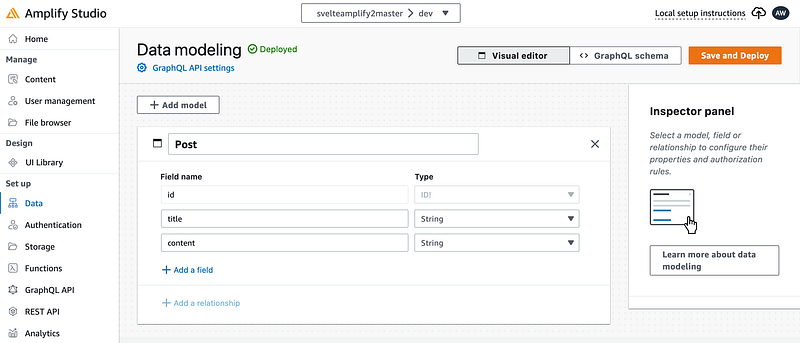
Amplify Studio Data modeling visual editor

To go in deep with Data modeling refer directly to the official documentation at these links: Data Modeling, Relationships

Once you’re ready, click on Save and Deploy and Amplify will start deploying data model resources across AWS AppSync and AWS DynamoDB.

2. Pulling the data model changes into the SvelteKit project

After defining your data model in Amplify Studio, it’s time to integrate it with your SvelteKit project. Amplify Studio will show the parameter to add to the amplify pull command to sync your environment with cloud resources. Copy the full command and run it on the terminal.
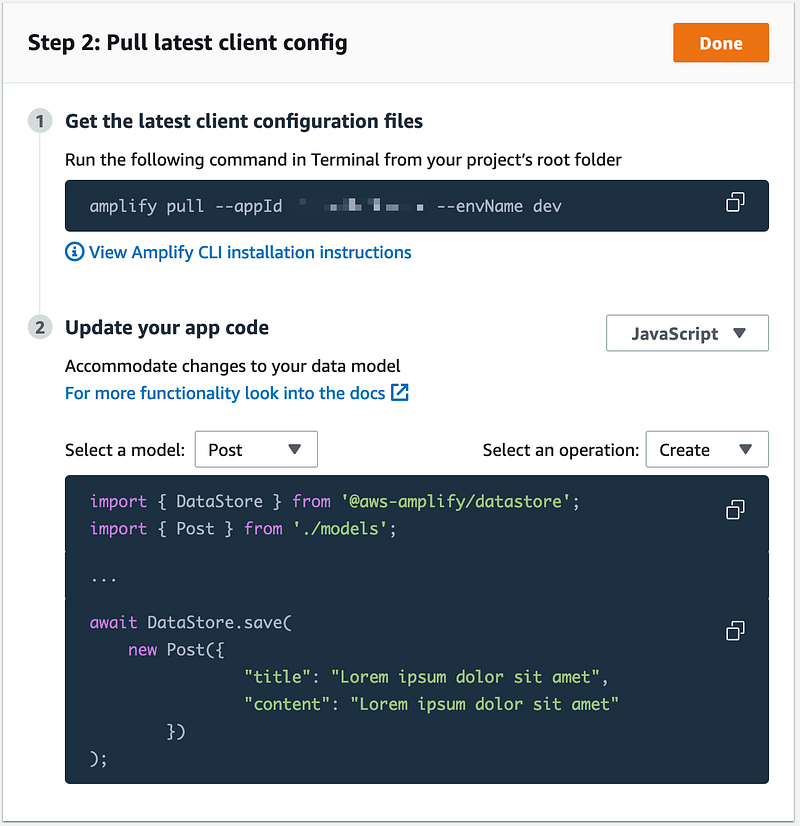
Amplify Studio shows you also the code for CRUD operations on the selected model. Let’s see how we can use it.

3. Adding codegen to the SvelteKit project

To use the models in your SvelteKit project we need to generate models schemas running the following command:

amplify codegen model

Amplify will generate code and save at src/models

4. Adding code

We create a model for a Post so let’s define the following structure under routes directory:
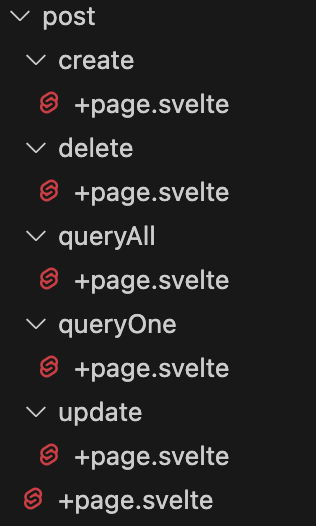
the post/+page.svelte page is just a page to call the others. Here the code:

<ul>
 <li>
  <a href="/post/create">Create</a>
 </li>
 <li>
  <a href="/post/queryAll">Query All</a>
    </li>
 <li>
  <a href="/post/queryOne">Query One</a>
    </li>
 <li>
  <a href="/post/update">Update</a>
    </li>
 <li>
  <a href="/post/delete">Delete</a>
 </li>
</ul>

We can reuse the code from Amplify Studio and the code to manage the UI. Here the final code:

Create new post

<script lang="ts">
 import { DataStore } from '@aws-amplify/datastore';
 import { Post } from '../../../models';

 let title = '';  
 let content = '';  

 const addPost = async (title: string, content: string) => {
  try {
   await DataStore.save(
   new Post({
    "title": title,
    "content": content
   })
  );
  } catch (error) {
   console.error(error);
  }
 };
</script>

<div class="container">
 <div>
  <label for="title"><b>Title</b></label>
  <input type="text" placeholder="Enter Title" name="title" required bind:value={title} />
  <br><br>
  <label for="content"><b>Content</b></label>
  <input type="text" placeholder="Enter Content" name="content" required bind:value={content} />
  <br><br>
  <button type="submit" on:click={() => addPost(title, content)}>Add Post</button>
  </div>
</div>

Delete a post

<script lang="ts">
 import { DataStore } from '@aws-amplify/datastore';
 import { Post } from '../../../models';

 let postId = '';  

 const deletePost = async (postId: string) => {
  try {
   const modelToDelete = await DataStore.query(Post, postId);
   DataStore.delete(modelToDelete);
  } catch (error) {
   console.error(error);
  }
 };
</script>


<div class="container">
 <div>
  <label for="postId"><b>postId</b></label>
  <input type="text" placeholder="Enter postId" name="postId" required bind:value={postId} />
  <br><br>
  <button type="submit" on:click={() => deletePost(postId)}>Delete Post</button>
  </div>
</div>

Query one post

<script lang="ts">
 import { DataStore } from '@aws-amplify/datastore';
 import { Post } from '../../../models';

 let queriedPost = null;
 let postId = '';  
 let showPost = false;

 const queryOnePost = async (postId: string) => {
  try {
   queriedPost = await DataStore.query(Post, postId);
   showPost = true;
  } catch (error) {
   console.error('Error quering post:', error);
  }
 }
</script>

<div class="container">
 <div>
  <label for="postId"><b>postId</b></label>
  <input type="text" placeholder="Enter postId" name="postId" required bind:value={postId} />
  <br><br>
  <button type="submit" on:click={() => queryOnePost(postId)}>Query One Post</button>
  </div>
</div>
<br>
<br>

{#if showPost}
    <table>
      <thead>
        <tr>
          <th>ID</th>
          <th>Title</th>
          <th>Content</th>
        </tr>
      </thead>
      <tbody>
          <tr>
            <td>{queriedPost.id}</td>
            <td>{queriedPost.title}</td>
            <td>{queriedPost.content}</td>
          </tr>
      </tbody>
    </table>
  {:else}
    <p>No posts found.</p>
{/if}

Query all posts

<script lang="ts">
 import { DataStore } from '@aws-amplify/datastore';
 import { Post } from '../../../models';

 let posts = [];
 let showTable = false;

 const queryAllPosts = async () => {
  try {
   posts = await DataStore.query(Post);
  } catch (error) {
   console.error('Error fetching posts:', error);
  }
 };
</script>


<div>
 <button on:click={() => {
    showTable = !showTable;
    if (showTable) {
      queryAllPosts ();
     }
  }}>
    {showTable ? "Hide All Posts" : "Show All Posts"}
 </button>
</div>  

{#if showTable}
  {#if posts.length > 0}
    <table>
      <thead>
        <tr>
          <th>ID</th>
          <th>Title</th>
          <th>Content</th>
        </tr>
      </thead>
      <tbody>
        {#each posts as post}
          <tr>
            <td>{post.id}</td>
            <td>{post.title}</td>
            <td>{post.content}</td>
          </tr>
        {/each}
      </tbody>
    </table>
  {:else}
    <p>No posts found.</p>
  {/if}
{/if}

<style>
  table {
    width: 100%;
    border-collapse: collapse;
  }
  th,
  td {
    border: 1px solid #ddd;
    padding: 8px;
    text-align: left;
  }
  th {
    background-color: #f2f2f2;
  }
</style>

Update a post

<script lang="ts">
 import { DataStore } from '@aws-amplify/datastore';
 import { Post } from '../../../models';

 let postId = '';  
 let title = '';  
 let content = '';  
 let showPost = false;

 let original = null;  
 let updated = null;  

 const updatePost = async (postId: string, title: string, content: string) => {
  try {
      original = await DataStore.query(Post, postId);
      updated = await DataStore.save(
         Post.copyOf(original, updated => {
             updated.title = title;
             updated.content = content;  
       })
            );
       showPost = true;
  } catch (error) {
   console.error('Error quering post:', error);
  }
 };
</script>

<div class="container">
 <div>
  <label for="postId"><b>postId</b></label>
  <input type="text" placeholder="Enter postId" name="postId" required bind:value={postId} />
  <br><br>
  <label for="title"><b>Title</b></label>
  <input type="text" placeholder="Enter Title" name="title" required bind:value={title} />
  <br><br>
  <label for="content"><b>Content</b></label>
  <input type="text" placeholder="Enter Content" name="content" required bind:value={content} />
  <br><br>
  <button type="submit" on:click={() => updatePost(postId, title, content)}>Update Post</button>
  </div>
</div>
<br>
<br>

{#if showPost}
<b>Original</b> 
<br>
    <table>
      <thead>
        <tr>
          <th>ID</th>
          <th>Title</th>
          <th>Content</th>
        </tr>
      </thead>
      <tbody>
          <tr>
            <td>{original.id}</td>
            <td>{original.title}</td>
            <td>{original.content}</td>
          </tr>
      </tbody>
    </table>

<br><br>

<b>Updated</b> 
<br>
    <table>
      <thead>
        <tr>
          <th>ID</th>
          <th>Title</th>
          <th>Content</th>
        </tr>
      </thead>
      <tbody>
          <tr>
            <td>{updated.id}</td>
            <td>{updated.title}</td>
            <td>{updated.content}</td>
          </tr>
      </tbody>
    </table>

  {:else}
    <p>No posts found.</p>
{/if}
Aws Amplify
Sveltekit
Data Model
Recommended from ReadMedium