
The Complete Guide to Recording an Analog Microphone with ESP32 to an SD card
MAX9814 and MAX4466
You would think that this would be easy, but I have been through hell and back just trying to get this to work. Let me do the heavy lifting for you.
Atomic14 is a well-known name in the field of ESP32 with audio data. He creates really simple but effective videos that detail the how-to’s for audio sampling through analog and I2S microphones. The main takeaway from him is to use ESP32’s in-built I2S as it has a dedicated DMA (Direct Memory Access) controller that allows us to stream samples from the ADC (Analog Digital Converter) straight into ram buffers independently from the CPU. A.K.A We utilize the ESP32’s RAM to stream samples faster and more consistently.
In my guide, I will be referencing his hard work which I believe should get more attention.
There is a severe lack of proper documentation on analog microphones since I2S microphones seem to be the most used for the ESP32. This is a stark difference from the Arduino where the usage of the commonly used MAX9814 and MAX4466 has always been showered with praise and affection. As such, my work is meant to provide an updated working solution that allows recording the MAX9814 to the SD card. It should be pointed out that the MAX4466 produced a ton of additional noise, which could be due to the manufacturing of my sensor or the need for a low-noise filter as referenced by Atomic14. Atomic14 does cover this topic.
First
we hook up the ESP32, SD card reader, and MAX9814 as seen below.
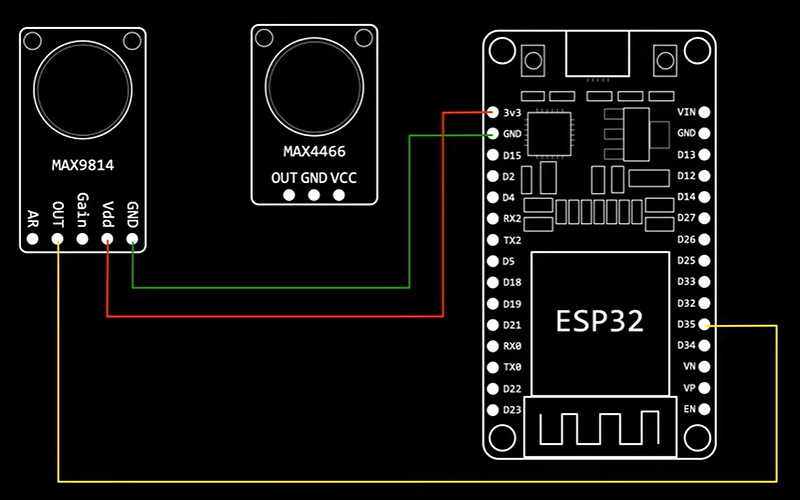

We will be using D35 as the output pin for our microphone, the drawing above should show it is connected to D35 as well.
Second
We have to use the library esp32_sdcard_audio and use the IDF_WAVE_SDCARD project.
Note as of 23/05/2022, I have tried to use the Arduino version however the sound quality of the MAX9814 was terrible and sounded like gibberish.
I use Vscode together with Platformio. Install Vscode and then go to extensions and install Platformio. Afterward, the PIO home should pop up and you can go to the Platformio on the toolbar to build, upload and monitor your flashed ESP32.
Third
We need to make some necessary changes. First, we will remove every other configuration. The code block below should be the only configuration.
ESP_LOGI(TAG, "Mounting SDCard on /sdcard");new SDCard("/sdcard", PIN_NUM_MISO, PIN_NUM_MOSI, PIN_NUM_CLK, PIN_NUM_CS);ESP_LOGI(TAG, "Creating microphone");I2SSampler *input = new ADCSampler(ADC_UNIT_1, ADC1_CHANNEL_7, i2s_adc_config);Ctrl+Click PIN_NUM_MISO and change the SD card pins to.
// sdcard#define PIN_NUM_MISO GPIO_NUM_19
#define PIN_NUM_CLK GPIO_NUM_18
#define PIN_NUM_MOSI GPIO_NUM_23
#define PIN_NUM_CS GPIO_NUM_5This depends on your ESP32 so check out if this should be different.
Next, we see that the ADC1_CHANNEL_7, Ctrl+Click it, is linked to GPIO35 as such we will have to wire the output of the microphone to this value.
I2SSampler *input = new ADCSampler(ADC_UNIT_1, ADC1_CHANNEL_7, i2s_adc_config);Ensure that the SD card is running on 5V.
Fourth
A common error is as shown below
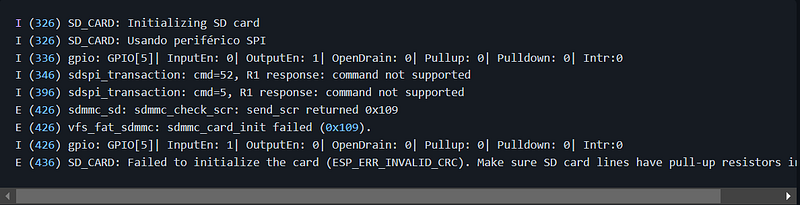
Fred not! This can easily be solved. Go to lib/sd_card/src or Ctrl-Shift-F “sdmmc_types”. Ctrl-Click sdmmc_types and change SDMMC_FREQ_DEFAULT from 20000 to 5000.

Afterward, build, upload, and monitor your flashed ESP32, it should work now!
Huge thanks to atomic14 for the help on my project, SLEEK, a life-detecting soft robot that searches for life under rubble!
If you like my work and want to support me in creating more content!


