
The Complete Glossary for SEO
Here are all the terms and definitions you’ll ever need to know

SEO is a term that didn’t exist until the ’90s and wasn’t part of the marketers’ arsenal until probably the late 2000s. But it’s grown to be important to marketers, web developers, and copywriters around the world.
It can take a lot of time to do it right; the search engine giants (looking at you, Google) are always changing their algorithm so marketers can’t “cheat” their way to higher rankings. They’ve developed it so that good, engaging, popular content appears higher on the rankings.
It’s both a blessing and a curse to marketers that search engines change their algorithms all the time. It means that click-baiting, bad marketers can’t manipulate search engines to boost their irrelevant products.
However, it also means that good marketers have to make more effort to take advantage of SEO, so they’re not lost under the sea of search engine results.
Glossary
First off, let’s do a few quick jargon-busting explainers. This is a “basics” blog post, after all:
SEO
Search engine optimisation. The act of improving your website/webpage so it appears higher in the rankings of search engines, increasing your chances of someone clicking on your link in that search engine.
Search engines
Platforms that people use to find what they’re after, like Google, Bing, and Yahoo.
Ranking
Where you appear in a search engine after someone has typed a certain word. If your ranking is higher, you will appear closer to the top of the search.
Metadata/meta tags
Information about your website held in the back end of your website. Some of this information is viewable in your search engine ranking, like your webpage title, URL, and description of your page
Bots
These browse your website and web pages (usually referred to as crawling) in order for search engines to assess where you should appear on search engine rankings.
URL
The website address that appears at the top of your screen. Usually starts https:// or http://.
CMS
Content management system. The platform where your website data is stored. You can edit your website and web pages on the CMS.
Plugin (or plug-in)
Additional software that you can add to a website to further customise it. Sort of like using apps on your phone.
For this blog article, we’re exploring just the basics of SEO because it’s such a vast subject.
So here we go; these are the basic elements of SEO that can affect your ranking on search engines:
Unique Content
All of the content you produce must be unique. Don’t copy it from somewhere else.
Straight-up plagiarism should not be done—ever.
You can certainly take inspiration from others’ work, but don’t straight-out copy it.
You will appear lower in rankings if the Google bots crawl your website and find that it’s the same as somewhere else.
Plus, visitors to your website will lose trust in you if they’ve seen the content elsewhere.
Once again: do not copy other people’s content.
Relevance
Your content must also be relevant to your brand, product, or service.
There’s no point in writing an amazing article about 51 ways to style short hair if you’re a law firm.
You need to write content that’s relevant so you can draw people into your website and brand and keep them there. If you spend time writing brilliant but irrelevant articles, you’ll waste your efforts. People may visit your website, sure, but what are the chances of them converting if they’re looking for something completely different?
That’s not to say that you can’t think outside of the box. If you can make a reasonable connection from your brand, product, or service to something that isn’t strictly related, those can bring in leads from completely new backgrounds.
For example, a cosmetics company might write an article on how to take photos for Instagram. Photography isn’t technically related to cosmetics, but it’s a reasonable link that those using cosmetics would be interested in taking photographs of their artwork.
Knowing what’s relevant comes from knowing your audience. If you know what they’re looking for, what they do, and what they like, you can create content to draw them in.
Keywords
To write for SEO, you must think like a bot.
Plus you need to think about who you’re trying to get to visit your website, and what words they might search to find you.
These search words should be considered your keywords, used throughout your content, and ideally in the header (which should also be h1 in your content source code, so the bots can easily recognise it).
However, don’t spam your content with your keywords. It needs to read well to the user. Plus, bots are always evolving and can tell when you’re intentionally repeating your keywords in your copy.
There are many useful tools to help you determine potential keywords, which you can also use as a starting point for coming up with topics for content. Here are a couple of useful tools when researching keywords for your brand:
Google Keyword Planner—this is primarily useful for running adverts, but it can be useful for SEO and content keywords.
Wordstream Keyword Tools—Wordstream has a few different resources for you to use, which are definitely worth having a play with.
Length
The length of your content on your web pages can also contribute to your search engine ranking.
In a study by SerpIQ, web pages appearing on the first page of searches had an average of 2,416 words.
So it’s best to aim for longer-form content. But reader beware—just waffling away doesn’t make for good content. Always aim for quality over quantity.
Just consider your topic and how much you can write about it. Is it best-placed for a long article or perhaps as a supporting video or infographic with another piece of long-form content?
EAT
This is an acronym we find really useful here at NSC.
All content you produce should showcase your:
Expertise Authority Trust
In a nutshell, this is what the bots are crawling your website to find: expertise, authority, and trust.
Metadata and Meta Tags
As mentioned before, metadata is the back end of your website, not the body of your copy.
I want to mention here as well that not all CMSs give you editing access to metadata, but this is best practice, so I would recommend getting a CMS that does give you access.
Some metadata appears on your search engine ranking, such as your URL and metatags:
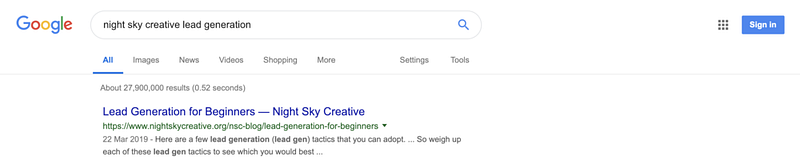
URL
Your URL should make sense. Try not to just let it get pre-populated with meaningless numbers and letters.
Most CMSs change your URL for you and update it with your page title. However, if your URL looks too long, cut out some words so it doesn’t look messy.
Meta title
Your meta title appears on your search engine ranking and at the top of your web browser:
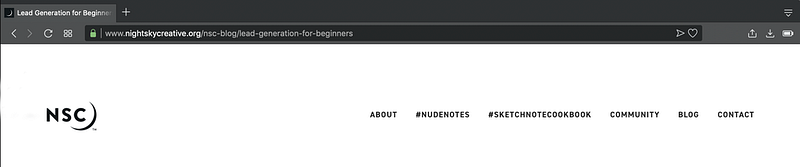
Your meta title should incorporate your brand name and page title and should be under about 60–70 characters (including spaces).
You need to include your brand name so it’s clear to search engine users what they’re clicking on, plus it’s another bit of brand awareness for you.
Don’t forget to incorporate your keywords into your meta title.
Meta description
Your meta description is the information that appears just below your meta title on your search engine ranking.
Most CMS pull this automatically from your page content, but you should be able to edit it where you need to.
Ultimately, it should clarify to the search engine user what they’re clicking on and encourage them to click.
Image tags
Image tags are what appear to bots when they’re crawling your site and come across images.
As they can’t “see” the images and don’t know what they’re pictures of, they use the image tags to determine what they are and whether they’re relevant.
It’s also good practice to save your images with descriptive but short titles, like “Woman-eating-cake.png.”
Using dashes (-) or underscores (_) to separate words makes it easier for bots.
Alt tags
Alt tags are mainly used for those who are visually impaired to help them read what images are onscreen. They should be used alongside the image tags, to support them.
For example, where the image tag might be “Woman-eating-cake.png,” the alt text could go into a bit more detail (without being too much), like “Woman eating strawberry cake with sprinkles.”
These alt tags can also further help bots to understand the images on your website and, if used properly, can boost your SEO ranking.
Engagement
How much visitors to your website engage with your content also contributes to your SEO ranking.
Engagement is any visit to your website but also comments, shares—anything that visitors could do to interact with your website.
Ultimately, if people enjoy visiting your website, you’ll be ranked higher in search engines.
Your aim here is to get people to engage as much as possible. Keep them on your website.
If your bounce rate is high (i.e. people visit, then leave almost immediately), you need to reduce that.
There are several reasons why people might leave your website quickly: your content is irrelevant, the load time is too long (see below), the user experience is bad, or it’s not accessible (also see below).
You also want to encourage users to share and comment on your content.
Give them a reason to.
Ask questions, give them an incentive.
Loading speed
Your loading speed is how long it takes your website or web page to load up on the user’s screen.
There are many contributors to your loading speed, but we’ll only discuss the main culprits:
Host
Your host is where you first bought your website from. If you go cheap, you get cheap.
Cheap hosting can impact the loading speed of your website due to lack of resources by the hoster. So don’t buy cheap; you’ll just get burned.
Image size
Remember the early days of the internet when images would load one pixel-line at a time? Things have definitely improved, but larger images can pull you back into the Dark Ages.
Image size has a big impact on the load time of your webpage.
To be clear, the image size isn’t the dimensions of the image (like 180px x 180px). The image size we’re talking about is the file size.
Aim to keep your images below 10 KB. You can do this by reducing the dimensions, reducing the resolution, and compressing the images.
It’s also better not to use too many images, as this can slow down your page.
Plugins
Plugins on your website (usually with hosts like WordPress) can both increase and decrease your loading speed.
Using too many plugins can slow down your load time, particularly with plugins that aren’t totally legit or optimised. However, some plugins are created to cut down your loading time and are very effective.
Basically, research your plugins properly before implementing them on your website. They are all, ultimately, extensions of your brand.
Accessibility
We’re looking at two types of accessibility here: Your website should consider those with health conditions or impairments, like people with visual impairments, and it should be mobile accessible.
It is near-impossible to completely prepare your website for people with every health condition, but engage your empathy to implement different ways of presenting your information to make it as easy as possible for everyone.
Some of the tips we’ve mentioned already can be useful, like image tags and alt tags.
To improve your website’s mobile accessibility (make it mobile-friendly), you need to consider a few things.
Keep it as simple as possible. The mobile screen will usually reformat your page layout, which can make things appear messy. So keep it simple. Here at NSC, we tend to stick to a text-image-text format with our blogs.
Sometimes, when aligning images alongside text, that can appear differently on mobile.
Make sure your buttons are big enough. How many times, when using your mobile, have you been unable to click on a button on a website because it’s too small? My finger is not that fat!
Pop-ups can appear differently on mobiles as well and can be tricky to close. You should be able to develop pop-ups that don’t appear for mobile or tablet users.
Be responsive.
Responsive design means that your website will reconfigure depending on how large someone’s screen is.
So it’s all well and good that your article appears correctly on an iPhone, but how does it appear on a Samsung tablet, or a Huawei, or a Google Pixel? Most decent CMSs have responsive designs, but it’s worth testing where you can.
These all impact your user experience, which can affect your bounce and engagement rate, which, in turn, affects your SEO ranking.
Backlinks
Backlinks are links from one website to another. These help build trust for search engine bots while they crawl your website. Essentially, they’re like partnerships with the website that you’re linking to.
You share a portion of each other’s trust rating with the bots. But it’s important to acknowledge that just spamming your content with backlinks is not a good idea and can damage your search engine ranking.
The bots know when you’re cheating at SEO.
User Experience
As mentioned before, things like loading speed, accessibility, and your content can affect user experience (or UX).
The user experience is what your customers experience when they visit your website.
This feeds into SEO because they both directly affect one another. Decent UX improves your SEO, and decent SEO improves your UX.
UX is another of those key elements of both marketing and design.
Imagine your website is a shop. You wouldn’t want to make things difficult for the shopper by blocking their entrance, making prices difficult to read, not accepting debit cards, or not labelling your aisles.
It all comes down to this: Consider who visits your website and what they want to achieve and make it as easy as possible for them to achieve that. Know your customer.
Monitor Your Metrics
Finally, the last key to mastering SEO is to monitor and measure your success. You can’t possibly know whether you’ve improved if you’re not tracking what success is to you.
Do you want to increase your search engine rating? Increase the number of visitors to your website or to a specific web page? Increase your sales of a particular product?
Don’t make it too general. Make your metrics specific, and make small changes at first, so you can tell what’s working for you.
Every website is different and will respond to SEO tactics differently.
Start with small changes that feed into specific metrics, and go from there.
It might seem like a lot to take in, but just work on it little by little, and you’ll see an improvement to your search engine ranking.
If you’re a business owner who’s keen to grow and succeed, download my free PDF: 23 Ways to Promote Your Product.


