
The Complete Beginner’s Guide to Web Scraping
Python is so powerful!
Web scraping allows us to extract the public data from website so that we can use it for some purpose.
Usually, we can only view the downloaded web page but what if you want to automate or you want to extract the TSLA stock price every other minute? Yes, it is possible to do it manually but this way is too time-consuming, not scalable, and highly not recommended. That’s where web scraping comes to help us gather and use valuable data that isn’t always available via APIs.

In this post, we’ll learn how to use BeautifulSoup & Requests to perform a quick and effective web-scraping for TSLA Stock Price Alert, an email will be automatically sent to notify the price has been now dropped. Let’s dive in.
1-Import The Necessary Libraries
2-Loading Webpages with request
The requests module helps to send HTTP requests in Python. So the next step is to inspect the required data classes from the complete source code. We select the card and click on the ‘Inspect Element’ option to get the source code of that particular section. You will get something similar to this:
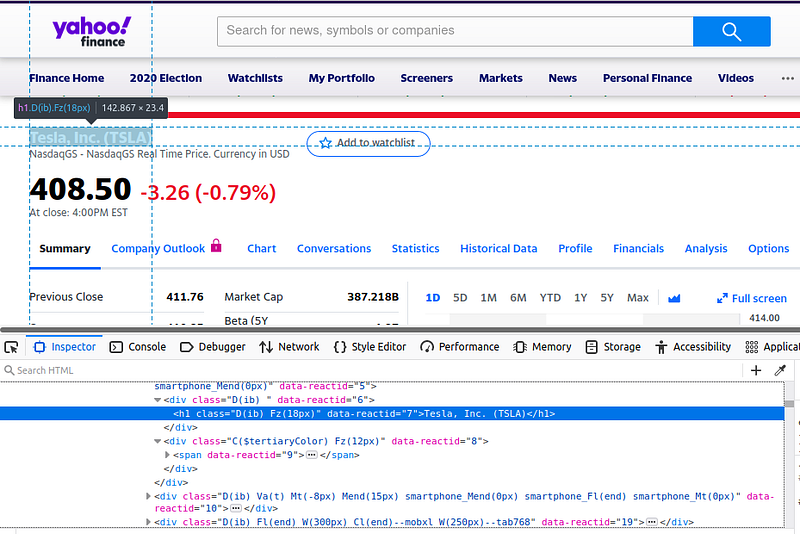
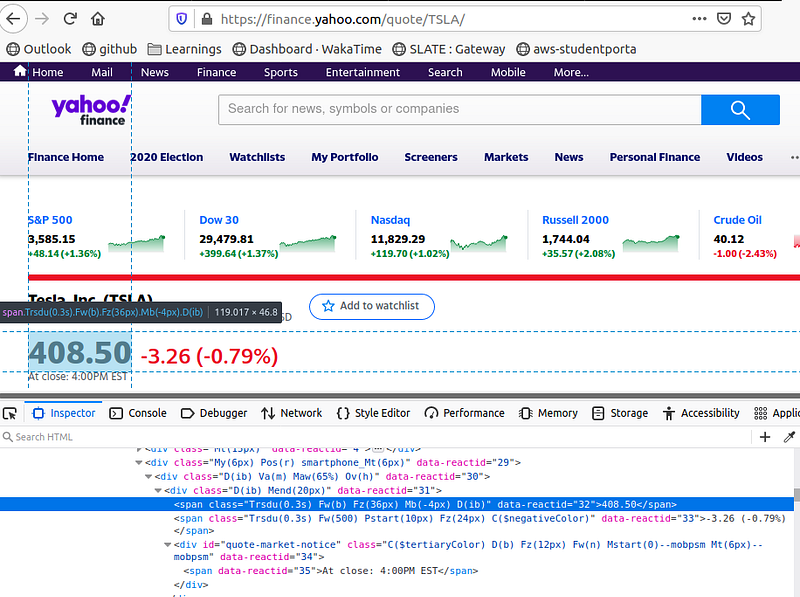
Now we need to write a function that could scrap the title and price from the webpage.
- Get the contents of the following URL using the
requestsmodule: https://finance.yahoo.com/quote/TSLA/ - Find the title and price using class the name inspected from the webpage
- Convert the string price to float
- Call the function to send an email
3- Sending Emails in a standard format
- Establish the SMTP connection at port 587
- Start TLS based SMTP Session
- Give the secret credentials along with the to and from email address.
- Set Email Parameters
- Terminate the SMTP Session
The complete code is available here. Feel free to check it out.
So that’s it! I hope you found it helpful, and also I hope that you have a nice day.
Till next time :) Happy Learning.
Bilal Khan.