
The Choice of Regularization: Ridge, Lasso and Elastic Net Regression
Applying L1, L2 or both L1 and L2 regularization to linear regression

Probably, you may have heard terms like “Ridge”, “Lasso” and “Elastic Net”. These are just technical terms. The underlying concept behind those is regularization. We’ll clarify this soon in this post.
Previously, we’ve discussed regularization from another angle: Mitigate Overfitting with Regularization. The main benefit of regularization is to mitigate overfitting. Regularized models are able to generalize well on the unseen data.
Basically, regularization is the process of limiting (controlling) the learning process of a model by adding another term to the loss (cost) function that we’re trying to minimize.
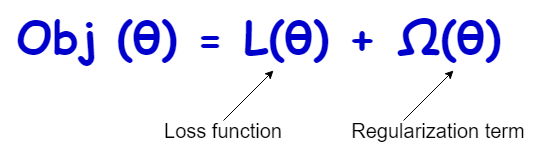
The regularization term (also called the penalty term) can take different forms that will be discussed soon in this post.
A linear regression model that predicts continuous-valued outputs learns the optimal values for its coefficients by minimizing its loss function. The same thing applies to a logistic regression model that predicts discrete-valued outputs. In both cases, we can apply regularization during the model training phase.
When we consider the Scikit-learn LogisticRegression() class for logistic regression models, there is a hyperparameter called penalty to choose the type of regularization.
LogisticRegression(penalty='...')There are 4 options to select for the penalty (type of regularization).
- ‘none’ — No regularization applied
- ‘l1’ — L1 regularization applied
- ‘l2’ — L2 regularization applied (default choice)
- ‘elasticnet’ — Both L1 and L2 regularization applied
However, when we consider the LinearRegression() class for linear regression models, there is no specific hyperparameter to choose the type of regularization. Instead, we should use 3 separate classes for each type of regularization.
- When we apply the L2 regularization to the cost function of linear regression, it is called Ridge regression.
- When we apply the L1 regularization to the cost function of linear regression, it is called Lasso regression.
- When we apply both L1 and L2 regularization to the cost function of linear regression at the same time, it is called Elastic Net regression.
All the above regression types fall under the category of regularized regression.
Let’s discuss each type in detail.
Ridge Regression
Here, we apply the L2 regularization term (defined below) to the cost function of linear regression:
L2 = α.Σ(squared values of coefficients)
The Scikit-learn class for Ridge regression is:
Ridge(alpha=...)The alpha is a hyperparameter that controls the regularization strength. It must be a positive float. The default value is 1. Larger values of alpha imply stronger regularization (less-overfitting, may be underfitting!). Smaller values imply weak regularization (overfitting). We want to build a model that neither overfits nor underfit the data. So, we need to choose an optimal value for alpha. For that, we can use a hyperparameter tuning technique.
Note: Ridge(alpha=0) is equivalent to the normal linear regression solved by the LinearRegression() class. It is not advised to use alpha=0 with Ridge regression. Instead, you should use normal linear regression.
Lasso Regression
Here, we apply the L1 regularization term (defined below) to the cost function of linear regression:
L1 = α.Σ(absolute values of coefficients)
The Scikit-learn class for Lasso regression is:
Lasso(alpha=...)This alpha and its definition are the same as the alpha defined in the L2 term. The default value is 1.
Note: Lasso(alpha=0) is equivalent to the normal linear regression solved by the LinearRegression() class. It is not advised to use alpha=0 with Lasso regression. Instead, you should use normal linear regression.
Elastic Net Regression
Here, we apply both L1 and L2 regularization terms to the cost function of linear regression at the same time.
The Scikit-learn class for Elastic Net regression is:
ElasticNet(alpha=..., l1_ratio=...)The hyperparameter l1_ratio defines how we mix both L1 and L2 regularization. Therefore, it is called the ElasticNet mixing parameter. The acceptable range of values for l1_ratio is:
0 <= l1_ratio <= 1Here are the possible cases:
l1_ratio = 0means there is no L1 term and there is only L2 regularization.l1_ratio = 1means there is no L2 term and there is only L1 regularization.0 < l1_ratio < 1means the regulation is defined as a combination of L1 and L2 terms. Ifl1_ratiois close to 1, it means that the L1 term is dominating. Ifl1_ratiois close to 0, it means that the L2 term is dominating.
So, that’s the idea behind the terms “Ridge”, “Lasso” and “Elastic Net”!
Summary
It is not necessary to always apply regularization to linear regression models. First, you can try with LogisticRegression() class and then see the output. If you get a lower value for the test RMSE and a higher value for the train RMSE, your regression model is overfitting. Then, you can try applying each type of regularization and see the outputs. You can also try different valid values for the hyperparameters alpha and l1_ratio. In the end, you’ll have many models. You can choose a good model by looking at the RMSE on both train and test sets. Please note that a good model neither overfits nor underfit the data. It should be able to perform well on training data and also generalize well on the unseen data (test data).
Note: In addition to applying regularization, there are other ways to address the problem of overfitting. You can learn them by reading the following series of articles writing by me.

This is the end of today’s post. My readers can sign up for a membership through the following link to get full access to every story I write and I will receive a portion of your membership fee.
Thank you so much for your continuous support! See you in the next story. Happy learning to everyone!
Special credit goes to Andre Hunter on Unsplash, who provides me with a nice cover image for this post.
Rukshan Pramoditha 2021–10–12


