
The Catch Behind the AWS Free Tier
Free AWS Services…to an extent

Nothing is free… right?
When it comes to AWS services, there are in fact some services that in and of themselves are free to use forever.
However, the important thing to remember (especially as you are learning and starting out on AWS), is that some free services will create other resources that are not free.
Before we get into the caveats, I would like to give you a quick list of services that on their own are actually free:
- Virtual Private Cloud (VPC)
- Auto-Scaling
- Elastic Beanstalk
- CloudFormation
- Identity and Access Management (IAM)
The most immediate thing you may be thinking is, “How are auto-scaling and CloudFormation free when their sole purpose is to scale up your resources on demand?”. Well as I mentioned, the services themselves are free, but the resources they can potentially create are not free.
AWS will generally bill you based on the type of resource you want, and how long you use it for.
Having said that, lets look at what the AWS free tier consists of, so you can get the most out of it without coming across any unexpected charges.
AWS Free Tier Breakdown
Within the AWS free tier, you can use some of the most popular services AWS offers for free for 12 months, up to a certain point.
For example, if you wanted to launch some EC2 instances, when you go to do that you will clearly be able to see which types of instances fit the free tier. Make sure to select those, otherwise you will not fall under the free tier umbrella.
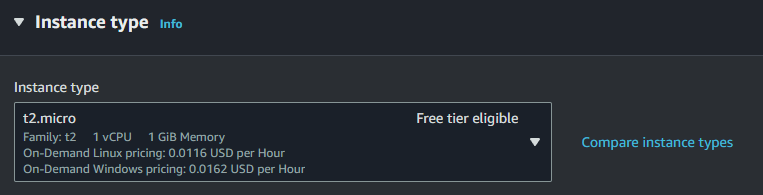
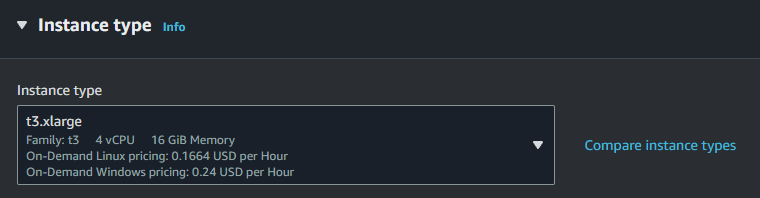
As you can see, there is a clear indicator when something does in fact fall in the free tier, so make sure you choose that.
Additionally, like I alluded to earlier you will get billed based on how long you use a resource for. In this case, even if you used the free tier eligible instance types, within your first 12 months you only get 750 hours of instance usage. Although in most cases this is enough to keep something running continuously every month, it is still good to be aware of.
So as you can see, the free tier is free, but with a few caveats. For your reference, below is a list of some of the popular AWS services features/limits that you should be aware of as you are exploring the free tier:
- 750 hours of Amazon EC2 Linux or RHEL or SLES t2.micro instance usage (1 GiB of memory and 32-bit and 64-bit platform support) — enough hours to run continuously each month
- 750 hours of Amazon EC2 Microsoft Windows Server t2.micro instance usage (1 GiB of memory and 32-bit and 64-bit platform support) — enough hours to run continuously each month
- 750 hours of an Elastic Load Balancer plus 15 GB data processing
- 750 hours of Amazon RDS Single-AZ Micro DB Instances, running MySQL, PostgreSQL, Oracle BYOL or SQL Server Express Edition — enough hours to run a DB Instance continuously each month. You also get 20 GB of database storage, 10 million I/Os and 20 GB of backup storage
- 750 hours of Amazon ElastiCache Micro Cache Node usage — enough hours to run continuously each month
- 30 GB of Amazon Elastic Block Storage in any combination of General Purpose (SSD) or Magnetic, plus 2 million I/Os (with EBS Magnetic) and 1 GB of snapshot storage
- 5 GB of Amazon S3 standard storage, 20,000 Get Requests, and 2,000 Put Requests
- 25 GB of Storage, 25 Units of Read Capacity and 25 Units of Write Capacity, enough to handle up to 200M requests per month with Amazon DynamoDB
- 25 Amazon SimpleDB Machine Hours and 1 GB of Storage
- 1,000 Amazon SWF workflow executions can be initiated for free. A total of 10,000 activity tasks, signals, timers and markers, and 30,000 workflow-days can also be used for free
- 100,000 Requests of Amazon Simple Queue Service
- 100,000 Requests, 100,000 HTTP notifications and 1,000 email notifications for Amazon Simple Notification Service
- 10 Amazon Cloudwatch metrics, 10 alarms, and 1,000,000 API requests
- 50 GB Data Transfer Out, 2,000,000 HTTP and HTTPS Requests for Amazon CloudFront
- 15 GB of bandwidth out aggregated across all AWS services
Hopefully this was helpful for you so that you can understand that while AWS does offer a free tier which is great for experimenting with and learning about AWS, you still need to be mindful about how you use it.
For your convenience, here is a link to the full documentation from AWS on their free tier offerings.
As always, best of luck on your continued journey through cloud computing.