avatarNaveenkumar Murugan

Free AI web copilot to create summaries, insights and extended knowledge, download it at here

5837

Abstract

hon-boto3-psycopg2-crypto-layer.zip s3://abc-dev01-incoming-files</b></p><p id="d646">Oops! Error!</p><p id="f055">When you didn’t attach any role (i.e. permissions to access any AWS services) to EC2, It will try to search for IAM credential (sercret key id and key) is present in AWS config. The following error depicts that credntial error.</p><figure id="c503"><img src="https://cdn-images-1.readmedium.com/v2/resize:fit:800/1*NKGyYr58_9BPj5S0KU-5_g.png"><figcaption>Error message</figcaption></figure><figure id="10b7"><img src="https://cdn-images-1.readmedium.com/v2/resize:fit:800/1*2WH1GtYQEdZprenM5oB6rw.png"><figcaption></figcaption></figure><p id="2793">The EC2 instance you created <b>doesn’t have permission</b> to write to S3, in our case we need to push this zip file to S3 as subsequently we are going to point this location and create a Lambda layer. And, creating lambda layer or pushing the new version of layer also EC2 will not have permission.</p><p id="36d6">Okay, how do we fix it?</p><p id="00ef">EC2 Instance needs to assume the role when it is calling other resources of AWS, to do that we need to create a policy and attach that policy to the role.</p><p id="2f04">Create the Policy (lambda-layer-push) with the following definition</p><div id="080d"><pre><span class="hljs-punctuation">{</span> <span class="hljs-attr">"Version"</span><span class="hljs-punctuation">:</span> <span class="hljs-string">"2012-10-17"</span><span class="hljs-punctuation">,</span> <span class="hljs-attr">"Statement"</span><span class="hljs-punctuation">:</span> <span class="hljs-punctuation">[</span> <span class="hljs-punctuation">{</span> <span class="hljs-attr">"Effect"</span><span class="hljs-punctuation">:</span> <span class="hljs-string">"Allow"</span><span class="hljs-punctuation">,</span> <span class="hljs-attr">"Action"</span><span class="hljs-punctuation">:</span> <span class="hljs-punctuation">[</span> <span class="hljs-string">"s3:PutObject"</span><span class="hljs-punctuation">,</span> <span class="hljs-string">"s3:ListBucket"</span><span class="hljs-punctuation">,</span> <span class="hljs-string">"s3:GetObject"</span> <span class="hljs-punctuation">]</span><span class="hljs-punctuation">,</span> <span class="hljs-attr">"Resource"</span><span class="hljs-punctuation">:</span> <span class="hljs-punctuation">[</span> <span class="hljs-string">"arn:aws:s3:::abc-dev01-incoming-files"</span><span class="hljs-punctuation">,</span> <span class="hljs-string">"arn:aws:s3:::abc-dev01-incoming-files/"</span> <span class="hljs-punctuation">]</span> <span class="hljs-punctuation">}</span><span class="hljs-punctuation">,</span> <span class="hljs-punctuation">{</span> <span class="hljs-attr">"Effect"</span><span class="hljs-punctuation">:</span> <span class="hljs-string">"Allow"</span><span class="hljs-punctuation">,</span> <span class="hljs-attr">"Action"</span><span class="hljs-punctuation">:</span> <span class="hljs-punctuation">[</span> <span class="hljs-string">"lambda:PublishLayerVersion"</span><span class="hljs-punctuation">,</span> <span class="hljs-string">"lambda:GetLayerVersion"</span><span class="hljs-punctuation">,</span> <span class="hljs-string">"lambda:UpdateFunctionConfiguration"</span><span class="hljs-punctuation">,</span> <span class="hljs-string">"lambda:GetFunctionConfiguration"</span><span class="hljs-punctuation">,</span> <span class="hljs-string">"lambda:DeleteLayerVersion"</span> <span class="hljs-punctuation">]</span><span class="hljs-punctuation">,</span> <span class="hljs-attr">"Resource"</span><span class="hljs-punctuation">:</span> <span class="hljs-string">""</span> <span class="hljs-punctuation">}</span> <span class="hljs-punctuation">]</span> <span class="hljs-punctuation">}</span></pre></div><p id="2933">Let’s break down the policy you provided:</p><div id="b092"><pre><span class="hljs-attr">"Statement"</span><span class="hljs-punctuation">:</span> <span class="hljs-punctuation">[</span> <span class="hljs-punctuation">{</span> <span class="hljs-attr">"Effect"</span><span class="hljs-punctuation">:</span> <span class="hljs-string">"Allow"</span><span class="hljs-punctuation">,</span> <span class="hljs-attr">"Action"</span><span class="hljs-punctuation">:</span> <span class="hljs-punctuation">[</span> <span class="hljs-string">"s3:PutObject"</span><span class="hljs-punctuation">,</span> <span class="hljs-string">"s3:ListBucket"</span><span class="hljs-punctuation">,</span> <span class="hljs-string">"s3:GetObject"</span> <span class="hljs-punctuation">]</span><span class="hljs-punctuation">,</span> <span class="hljs-attr">"Resource"</span><span class="hljs-punctuation">:</span> <span class="hljs-punctuation">[</span> <span class="hljs-string">"arn:aws:s3:::abc-dev01-incoming-files"</span><span class="hljs-punctuation">,</span> <span class="hljs-string">"arn:aws:s3:::abc-dev01-incoming-files/*"</span> <span class="hljs-punctuation">]</span> <span class="hljs-punctuation">}</span></pre></div><p id="3588">This policy allows access to read/write/list the (s3:GetObject/s3:PutObject/s3:ListBucket) objects in the bucket arn:aws:s3:::abc-dev01-incoming-files.</p><div id="0736"><pre><span class="hljs-punctuation">{</span> <span class="hljs-attr">"Effect"</span><span class="hljs-punctuation">:</span> <span class="hljs-string">"Allow"</span><span class="hl

Options

js-punctuation">,</span> <span class="hljs-attr">"Action"</span><span class="hljs-punctuation">:</span> <span class="hljs-punctuation">[</span> <span class="hljs-string">"lambda:PublishLayerVersion"</span><span class="hljs-punctuation">,</span> <span class="hljs-string">"lambda:GetLayerVersion"</span><span class="hljs-punctuation">,</span> <span class="hljs-string">"lambda:UpdateFunctionConfiguration"</span><span class="hljs-punctuation">,</span> <span class="hljs-string">"lambda:GetFunctionConfiguration"</span><span class="hljs-punctuation">,</span> <span class="hljs-string">"lambda:DeleteLayerVersion"</span> <span class="hljs-punctuation">]</span><span class="hljs-punctuation">,</span> <span class="hljs-attr">"Resource"</span><span class="hljs-punctuation">:</span> <span class="hljs-string">"*"</span> <span class="hljs-punctuation">}</span></pre></div><ul><li><code>lambda:PublishLayerVersion</code>: Permits publishing a new version of a Lambda layer.</li><li><code>lambda:GetLayerVersion</code>: Allows fetching information about a Lambda layer version.</li><li><code>lambda:UpdateFunctionConfiguration</code>: Grants the ability to update the configuration of a Lambda function.</li><li><code>lambda:GetFunctionConfiguration</code>: Enables fetching the configuration details of a Lambda function.</li><li><code>lambda:DeleteLayerVersion</code>: Allows the deletion of a specific version of a Lambda layer.</li></ul><figure id="cd70"><img src="https://cdn-images-1.readmedium.com/v2/resize:fit:800/1*ay1GNmjZ3X0FwSinD2gCMg.png"><figcaption></figcaption></figure><p id="7ad6">Create the role (lambda-layer-push-role) and attach the policy (lambda-layer-push)</p><figure id="ab44"><img src="https://cdn-images-1.readmedium.com/v2/resize:fit:800/1*VLcZNCc2axgHEMhZPSJeTA.png"><figcaption></figcaption></figure><p id="e7da">Trust policy (what are all the resources can assume this role), in our case EC2 so the policy would be (It will be auto created when you pick EC2 as service during the role creation).</p><div id="b874"><pre><span class="hljs-punctuation">{</span> <span class="hljs-attr">"Version"</span><span class="hljs-punctuation">:</span> <span class="hljs-string">"2012-10-17"</span><span class="hljs-punctuation">,</span> <span class="hljs-attr">"Statement"</span><span class="hljs-punctuation">:</span> <span class="hljs-punctuation">[</span> <span class="hljs-punctuation">{</span> <span class="hljs-attr">"Effect"</span><span class="hljs-punctuation">:</span> <span class="hljs-string">"Allow"</span><span class="hljs-punctuation">,</span> <span class="hljs-attr">"Principal"</span><span class="hljs-punctuation">:</span> <span class="hljs-punctuation">{</span> <span class="hljs-attr">"Service"</span><span class="hljs-punctuation">:</span> <span class="hljs-string">"lambda.amazonaws.com"</span> <span class="hljs-punctuation">}</span><span class="hljs-punctuation">,</span> <span class="hljs-attr">"Action"</span><span class="hljs-punctuation">:</span> <span class="hljs-string">"sts:AssumeRole"</span> <span class="hljs-punctuation">}</span> <span class="hljs-punctuation">]</span> <span class="hljs-punctuation">}</span></pre></div><p id="242b">Okay, now let us link this role to our EC2 instance (select the instance, go to security, and Modify IAM role)</p><figure id="3220"><img src="https://cdn-images-1.readmedium.com/v2/resize:fit:800/1*ZRmPetQwHUW4mdfqb_GRnQ.png"><figcaption></figcaption></figure><p id="2ebd">select the role you just created and update.</p><figure id="5ef7"><img src="https://cdn-images-1.readmedium.com/v2/resize:fit:800/1*tblnJXC95emQ1vJEqIZCnA.png"><figcaption></figcaption></figure><figure id="b5a4"><img src="https://cdn-images-1.readmedium.com/v2/resize:fit:800/1*pDVF-VEcv4NiijxbI7RmVg.png"><figcaption></figcaption></figure><p id="783e">All set , let us try to copy our layer to s3.</p><p id="5297">Awesome, now it is done.</p><figure id="61f2"><img src="https://cdn-images-1.readmedium.com/v2/resize:fit:800/1*iZ_-sizaOd_aRtZ6AVYVMQ.png"><figcaption></figcaption></figure><p id="8fd5">Let us create the layer and push our layer version 1.</p><div id="3823"><pre>aws <span class="hljs-keyword">lambda</span> publish-layer-version --layer-name python-boto3-psycopg2-crypto-layer --content S3Bucket=abc-dev01-incoming-files,S3Key=python-boto3-psycopg2-crypto-layer.<span class="hljs-built_in">zip</span> --compatible-runtimes python3<span class="hljs-number">.8</span> --region ap-southeast-<span class="hljs-number">2</span></pre></div><figure id="6ff5"><img src="https://cdn-images-1.readmedium.com/v2/resize:fit:800/1*BuQ8IDBMshK54MN3PrIeCw.png"><figcaption></figcaption></figure><p id="befa">Successfully, created the layer:<b>python-boto3-psycopg2-crypto-layer </b>we can use it in the lambda function now.</p><figure id="6fc5"><img src="https://cdn-images-1.readmedium.com/v2/resize:fit:800/1*mK07q4hhjCDON7BQeqQlIA.png"><figcaption></figcaption></figure><figure id="608c"><img src="https://cdn-images-1.readmedium.com/v2/resize:fit:800/1*lH_TbdLG74wfaiUsyCFT3g.png"><figcaption></figcaption></figure><p id="5f7f"><b>Note: </b>AWS Lambda has a maximum deployment package size limit of 250 MB, which includes the function code and any additional layers. This limitation is in place to ensure efficient deployment and execution of Lambda functions in the AWS environment</p><p id="e188">Have questions or thoughts? Don’t hesitate to share them in the comments below! If you found this article helpful or enjoyable, show your appreciation by giving it a round of applause 👏. Happy learning and looking forward to hearing from you!</p></article></body>

The best way to package your AWS Lambda function’s dependencies


The most frequently encountered challenge with AWS Lambda, as seen on Stack Overflow, is the ‘No module found for import.’ This often arises from inadequately packaged dependencies for Lambda functions. If you’re seeking the best method to package your dependencies for a Lambda function, you’re in the right place.

Lambda merely provides the execution environment, be it for Python, JavaScript, or any other language. You’re responsible for specifying the packages your Lambda function requires. It’s a common misconception that popular packages like ‘boto3,’ essential for programmatically accessing AWS services, are automatically included in the Lambda execution environment. However, nothing is included by default, except native Python libraries like os, sys, and logging.

For instance, if you’re working on a Lambda function to read Parquet data from S3 and load it into RDS PostgreSQL, you’ll likely need packages like ‘boto3’ for AWS service interaction and ‘pyarrow’ for handling Parquet files.

There are two ways to package your Lambda function code. One option is to include both your Lambda function and its dependencies in a single archive for upload. The other option, which we’ll explore in this article, involves separating the dependencies and core functionality by using Lambda layers.

We’ve opted for the second option as it promotes reusability of Lambda layers across multiple functions. This approach allows you to manage the core functionality in the AWS console while updating dependencies separately in the foreground. Unlike the first option, where code and dependencies are bundled together, this separation makes it easier to handle and view the code in the foreground.

Unit testing Lambda code locally before uploading to the cloud can be challenging. Option 1 may lead to multiple code uploads during the build process. Therefore, we’ve chosen Option 2 for its support, flexibility, and layer reusability.

Let’s dive in and package the necessary dependencies for a function that reads data from S3 and loads it into RDS. This article will focus on creating the Lambda layer, providing a comprehensive guide for developers.

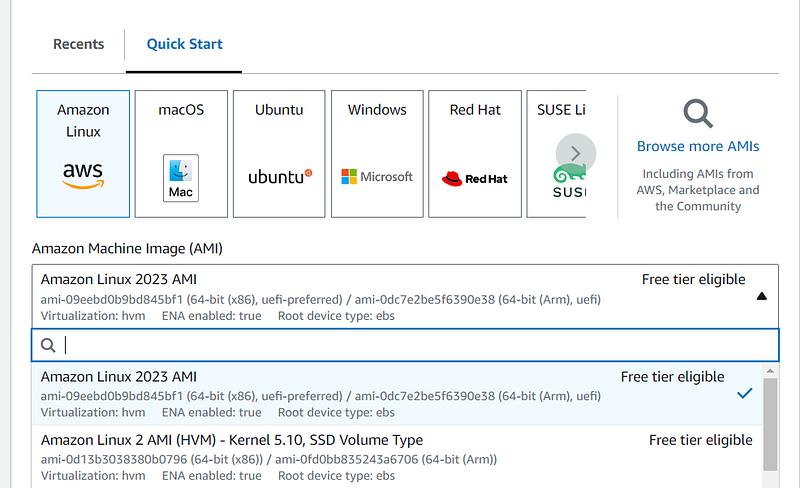
  1. Get a AMI Linux 2 Ec2 instance.

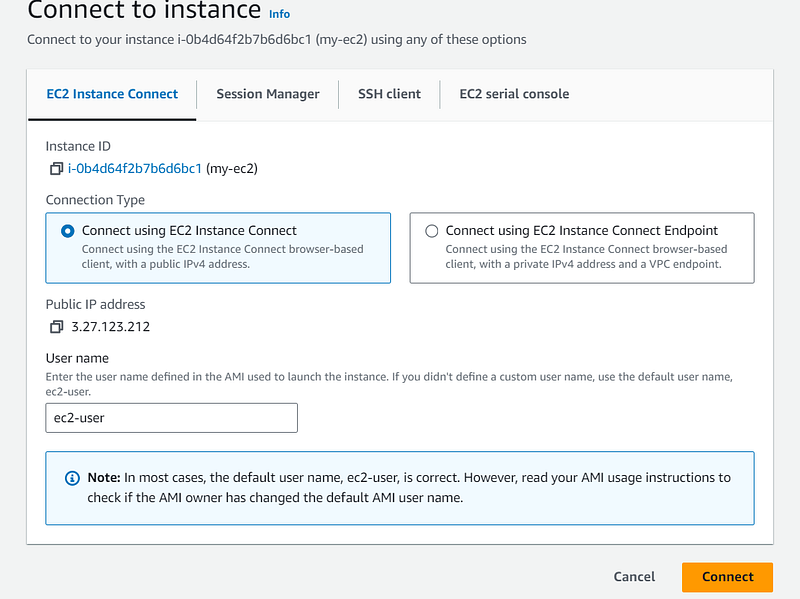
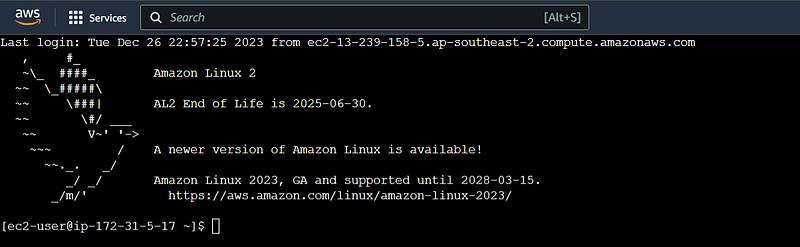
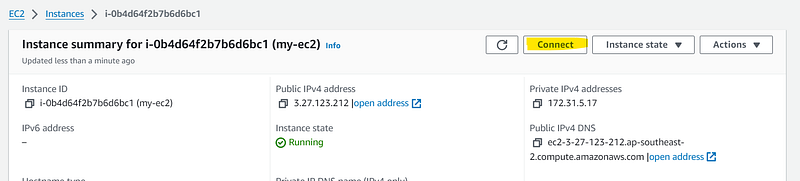
2. Connect to the Ec2 Instance.
3. Execute the following code in the EC2 command line

  • Install the python version based on the Lambda execution environment.

from LAMBDA function configuration

sudo amazon-linux-extras install python3.8
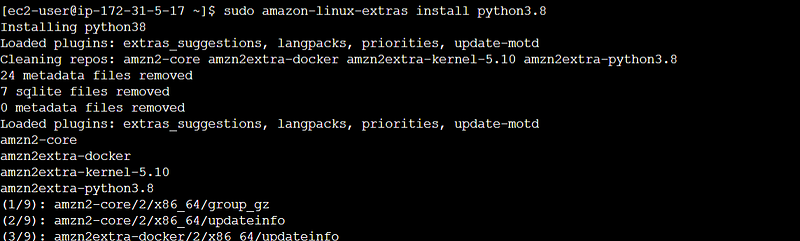
  • Get/Download the script to install pip in the EC2 Instance

curl -O https://bootstrap.pypa.io/get-pip.py

  • Install the ‘pip’ for the current user .

python3.8 get-pip.py — user
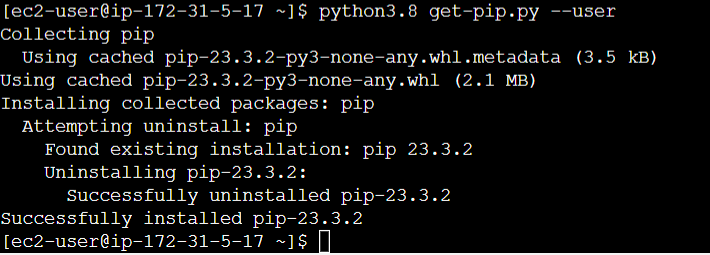
4. Create the directory named python.

mkdir python (I)

It is not optional to name the directory as python , it is mandatory why?
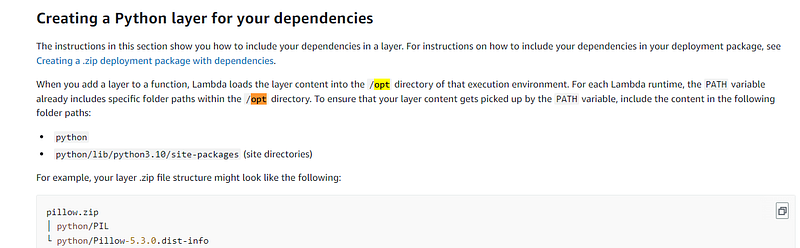
from AWS Lambda Documentation

5. Install the dependencies in the python directory.

python3.8 -m pip install boto3 psycopg2-binary cryptography -t python/
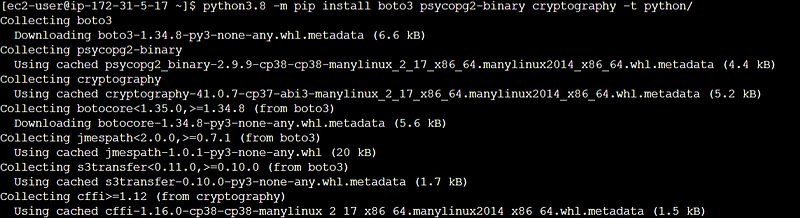
6. Zip the dependencies

zip -r <Any name>.zip python

e.g. zip -r python-boto3-psycopg2-crypto-layer.zip python

I have named it is as ‘python-boto3-psycopg2-crypto-layer’ as it will make sense for me when I need a same packages for other lambda function and can reuse it.

7. Copy the Zipped file to s3.

aws s3 cp python-boto3-psycopg2-crypto-layer.zip s3://abc-dev01-incoming-files

Oops! Error!

When you didn’t attach any role (i.e. permissions to access any AWS services) to EC2, It will try to search for IAM credential (sercret key id and key) is present in AWS config. The following error depicts that credntial error.


Error message

The EC2 instance you created doesn’t have permission to write to S3, in our case we need to push this zip file to S3 as subsequently we are going to point this location and create a Lambda layer. And, creating lambda layer or pushing the new version of layer also EC2 will not have permission.

Okay, how do we fix it?

EC2 Instance needs to assume the role when it is calling other resources of AWS, to do that we need to create a policy and attach that policy to the role.

Create the Policy (lambda-layer-push) with the following definition

{
    "Version": "2012-10-17",
    "Statement": [
        {
            "Effect": "Allow",
            "Action": [
                "s3:PutObject",
                "s3:ListBucket",
                "s3:GetObject"
            ],
            "Resource": [
                "arn:aws:s3:::abc-dev01-incoming-files",
                "arn:aws:s3:::abc-dev01-incoming-files/*"
            ]
        },
        {
            "Effect": "Allow",
            "Action": [
                "lambda:PublishLayerVersion",
                "lambda:GetLayerVersion",
                "lambda:UpdateFunctionConfiguration",
                "lambda:GetFunctionConfiguration",
                "lambda:DeleteLayerVersion"
            ],
            "Resource": "*"
        }
    ]
}

Let’s break down the policy you provided:

"Statement": [
        {
            "Effect": "Allow",
            "Action": [
                "s3:PutObject",
                "s3:ListBucket",
                "s3:GetObject"
            ],
            "Resource": [
                "arn:aws:s3:::abc-dev01-incoming-files",
                "arn:aws:s3:::abc-dev01-incoming-files/*"
            ]
        }

This policy allows access to read/write/list the (s3:GetObject/s3:PutObject/s3:ListBucket) objects in the bucket arn:aws:s3:::abc-dev01-incoming-files.

{
            "Effect": "Allow",
            "Action": [
                "lambda:PublishLayerVersion",
                "lambda:GetLayerVersion",
                "lambda:UpdateFunctionConfiguration",
                "lambda:GetFunctionConfiguration",
                "lambda:DeleteLayerVersion"
            ],
            "Resource": "*"
        }
  • lambda:PublishLayerVersion: Permits publishing a new version of a Lambda layer.
  • lambda:GetLayerVersion: Allows fetching information about a Lambda layer version.
  • lambda:UpdateFunctionConfiguration: Grants the ability to update the configuration of a Lambda function.
  • lambda:GetFunctionConfiguration: Enables fetching the configuration details of a Lambda function.
  • lambda:DeleteLayerVersion: Allows the deletion of a specific version of a Lambda layer.
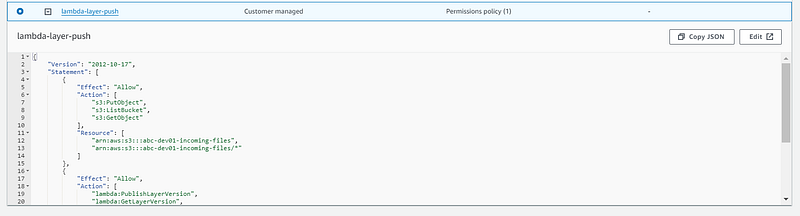
Create the role (lambda-layer-push-role) and attach the policy (lambda-layer-push)

Trust policy (what are all the resources can assume this role), in our case EC2 so the policy would be (It will be auto created when you pick EC2 as service during the role creation).

{
    "Version": "2012-10-17",
    "Statement": [
        {
            "Effect": "Allow",
            "Principal": {
                "Service": "lambda.amazonaws.com"
            },
            "Action": "sts:AssumeRole"
        }
    ]
}

Okay, now let us link this role to our EC2 instance (select the instance, go to security, and Modify IAM role)
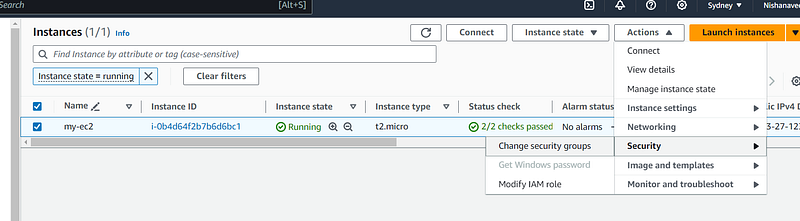
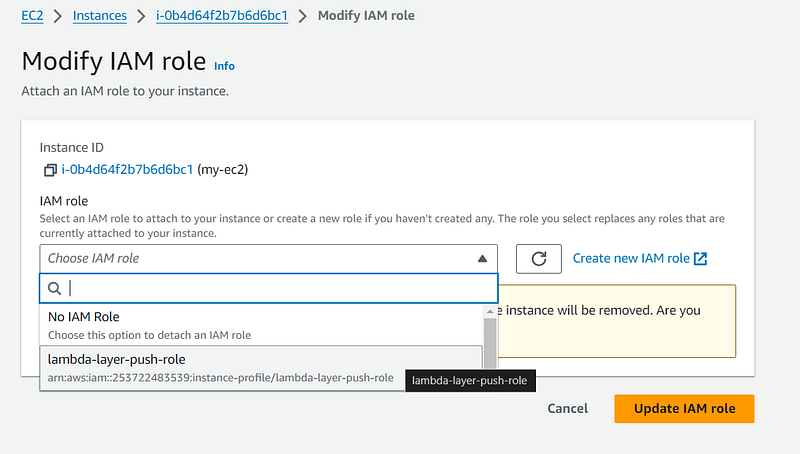
select the role you just created and update.

All set , let us try to copy our layer to s3.

Awesome, now it is done.

Let us create the layer and push our layer version 1.

aws lambda publish-layer-version --layer-name python-boto3-psycopg2-crypto-layer --content S3Bucket=abc-dev01-incoming-files,S3Key=python-boto3-psycopg2-crypto-layer.zip --compatible-runtimes python3.8 --region ap-southeast-2
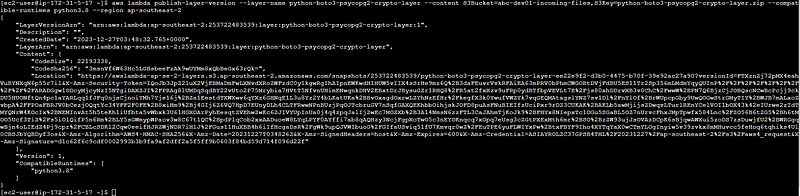
Successfully, created the layer:python-boto3-psycopg2-crypto-layer we can use it in the lambda function now.

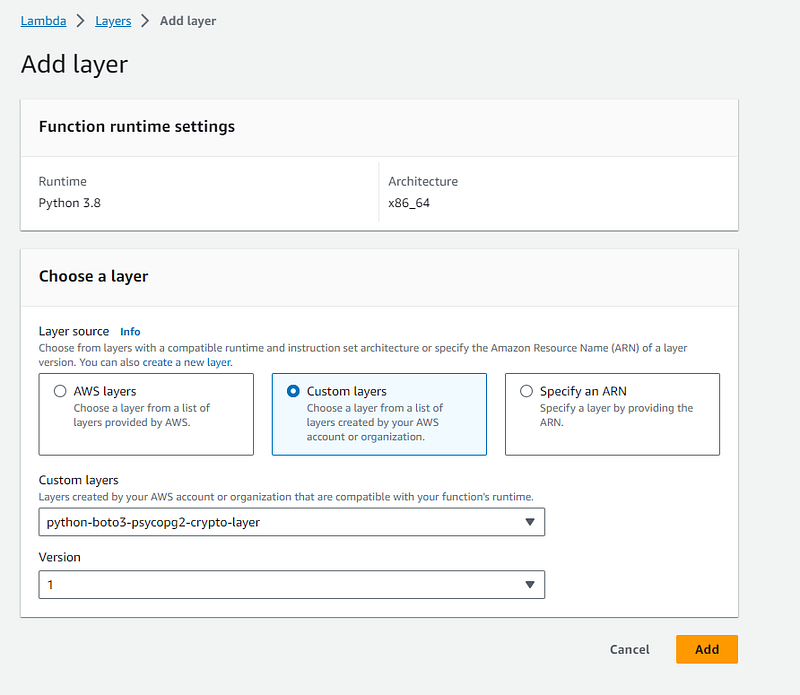
Note: AWS Lambda has a maximum deployment package size limit of 250 MB, which includes the function code and any additional layers. This limitation is in place to ensure efficient deployment and execution of Lambda functions in the AWS environment

Have questions or thoughts? Don’t hesitate to share them in the comments below! If you found this article helpful or enjoyable, show your appreciation by giving it a round of applause 👏. Happy learning and looking forward to hearing from you!

Lambda
Lambda Function
AWS Lambda
Aws Lambda Layer
Serverless Architecture
Recommended from ReadMedium