

The Best 22 Microsoft Visual Studio Code Extensions for Python Development to Increase Your Productivity
Coupled with the combination of GitHub and VSCode, Visual Studio Code (VSCode) is indispensable for most front-end developers/programmers. As a code editor, VSCode is a free open source software, that has many extensions to improve development efficiency.
Today I share very useful VSCode extensions for Python that allow you to increase your productivity.

VSCode supports highlighting Python code even without the Python extensions. However, if you want to use code in Python, you must install it to improve the productivity of Python developers, so that the developers can open the .py file. There are several features:
A. IntelliSense: Edit your code with auto-completion, code navigation, syntax checking, and more
B. Linting: Use Pylint, Flake8, etc. for addition code analysis or inspection
C. Code Formatting: Use black, autopep, or YAPF to format your code
D. Debugging: Debug your Python Scripts, web apps, remote or multi-threaded processes
E. Testing: Run and debug tests through the Test Explorer with Unittest or Pytest
F. Jupyter Notebooks: Create and edit Jupyter Notebooks, add and run code cells, render plots, visualize variables through the variable browser, visualize data frames with the data viewer, and more
G. Environments: Automatically activate and switch between virtualenv, venv pipenv, conda, pyenv environments
H. Refactoring: Restructure your Python code with variable extraction, method extraction, and import sorting
2. LiveCode

It is easier for you to debug Python code
A. Real-time Evaluation: You don’t need to run your python file, just keep typing
B. Variable display: Whenever a variable is declared or changed, its new value is displayed in the same line
C. Loop display: For each iteration of a loop all intermediate values are displayed
D. Error display: The instant you make a mistake an error with the stack trace is shown

It contains many code snippets such as strings, lists, sets, tuples, dictionaries, classes, conditional statements, loops and etc. Those are templates that make it easier to enter commands to generate the repeating code patterns, and then fine-tune to complete the function development. Also, this tool can provide you with a sample code for reference, and do not go to the search engine to search for example.

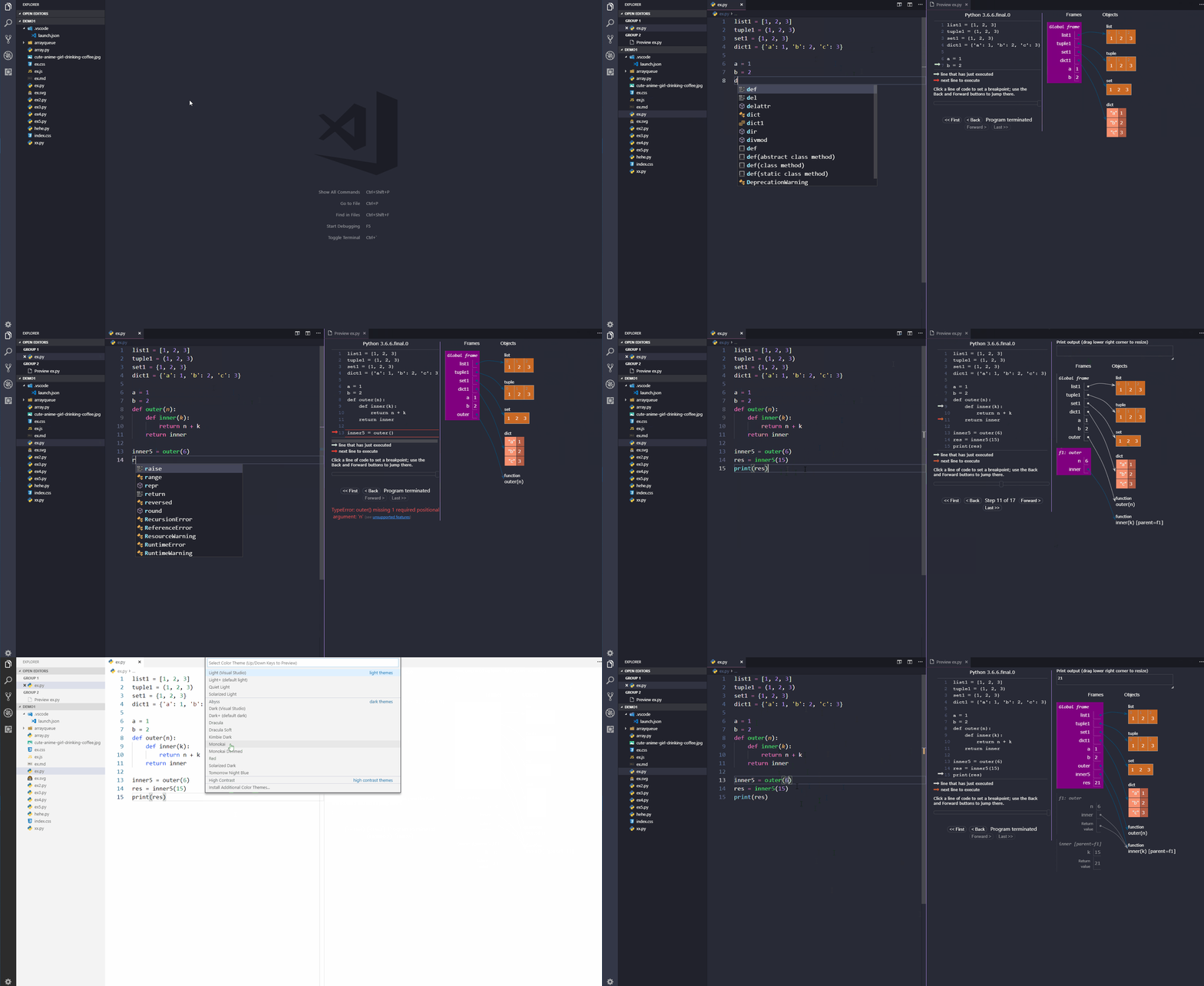
It supports the debugging preview for the Python language. It means that you can visualize the results of your code in real-time. You can switch various theme skins for VSCode.
5. Sort Lines

It gives you alphabetical sorting.
6. Git Graph
It is the most visually appealing plugin for interacting with Git in VSCode. When performing complex git operations, it is useful to see a well-defined commit tree, which is very customizable and provides developers control over the UI such as graphical styles and branch colors. Through this plugin, you can clearly see the commit records, the details of file changes, changes of the current branch, uncommitted changes, and many customizable extension settings, create operations through buttons, and even perform code reviews without leaving the IDE.

When the preference “Auto Indent” is checked, the newline cursor will automatically tab when there is a colon. When returning, the new line will also automatically remove a tab. But other than these 2 cases, if you roll back a tab and then change the line, it will automatically make a tab. This extension has solved this problem perfectly.
8. Python Test Explorer for Visual Studio Code

A. Display the test explorer in the text view in the sidebar with all detected tests and suites and their state
B. Support for Unittest, Pytest, and Testplan test frameworks and their plugins
C. Support multi-root workspaces
D. Convenient bug reporting during test discovery
- Provide type-hint autocompletion for built-in types, classes, and typing modules.
- Estimate the correct type and provide completion
- Python files can be searched in the workspace for type estimation purposes
10. Sourcery

Sourcery is a VScode extension to help you improve your Python code. It automatically reviews and gives instant suggestions to refactors your code so you can spend more time focusing on writing new code and less time cleaning up. It makes all of your Python code cleaner and more readable. There are some features to help your code:
- Real-time refactoring suggestions
- Continuous code quality feedback
- Multi-file analysis
- Duplicate code detection
- GitHub Pull Request reviews
- Sourcery CLI, CI, & Pre-Commit Hook options
11. Bookmarks

- Mark/unmark positions in your code and give them a name
- Add virtual workspace support
- Improved usability of the sidebar
- Add cross-platform support
- See a list of all bookmarks in one file and the project
- Jump forward and backward between bookmarks
12. Thunder Client

It is a lightweight Rest API client.
13. Docs View

A. Displays documentation automatically in the sidebar or pannel
B. Support for any langugaes
C. Support syntax highlighting and markdown rendering
14. Sourcegraph

It allows you to find and fix things fast across all your code. Also, you can search millions of open-source repositories for free directly from the VSCode IDE. Learn from helpful code examples, and reuse code from millions of repositories in the open-source libraries. You can signup for a free Sourcegraph cloud account so that you can synchronize your private and public repositories and search all your code in a single view in VSCode. It also provides fast, cross-repository navigation with “Go to Definition” and “Find References” features to quickly understand new code and find answers in codebases of any size.
15. Pylance

A. Docstrings
B. Signature help with type information
C. Provide Code completion
D. Auto-imports
E. Parameter suggestions
F. Navigate all your code
F. IntelliCode compatibility

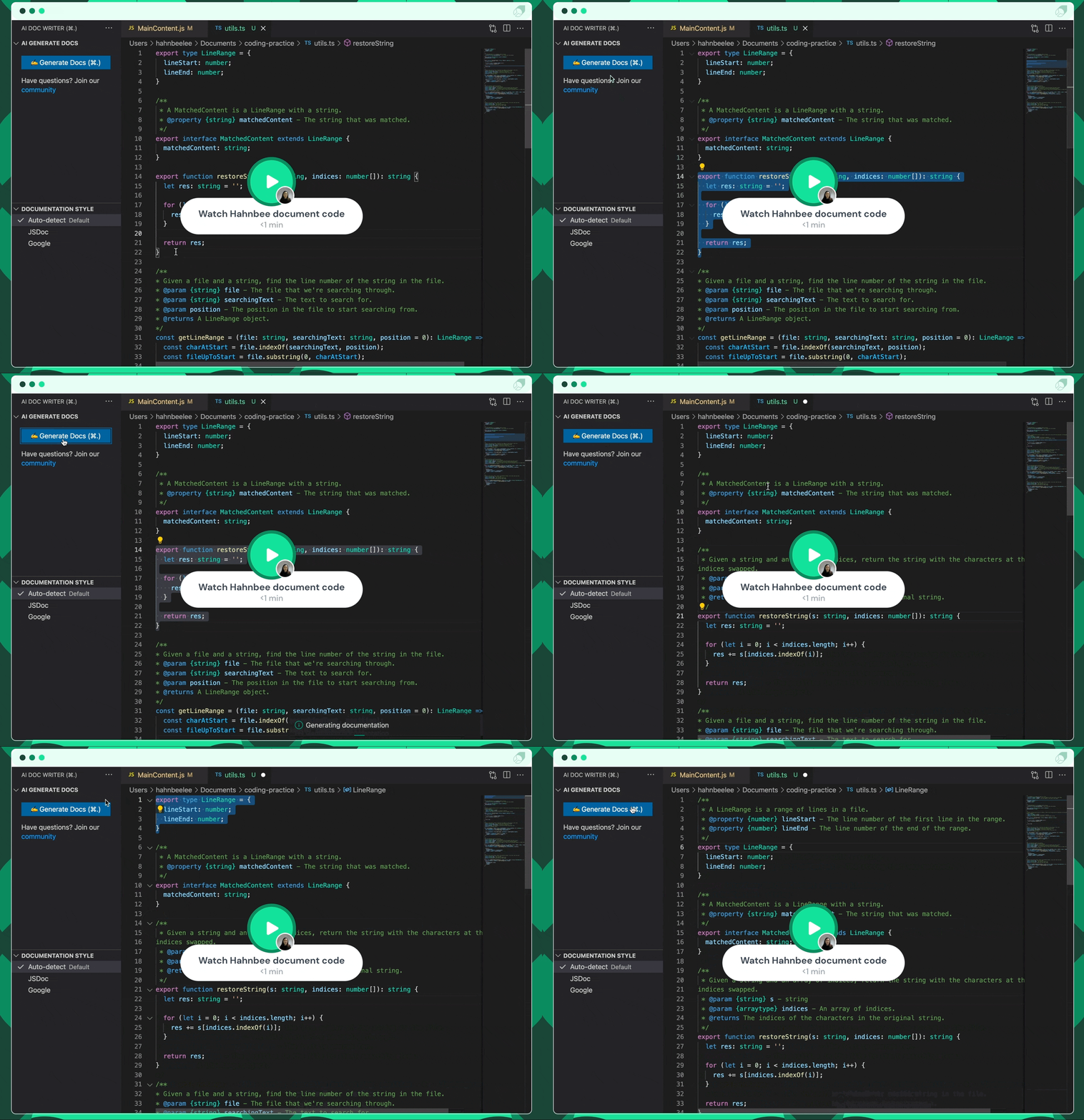
Just select the function code, and then press a shortcut key to automatically generate a comment for the method which can be used for function documentation.
17. Krinql

If you don’t understand the code, Krinql can answer or let it write the docstring. Also, it can find how to use the library and automate it in the VSCode editor itself.
18. GistPad

It lets you edit GitHub GIsts and repositories directly in VSCode.
19. CodeSnap

A. Quickly save screenshots of your code
B. Copy screenshots to your clipboard
It provides AI-assisted IntelliSense by showing recommended completion items for your code context.
21. AREPL for python

A. Real-Time Evaluation: AREPL evaluates your code automatically
B. Variable Display: The final state of your local variables is displayed in a collapsible JSON format
C. Error Display: The mistake you make
D. Settings: AREPL offers many settings to fit your user experience.
22. Wolf

You can experience the WYSIWYG (What You See Is What You Get) in the Python interpreter in VSCode.
References
If you’ve found any of my articles helpful or useful then please consider throwing a coffee my way to help support my work or give me patronage😊, by using
Last but not least, if you are not a Medium Member yet and plan to become one, I kindly ask you to do so using the following link. I will receive a portion of your membership fee at no additional cost to you.


