
The Beginner’s Guide to Similarity Matching Using spaCy
Using spaCy and Python to detect the similarities between sentences

This piece covers the basic steps to determining the similarity between two sentences using a natural language processing module called spaCy. The following tutorial is based on a Python implementation. This is particularly useful for matching user input with the available questions for a FAQ Bot.
Given the following sentences:
- How do I join a guild?
- How do I add friends?
- What is a mount?
- How to increase my battle rating?
- Can I attack while on a mount?
Which sentences are similar to each other? From the human perspective, we can easily identify that sentence 3 and sentence 5 have some similarity to each other due to the fact that both contain the word mount. As for the computers, they have to rely on comparing the word vectors (word embeddings), which represents the multi-dimensional meaning of each word. For example, the word vector for ‘banana’ is represented as follow:
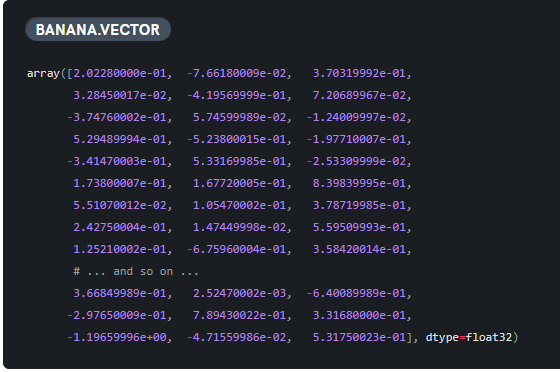
These word vectors are generated using an algorithm called word2vec, which can be trained using any open-sources libraries such as Gensim or FastText. Fortunately, spaCy has its own words vectors built-in that are ready to be used (only applicable for certain language and models).
Altogether there are five sections in this tutorial:
- Setup and installation
- Usage and API calls
- Custom Functions
- Evaluation
- Conclusion
Let’s get started!
Setup and Installation
As stated on the official website, “spaCy is compatible with 64-bit CPython 2.7 /3.5+ and runs on Unix/Linux, macOS/OS X, and Windows. The latest spaCy releases are available over pip and conda.” Kindly refer to the quickstart page if you are having trouble installing it.
Python
In this tutorial, I will be using Python 3.7.1 installed in a virtual environment
spaCy module
Check out the following commands and run them in the command prompt:
- Installing via pip for those without GPU
pip install spacy- Installing via conda
conda install -c conda-forge spacy- Upgrading spacy via pip
pip install -U spacy- Installing via pip for those with GPU
pip install -U spacy[cuda92]I am using spaCy 2.0.18 for this tutorial. Once you have spaCy installed, you need to download the language model before you can actually use it.
Language model
You can find the full list and available model in the following link. I will be using the large English model. In the command prompt, enter the following code:
python -m spacy download en_core_web_lgIf you would like to have a specific version of the model, use the following command (example for download the small English model version 2.1.0):
python -m spacy download en_core_web_sm-2.1.0 --directUsage and API calls
Once you have everything installed, let’s test out the basic API calls available to us.
Importing and loading module
The first step is to import the spaCy module and load the language model that we have just downloaded. I am using Jupyter Notebook and running the following code:
If you have an issue with the symlink, you can use this code to load the model:
Stopwords
Stopwords are words which are filtered out during the pre-processing or post-processing of text. To get the stopwords for English models, you can use the following code:
#assign the default stopwords list to a variable
STOP_WORDS = spacy.lang.en.stop_words.STOP_WORDS
As of version 2.0.11, it includes some syntactic sugar that allows you to add or remove stopwords.
- Check the current stopwords:
#nlp refers to the name of the model loaded, change the name accordingly
#nlp = en_core_web_lg.load() or nlp = spacy.load("en_core_web_lg")
print(nlp.Defaults.stop_words)- Add a single stopword:
nlp.Defaults.stop_words.add("add")- Add several stopwords:
nlp.Defaults.stop_words |= {"stop","word",}- Remove a single stopword:
nlp.Defaults.stop_words.remove("remove")- Remove several stopwords:
nlp.Defaults.stop_words -= {"stop", "word"}Similarity matching
To compare the similarity between two sentences, use the following code:
doc1 = nlp("How do I turn sound on/off?")
doc2 = nlp("How do I obtain a pet?")
doc1.similarity(doc2)
You should get the following output, though your results might differ based on the version used:
0.8680366536690709The value ranges from 0 to 1, with 1 meaning both sentences are the same and 0 showing no similarity between both sentences. As you can notice, the result is quite high even though the sentences don’t seem to be related from a human perspective. This is due to both of the sentences starting with “How do I” and ending with the symbol “?”. However, there can be cases where the sentences do not have any common words but still have high similarity. In order to solve this, we need to pre-process the text into the relevant parts. For example, if we were to test is using the following sample:
doc1 = nlp("turn sound on/off")
doc2 = nlp("obtain a pet")
doc1.similarity(doc2)
The similarity here should be a lot less. After running the code, I received the following result:
0.49538299705127853Hence, text pre-processing is very important in any natural language processing project. Let’s move on to the next section where we will be writing some custom functions for text pre-processing.
Custom Functions
The purpose of custom functions is to improve the accuracy rate by pre-processing the input or output data.
Removing stopwords using for loop
We will start with a function to remove stopwords. Check out the following code:
- Convert the text into lower case (case-insensitive matching).
- Declare a list variable to store the results.
- Loop over each of the words.
- Check if the word found in the list of stop words.
- Append the word to the list variable.
- Join the words into a sentence and return the result.
Removing stopwords using list comprehension
We can further optimize our code by changing the for loop into list comprehension:
As you can see, the code is much less verbose. Let’s test the speed to see the difference. I will be using the magic %timeit function available for Jupyter Notebook. You can implement your own function to time the results:
sample = "Thanks for the cool story bro!"
%timeit remove_stopwords(sample)
%timeit remove_stopwords_fast(sample)
I got the following result (might differs according to machines):
6.87 ms ± 274 µs per loop (mean ± std. dev. of 7 runs, 100 loops each)
6.54 ms ± 70.5 µs per loop (mean ± std. dev. of 7 runs, 100 loops each)
Note that there are times where for loop performs better than list comprehension. You also need to take into account the readability of your code. Make sure you don’t over optimize your code just for a little gain.
Removing pronouns
You can easily determine which words are pronouns using the token.lemma_ call:
If you intend to get only the lemmatization form of the word, you can modify the code into the following:
Remove stopwords, punctuation, and pronouns
In the following code snippet, I will show you how to include multiple pre-processing functionalities into one function. You can follow the same structure and add in additional functionality according to your use case. The advantage of putting them together is reducing the need to loop through the words multiple times.
Calculate similarity with pre-processing functions
You can call the pre-processing function right before the similarity function as follows:
Evaluation
Once you have the functions ready, you can easily call them up and compare the user input against a list of questions in a text file or database. I will be using some sample FAQ question from a game by Yoozoo Games called Legacy of Discord - Furious Wings. The list is available via the following link. The questions include:
...
What can I do if there is emergent game issue?
What can I do if my Flash Player version is too old?
What can I do if the game stuck on loading page?
What can I do if the Flash Player crashed?
What can I do if I can't login?
How could I get the chance to play the game?
Will my Beta Release account be deleted? Can I recharge during Beta Release?
Can I get high quality souls with my low quality souls?
How many qualities of Hero Souls there are?
What's the usage of Hero Soul?
Why some players get better reward from Conquest?
What's the benefit if a guild occupied a mine area?
Why can't I attack some players' mine?
Is all the mining area the same?
Why other player get better reward than I do?
Can I control the skills manually in Arena?
Why I can't explore a certain stage?
Can I challenge the stage I already passed?
What's the usage of Mount?
...
I am going to test a few different sample inputs and evaluate the results. The result is based on the three with the highest values.
Game of Thrones version
The keyword version is the key factor in the high similarity.
'What can I do if my Flash Player version is too old?' #0.7180225711646898'How could I get the chance to play the game?' #0.6954108074024377"Why can't I enter the game?" #0.6835874250781667Any use for mounts?
Notice the big difference in the similarity value between the top 1 and top 2. This allows us to set a threshold to only display results that surpass it.
"What's the usage of Mount?" #0.8644284544385071'How many sockets does a equipment have?' #0.5640873317116436'How do I change audio setting?' #0.5242988083830281I am a student
A random sentence that has no connection to any of the questions in the list.
"What's the highest level I can reach?" #0.42903297878853114"Why I can't explore a certain stage?" #0.40936269689262966'How do I gain Activity points?' #0.3974547468215102Kawaii desu ne
I am using the romaji form of 可愛いですね just for fun. As I have mentioned, the language model that I am using is for English text. Using other language will resulted in similar results with very low similarity.
'How many types of Heroes in LOA III?' #0.2616090637978352'How to be VIP?' #0.15710692304217794'Can I recycle the gem I already used?' #0.14802936240064615Conclusion
Congratulations for making this far! This tutorial only demonstrated the basic concept of using spaCy to calculate the similarity. You can further build on top of it depending on your use case. For example, a simple API call to determine the top three most similar questions based on user input. The possibilities are endless, provided you have the right mindset and knowledge in utilizing it. Feel free to play around with spaCy as there is a lot more built-in functionality available. We shall meet again in the next tutorial!


