
Mastering Kubernetes One Task at a Time — Containers and Pods
A hands-on approach to get comfortable writing containers and pods, the fundamental application building blocks running in a Kubernetes cluster.
Table of Contents
- Introduction
- Understanding Containers and Pods
- Create and Access KIND Cluster on EC2
- Create Pod Manifest with Container Spec — Nginx Image
- Execute Command Inside a Pod Container
- Go Inside a Pod Container
- Describe a Running Pod
- Conclusion
Introduction
Armed with a ready Kubernetes cluster and equipped with the basic kubectl commands covered in my last Know Thy Cluster, Thy (Kubectl) Commands! post, a great refresher if you haven’t had a chance to review, it’s time to master the basics of Containers and Pods, the core enablers of containerized applications.
It’s paramount to get really comfortable understanding the concepts and language of containers and pods, knowing how to write pod manifests at a moment’s notice, create pods, monitor and validate their workings. We’ll do all that in a 100% hands-on manner in this post.
After that, we’ll have plenty of opportunities to learn and apply the vast riches of Kubernetes features, services, and myriad other bells and whistles, including Deployments, Scaling, Services, Load Balancing, Networking, Storage, and Cluster Operation and Administration tasks.
As a reminder, the full script
containers-and-pods.shcovering all the examples of this post is available in the GitHub repository https://github.com/jdluther2020/jdluther-kubernetes-io-tasks. This repository also comes pre-installed on the EC2 instance hosting the KIND cluster under the/home/ec2-user/jdluther-kubernetes-io-tasksfolder. You can either refer to and run the script directly or follow the gist page I will demonstrate below.
Let’s get hands-on!
Understanding Containers and Pods
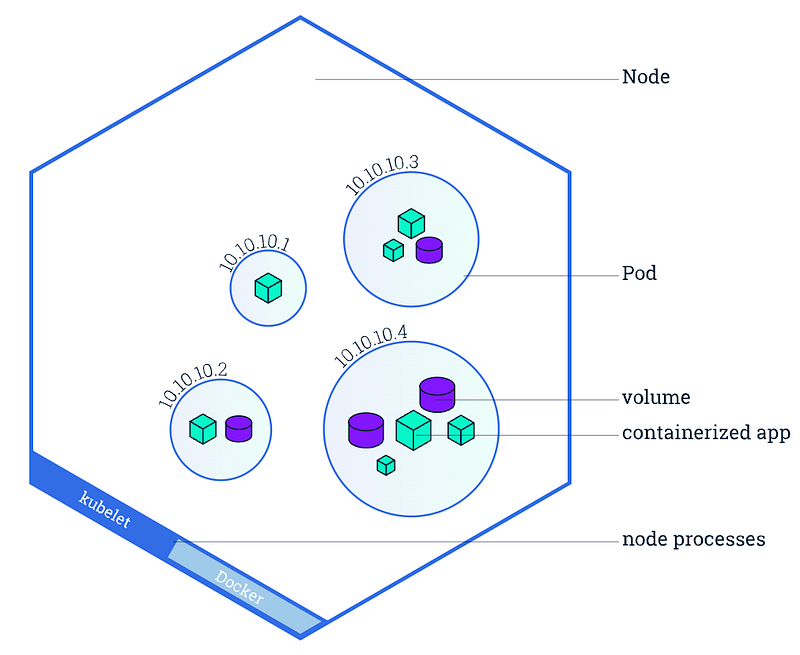
For the purpose of this article, keeping it short and simple, the following two references, along with the diagram below, provide a clear understanding of how containers and pods play their role in the context of a Kubernetes cluster made up of nodes. If something is still not clear, the hands-on exercises should address any gaps.
1. What’s a Container Image? Since a container is a running instance of a container image, it’s more important to understand a container image, which represents binary data that encapsulates an application and all its software dependencies. Container images are executable software bundles that can run standalone and that make very well-defined assumptions about their runtime environment. More at: https://kubernetes.io/docs/concepts/containers/images/.
2. What’s a Pod? A Pod is a group of one or more application containers (such as Docker) and includes shared storage (volumes), IP address, and information about how to run them. More at: https://kubernetes.io/docs/concepts/workloads/pods/.
Create and Access KIND Cluster on EC2
First thing first. Let’s repeat the process we’ve gone through before to create and access the cluster, following the gist code below. Refer to The AWS Way — IaC in Action — A Docker and KIND Ready Amazon EC2 Node blog for a detailed explanation if you’re doing it for the first time.
Create Pod Manifest with Container Spec — Nginx Image
I always keep the official Kubernetes.io API documentation shown below handy for reference. When in doubt, this is the go-to place to refer to and discern right from wrong. However, don’t expect these pages to teach you how to write a working Pod manifest. There are less daunting ways to learn, for example by following the gist code below.
Execute Command Inside a Pod Container
Let’s continue the practice by creating another pod with the highly popular busybox container image. This time we will run a command inside the container. See the complete code below.
Go Inside a Pod Container
We have a nginx pod and a busybox pod running. Let’s try another popular, the great Alpine Linux image, a more powerful alternative to BusyBox image. In this example, our goal is to keep the container running, get a shell access to go inside it, perform an operational task and end by pinging the web server running inside the nginx pod. The gist code below has the complete end-to-end demonstration.
Describe a Running Pod
Often it’s necessary to obtain detailed information about a running or pending pod for debugging purposes or checking the event history. Two common ways to accomplish it are by using kubectl describe podand kubectl get pod commands with -o yaml option. The code below demonstrates both.
Conclusion
In this Containers and Pods article of the Mastering Kubernetes One Task at a Time series, I’ve covered four examples showing how to create different kind of pods with a few highly popular and practical container images and perform key activities to watch and monitor the pods in a Kubernetes cluster.
The complete hands-on examples should help learn and get comfortable writing pod manifests without having to memorize any specs. By leveraging the help feature of kubectl command and subcommands, combined with Kubernetes.io documentation reference, everyone should be able to navigate and perform these common tasks with alacrity.
Thank you for following. Feel free to check out the next task — Pods, Deployments, and ReplicaSets.
If you benefited from reading the post, please 👏 a few times before parting, and help others by sharing it; I highly appreciate that!
Please follow to stay in touch, track, and be the first to get notified of all future writings on AWS Cloud, Containers, Kubernetes, and Machine Learning. Also, check all my stories on The AWS Way publication.


