
The Art of User Interface Drop Shadows
Make your UI look professional
Many elements on interfaces tend to mimic real-world objects. Drop shadows are one of them. These are helpful cues to indicate whether a window or panel is floating. Floating surfaces signify a temporary or momentary state that requires user interaction.
For users to interpret floating surfaces correctly, your shadows must look natural and realistic. There’s an art to drop shadows that most designers don’t know.
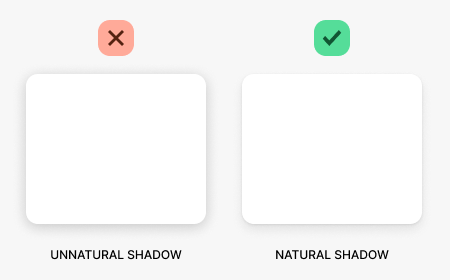
Notice how these two surfaces have different drop shadows. The difference may look subtle, but it affects how users perceive the interface. An unnatural shadow like the one on the left will make your interface look less professional. Making your shadows more natural will give your interface a more sleek and polished look.
When you cast light upon a real-world object, it creates two distinct shadows. The first one is the core shadow, the thin, dark ring closest to the object. The second one is the cast shadow, the lighter and thicker shadow behind the object.
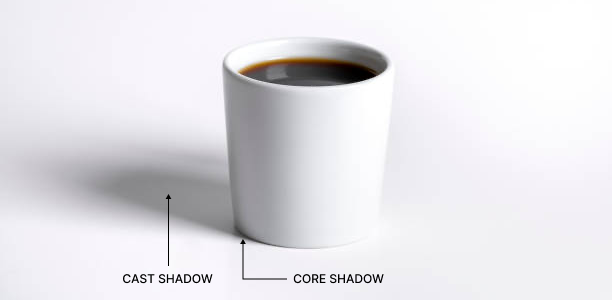
Most designers fail to display these two shadows correctly. They tend to use only one drop shadow with a large blur and high opacity. Doing this makes the surface edges too fuzzy and harsh.
Applying a core shadow and cast shadow is the correct way to display your drop shadow. Make the core shadow dark and tight to the surface. For example, a 1-pixel Y-axis and 3-pixel blur with a 10% opacity works well.
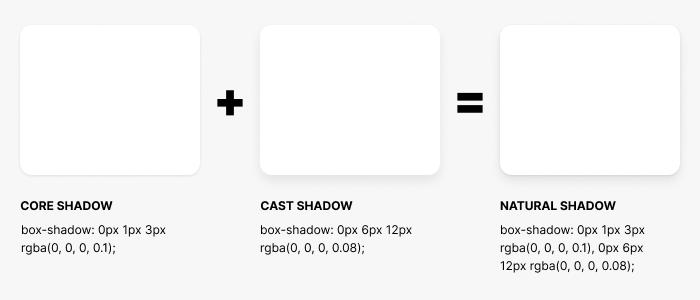
Then make the cast shadow lighter with a bigger blur and deeper Y-axis. A good default is a 6-pixel Y-axis and 12-pixel blur with an 8% opacity. The result is a surface with two different drop shadows that mimics a real-world shadow.
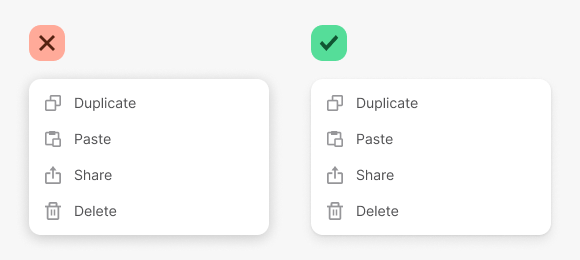
Now you can apply this drop shadow to your interface components and get a more natural and polished look. Notice how the menu looks more professional after the change in shadows. It’s these little details that matter when it comes to designing a visually appealing user experience.

For more insightful design articles, get a subscription to the official UX Movement Newsletter on Substack


