avatarWaleska 404

Free AI web copilot to create summaries, insights and extended knowledge, download it at here

2022

Abstract

ou cannot call the constructor of the Activity yourself; they are under the management of the Android operating system.</li><li>After instantiating these objects, Android will invoke the <code>onCreate()</code> method.</li><li>The <code>onDestroy()</code> method is invoked to inform the Activity that it is no longer needed.</li><li>Despite its name, even after <code>onDestroy()</code> returns, the actual destruction of the Activity object is not guaranteed.</li></ul><h1 id="8e53">Start and Stop</h1><ul><li><code>onStart()</code> is called when the Activity gains control of any visible area of the screen.</li><li><code>onStop()</code> is called when the Activity no longer has control of any visible part of the screen.</li><li>⚠️ Notice that an Activity can be in the background but still has not gone through <code>onStop()</code> because these two methods discussed earlier are related to the visibility of the screen.⚠️ For example:</li></ul><blockquote id="b5fa"><p>1. Activity 1 is in the foreground.</p></blockquote><blockquote id="6e0d"><p>2. Activity 2 comes to the foreground, and Activity 1 goes to the background, but Activity 1 is still visible because Activity 2 is transparent or does not fill the entire screen.</p></blockquote><blockquote id="7ed9"><p>3. Therefore, <code>onStop()</code> for Activity 1 is NOT called, even though it is in the background.</p></blockquote><h1 id="baf6">Resume and Pause</h1><ul><li><code><i>onResume()</i></code> is called when the Activity becomes interactive to the user (this means when the Activity becomes the top of its respective Activity stack).</li><li><code><i>onPause()</i></code> is called when the Activity becomes non-interactive to the user (the Activity is not at the top of its respective Activity stack).</li></ul><h1 id="3705">Activities Back Stack</h1><figure id="c3f3"><img src="https://cdn-images-1.readmedium.com/v2/resize:fit:800/1*OOQU79rdES3UeJBHFuDiQQ.png"><figcaption></figcaption></figure><ol><li>Launch Activity 1: <code>onCreate()</code

Options

, <code>onStart()</code> , <code>onResume()</code> executed for activity 1.</li><li>Launch Activity 2: <code>onPause()</code> executed for activity 1. <code>onCreate()</code> , <code>onStart()</code> , <code>onResume()</code> executed for activity 2. <code>onStop()</code> executed for activity 1.</li><li>Launch Activity 3: <code>onPause()</code> executed for activity 2. <code>onCreate()</code> , <code>onStart()</code> , <code>onResume()</code> executed for activity 3. <code>onStop()</code> executed for activity 2.</li><li>Go back: <code>onPause()</code> , <code>onStop()</code> , <code>onDestroy()</code> executed for activity 3. <code>onStart()</code> , <code>onResume()</code> executed for activity 2.</li><li>Launch Activity 4: <code>onPause()</code> executed for activity 2. <code>onCreate()</code> , <code>onStart()</code> , <code>onResume()</code> executed for activity 4 <code>onStop()</code> executed for activity 2.</li><li>Go back: <code>onPause()</code> , <code>onStop()</code> , <code>onDestroy()</code> executed for activity 4. <code>onStart()</code> , <code>onResume()</code> executed for activity 2.</li><li>Go back: On Android 11 and older, activity 1 would be destroyed on back navigation. On Android 12 and newer, it goes to background and can be brought to foreground later.</li></ol><h1 id="b692">Android Lifecycle App</h1><blockquote id="971e"><p><i>🚀 I am building an app to showcase and learn the hole Android lifecycle. Suggestions and contributions are welcome! <a href="https://github.com/waleska404/android-lifecycle">https://github.com/waleska404/android-lifecycle</a></i></p></blockquote><p id="645b">👉 Next chapter: <a href="https://readmedium.com/the-android-lifecycle-cheat-sheet-part-iii-avoid-this-mistakes-activity-lifecycle-cfe0b354e88a">Part I I I — Avoid This Mistakes (Activity Lifecycle)</a> 👈 Previous chapter: <a href="https://readmedium.com/the-android-lifecycle-cheat-sheet-part-i-application-process-2b74813e23d3">Part I — Application Process</a></p></article></body>

The Android Lifecycle Cheat Sheet — Part II: Activity Lifecycle

Part I — Application Process Part I I — Activity Lifecycle 👉 You are here📍 Part I I I — Avoid This Mistakes (Activity Lifecycle) Part IV — Intro to Fragment Lifecycle Part V — Fragment View Lifecycle 👉 Upcoming ⏰ Part VI — View Model Lifecycle 👉 Upcoming ⏰

What is a Lifecycle?

It is the specification of an object’s creation and destruction times, along with a set of special callback methods that the system automatically invokes in response to specific events.

What is an Android Activity?

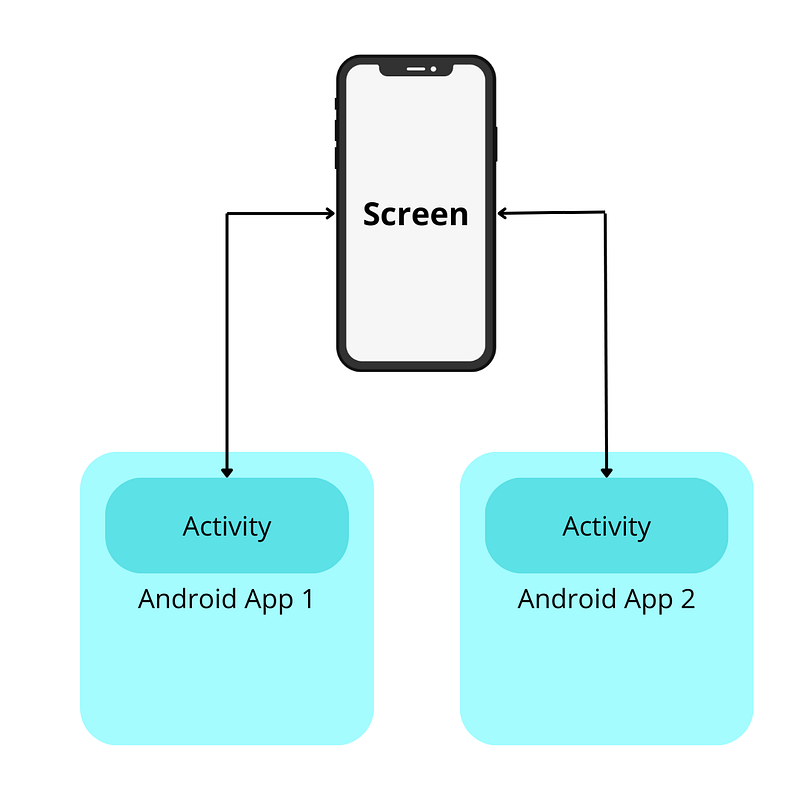
Among other functions it acts as a screen area controller. This implies that the screen is a shared resource among different applications, leading to various implications:

  • The OS should be capable of transferring control over windows from one Activity to another.
  • Activities need to be notified when the state of their control changes.
  • Activities should be able to exchange data among themselves.

The Activity lifecycle supports these requirements ☝️
Create and Destroy

  • Activity objects are instantiated by the system. To create an Activity, you request it, and the system instantiates it for you. You cannot call the constructor of the Activity yourself; they are under the management of the Android operating system.
  • After instantiating these objects, Android will invoke the onCreate() method.
  • The onDestroy() method is invoked to inform the Activity that it is no longer needed.
  • Despite its name, even after onDestroy() returns, the actual destruction of the Activity object is not guaranteed.

Start and Stop

  • onStart() is called when the Activity gains control of any visible area of the screen.
  • onStop() is called when the Activity no longer has control of any visible part of the screen.
  • ⚠️ Notice that an Activity can be in the background but still has not gone through onStop() because these two methods discussed earlier are related to the visibility of the screen.⚠️ For example:

1. Activity 1 is in the foreground.

2. Activity 2 comes to the foreground, and Activity 1 goes to the background, but Activity 1 is still visible because Activity 2 is transparent or does not fill the entire screen.

3. Therefore, onStop() for Activity 1 is NOT called, even though it is in the background.

Resume and Pause

  • onResume() is called when the Activity becomes interactive to the user (this means when the Activity becomes the top of its respective Activity stack).
  • onPause() is called when the Activity becomes non-interactive to the user (the Activity is not at the top of its respective Activity stack).

Activities Back Stack
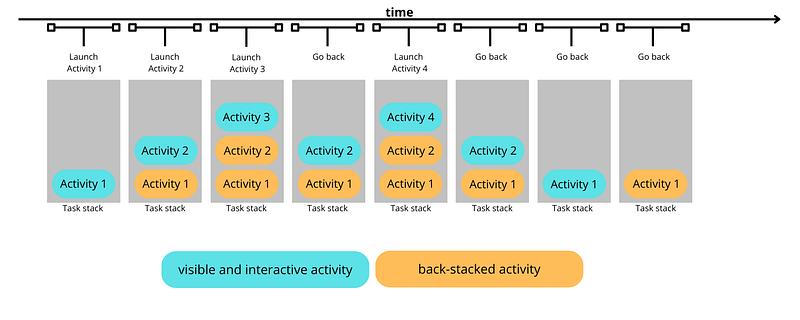
  1. Launch Activity 1: onCreate() , onStart() , onResume() executed for activity 1.
  2. Launch Activity 2: onPause() executed for activity 1. onCreate() , onStart() , onResume() executed for activity 2. onStop() executed for activity 1.
  3. Launch Activity 3: onPause() executed for activity 2. onCreate() , onStart() , onResume() executed for activity 3. onStop() executed for activity 2.
  4. Go back: onPause() , onStop() , onDestroy() executed for activity 3. onStart() , onResume() executed for activity 2.
  5. Launch Activity 4: onPause() executed for activity 2. onCreate() , onStart() , onResume() executed for activity 4 onStop() executed for activity 2.
  6. Go back: onPause() , onStop() , onDestroy() executed for activity 4. onStart() , onResume() executed for activity 2.
  7. Go back: On Android 11 and older, activity 1 would be destroyed on back navigation. On Android 12 and newer, it goes to background and can be brought to foreground later.

Android Lifecycle App

🚀 I am building an app to showcase and learn the hole Android lifecycle. Suggestions and contributions are welcome! https://github.com/waleska404/android-lifecycle

👉 Next chapter: Part I I I — Avoid This Mistakes (Activity Lifecycle) 👈 Previous chapter: Part I — Application Process

Android
AndroidDev
Software Engineering
Software Development
Android Lifecycle
Recommended from ReadMedium