avatarMaxence LQ

Free AI web copilot to create summaries, insights and extended knowledge, download it at here

9835

Abstract

</span> )</pre></div><p id="e3d7">Here is the output:</p><div id="bc2d"><pre><span class="hljs-attribute">Timer</span> : <span class="hljs-number">0</span>.<span class="hljs-number">18866491317749023</span> <span class="hljs-attribute">666666166</span>.<span class="hljs-number">4588418</span></pre></div><p id="4b3f">We can see that our timer is working very well. Let’s try to pass an argument to <code>my_simple_function</code> now:</p><div id="c192"><pre><span class="hljs-function"><span class="hljs-title">print</span><span class="hljs-params">( timer(my_simple_function)</span><span class="hljs-params">(<span class="hljs-number">2</span>_000_000)</span></span> )</pre></div><p id="ca7b">And here is the output:</p><div id="3ca7"><pre><span class="hljs-attribute">Timer</span> : <span class="hljs-number">0</span>.<span class="hljs-number">38884878158569336</span> <span class="hljs-attribute">1885617375</span>.<span class="hljs-number">8495038</span></pre></div><p id="5a2b">It works completely. But if we want to call multiple times our decorated function, we could save it into a variable to only call once our decorator.</p><div id="b459"><pre><span class="hljs-attr">my_simple_function_with_timer</span> = timer(my_simple_function)</pre></div><p id="464b">And we can now call our function multiple times:</p><div id="17d4"><pre><span class="hljs-function"><span class="hljs-title">my_simple_function_with_timer</span><span class="hljs-params">(<span class="hljs-number">1</span>_000)</span></span> <span class="hljs-function"><span class="hljs-title">my_simple_function_with_timer</span><span class="hljs-params">(<span class="hljs-number">10</span>_000)</span></span> <span class="hljs-function"><span class="hljs-title">my_simple_function_with_timer</span><span class="hljs-params">(<span class="hljs-number">100</span>_000)</span></span> <span class="hljs-function"><span class="hljs-title">my_simple_function_with_timer</span><span class="hljs-params">(<span class="hljs-number">1</span>_000_000)</span></span></pre></div><p id="58c2">Output:</p><div id="9a6a"><pre><span class="hljs-attribute">Timer</span> : <span class="hljs-number">0</span>.<span class="hljs-number">00019359588623046875</span> <span class="hljs-attribute">Timer</span> : <span class="hljs-number">0</span>.<span class="hljs-number">0024785995483398438</span> <span class="hljs-attribute">Timer</span> : <span class="hljs-number">0</span>.<span class="hljs-number">026081323623657227</span> <span class="hljs-attribute">Timer</span> : <span class="hljs-number">0</span>.<span class="hljs-number">2023618221282959</span></pre></div><figure id="31f1"><img src="https://cdn-images-1.readmedium.com/v2/resize:fit:800/1*FpJZlLcrFy5AT8IvDavRyw.png"><figcaption>Here is the complete code</figcaption></figure><h1 id="1038">The syntactical sugar with @</h1><p id="8999">OK, we can now create our own decorators.</p><p id="ca80">For now, the way we decorate functions is not very understandable. We first need to define a function, then we need to call the decorator with our function as an argument, store the return function, and then we can use it.</p><p id="7354">Luckily for us, Python is full of syntactical sugar, and there is one for decorators. This syntax is used to decorate a function when we define them. Let me show you how it works. Here we have our function definition:</p><div id="f9cd"><pre><span class="hljs-variable">def</span> <span class="hljs-function"><span class="hljs-title">my_simple_function</span>(<span class="hljs-variable">n</span> = <span class="hljs-number">1000000</span>): <span class="hljs-variable"><span class="hljs-class">result</span></span> = <span class="hljs-number">0</span> <span class="hljs-variable">for</span> <span class="hljs-variable">i</span> <span class="hljs-variable"><span class="hljs-keyword">in</span></span> <span class="hljs-title">range</span>(<span class="hljs-variable">n</span>): <span class="hljs-variable"><span class="hljs-class">result</span></span> += <span class="hljs-title">sqrt</span>(<span class="hljs-variable">i</span>)</span> <span class="hljs-variable">return</span> <span class="hljs-variable"><span class="hljs-class">result</span></span></pre></div><p id="3170">And all we have to do is to add this before function definition:</p><div id="0eb7"><pre><span class="hljs-meta">@timer</span></pre></div><p id="bbad">It looks like this:</p><div id="b280"><pre><span class="hljs-variable">@timer</span> def my_simple_function(n <span class="hljs-operator">=</span> <span class="hljs-number">1000000</span>): <span class="hljs-keyword">result</span> <span class="hljs-operator">=</span> <span class="hljs-number">0</span> <span class="hljs-keyword">for</span> i <span class="hljs-keyword">in</span> <span class="hljs-keyword">range</span>(n): <span class="hljs-keyword">result</span> <span class="hljs-operator">+</span><span class="hljs-operator">=</span> <span class="hljs-built_in">sqrt</span>(i) <span class="hljs-keyword">return</span> <span class="hljs-keyword">result</span></pre></div><p id="b7b3">And now if we call our function:</p><div id="2479"><pre><span class="hljs-function"><span class="hljs-title">my_simple_function</span><span class="hljs-params">( <span class="hljs-number">1</span>_000_000 )</span></span></pre></div><p id="c3c8">Here is the output:</p><div id="8846"><pre><span class="hljs-attribute">Timer</span> : <span class="hljs-number">0</span>.<span class="hljs-number">19669675827026367</span></pre></div><h1 id="68cc">Examples of well-known decorators</h1><p id="2e12">You have probably already seen this syntax in some code.</p><p id="c3e8">The most used decorators in Python are probably <code>@staticmethod</code>and <code>@classmethod</code>. They are built-in decorators used with Object-Oriented Programming which are used to define static methods and class methods.</p><p id="dbf1">Quickly, static methods and class methods are a bit like classic methods. <b>The main difference is that static methods, as well as class methods, are not bound to an instance of an object</b>. You can call a static or class method without even creating an instance of the class. Class methods take as the first parameter the class, which allows you to create an instance of the class inside of the method.</p><p id="c59c">I won’t explain more here but feel free to inquire about OOP in Python.</p><p id="e0cf">The second case where you probably saw decorators is <b>when coding a web app with a framework like <a href="https://flask.palletsprojects.com/en/2.0.x/">Flask</a> or <a href="https://fastapi.tiangolo.com/">FastAPI</a></b>.</p><p id="6e9c">Here is a very simple example of a decorated function that you could find in Flask code.</p><div id="2ceb"><pre><span class="hljs-variable">@app</span>.route(<span class="hljs-string">"/login"</span>) <span class="hljs-keyword">def</span> <span class="hljs-title function_">login_page</span>(): <span class="hljs-keyword">return</span> render_template(<span class="hljs-string">'login.html'</span>)</pre></div><p id="c92e">Here you can see the decorator is <code>app.route</code> and we pass an argument <code>"/login"</code> (I will explain in the next part how to handle arguments).</p><p id="894e">With FastAPI, you could find a code like that:</p><div id="1bf5"><pre>@app.<span class="hljs-keyword">get</span>(<span class="hljs-string">"/users-data"</span>) <span class="hljs-function">def <span class="hljs-title">get_users_data</span>(): <span class="hljs-keyword">return</span> <span class="hljs-title">get_users_json</span>()</span></pre></div><p id="90d3">It’s very similar to the previous code, the decorator is <code>app.get</code> and we pass an argument, <code>"/users-data"</code> .</p><p id="1036">These were just two examples of where decorators are used, but they are used in many other cases. This is why it’s an important concept in Python.</p><h1 id="9f1a">More advanced cases</h1><p id="35ab">OK, now you know the basics of decorators as well as a few examples of situations where it’s useful. <b>In this part, I will try to go a bit further by explaining your more advanced use of decorators</b>.</p><h1 id="e1ab">Pass arguments to decorators</h1><p id="05b2">First, as we saw with Flask and FastAPI, we can pass arguments to decorators. This may not be very useful for basic decorators but <b>it’s very important in more advanced decorators like in web apps for example</b>.</p><p id="e7bb">The first thing to do is to modify our decorator’s function to receive more than one argument.</p><p id="02cf">Here, the syntax is a bit different from the basic syntax. You need to define a function, in a function, in a function. Yeah, that seems complex.</p><p id="5938">We need first to write a function that receives our argument(s). Then, inside of it, you need to define your decorator like you would have done without arguments, with the wrapper inside of it. It looks like that:</p><div id="aa63"><pre>def decorator(argument): def decorator2(func): def <span class="hljs-keyword">wrapper</span>(*args, **kwargs): do_someting_with(argument) result = func(*args, **kwargs) do_something_else_with(arugment) <span class="hljs-keyword">return</span> result <span class="hljs-keyword">return</span> <span class="hljs-keyword">wrapper</span> <span class="hljs-keyword">return</span> decorator2</pre></div><p id="cff4">Let’s write a more concrete decorator:</p><div id="746e"><pre>def print_decorator(message): def decorator(func): def <span class="hljs-keyword">wrapper</span>(*args, **kwargs): print(message) <span class="hljs-keyword">return</span> func(*args, **kwargs) <span class="hljs-keyword">return</span> <span class="hljs

Options

-keyword">wrapper</span> <span class="hljs-keyword">return</span> decorator</pre></div><p id="5c9a">Our decorator takes as the second argument as string ( <code>message</code> ) and print it before calling the function that’s decorated.</p><p id="0501">Now, if we use the syntax without @, it looks like this</p><div id="0ca7"><pre>result = print_decorator(<span class="hljs-string">"Summing!"</span>)(<span class="hljs-name">get_sum_of</span>)(<span class="hljs-number">2</span>, <span class="hljs-number">5</span>)</pre></div><p id="2532">We just pass as a second argument to the decorator our message.</p><p id="f93b">With the @-syntax, <b>it’s very intuitive</b>, you just pass the argument to the decorator:</p><div id="b191"><pre><span class="hljs-meta">@print_message_before_function(<span class="hljs-params"><span class="hljs-string">"Summing!"</span></span>)</span> <span class="hljs-keyword">def</span> <span class="hljs-title function_">get_sum_of</span>(<span class="hljs-params">a, b</span>): <span class="hljs-keyword">return</span> a + b</pre></div><p id="e6a3">And that’s it! You can pass as many arguments as you want just like you would with a regular function.</p><figure id="b14e"><img src="https://cdn-images-1.readmedium.com/v2/resize:fit:800/1*1J4BaMXfOkyt-4J5oUv5DQ.png"><figcaption>Here is the complete code</figcaption></figure><h1 id="2523">Decorate a function multiple times</h1><p id="052c">Sometimes, when working with decorators, <b>you will need to decorate a function multiple times</b>. For example in a situation like this:</p><div id="d785"><pre><span class="hljs-variable">@app</span>.<span class="hljs-built_in">route</span>(<span class="hljs-string">"/home"</span>) <span class="hljs-variable">@login_required</span> def <span class="hljs-built_in">home_page</span>(): return <span class="hljs-built_in">render_template</span>(<span class="hljs-string">'user-home.html'</span>)</pre></div><p id="b094">Here as you can see, here the function is decorated for a first time by <code>login_required</code> and then a second time by <code>app.route</code> . Decorate a function multiple times is very simple, you just put the decorators on top of each other.</p><p id="c810" type="7">Decorate a function multiple times is very simple, you just put the decorators on top of each other.</p><blockquote id="c5c1"><p>Yes, but what about the order of decoration?</p></blockquote><p id="dc28">Indeed, this is a very important thing to know. To test it, let’s re-use or <code>print_decorator</code> from the previous section.</p><p id="4d16">What if we test something like that:</p><div id="0e05"><pre><span class="hljs-variable">@print_decorator</span>(<span class="hljs-string">"1"</span>) <span class="hljs-variable">@print_decorator</span>(<span class="hljs-string">"2"</span>) <span class="hljs-variable">@print_decorator</span>(<span class="hljs-string">"3"</span>) def <span class="hljs-built_in">my_function</span>(): <span class="hljs-built_in">print</span>(<span class="hljs-string">"Hello"</span>)</pre></div><p id="ab6e">And we can then call it:</p><div id="4f31"><pre><span class="hljs-function"><span class="hljs-title">my_function</span><span class="hljs-params">()</span></span></pre></div><p id="6460">And here is the output:</p><div id="0717"><pre>1 2 3 Hello</pre></div><p id="b710">With this output, we can guess that our function looks like this:</p><div id="e863"><pre><span class="hljs-function"><span class="hljs-title">print</span><span class="hljs-params">(<span class="hljs-string">"1"</span>)</span></span> <span class="hljs-function"><span class="hljs-title">print</span><span class="hljs-params">(<span class="hljs-string">"2"</span>)</span></span> <span class="hljs-function"><span class="hljs-title">print</span><span class="hljs-params">(<span class="hljs-string">"3"</span>)</span></span> <span class="hljs-function"><span class="hljs-title">print</span><span class="hljs-params">(<span class="hljs-string">"Hello"</span>)</span></span></pre></div><p id="3585">And we wrote it like that:</p><div id="d8c3"><pre><span class="hljs-meta prompt_">...</span> print(message) result = func(*args, **kwargs) <span class="hljs-meta prompt_">...</span></pre></div><p id="648f">So we know that the first to be added to the function is the 3. This means that the first decorator to be executed is the closest to the function. This is an important thing to remember.</p><p id="5302" type="7">The first decorator to be executed is the closest to the function definition.</p><h1 id="a15f">Solve naming problem</h1><p id="7676">A problem you may run into when working with complex decorators is a naming problem. Indeed, <b>sometimes in a program, you’ll need to use the function’s name</b> ( <code>func.name</code> ), or a module may need to use it. In that case, you have to be very careful with the name of your decorated function. Let me show you the problem if we use again the previous example of <code>my_function</code>, we can print the function’s name if we don’t decorate it:</p><div id="77b7"><pre><span class="hljs-function"><span class="hljs-title">print</span><span class="hljs-params">(my_function.name)</span></span></pre></div><div id="be4a"><pre><span class="hljs-meta"># OUTPUT :</span> <span class="hljs-meta"># my_function</span></pre></div><p id="6d89">But if we decorate it:</p><div id="631f"><pre><span class="hljs-function"><span class="hljs-title">print</span><span class="hljs-params">(my_function.name)</span></span></pre></div><div id="c4f0"><pre># OUTPUT :

<span class="hljs-keyword">wrapper</span></pre></div><p id="97fd">We can see that the function’s name is actually the name of the function we defined in our decorator body.</p><blockquote id="2b1f"><p>What’s the problem so?</p></blockquote><p id="37d2">Well, it becomes a problem when you have multiple decorated functions:</p><div id="85c9"><pre><span class="hljs-variable">@print_decorator</span>(<span class="hljs-string">"1"</span>)

def <span class="hljs-built_in">my_function</span>(): <span class="hljs-built_in">print</span>(<span class="hljs-string">"Hello"</span>)

<span class="hljs-variable">@print_decorator</span>(<span class="hljs-string">"2"</span>) def <span class="hljs-built_in">my_other_function</span>(): <span class="hljs-built_in">print</span>(<span class="hljs-string">"Bye"</span>)

<span class="hljs-built_in">print</span>(my_function.name) <span class="hljs-built_in">print</span>(my_other_function.name)</pre></div><p id="93d6">Here is the output:</p><div id="adc5"><pre><span class="hljs-keyword">wrapper</span> <span class="hljs-keyword">wrapper</span></pre></div><p id="e08e">As you can see, <b>the two functions have the same name, and that becomes a problem</b>. Indeed, for example when the Flask framework store the routes of the web application, function’s names are used, and that’s why it’s a problem that two functions have the same name.</p><p id="aed0">Luckily, the problem can be solved quite easily. We just need to change the function’s name to match its original one.</p><p id="e715">The <code>name</code> is not only gettable but it’s settable too, so we can modify it very easily.</p><p id="8836">Writing the following is totally valid:</p><div id="dcf6"><pre><span class="hljs-attr">my_function.name</span> = <span class="hljs-string">"Any name that you want"</span></pre></div><p id="196e">So we need to get the original name and set the wrapper’s name to this original name.</p><div id="22c5"><pre><span class="hljs-keyword">wrapper</span>.name = func.name</pre></div><p id="340a">Here is the full code:</p><div id="cb98"><pre>def print_decorator(message): def decorator(func): def <span class="hljs-keyword">wrapper</span>(*args, **kwargs): print(message) <span class="hljs-keyword">return</span> func(*args, **kwargs) <span class="hljs-keyword">wrapper</span>.name = func.name # <<span class="hljs-comment">--</span> <span class="hljs-keyword">return</span> <span class="hljs-keyword">wrapper</span> <span class="hljs-keyword">return</span> decorator</pre></div><p id="927c">And now if we run again our code:</p><div id="64e3"><pre><span class="hljs-variable">@print_decorator</span>(<span class="hljs-string">"1"</span>) def <span class="hljs-built_in">my_function</span>(): <span class="hljs-built_in">print</span>(<span class="hljs-string">"Hello"</span>)

<span class="hljs-variable">@print_decorator</span>(<span class="hljs-string">"2"</span>) def <span class="hljs-built_in">my_other_function</span>(): <span class="hljs-built_in">print</span>(<span class="hljs-string">"Bye"</span>)

<span class="hljs-built_in">print</span>(my_function.name) <span class="hljs-built_in">print</span>(my_other_function.name)</pre></div><p id="523f">Here is the output:</p><div id="1d1b"><pre>my<span class="hljs-emphasis">function my_other</span>function</pre></div><p id="1ddd">Great! We no longer have any problem with our function name. So when you write a decorator, don’t forget to change the wrapper’s name to the function’s name!</p><p id="9f6f" type="7">Don’t forget to change the wrapper’s name to the function’s name!</p><figure id="e16b"><img src="https://cdn-images-1.readmedium.com/v2/resize:fit:800/1*1bupqrJuQtj6JVPuc2H6mA.png"><figcaption>Here is a more general implementation of a decorator that takes arguments</figcaption></figure><h2 id="714f">Thanks for reading!</h2><p id="45e1">Follow me not to miss <b>the next stories of this series!</b></p><h2 id="ce8f">See you in the next story! 👋</h2><p id="008d" type="7">And as always, may the code be with you!</p><p id="2698"><i>More content at <a href="http://plainenglish.io/"><b>plainenglish.io</b></a></i></p></article></body>

The Amazing Power of Decorators (Python Wonders — Ep 1)

Understand and master decorators in less than 10 minutes

Photo by Christopher Gower on Unsplash

Welcome to the first episode of this series. Without further talk, let’s get into it!

What are decorators?

Before everything else, what are decorators?

What are decorators?

Decorators, as the name suggests, are used to decorating a function or a method. Here decorate means change the behavior of the function. A decorator generally adds some functionality to a function.

A decorator generally adds some functionality to a function.

Even though these decorators are present in many programming languages, here I will focus on Python decorators. But the concept of decorating a function is not unique to Python.

The concept of decorating a function is not unique to Python.

Why do we need decorators?

Now that you know what is a decorator, you may be wondering.

What’s the point of having decorators? Why not just add the functionality inside of the function’s body? It would easier, no need to create a decorator, and it would make everything more clear, so that you know exactly what the function will do.

And yes, that’s true, but as you must know, the absolute goal in programming is to prevent repetition.

The absolute goal in programming is to prevent repetition.

For example, if you have 5 functions that at the start print the current time, and then do something else different for each one, why repeat yourself, and write 5 times the code to print the current time?

Else you could just a decorator that would decorate the functions and make them print the current time without needing to write it in each function. And that’s the whole point of decorators, add functionality to multiple functions without needing to rewrite it each time.

Add functionality to multiple functions without needing to rewrite it each time.

How to use decorators?

OK, now you understand what are decorators and how to use them, let’s dive into the more technical part.

In Python, decorators, are just functions, that take as input a function, and return the decorated function. For example, imagine you have a decorator ( print_current_time ), and you want to decorate a function, here is how you can do it:

def some_function(...):
    ...
some_function_decorated = print_current_time(some_function)

And now, if you call the some_function_decorated , the first thing the function is going to do is print the current time.

Or if you need to call only once the decorated function, you don’t need to store it, you can just call it right away:

def some_function(...):
    ...
print_current_time(some_function)(...)

This syntax of calling a function and then calling the result may not be very intuitive, but it’s completely valid in Python.

How to create decorators?

You can use decorators without knowing how to create ones, but sometimes you will see that you could prevent a lot of repetitions and feel the need to create your own decorator. So let’s do it.

We will create a decorator that measures the time taken by the decorated function to execute, and then that print it.

First, and before implementing our timer, we need to understand the way of creating decorators.

Decorators are functions, that take as first argument a function, and that return another function. In Python, there are two ways to create functions the first is lambda functions, but they aren’t really good to define complex functions. The second way is using the “def” keyword. So inside of our decorator, we will need to define a function with “def”. And then we will return this function, it will look something like this:

def my_decorator( func ):
    def decorated_func():
        ...
    return decorated_func

Inside of decorated_func , we will need to call func to execute the original function. But we can add more code than just the func call.

def my_decorator( func ):
    def decorated_func():
        ...
        func()
        ...
    return decorated_func

Good! But what if func returns a value? Our decorated_func won’t return it, so we need to return the return value of func .

def my_decorator( func ):
    def decorated_func():
        ...
        result = func()
        ...
        return result
    return decorated_func

That’s already better. But how do we pass arguments to func ? Well for that we will use what’s called *args and **kwargs. If you are not familiar with them, go check out my story on the topic.

Here is the code using *args and **kwargs:

def my_decorator( func ):
    def decorated_func(*args, **kwargs):
        ...
        result = func(*args, **kwargs)
        ...
        return result
    return decorated_func

And now we have a functioning decorator. But for now, it doesn’t add any functionality, it’s time to add our timer code.

To implement our timer, we will use the built-in time module:

import time

And here is the implementation of the decorator:

def timer( func ):
    def decorated_func(*args, **kwargs):
        time_1 = time.time()
        result = func(*args, **kwargs)
        print(f"Timer : {time.time() - time_1}")
        return result
    return decorated_func

Let’s now try our timer!

I wrote a very simple function to test it:

def my_simple_function(n = 1000000):
    result = 0
    for i in range(n):
        result += sqrt(i)
    return result

And add this a the top of your file:

from math import sqrt

And let’s call our decorated function now:

print( timer(my_simple_function)() )

Here is the output:

Timer : 0.18866491317749023
666666166.4588418

We can see that our timer is working very well. Let’s try to pass an argument to my_simple_function now:

print( timer(my_simple_function)(2_000_000) )

And here is the output:

Timer : 0.38884878158569336
1885617375.8495038

It works completely. But if we want to call multiple times our decorated function, we could save it into a variable to only call once our decorator.

my_simple_function_with_timer = timer(my_simple_function)

And we can now call our function multiple times:

my_simple_function_with_timer(1_000)
my_simple_function_with_timer(10_000)
my_simple_function_with_timer(100_000)
my_simple_function_with_timer(1_000_000)

Output:

Timer : 0.00019359588623046875
Timer : 0.0024785995483398438
Timer : 0.026081323623657227
Timer : 0.2023618221282959
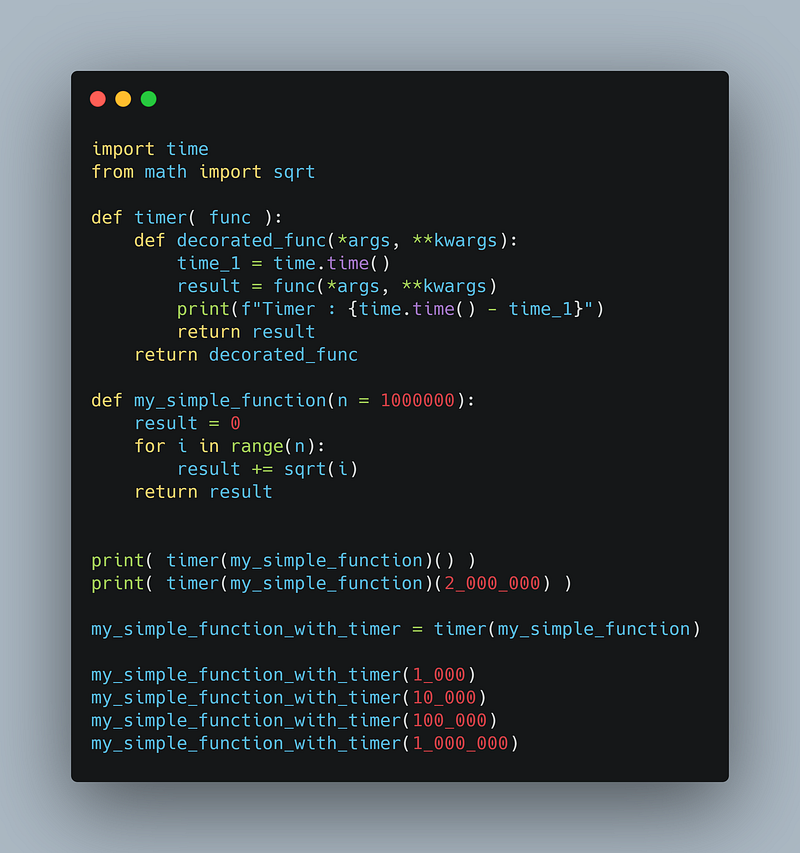
Here is the complete code

The syntactical sugar with @

OK, we can now create our own decorators.

For now, the way we decorate functions is not very understandable. We first need to define a function, then we need to call the decorator with our function as an argument, store the return function, and then we can use it.

Luckily for us, Python is full of syntactical sugar, and there is one for decorators. This syntax is used to decorate a function when we define them. Let me show you how it works. Here we have our function definition:

def my_simple_function(n = 1000000):
    result = 0
    for i in range(n):
        result += sqrt(i)
    return result

And all we have to do is to add this before function definition:

@timer

It looks like this:

@timer
def my_simple_function(n = 1000000):
    result = 0
    for i in range(n):
        result += sqrt(i)
    return result

And now if we call our function:

my_simple_function( 1_000_000 )

Here is the output:

Timer : 0.19669675827026367

Examples of well-known decorators

You have probably already seen this syntax in some code.

The most used decorators in Python are probably @staticmethodand @classmethod. They are built-in decorators used with Object-Oriented Programming which are used to define static methods and class methods.

Quickly, static methods and class methods are a bit like classic methods. The main difference is that static methods, as well as class methods, are not bound to an instance of an object. You can call a static or class method without even creating an instance of the class. Class methods take as the first parameter the class, which allows you to create an instance of the class inside of the method.

I won’t explain more here but feel free to inquire about OOP in Python.

The second case where you probably saw decorators is when coding a web app with a framework like Flask or FastAPI.

Here is a very simple example of a decorated function that you could find in Flask code.

@app.route("/login")
def login_page():
    return render_template('login.html')

Here you can see the decorator is app.route and we pass an argument "/login" (I will explain in the next part how to handle arguments).

With FastAPI, you could find a code like that:

@app.get("/users-data")
def get_users_data():
    return get_users_json()

It’s very similar to the previous code, the decorator is app.get and we pass an argument, "/users-data" .

These were just two examples of where decorators are used, but they are used in many other cases. This is why it’s an important concept in Python.

More advanced cases

OK, now you know the basics of decorators as well as a few examples of situations where it’s useful. In this part, I will try to go a bit further by explaining your more advanced use of decorators.

Pass arguments to decorators

First, as we saw with Flask and FastAPI, we can pass arguments to decorators. This may not be very useful for basic decorators but it’s very important in more advanced decorators like in web apps for example.

The first thing to do is to modify our decorator’s function to receive more than one argument.

Here, the syntax is a bit different from the basic syntax. You need to define a function, in a function, in a function. Yeah, that seems complex.

We need first to write a function that receives our argument(s). Then, inside of it, you need to define your decorator like you would have done without arguments, with the wrapper inside of it. It looks like that:

def decorator(argument):
    def decorator2(func):
        def wrapper(*args, **kwargs):
            do_someting_with(argument)
            result = func(*args, **kwargs)
            do_something_else_with(arugment)
            return result
        return wrapper
    return decorator2

Let’s write a more concrete decorator:

def print_decorator(message):
    def decorator(func):
        def wrapper(*args, **kwargs):
            print(message)
            return func(*args, **kwargs)
        return wrapper
    return decorator

Our decorator takes as the second argument as string ( message ) and print it before calling the function that’s decorated.

Now, if we use the syntax without @, it looks like this

result = print_decorator("Summing!")(get_sum_of)(2, 5)

We just pass as a second argument to the decorator our message.

With the @-syntax, it’s very intuitive, you just pass the argument to the decorator:

@print_message_before_function("Summing!")
def get_sum_of(a, b):
    return a + b

And that’s it! You can pass as many arguments as you want just like you would with a regular function.
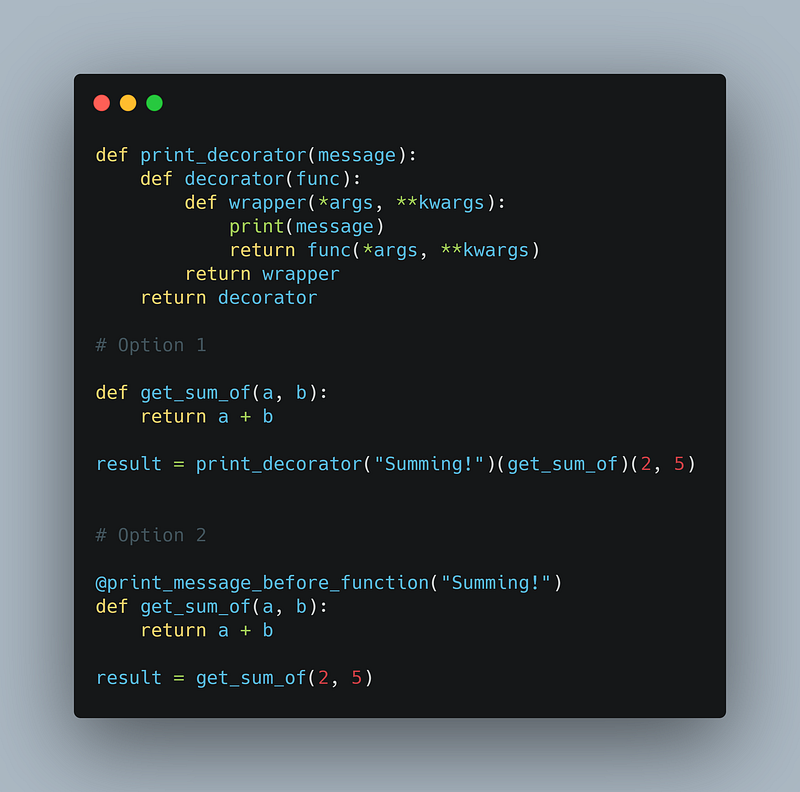
Here is the complete code

Decorate a function multiple times

Sometimes, when working with decorators, you will need to decorate a function multiple times. For example in a situation like this:

@app.route("/home")
@login_required
def home_page():
    return render_template('user-home.html')

Here as you can see, here the function is decorated for a first time by login_required and then a second time by app.route . Decorate a function multiple times is very simple, you just put the decorators on top of each other.

Decorate a function multiple times is very simple, you just put the decorators on top of each other.

Yes, but what about the order of decoration?

Indeed, this is a very important thing to know. To test it, let’s re-use or print_decorator from the previous section.

What if we test something like that:

@print_decorator("1")
@print_decorator("2")
@print_decorator("3")
def my_function():
    print("Hello")

And we can then call it:

my_function()

And here is the output:

1
2
3
Hello

With this output, we can guess that our function looks like this:

print("1")
print("2")
print("3")
print("Hello")

And we wrote it like that:

...
print(message)
result = func(*args, **kwargs)
...

So we know that the first to be added to the function is the 3. This means that the first decorator to be executed is the closest to the function. This is an important thing to remember.

The first decorator to be executed is the closest to the function definition.

Solve naming problem

A problem you may run into when working with complex decorators is a naming problem. Indeed, sometimes in a program, you’ll need to use the function’s name ( func.__name__ ), or a module may need to use it. In that case, you have to be very careful with the name of your decorated function. Let me show you the problem if we use again the previous example of my_function, we can print the function’s name if we don’t decorate it:

print(my_function.__name__)
# OUTPUT :
# my_function

But if we decorate it:

print(my_function.__name__)
# OUTPUT :
# wrapper

We can see that the function’s name is actually the name of the function we defined in our decorator body.

What’s the problem so?

Well, it becomes a problem when you have multiple decorated functions:

@print_decorator("1")
def my_function():
    print("Hello")
    
@print_decorator("2")
def my_other_function():
    print("Bye")
    
print(my_function.__name__)
print(my_other_function.__name__)

Here is the output:

wrapper
wrapper

As you can see, the two functions have the same name, and that becomes a problem. Indeed, for example when the Flask framework store the routes of the web application, function’s names are used, and that’s why it’s a problem that two functions have the same name.

Luckily, the problem can be solved quite easily. We just need to change the function’s name to match its original one.

The __name__ is not only gettable but it’s settable too, so we can modify it very easily.

Writing the following is totally valid:

my_function.__name__ = "Any name that you want"

So we need to get the original name and set the wrapper’s name to this original name.

wrapper.__name__ = func.__name__

Here is the full code:

def print_decorator(message):
    def decorator(func):
        def wrapper(*args, **kwargs):
            print(message)
            return func(*args, **kwargs)
        wrapper.__name__ = func.__name__ # <--
        return wrapper
    return decorator

And now if we run again our code:

@print_decorator("1")
def my_function():
    print("Hello")
    
@print_decorator("2")
def my_other_function():
    print("Bye")
    
print(my_function.__name__)
print(my_other_function.__name__)

Here is the output:

my_function
my_other_function

Great! We no longer have any problem with our function name. So when you write a decorator, don’t forget to change the wrapper’s name to the function’s name!

Don’t forget to change the wrapper’s name to the function’s name!
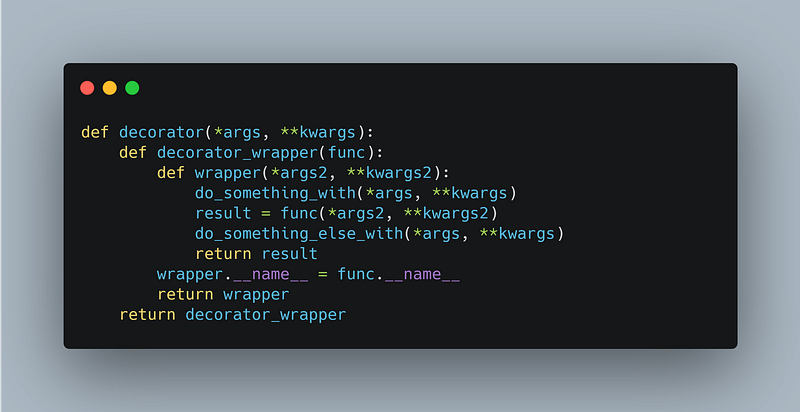
Here is a more general implementation of a decorator that takes arguments

Thanks for reading!

Follow me not to miss the next stories of this series!

See you in the next story! 👋

And as always, may the code be with you!

More content at plainenglish.io

Programming
Coding
Python
Productivity
Software Development
Recommended from ReadMedium